giriiş
This manual provides comprehensive instructions for setting up, operating, and maintaining your new Tecno Pop 5 LTE smartphone. Designed for seamless performance and a vibrant user experience, your device comes equipped with advanced features to keep you connected and entertained.

Figure 1: Tecno Pop 5 LTE - Front and Back View
Ürün Bittiview Video
Hızlı bir genel bakış için bu resmi videoyu izleyin.view of the Tecno Pop 5 LTE's main features and design.
Video 1: Tecno Pop 5 LTE Product Overview
Paket İçeriği
Upon unboxing your Tecno Pop 5 LTE, please ensure all the following items are present:
- Tecno Pop 5 LTE Smartphone
- Güç Adaptörü
- Mikro USB Kablosu
- SIM İtici Aracı
Kurulum Kılavuzu
SIM ve SD Kart Kurulumu
Your Tecno Pop 5 LTE supports dual Nano SIM cards and expandable memory via a microSD card.
- Cihazın yan tarafındaki SIM tepsisini bulun.
- SIM çıkarma aracını tepsinin yanındaki küçük deliğe yerleştirin ve tepsi dışarı çıkana kadar yavaşça itin.
- Place your Nano SIM card(s) and/or microSD card into the designated slots on the tray, ensuring correct orientation.
- Tepsiyi cihazın yan tarafına tam oturana kadar dikkatlice geri itin.
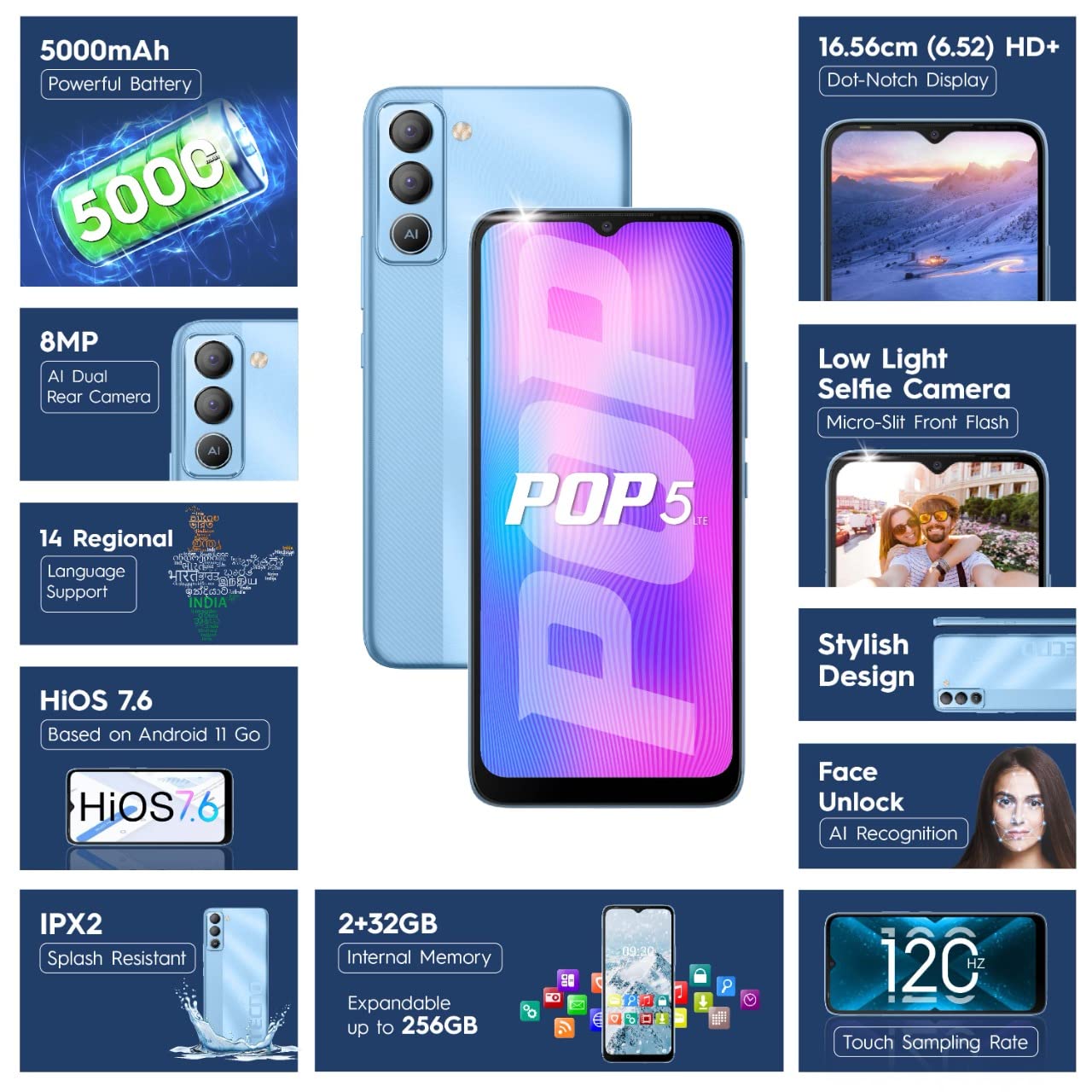
Figure 2: SIM Tray Insertion
İlk Güç Açma ve Kurulum
Press and hold the power button located on the side of the device until the Tecno logo appears. Follow the on-screen prompts to select your language, connect to Wi-Fi, and set up your Google account.
Temel Özelliklerview
Canlı Ekran
The Tecno Pop 5 LTE features a vibrant 6.52-inch Dot Notch HD+ display with a 90% screen-to-body ratio, offering an immersive viewing experience. With up to 480 nits maximum brightness, content remains clear even in bright conditions.

Figure 3: Immersive Dot Notch Display
Uzun Ömürlü Pil
Güçlü bir donanıma sahip 5000mAh pil, the Tecno Pop 5 LTE provides extended usage times, including up to 48 hours of video playback and 31 days of standby time. The Ultra Power Saving Mode further optimizes battery life.
Gelişmiş Kamera Sistemi
Capture clear and detailed images with the 8MP Portrait Dual rear Camera, featuring excellent image processing and a dual flashlight for enhanced low-light photography. For selfies, the 5MP F2.0 Aperture Front Camera includes a Micro Slit Front Flash with adjustable brightness for brighter night selfies.

Figure 4: Rear Camera Module
Performans ve Depolama
The device runs on a 2GB RAM and is powered by a MediaTek Helio A22 2GHz Quad-core processor, ensuring smooth daily operations. It comes with 32GB of internal storage, expandable up to 256GB, providing ampUygulamalarınız ve medyalarınız için alan.
Yazılım ve Güvenlik
Your smartphone operates on HiOS 7.6 based on Android 11, offering a user-friendly interface and various localized features. Security features include Yüz Tanıma Kilidi with closed eye protection for instant and secure access. Additional features like Kids Mode, Anti-Theft Alarm, Vault 2.0, and Voice Changer enhance usability and safety.
Gelişmiş Dayanıklılık
The Tecno Pop 5 LTE is Splash Resistant up to IPX2 rating, providing protection against water splashes.
Cihazınızı Çalıştırma
Temel Gezinme
Navigate your device using intuitive touch gestures. The 120Hz Dokunmatik Sampling Oranı ensures a smoother and more responsive touch experience.
Using Face Unlock
To set up Face Unlock, go to Ayarlar > Güvenlik > Yüz Tanıma Kilidi and follow the instructions. Once set up, simply look at your phone to unlock it instantly.
Kamera Fonksiyonları
Open the Camera app to access various modes like AI Portrait, HDR, AI Beauty, and Filters. Tap the shutter button to capture photos or switch to video mode for 1080P video recording.
Güç Tasarrufu Modu
To extend battery life, activate Ultra Power Saving Mode via the quick settings panel or in Settings > Battery Lab.
Regional Language Support
The device supports 14 regional languages. To change your device language, go to Ayarlar > Sistem > Diller ve giriş > Diller.
Phone Cloner
Easily migrate your data from an old device to your new Tecno Pop 5 LTE using the Phone Cloner feature, which allows one-tap data migration without using mobile data.
Bakım ve Özen
Pil Bakımı
To maximize battery lifespan, avoid extreme temperatures and try to keep the battery charge between 20% and 80%. Use only the provided adaptor and Micro USB cable for charging.
Cihazınızı Temizleme
Use a soft, lint-free cloth to gently wipe the screen and body of your phone. Avoid using harsh chemicals or abrasive materials.
Yazılım Güncellemeleri
Regularly check for and install software updates to ensure your device has the latest features, security patches, and performance improvements. You can find updates in Ayarlar > Sistem > Sistem güncellemesi.
Sorun giderme
Yaygın Sorunlar ve Çözümleri
- Cihaz açılmıyor: Pilinin dolu olduğundan emin olun. Telefonu açmadan önce en az 15 dakika şarj cihazına bağlı bırakın.
- Ekran tepkisiz: Try restarting the device by holding the power button for 10-15 seconds. If the issue persists, a factory reset might be necessary (Not: Bu, tüm verileri silecektir).
- Zayıf ağ sinyali: SIM kartınızın doğru takılı olduğundan emin olun. Daha iyi şebeke kapsama alanına sahip bir yere geçin.
- Uygulamalar çöküyor: Sorunlu uygulamanın önbelleğini temizleyin (Ayarlar > Uygulamalar ve bildirimler > Uygulama bilgileri > [Uygulama Adı] > Depolama ve önbellek > Önbelleği temizleSorun devam ederse, uygulamayı yeniden yükleyin.
Teknik Özellikler
Ayrıntılı Özellikler
| Özellik | Detay |
|---|---|
| Model Numarası | BD4i |
| İşletim Sistemi | HiOS 7.6 based on Android 11 |
| Veri deposu | 2 GB |
| Dahili Depolama | 32 GB (256 GB'a kadar genişletilebilir) |
| İşlemci | MediaTek Helio A22, 2 GHz Quad-core |
| Görüntülemek | 6.52" Dot Notch HD+ (720p), 480 nits max. brightness, 120Hz Touch Sampling Oranı |
| Arka Kamera | 8MP + AI Lens, Dual Flashlight, F2.0 Aperture, AI Portrait, HDR, AI Beauty, Filters, 16 AI Scene Detection, 4X Zoom, 1080P Video |
| Ön Kamera | 5MP F2.0 Aperture, Micro Slit Front Flash |
| Pil | 5000mAh Lityum Polimer |
| Bağlantı | Cellular (LTE), Bluetooth, Wi-Fi, USB, GPS/GNSS/BEIDOU/Galileo |
| Ses Jakı | 3.5 mm |
| Boyutlar | 16.5x7.6x0.9 cm |
| Ağırlık | 195 gr |
| Renk | Buz Mavisi |
| Özel Özellikler | Enhanced Regional Language Supports (14 languages), Kids Mode, Anti Theft Alarm, Vault 2.0, Voice Changer, Splash Resistant (IPX2), Face Unlock (0.93 Sec Instant Unlock) |
Garanti ve Destek
Ürün Desteği
Your Tecno Pop 5 LTE comes with a 1 Yıl Garanti from the manufacturer, G Mobiles India.
For any technical assistance, service, or warranty claims, please contact Tecno customer support. You can find more information on their official website or visit one of their 950+ Service Centers across India.
Manufacturer: G Mobiles India, Ismartu India Private Limited, D-197 and 198, Sector 63, Noida, Gautam Buddha nagar, Uttar Pradesh 201301.
Importer: G-Mobile Devices Private Limited, Unit No. B 301, Third Floor Tower B Plot no 7, Sec - 142, Noida, Uttar Pradesh PIN - 201301.
Daha fazla bilgi için, ürün detay sayfasına da göz atabilirsiniz. Amazon.in.


