1. Giriş
This manual provides comprehensive instructions for the installation, operation, and maintenance of your COUGAR Archon 2 RGB Mid Tower Case. Please read this manual carefully before beginning installation to ensure proper setup and to maximize the performance and longevity of your product.

Şekil 1.1: Açısal view of the COUGAR Archon 2 RGB Mid Tower Case, showcasing the tempered glass side panel and front RGB fans.
2. Ürün Özellikleri
The COUGAR Archon 2 RGB Mid Tower Case is designed for PC enthusiasts seeking a balance of aesthetics, airflow, and functionality. Key features include:
- Elegant Design with Tempered Glass: A sleek black finish combined with a tempered glass side panel allows for a clear view iç bileşenler ve RGB aydınlatma.
- Optimize Edilmiş Hava Akışı: Supports multiple fan configurations and includes three pre-installed 120mm ARGB fans at the front for efficient cooling.
- Geniş Uyumluluk: Accommodates Mini ITX, Micro ATX, and ATX motherboards.
- AmpDepolama Seçenekleri: Provides bays for both 3.5" HDDs and 2.5" SSDs.
- Kullanışlı Ön Giriş/Çıkış: Features USB 3.0 and USB 2.0 ports for easy peripheral connectivity.
- RGB Aydınlatma Kontrolü: Integrated ARGB fans offer customizable lighting effects.

Şekil 2.1: Ön view of the COUGAR Archon 2 RGB case, highlighting the three pre-installed ARGB fans.
3. Kurulum Kılavuzu
Follow these steps to properly install your components into the COUGAR Archon 2 RGB case.
3.1. Kurulum Öncesi Kontrol Listesi
- Ensure you have all necessary components: motherboard, CPU, RAM, GPU, power supply, storage drives, and appropriate tools (screwdriver, zip ties).
- Temiz ve statik elektrikten arındırılmış bir yüzeyde çalışın. Antistatik bileklik kullanmayı düşünün.
3.2. Davanın Açılması
- Carefully remove the tempered glass side panel by unscrewing the thumbscrews located at the rear of the case. Set the panel aside on a soft, flat surface to prevent scratches.
- Remove the opposite metal side panel by unscrewing its thumbscrews and sliding it backward.
3.3. Anakart Kurulumu
- G/Ç kalkanını (anakartınıza önceden takılı değilse) kasanın arka açıklığına takın.
- Anakartınızı kasanın içindeki destek ayaklarıyla hizalayın. Tüm destek ayaklarının anakartınızdaki vida delikleriyle eşleştiğinden emin olun.
- Anakartı, verilen vidaları kullanarak sabitleyin. Aşırı sıkmayın.
3.4. Güç Kaynağı Ünitesi (PSU) Kurulumu
- Kasanın arka alt kısmında bulunan güç kaynağı montaj alanını bulun.
- Slide your PSU into the designated bay from the rear of the case, ensuring the fan faces downwards for optimal cooling (if the case has a bottom vent).
- PSU'yu kasanın arkasından vidalarla sabitleyin.
3.5. Depolama Sürücüsü Kurulumu
The Archon 2 RGB supports both 3.5" HDDs and 2.5" SSDs.
- 3.5 inç HDD'ler için: Locate the drive cage usually beneath the PSU shroud. Slide the HDD into the drive bay and secure it with screws.
- 2.5 inç SSD'ler için: Mount SSDs to the designated mounting points on the back of the motherboard tray or within the drive cage, securing them with screws.
3.6. Genişletme Kartı (GPU) Kurulumu
- Kasanın arkasından gerekli PCIe yuvası kapaklarını çıkarın.
- Insert your graphics card or other expansion cards into the appropriate PCIe slot on the motherboard.
- Secure the card with screws to the case.
3.7. Kablo Yönetimi ve Ön Panel Bağlantıları
Route all power and data cables neatly behind the motherboard tray. Connect the front panel I/O cables (USB, audio, power switch, reset switch, LED indicators) to their respective headers on the motherboard according to your motherboard manual.

Figure 3.1: Dimensions of the COUGAR Archon 2 RGB case, useful for planning component fit and space.
4. Kullanım Talimatları
4.1. Açma
Once all components are installed and cables are connected, replace both side panels. Connect your monitor, keyboard, mouse, and power cable to the PSU. Press the power button on the top panel of the case to start your system.
4.2. RGB Aydınlatma Kontrolü
The pre-installed ARGB fans are typically controlled via a dedicated button on the case's front I/O panel or through your motherboard's RGB software (if connected to an ARGB header). Refer to your motherboard manual for software-based control options.
5. Bakım
Düzenli bakım, PC bileşenlerinizin optimum performans ve uzun ömürlü olmasını sağlamaya yardımcı olur.
- Toz Temizleme: Periyodik olarak toz filtrelerini (varsa) ve iç bileşenleri basınçlı hava kullanarak temizleyin. Temizlemeden önce sistemin kapalı ve fişinin çekilmiş olduğundan emin olun.
- Kablo yönetimi: Ensure cables are neatly routed to avoid obstructing airflow.
- Fan Denetimi: Check fans for dust buildup or obstructions that could impede their operation.
6. Sorun Giderme
Sorunlarla karşılaşırsanız aşağıdaki genel sorun giderme adımlarına bakın:
- Sistem Açılmıyor:
- Güç kaynağının duvar prizine, anakarta (24 pin ve CPU 8 pin) ve ön panel güç anahtarı başlığına olan bağlantıları da dahil olmak üzere tüm güç bağlantılarını kontrol edin.
- Güç kaynağı anahtarının 'AÇIK' konumda olduğundan emin olun.
- Fanlar dönmüyor / RGB ışıkları çalışmıyor:
- Verify fan power cables are securely connected to the motherboard or fan controller.
- Check ARGB headers for proper connection to the motherboard or RGB controller.
- Ensure RGB software or case button is correctly configured.
- Görüntü Çıkışı Yok:
- Confirm the monitor cable is connected to the graphics card (not the motherboard integrated graphics, unless no dedicated GPU is present).
- Ekran kartını ve RAM modüllerini yeniden yerleştirin.
7. Özellikler
Detailed specifications for the COUGAR Archon 2 RGB Mid Tower Case:
| Özellik | Detay |
|---|---|
| Model Adı | ARCHON 2 RGB |
| Dava Türü | Orta kule |
| Anakart Uyumluluğu | Mini ITX, Mikro ATX, ATX |
| Boyutlar (UxGxY) | 14.96 x 8.27 x 18.5 inç (380 x 210 x 470 mm) |
| Ürün Ağırlığı | 11.37 pound (5.17 kg) |
| Malzeme | Metal, Temperli Cam |
| Renk | Siyah |
| Önceden yüklenmiş Fanlar | 3 x 120mm ARGB fans (Front) |
| Fan Desteği (Ön) | 3x120mm veya 2x140mm |
| G/Ç Bağlantı Noktaları | 1 x USB 2.0, 2 x USB 3.0, Ses Girişi/Çıkışı |
| Güç Kaynağı Montaj Tipi | Alt Montaj |
| Soğutma Yöntemi | Hava |
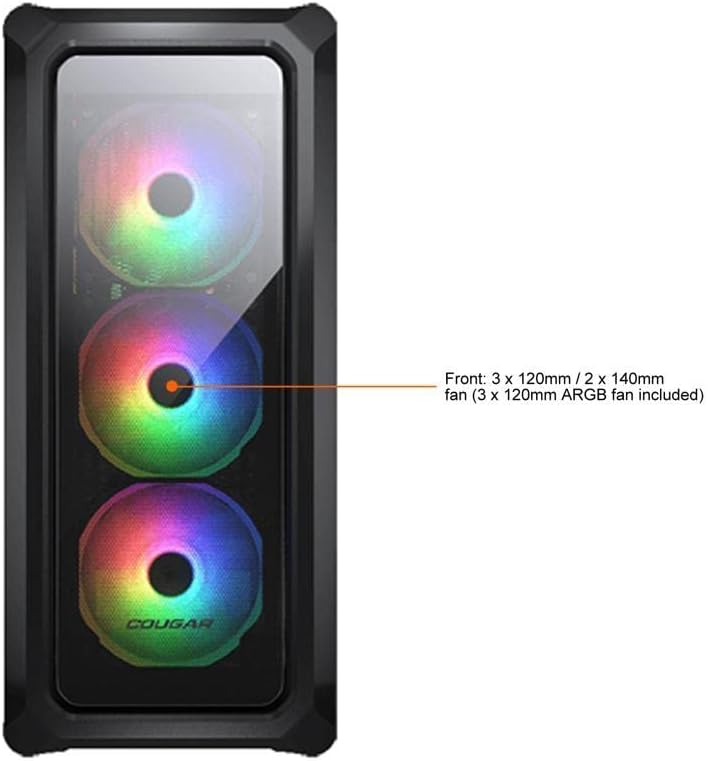
Figure 7.1: Front panel fan configuration and size options for the COUGAR Archon 2 RGB case.
8. Garanti ve Destek
Garanti bilgileri ve teknik destek için lütfen resmi COUGAR web sitesine başvurun. webSite üzerinden satın alabilir veya müşteri hizmetleri departmanıyla iletişime geçebilirsiniz. Satın alma belgenizi garanti talepleriniz için saklayın.
COUGAR Official Webalan: pumagaming.com


