1. Giriş
This manual provides comprehensive instructions for the installation, operation, and maintenance of the Commax CL-302i Lamp. Please read this manual thoroughly before attempting to install or operate the device to ensure proper function and safety. Keep this manual for future reference.
2. Ürün Bittiview
The Commax CL-302i is an accessory lamp designed for integration into various systems, providing illumination with a color temperature of 3000 Kelvin. Its compact design allows for discreet installation.
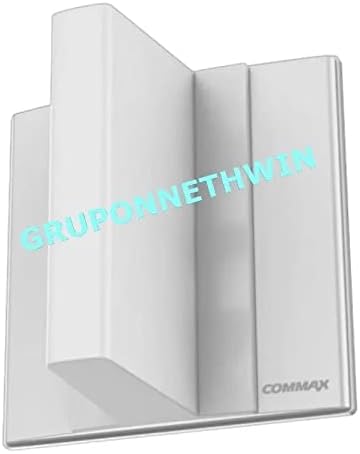
Şekil 2.1: Ön view of the Commax CL-302i Lamp. This image displays the external casing'nin l'siamp, which is white and features a minimalist design with the "COMMAX" logo visible on the lower right.

Şekil 2.2: Dahili view of the Commax CL-302i Lamp, showing the circuit board. The image reveals the internal electronic components, including several small LEDs and other circuitry mounted on a green PCB, indicating the lamp's internal structure.
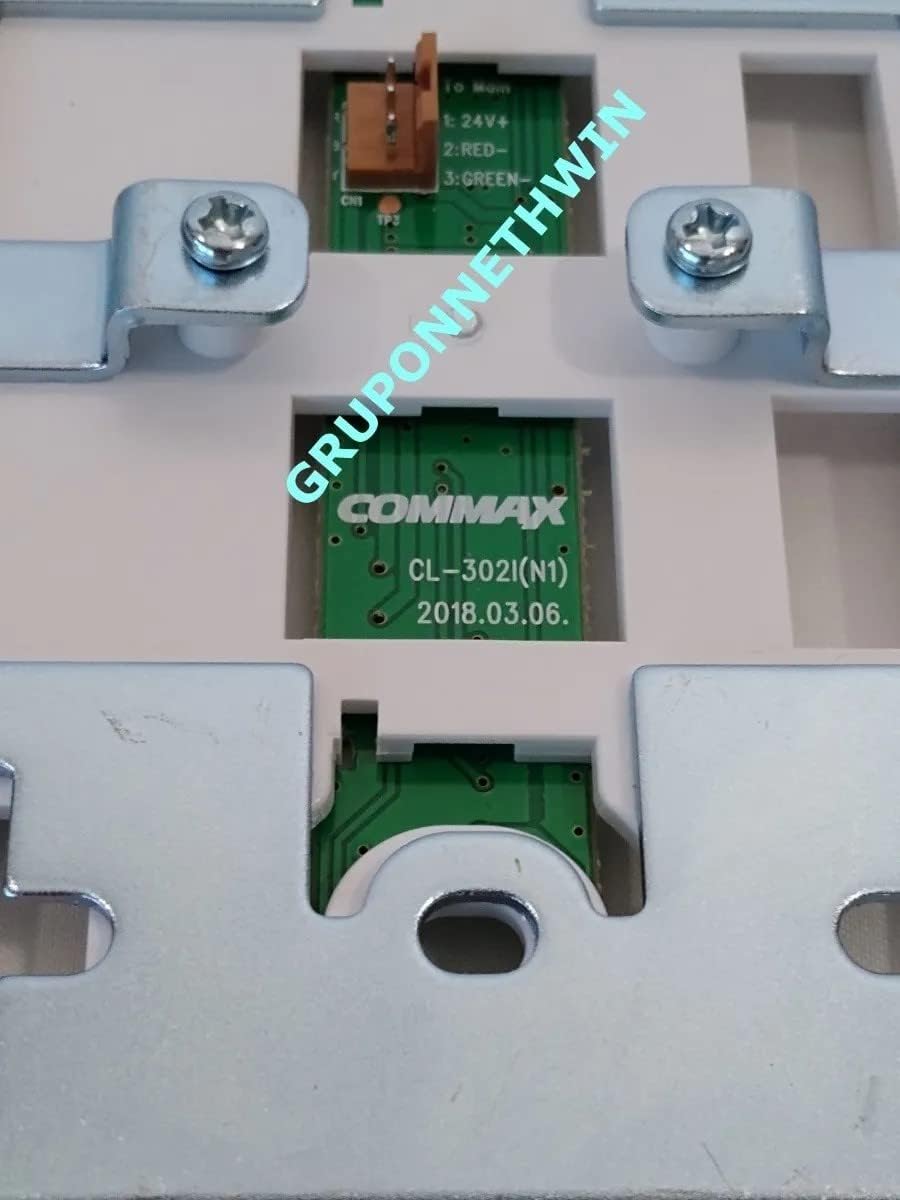
Şekil 2.3: Close-up of the Commax CL-302i Lamp circuit board. This detailed view clearly shows the model number "CL-302I(N1)" and the manufacturing date "2018.03.06". It also highlights the wiring connection points labeled "1: 24V+", "2: RED", and "3: GREEN", which are crucial for installation.

Şekil 2.4: Package contents of the Commax CL-302i Lamp. The image displays the lamp unit, partially wrapped in bubble wrap, alongside a small plastic bag containing wiring and a screw, indicating the included installation accessories.
3. Kurulum ve Kurulum
Proper installation is crucial for the safe and effective operation of the Commax CL-302i Lamp. It is recommended that installation be performed by a qualified professional.
3.1 Güvenlik Önlemleri
- Always disconnect power to the installation area before beginning any wiring.
- Ensure the power supply matches the lamp's requirements (24V DC).
- l'yi açığa çıkarmayınamp neme veya aşırı sıcaklıklara.
3.2 Kurulum Adımları
- Paketi aç: Carefully remove all components from the packaging. Verify that all parts, including the lamp unit, wiring, and mounting hardware, are present as shown in Figure 2.4.
- Montaj: l için uygun bir yer seçinamp. benamp is designed for a center position installation. Secure the lamp unit using the provided mounting hardware.
- Kablo Bağlantıları: Kablolama detayları için Şekil 2.3'ye bakın.
- Bağlan 24V + wire to the positive terminal of your 24V DC power supply.
- Bağlan KIRMIZI wire to the designated control input (if applicable).
- Bağlan YEŞİL wire to the designated control input or ground (if applicable).
Note: Ensure all connections are secure and insulated to prevent short circuits.
- Test: Once all connections are made, restore power to the installation area and test the lamp'in işlevselliği.
4. Operasyon
The Commax CL-302i Lamp functions as an accessory light. Its operation is typically controlled by an external switch or integrated system to which it is connected. Once properly installed and powered, the lamp will illuminate when activated by the controlling system.
5. Bakım
The Commax CL-302i Lamp requires minimal maintenance to ensure long-term performance.
- Temizlik: Periodically wipe the exterior of the lamp with a soft, dry cloth. Do not use abrasive cleaners or solvents, as these may damage the finish.
- Denetleme: Regularly inspect the wiring and connections for any signs of wear, damage, or loose contacts. Address any issues promptly.
- Bileşen Değişimi: Lamp utilizes integrated LED components and is not designed for user-serviceable bulb replacement. If the lamp malfunctions, consult the troubleshooting section or contact support.
6. Sorun Giderme
If you encounter issues with your Commax CL-302i Lamp, aşağıdaki yaygın sorunlara ve çözümlere bakın:
| Sorun | Olası Neden | Çözüm |
|---|---|---|
| Lamp aydınlatmaz. | Güç kaynağı yok. Yanlış kablolama. Hatalı lamp birim. | Check if power is supplied to the circuit. Verify wiring connections according to Figure 2.3. If power and wiring are correct, the unit may be faulty; contact support. |
| Lamp titriyor veya sönüyor. | Dengesiz güç kaynağı. Bağlantı koptu. Aşırı ısınma. | Kararlı bir 24V DC güç kaynağı sağlayın. Tüm kablo bağlantılarının sıkılığını kontrol edin. L çevresinde yeterli havalandırma olduğundan emin olun.amp. |
Bu çözümleri denedikten sonra sorun devam ederse lütfen müşteri desteğiyle iletişime geçin.
7. Özellikler
| Örnek | CL-302i |
| Üretici | Kommaks |
| Seller Brand | Genel |
| Renk Sıcaklığı | 3000 Kelvin |
| Ürün Paket Miktarı | 1 |
| Konum | Merkez |
| ASIN | B09NZMSXZ2 |
| İlk Mevcut Tarih | 25 Temmuz 2023 |
8. Garanti ve Destek
For warranty information and customer support, please refer to the documentation provided at the time of purchase or contact your retailer. Specific warranty terms may vary depending on the region and point of sale.
If you require technical assistance or have questions not covered in this manual, please reach out to the manufacturer or authorized service center.


