1. Giriş
This manual provides detailed instructions for the installation, configuration, operation, and maintenance of your Ruijie Reyee Wi-Fi 6 Ceiling Access Point, model RG-RAP2260(G). Please read this manual thoroughly before using the device to ensure proper setup and optimal performance.
2. Güvenlik Bilgileri
- Güç Kaynağı: Use only the specified power adapter (DC 12V/1.5A) or a Power over Ethernet (PoE) source that complies with IEEE 802.3at/af standards.
- Kurulum Ortamı: Install the device in a dry, well-ventilated area, away from direct sunlight, heat sources, and strong electromagnetic fields.
- Montaj: Ensure the device is securely mounted to a stable surface (ceiling or wall) to prevent accidental falls.
- Bakım: Cihazı açmayınasing. Tüm servis işlemlerini yetkili personele yaptırın.
3. Paket İçeriği
Paketin içinde tüm öğelerin mevcut olduğundan emin olun:
- 1 x Ruijie Reyee Wi-Fi 6 Ceiling Access Point (RG-RAP2260(G))
- Montaj Braketi
- Vidalar ve Dübeller
- Hızlı Başlangıç Kılavuzu (ayrıca dahil edilebilir)
4. Ürün Bittiview
The Ruijie Reyee RG-RAP2260(G) is a high-performance Wi-Fi 6 (802.11ax) ceiling-mounted access point designed for robust wireless connectivity.
4.1 Ön View
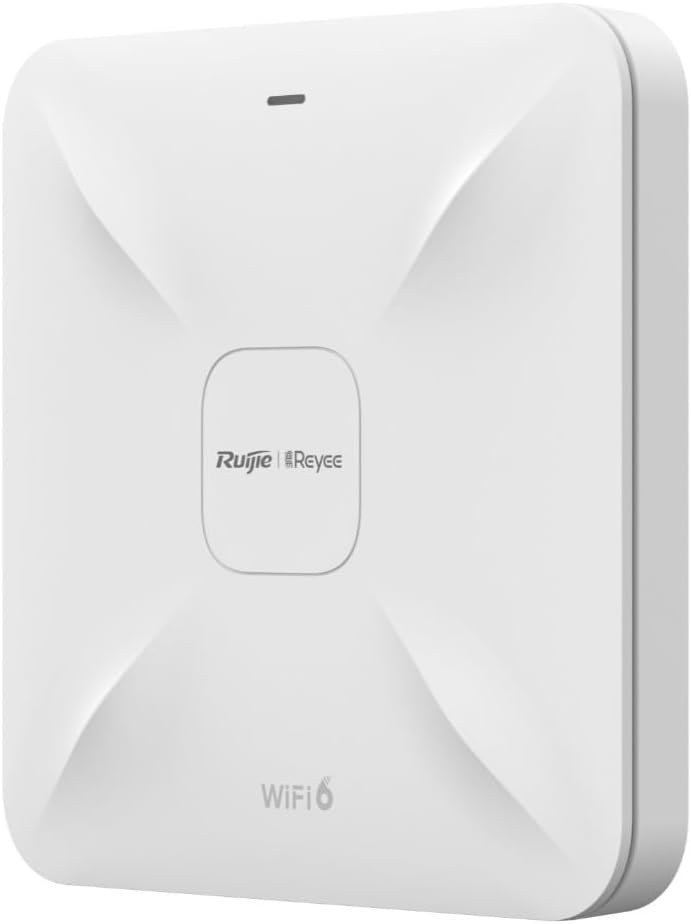
Resim Açıklaması: Bu görüntü ön tarafı gösteriyor view of the Ruijie Reyee RG-RAP2260(G) access point. It is a square-shaped white device with a subtle X-pattern on its surface, featuring the 'Ruijie | Reyee' logo centrally and 'WiFi 6' text at the bottom. A small LED indicator is visible at the top edge.
4.2 Arka View ve Limanlar

Resim Açıklaması: This image shows the rear panel of the Ruijie Reyee RG-RAP2260(G) access point. It features several ports and a reset button. From left to right, the ports are labeled 'RESET', 'LAN2', 'LAN1/PoE', and 'DC=12V'. There are also mounting points visible around the perimeter.
4.3 LED Göstergeleri
The LED indicator on the front of the device provides status information:
- Katı mavi: Cihaz normal çalışıyor.
- Yanıp Sönen Mavi: Cihaz başlatılıyor veya bellenim güncellemesi yapılıyor.
- Düz Kırmızı: Device error or failure.
- Kapalı: Cihaz kapalı.
5. Kurulum
5.1 Erişim Noktasının Montajı
- Bir Konum Seçin: Select a central location on a ceiling or wall for optimal Wi-Fi coverage. Avoid obstructions.
- Montaj Braketini Kurun: Use the provided screws and wall plugs to securely attach the mounting bracket to the chosen surface.
- Erişim Noktasını Bağlayın: Align the access point with the mounting bracket and twist it clockwise until it locks into place.
5.2 Cihaza Güç Verme
The RG-RAP2260(G) can be powered in two ways:
- Ethernet Üzerinden Güç (PoE): Connect an Ethernet cable from a PoE-enabled switch or injector to the LAN1/PoE port on the access point. This provides both power and data connectivity.
- DC Güç Adaptörü: Connect a 12V/1.5A DC power adapter (sold separately) to the DC = 12V port. Then, connect an Ethernet cable from your network to either the LAN1/PoE or LAN2 port for data.
5.3 İlk Yapılandırma
You can configure the access point using the Reyee Cloud App or a web tarayıcı.
5.3.1 Using the Reyee Cloud App
- Download the Reyee Cloud App from your mobile app store.
- Register or log in to your Reyee Cloud account.
- Tap '+' to add a new device and follow the on-screen instructions to scan the QR code on the device or manually add it.
- Configure your Wi-Fi network name (SSID) and password.
5.3.2 Birini kullanarak Web Tarayıcı
- Connect your computer to the access point's network (either directly via Ethernet or to its default Wi-Fi SSID, if broadcast).
- Bir tane aç web browser and enter the default IP address (refer to the Quick Start Guide or device label for the specific IP, commonly 192.168.1.1 or 192.168.120.1).
- Enter the default username and password (e.g., admin/admin or as specified on the device label).
- Follow the setup wizard to configure your network settings, including SSID, security type, and password.
6. Çalıştırma
6.1 Cihazları Wi-Fi'ye Bağlama
Once configured, your Wi-Fi network will be broadcast. On your wireless devices (smartphones, laptops, tablets):
- Go to Wi-Fi settings.
- Select your configured Wi-Fi network name (SSID).
- Wi-Fi şifresini girin.
- Bağlamak.
6.2 Misafir Ağı
The RG-RAP2260(G) supports a guest network feature. This allows you to provide internet access to guests without giving them access to your main network resources. This feature can be enabled and configured through the Reyee Cloud App or the web yönetim arayüzü.
- Enable Guest Mode.
- Set a separate SSID and password for the guest network.
- Configure bandwidth limits or access restrictions if desired.
7. Bakım
7.1 Firmware Güncellemesi
Regularly updating the firmware ensures optimal performance, security, and access to new features. Firmware updates can typically be managed via the Reyee Cloud App or the web management interface. It is recommended to perform updates during off-peak hours.
7.2 Temizlik
To clean the device, gently wipe the exterior with a soft, dry cloth. Do not use liquid cleaners or abrasive materials, as they may damage the casing veya dahili bileşenler.
7.3 Fabrika Ayarlarına Sıfırlama
To restore the access point to its factory default settings:
- Cihazın açık olduğundan emin olun.
- Bulun SIFIRLAMA button on the rear panel (refer to Section 4.2).
- Using a paperclip or a similar pointed object, press and hold the RESET button for approximately 5-10 seconds until the LED indicator changes.
- Düğmeyi bırakın. Cihaz fabrika varsayılan ayarlarına sıfırlanarak yeniden başlatılacaktır.
8. Sorun Giderme
8.1 Güç Yok
- Check if the power adapter is securely connected to the DC=12V port and a power outlet, or if the PoE source is active and connected to the LAN1/PoE port.
- Elektrik prizinin çalışır durumda olduğundan emin olun.
8.2 No Wi-Fi Signal
- Ensure the device is powered on and the LED indicator is solid blue.
- Check if the Ethernet cable is properly connected to the LAN1/PoE or LAN2 port and to your network.
- Verify Wi-Fi settings (SSID, password) in the configuration interface.
- Erişim noktasını yeniden başlatın.
8.3 Yavaş Wi-Fi Hızı
- Diğer kablosuz cihazlardan veya ağlardan kaynaklanan parazitleri kontrol edin.
- Ensure the access point is placed in an optimal location, free from obstructions.
- İnternet servis sağlayıcınızın hızını doğrulayın.
- Update the access point's firmware to the latest version.
9. Özellikler
| Özellik | Şartname |
|---|---|
| Marka | RUIJIE |
| Model Adı | RG-RAP2260(G) |
| Wi-Fi standart | 802.11ac, 802.11ax (Wi-Fi 6) |
| Frekans Bant Sınıfı | Çift Bant |
| Bağlantı Teknolojisi | Wifi |
| Özel Özellik | Misafir Modu |
| Anten Tipi | Dahili |
| Renk | Beyaz |
| Uyumlu Cihazlar | All compatible devices |
| Bileşenler Dahil | 1 Reyee WiFi 6 Dual Band 1775 Mbps Ceiling Access Point - White |
10. Garanti ve Destek
10.1 Garanti Bilgileri
This product comes with a standard manufacturer's warranty. Please refer to the warranty card included in your product packaging or visit the official Ruijie webBölgenize özgü ayrıntılı garanti şartları ve koşulları için siteyi ziyaret edin.
10.2 Teknik Destek
For technical assistance, troubleshooting, or further inquiries, please contact Ruijie Networks customer support. Support resources, including FAQs and contact details, are available on the official Ruijie webalan:
- Webalan: www.ruijienetworks.com
- E-posta/Telefon: Şuna bakın: webBölgesel iletişim bilgileri için siteyi ziyaret edin.