1. Ürün Bittiview
The Vonets VAP11G-300 is a professional 300Mbps WiFi repeater designed for stable and reliable network connectivity. It supports WiFi to wired and wired to WiFi functions, making it suitable for various applications.
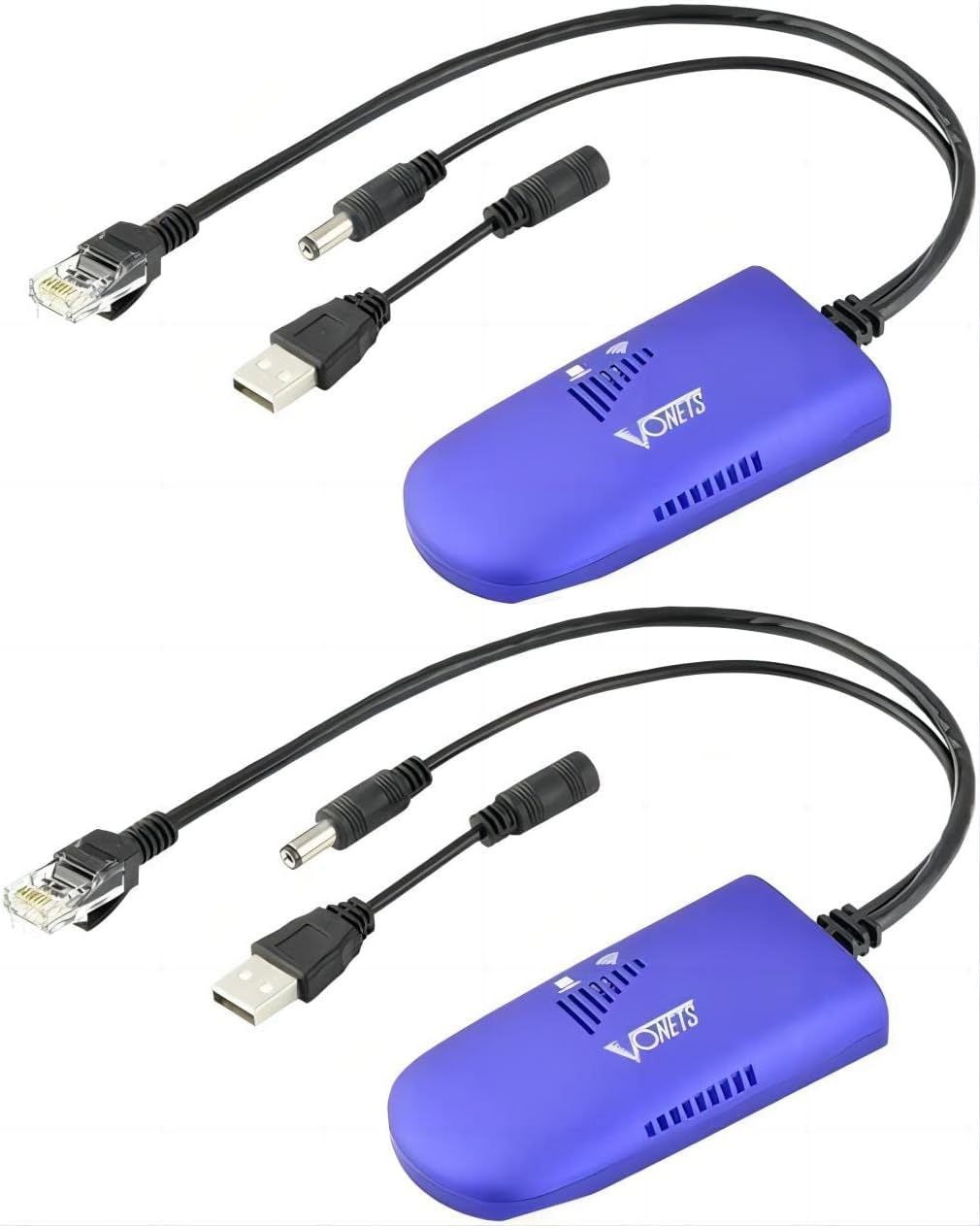
Image: Two Vonets VAP11G-300 WiFi bridges, showcasing their compact design and included cables.
2. Ürün Özellikleri
- 2025 Yeni Yükseltme: Features a new process design for super stability. Functions as an Industrial Mini WiFi Bridge/Repeater/AP, supporting both WiFi to wired and wired to WiFi connectivity.
- Parametreler: Offers a 2.4GHz WiFi rate of 300Mbps, adhering to 802.11b/g/n WiFi protocol. Point-to-point transmission distance is up to 100 meters without obstacles for small data, and less than 80 meters for video transmission.
- Güç Kaynağı: Includes a two-in-one dedicated power cord, offering USB and DC power supply options. USB supports 5V/1A power, while the DC2.0 power hole supports wide voltage DC5-15V. Comes with a 10/100M adaptive Ethernet cable.
- Kompakt Boyut: The card-sized device is easy to carry and integrate, measuring 3.62 x 1.85 x 0.83 inches.
- Continuous Update Service: Software is continuously optimized, allowing online upgrades for optimal device function.

Image: The compact size of the VAP11G-300 compared to a credit card, highlighting its portability and the high-performance Mediatek chip.
3. Ürün Şeması ve Bileşenleri
The VAP11G-300 features essential components for its operation:
- USB Bağlantı Noktası: For power supply (5V/1A recommended).
- DC Power Supply Hole: Geniş hacim desteğitage DC5-15V güç kaynağı.
- LAN Bağlantı Noktası (RJ45): For Ethernet cable connection.
- Hotspot Connection Status Light: Indicates the status of the WiFi hotspot connection.
- Ethernet Cable Connection Light: Ethernet bağlantısının durumunu gösterir.
- Sıfırlama Düğmesi: Cihazı fabrika ayarlarına sıfırlamak için kullanılır.
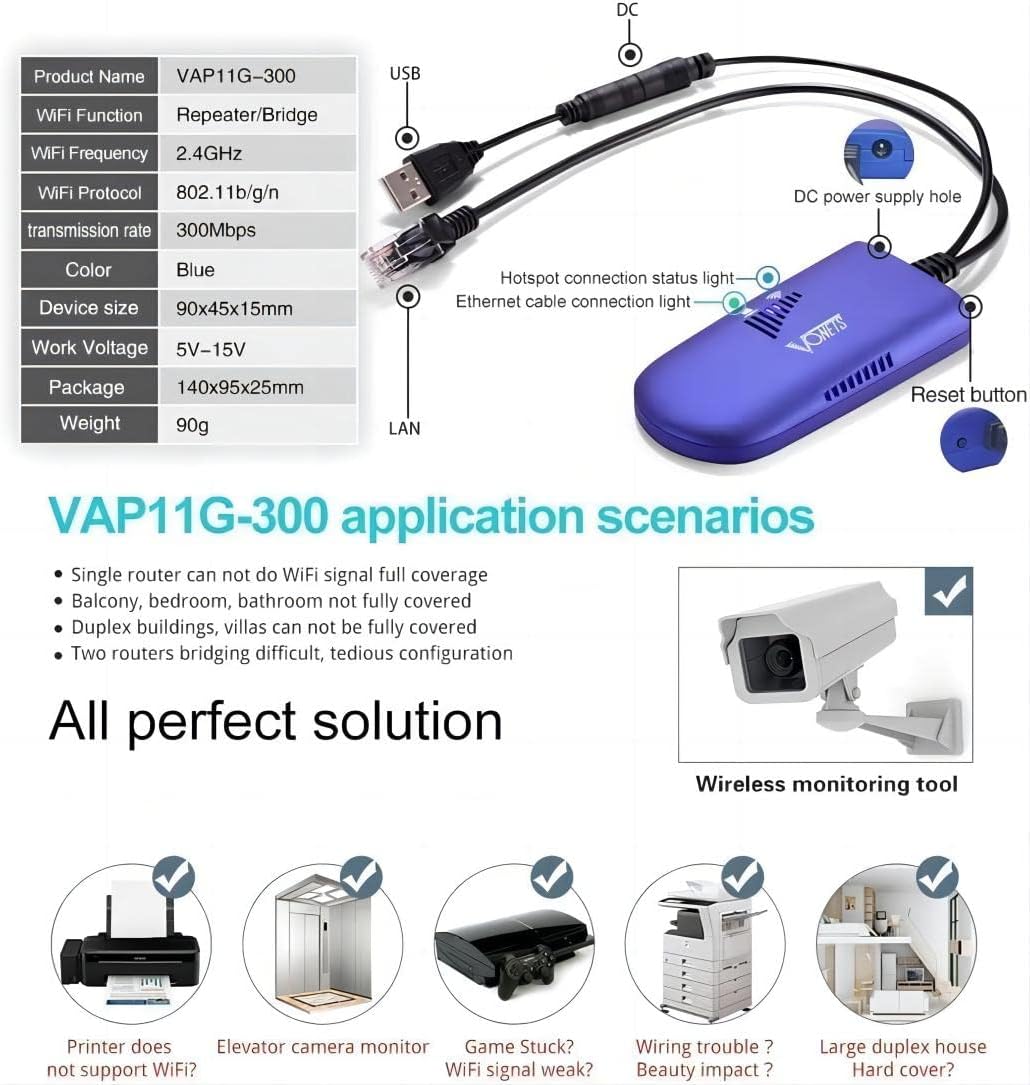
Image: Detailed diagram illustrating the various ports and indicator lights on the VAP11G-300 device.
4. Kurulum ve Yapılandırma
4.1 Cihazı Açma
Connect the VAP11G-300 to a power source using the provided two-in-one dedicated power cord. A 5V/2A typical power supply is recommended for optimal performance. The device will power on, and indicator lights will illuminate.
4.2 Configuration via Computer
To configure the device using a computer, follow these steps:
- Connect the VAP11G-300 to your computer via an Ethernet cable.
- Bir tane aç web browser and enter the configured domain (http://vonets.cfg) or the IP address (192.168.254.254) in the address bar.
- Enter the User ID and password. Both are typically "admin". Click "Login".
- Navigate to the WiFi Hotspots section. The device will search for available WiFi hotspots.
- Select your desired WiFi hotspot from the list and click "Next".
- Enter the password for your selected WiFi hotspot.
- Click "Apply" and then "Reboot" or power off the device. The device will reboot, which may take about 1 minute. Wait until the LED light flashes normally.
Video: A step-by-step guide on how to configure the Vonets VAP11G-300 using a computer, demonstrating the web interface and settings.
4.3 Configuration via Smartphone
To configure the device using a smartphone, follow these steps:
- Find the MAC address of the VAP11G-300, which is located on the back of the device.
- Connect your smartphone to the WiFi SSID of the VAP11G-300 (the SSID is VONETS_2.4G_XXXX, where XXXX is the last four digits of the MAC address). The default password is 12345678.
- Bir tane aç web browser on your smartphone and enter the configured domain (http://vonets.cfg) or the IP address (192.168.254.254) in the address bar.
- Enter the User ID and password. Both are typically "admin". Click "Login".
- Navigate to the WiFi Hotspots section. The device will search for available WiFi hotspots.
- Select your desired WiFi hotspot from the list and click "Next".
- Enter the password for your selected WiFi hotspot.
- Click "Apply" and then "Reboot" or power off the device. The device will reboot, which may take about 1 minute. Wait until the LED light flashes normally.
Video: A step-by-step guide on how to configure the Vonets VAP11G-300 using a smartphone, demonstrating the mobile web interface and settings.
5. Çalışma Modları
The Vonets VAP11G-300 supports two primary operating modes:
- AP Modu: In Access Point (AP) mode, the device converts wired networks to wireless access. This is suitable for scenarios where an Ethernet cable provides internet access to a computer without requiring dialing.
- Tekrarlayıcı Modu: In Repeater mode, the device extends the existing network, facilitating easy network expansion. It can also convert WiFi to an RJ45 network, allowing a computer to access the internet via a network cable.

Image: Visual representation of the VAP11G-300 operating in AP Mode (wired to wireless) and Repeater Mode (extending wireless network).
6. Uygulama Senaryoları
The VAP11G-300 is a versatile device suitable for various network applications, including:
- Surveillance systems (e.g., IP cameras, DVRs)
- Elektronik teraziler
- Tıbbi ekipman
- Internet of Things (IoT) equipment
- Video iletimi
- Industrial PLC (Programmable Logic Controller)
- Gaming consoles (e.g., PS3)
- Yazıcılar
- Robotlar
- Extending WiFi coverage in areas with weak signals (e.g., single rooms, balconies, duplex buildings).

Image: Wireless monitoring application diagram, illustrating how the VAP11G-300 can be used for remote video surveillance in various setups.

Image: A visual guide to various devices and systems that can benefit from the VAP11G-300's connectivity features.
7. Özellikler
| Şartname | Değer |
|---|---|
| Ürün Boyutları | 3.62 x 1.85 x 0.83 inç |
| Ürün Ağırlığı | 5.8 ons |
| Ürün Model Numarası | VAP11G-300 |
| Kablosuz İletişim Standardı | 802.11bgn |
| Veri Aktarım Hızı | Saniyede 300 Megabayt |
| Frekans Bant Sınıfı | Çift Bant |
| Bağlayıcı Türü | RJ45, USB |
| Üretici | Shenzhen Houtian Network Communication Technology Co.,Ltd |
| İlk Mevcut Tarih | 15 Aralık 2021 |
8. Sorun Giderme
If you encounter issues with your Vonets VAP11G-300, consider the following common troubleshooting steps:
- Güç Kontrolü: Ensure the device is properly powered on with the recommended 5V/2A power supply. Check if the indicator lights are active.
- Ağ kablosu: Verify that all Ethernet cables are securely connected.
- IP Adresi Çakışması: If you experience connectivity issues after configuration, ensure there are no IP address conflicts on your network. The manual recommends disabling the DHCP server if conflicts occur.
- Aygıtı Yeniden Başlat: A simple reboot can often resolve temporary connectivity problems. Power off the device, wait a few seconds, and then power it back on.
- Fabrika ayarları: If problems persist, use the reset button to restore the device to its factory default settings. This will clear all custom configurations.
- Check WiFi Hotspot Password: Double-check that the WiFi hotspot password entered during configuration is correct.
- Sinyal Gücü: Ensure the device is within adequate range of the source WiFi hotspot. Weak signals can affect performance.
9. Bakım
To ensure the longevity and optimal performance of your Vonets VAP11G-300:
- Cihazı serin, kuru bir yerde, doğrudan güneş ışığından ve nemden uzak tutun.
- Cihazı güçlü elektromanyetik girişim kaynaklarının yakınına yerleştirmekten kaçının.
- Regularly check for and install software updates to benefit from performance optimizations and new features.
- Clean the device periodically with a soft, dry cloth to prevent dust buildup.
10. Garanti ve Destek
For warranty information, technical support, or further assistance, please refer to the official Vonets website or contact their customer service. Details regarding specific warranty periods and service terms may vary by region and purchase location.
Ziyaret edebilirsiniz Vonets Store on Amazon Daha fazla bilgi için.


