giriiş
The TALOYA Flush Mount Smart LED Ceiling Light offers versatile lighting solutions with advanced control options. This 12-inch, 24W light features adjustable white light (3000K~6500K) and a vibrant RGB ambiance backlight. It can be controlled via a dedicated remote, a mobile application, or voice commands through Amazon Alexa and Google Home. Designed for easy installation and energy efficiency, this manual provides comprehensive instructions for setup, operation, and maintenance.

Image: The TALOYA Smart LED Ceiling Light, showcasing its main features including remote, app, and voice control compatibility.
Kutuda Neler Var?
- Aydınlatma armatürü
- Uzaktan kumanda
- Montaj Donanımı
- Kullanım Kılavuzu

Resim: Ürün ambalajında yer alan tüm bileşenler.
Özellikler
| Özellik | Tanım |
|---|---|
| Marka | TALOYA |
| Model Adı | RK300-24W-AI-BKMG41 |
| Ürün Boyutları | 12"U x 12"G x 1.34"Y |
| Netage | 24 Watts (20W White + 4W RGB) |
| Parlaklık | 2000 Lümen |
| Açık Renk | RGB Backlight, White Main Light (3000-6500K) |
| Kontrol Yöntemleri | Mobile App, Remote Control, Voice Control (Alexa, Google Assistant) |
| Bağlantı | Wi-Fi (2.4G) |
| Kurulum Türü | Dağı Flush |
| İç/Dış Mekan Kullanımı | Sadece İç Mekan |
| Malzeme | Plastik |
| Ortalama Hayat | 30000 Saat |

Image: Product dimensions and included accessories for installation.
Kurulum ve Yükleme
Follow these steps for safe and proper installation of your TALOYA Smart LED Ceiling Light. Ensure power is turned off at the circuit breaker before beginning installation.
- Prepare the Base Plate: Carefully remove the base plate from the lamp Saat yönünün tersine döndürerek.
- Taban Plakasını Sabitleyin: Mount the base plate to your ceiling. Use tapered tapping screws for solid ceilings or flat head screws for wire boxes. Ensure the base plate is securely fastened.
- Connect AC Cables: Connect the AC cables from your ceiling to the light fixture's wires. Use the provided fast wire connectors or wire nuts, ensuring a secure connection for both live and neutral wires.
- Aydınlatma Armatürü'nü takın: Push the wire nuts upwards into the ceiling box. Align the light fixture with the secured base plate and rotate it clockwise until it locks into place.
Kurulum Video Kılavuzu
Video: A detailed guide demonstrating the physical installation steps for the TALOYA Smart LED Ceiling Light.
Kullanım Talimatları
The TALOYA Smart LED Ceiling Light offers multiple ways to control your lighting experience.
1. Mobil Uygulama Kontrolü
Control your light from anywhere using the Smart Life app (available for iOS & Android). This allows for dimming, color changes, scene selection, and scheduling.
- Color-Changeable: Access 16 million RGB colors for the backlight and adjust white light from 3000K to 6500K.
- Kısılabilir: Parlaklığı %10 ile %100 arasında ayarlayın.
- Sahneler: Choose from various preset scenes or create custom lighting effects.
- Zamanlayıcı ve Program: Set automatic on/off times to suit your daily routine.
- Grup Kontrolü: Control multiple TALOYA smart lights simultaneously.
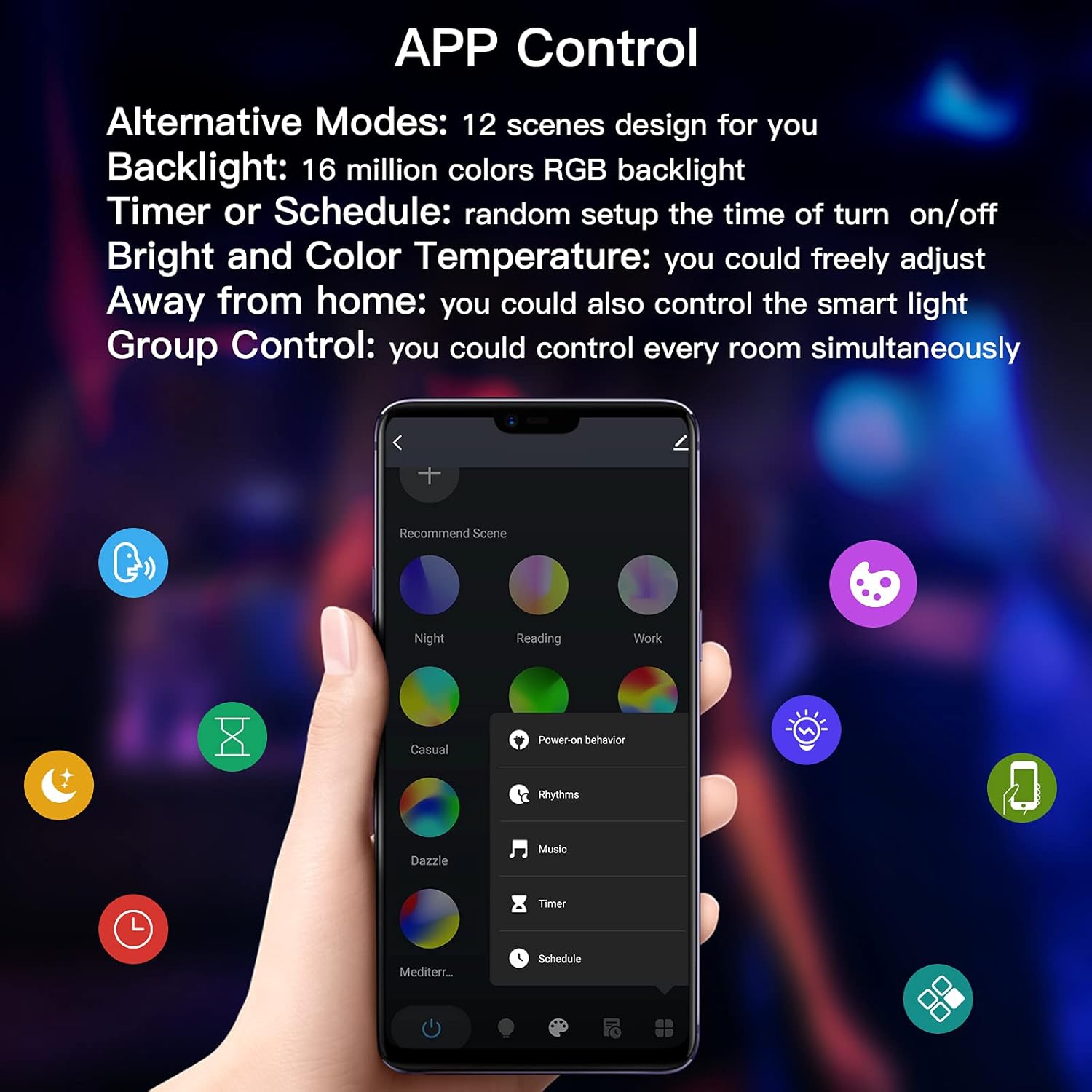
Image: The mobile app interface for controlling light settings, including color and brightness.

Resim: Eskiamples of 16 million RGB backlight colors and multiple scene options.
2. Ses Kontrolü
Integrate your light with Amazon Alexa or Google Home for convenient voice commands.
- Açma/Kapatma: "Alexa, yatak odasının ışığını aç."
- Renk Ayarı: "Google, change the light to blue."
- Parlaklık Ayarı: "Alexa, dim the ceiling light to 50%."

Image: Voice control compatibility with Amazon Alexa and Google Assistant.
3. Uzaktan Kumanda
Use the included remote control for quick adjustments without needing your phone or voice assistant.
- AÇIK/KAPALI: Işığı açın veya kapatın.
- Parlaklık/Hız: Adjust brightness or the speed of dynamic modes.
- Renk Sıcaklığı: Switch between Cool White, Warm White, and Neutral White.
- 12 Colors Option: Select from 12 preset colors.
- Smooth/Flash Mode: Activate smooth color transitions or flashing effects.

Image: Layout and functions of the included remote control.
Özellik Videoları
Video: An introduction to the various smart functions of the TALOYA ceiling light.
Video: Demonstrating the RGB ambient light feature of the smart ceiling light.
Video: Showcasing the remote control functionality of the smart light.
Bakım
To ensure the longevity and optimal performance of your TALOYA Smart LED Ceiling Light, follow these simple maintenance guidelines:
- Temizlik: Gently wipe the surface of the light fixture with a soft, dry cloth. Avoid using abrasive cleaners, solvents, or harsh chemicals, as these can damage the finish or electronic components.
- Temizlemeden Önce Gücü Kapatın: Always ensure the power to the light fixture is turned off at the circuit breaker before cleaning to prevent electrical shock.
- Kullanıcı Tarafından Bakımı Yapılabilecek Parça Yok: The LED chips are integrated and not user-replaceable. Do not attempt to disassemble the light fixture.
Sorun giderme
If you encounter issues with your TALOYA Smart LED Ceiling Light, refer to the following common solutions:
Connection Issues with Mobile App
If the light fails to connect to the Smart Life app:
- Reset the Light: Cycle the light switch ON and OFF three times. The light should then start fast blinking (0.5s/time), indicating it's in pairing mode.
- Check Wi-Fi Network: Ensure your mobile device is connected to a 2.4GHz Wi-Fi network. The light does not support 5GHz Wi-Fi.
- Şifrenizi denetleyin: Double-check that you are entering the correct Wi-Fi password in the app.
- AP Modu Bağlantısı: If fast blinking connection fails, try AP mode. Reset the light again (ON/OFF 3 times) until it blinks slowly (2s/time). In the app, select AP Mode for connection and follow the on-screen instructions to connect to the light's hotspot.
- Yönlendirici Kararlılığı: If your home Wi-Fi router has an unstable signal, create a new Wi-Fi network by turning on the hotspot with an extra 4G phone. Use this new Wi-Fi to connect your light with the controlled phone which has the Smart Life App.
- Clear Existing Devices: If you have many smart devices in your app, it might interfere with adding new ones. Try removing or emptying other devices in the app before connecting the light.
App Connection Troubleshooting Video
Video: A step-by-step guide on how to connect the smart light to your mobile phone, including solutions for common connection problems.
Garanti ve Destek
TALOYA stands behind the quality of its products. This Smart LED Ceiling Light comes with the following:
- 2 Yıl Ücretsiz Değişim: Enjoy a free replacement within 2 years for any quality-related issues from the original purchase date.
- 30-Day Money-back Guarantee: If you are not satisfied, a 30-day money-back guarantee is provided.
- 7*24 Hours Customer Support: For any questions or concerns, please do not hesitate to contact the TALOYA service team.
İletişim Bilgileri:
- E-posta: info@taloya.com
- WhatsApp/WeChat: +86 18370998400


