1. Giriş
Thank you for choosing the Dalton 2000VA Uninterruptible Power Supply (UPS). This device is designed to provide reliable power backup and protection for your electronic equipment against power outages, surges, and fluctuations. Please read this manual thoroughly before installation and operation to ensure optimal performance and safety.
2. Önemli Güvenlik Talimatları
Yangın, elektrik çarpması ve yaralanma riskini azaltmak için her zaman şu temel güvenlik önlemlerine uyun:
- UPS kutusunu açmayın.asing. İçeride kullanıcı tarafından onarılabilecek parça bulunmamaktadır. Bakım işlemlerini yetkili servis personeline yaptırın.
- Do not use the UPS in environments with excessive dust, humidity, or extreme temperatures.
- Kesintisiz güç kaynağının topraklı bir elektrik prizine bağlı olduğundan emin olun.
- Do not connect non-computer related items like medical equipment, life support equipment, or household appliances to the UPS.
- UPS cihazını iyi havalandırılan bir yere, doğrudan güneş ışığından veya ısı kaynaklarından uzak bir konuma yerleştirin.
- In case of emergency, press the power button to turn off the UPS and disconnect it from the AC power source.
3. Paket İçeriği
Paketinizde tüm öğelerin mevcut olduğundan emin olun:
- Dalton 2000VA UPS Unit
- Güç Kablosu
- USB Communication Cable (if applicable)
- Kullanım Kılavuzu (bu belge)

Şekil 3.1: Ön view of the Dalton 2000VA UPS unit, showing the display screen and power button.
4. Kurulum ve Kurulum
Follow these steps to set up your UPS:
- Paketin açılması: UPS paketini dikkatlice ambalajından çıkarın. Herhangi bir nakliye hasarı olup olmadığını kontrol edin.
- Atama: Place the UPS on a flat, stable surface in a cool, dry, and well-ventilated area. Ensure there is adequate space around the unit for airflow.
- Başlangıç ücreti: Before connecting any devices, plug the UPS power cord into a grounded wall outlet. Allow the unit to charge for at least 8 hours to ensure the battery is fully charged. The display will indicate charging status.
- Bağlantı Cihazları:
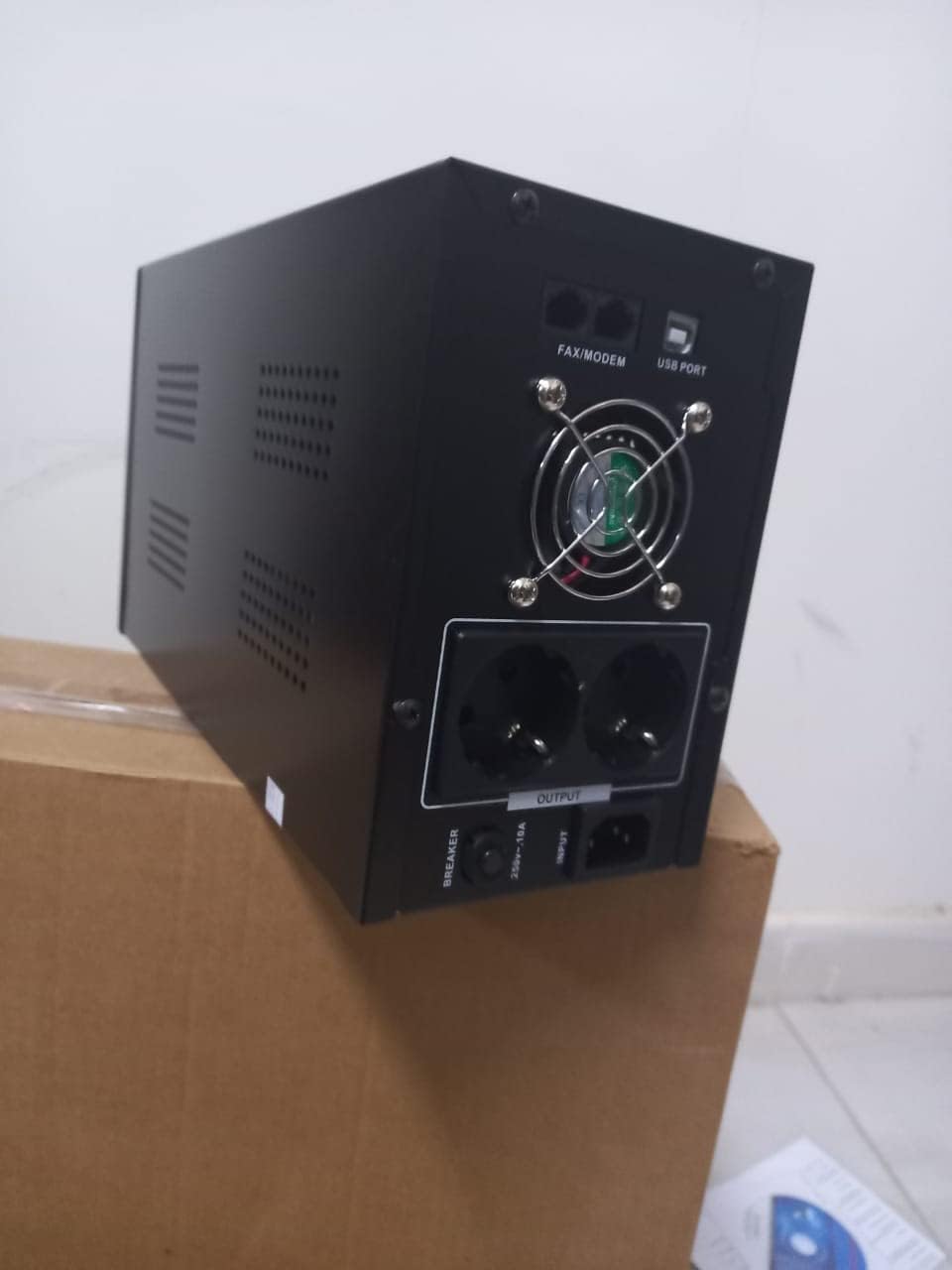
Şekil 4.1: Arka view of the Dalton 2000VA UPS, highlighting the input power port, output sockets, and USB/Modem ports.
- Once the battery is charged, connect your computer, monitor, and other critical electronic devices to the UPS output sockets.
- Do not overload the UPS. Refer to the specifications section for maximum load capacity.
- If applicable, connect the USB communication cable from the UPS to your computer for monitoring software (software not included, check manufacturer's webalan).
5. UPS'in çalıştırılması
5.1 Açma/Kapatma
- Açmak İçin: After connecting to AC power and charging, press and hold the power button on the front panel for approximately 3 seconds until you hear a beep and the display illuminates.
- Kapatmak İçin: Press and hold the power button for approximately 3 seconds until you hear a beep and the display turns off. If the UPS is running on battery, it will shut down immediately. If connected to AC, it will switch to bypass mode before shutting down.
5.2 Ekranı Anlamak
The front panel LCD display provides real-time status information:
- İÇİNDE: Giriş hacmini görüntülertagŞebeke elektriğinden gelen e.
- DIŞARI: Çıkış hacmini görüntülertage provided by the UPS to connected devices.
- NORMAL: UPS'in şebeke elektriğiyle çalıştığını gösterir.
- Yarasa: Pil şarj seviyesini gösterir.
- Yük: Yüzdeyi gösterirtagUPS'in kapasitesinin bağlı cihazlar tarafından kullanılması.
- Battery Mode Icon: Appears when the UPS is running on battery power during an outage.

Şekil 5.1: Yan view of the UPS, showing the illuminated display with power status indicators.
5.3 Pil Yedekleme Fonksiyonu
Bir elektrik kesintisi durumundatage, the UPS will automatically switch to battery power, providing continuous power to your connected devices. The duration of backup power depends on the load connected and the battery's charge level. The UPS will emit an audible alarm during battery operation.
When utility power returns, the UPS will automatically switch back to AC power and begin recharging its battery.
6. Bakım
- Pil Bakım: To maximize battery life, ensure the UPS is always connected to an AC outlet to keep the battery charged. If the UPS is stored for an extended period, recharge it every three months for at least 8 hours.
- Temizlik: Disconnect the UPS from all power sources before cleaning. Use a soft, dry cloth to wipe the exterior. Do not use liquid or aerosol cleaners.
- Havalandırma: Regularly check that the ventilation openings are not blocked by dust or debris to prevent overheating.
7. Sorun Giderme
Yaygın sorunlar ve çözümleri için aşağıdaki tabloya bakın:
| Sorun | Olası Neden | Çözüm |
|---|---|---|
| UPS açılmıyor. | Battery not charged or power cord disconnected. | Ensure power cord is securely plugged in and allow battery to charge for 8 hours. |
| UPS normal modda sürekli bip sesi çıkarıyor. | Aşırı yük durumu. | Disconnect non-essential equipment until the alarm stops. Check total load. |
| Kısa yedekleme süresi. | Battery not fully charged or battery nearing end of life. | Allow UPS to charge for 8 hours. If issue persists, battery may need replacement (contact service center). |
| UPS, kullanım sırasında güç sağlamaz.tage. | Battery discharged or internal fault. | Ensure UPS was fully charged. If problem persists, contact authorized service center. |
8. Teknik Özellikler
| Özellik | Detay |
|---|---|
| Ürün Boyutları | 12.5x22.5x38 cm |
| Üretici | Dalton |
| Marka Adı | Genel |
| Renk | Siyah |
| Malzeme | Metal |
| Akım | 5 Ampburada |
| Form Faktörü | Raf |
| Frekans Aralığı | 50-60 Hz |
| Çıkış Hacmitage | 220 Volt |
| Bağlayıcı Türü | AC |
9. Garanti ve Destek
Dalton provides an authorized maintenance center for all Uninterruptible Power Supply units. For warranty claims, technical support, or service inquiries, please contact your local Dalton authorized distributor or service center. Keep your purchase receipt as proof of purchase for warranty validation.
For further assistance, please visit the official Dalton website veya müşteri desteği ile iletişime geçin.