1. Giriş
Thank you for choosing the Edifier W280NB Bluetooth Wireless Neckband Earbuds. These earbuds are designed to provide a high-quality audio experience with features like Active Noise Cancellation (ANC), Ambient Sound Monitoring, and AI call noise reduction. Their lightweight, comfortable design and IP55 water resistance make them ideal for various activities, including gym workouts and running.
2. Kutuda Neler Var?
- Edifier W280NB Earbuds
- Şarj kablosu
- Multiple Sizes of Eartips and Ear Wings
3. Ürün Bittiview
Familiarize yourself with the components of your Edifier W280NB earbuds:

Şekil 3.1: Edifier W280NB Neckband Earbuds. The image shows the black neckband-style earbuds with the control module visible on the right side of the neckband.
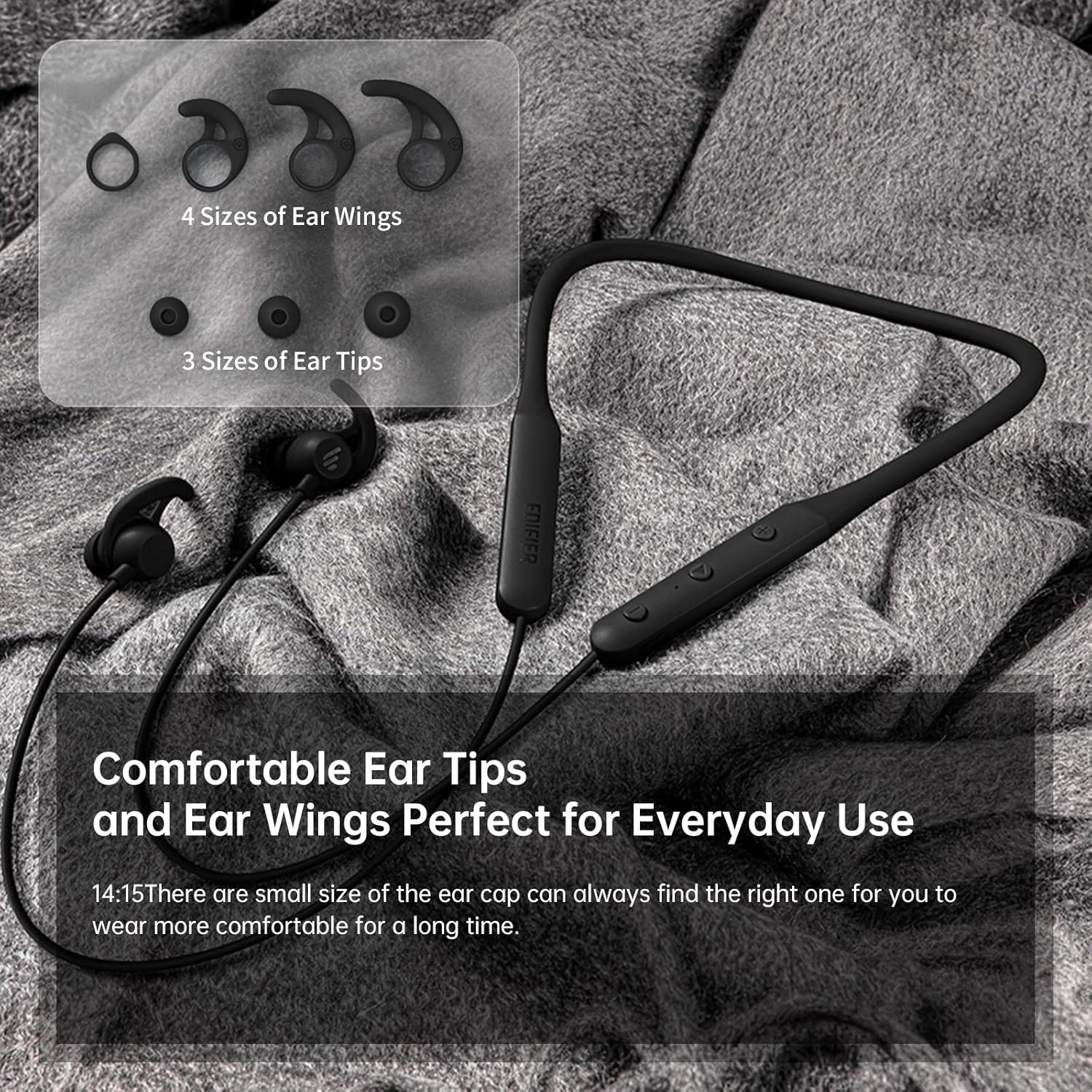
Şekil 3.2: Comfortable Ear Tips and Ear Wings. This image displays different sizes of silicone ear tips and ear wings, highlighting the customizable fit for user comfort.
The earbuds feature a flexible neckband for secure wear, with integrated controls for easy access to functions like volume, playback, and call management. The ear tips and ear wings are designed for a comfortable and stable fit during various activities.
4. Kurulum
4.1 Kulaklıkları Şarj Etme
Before first use, fully charge the earbuds. Connect the provided charging cable to the charging port on the neckband and to a USB power source. The indicator light will show charging status. A full charge provides up to 13 hours of playtime (ANC off). For quick use, a 2-minute charge can provide approximately 2 hours of playtime.

Şekil 4.1: Fast Charge and Long Playback Time. This image illustrates the battery life with ANC on (11 hours) and ANC off (13 hours), and the quick charge capability (10 minutes charge for 2.5 hours use).
4.2 Bluetooth Eşleştirme
- Kulaklıkların şarjının dolu ve kapalı olduğundan emin olun.
- Eşleştirme modunu gösteren gösterge ışığı mavi ve kırmızı renkte yanıp sönene kadar güç düğmesini basılı tutun.
- Cihazınızda (akıllı telefon, tablet, dizüstü bilgisayar) Bluetooth'u etkinleştirin ve kullanılabilir cihazları arayın.
- Select "Edifier W280NB" from the list of found devices.
- Bağlantı kurulduktan sonra gösterge ışığı sabit mavi renkte yanacaktır.
5. Kullanım Talimatları
5.1 Kontroller
The control module on the neckband allows you to manage various functions:
- Güç Düğmesi: Açmak/kapatmak için basılı tutun. Müziği oynatmak/duraklatmak veya aramaları cevaplamak/sonlandırmak için kısa basın.
- Sesi Aç (+): Kısa basışla sesi açın. Uzun basışla sonraki parçaya geçin.
- Sesi kıs (-): Kısa basıldığında ses kısılır. Uzun basıldığında önceki parça çalınır.
- Fonksiyon Düğmesi: (Specific button for ANC/Ambient mode, refer to product diagram if available, otherwise assume integrated with power/volume)
5.2 Aktif Gürültü Önleme (ANC)
The ANC feature reduces ambient noise, providing a more immersive listening experience. Activate or deactivate ANC using the designated control button (often a long press on the power button or a dedicated button).

Şekil 5.1: Active Noise Cancellation. A man is shown wearing the earbuds, with text indicating the ANC technology for a quieter experience.
5.3 Ambient Sound Monitoring
This mode allows you to hear your surroundings without removing the earbuds, enhancing safety and awareness. Toggle this mode on/off via the control module.

Şekil 5.2: Ambient Sound Mode. A woman is shown wearing the earbuds, with text explaining the real-time sensation of ambient sound monitoring.
5.4 Arama İşlevleri
The earbuds support hands-free calling with AI call noise reduction technology, ensuring clear conversations by filtering out ambient noise.
- Çağrıyı Cevapla/Sonlandır: Güç düğmesine kısa basın.
- Çağrıyı Reddet: Güç düğmesine uzun basın.

Şekil 5.3: Call Noise Cancellation. A woman is shown wearing the earbuds, with text describing the AI call noise-cancelling technology for clear calls.
6. Bakım
6.1 Temizlik
- Kulaklık uçlarını düzenli olarak yumuşak, kuru bir bezle temizleyin.
- If necessary, remove the ear tips and wash them with mild soap and water, ensuring they are completely dry before reattaching.
- Wipe the neckband and earbud surfaces with a slightly damp bez. Sert kimyasallar veya aşındırıcı malzemeler kullanmaktan kaçının.
6.2 Su ve Toza Dayanıklılık (IP55)
The Edifier W280NB earbuds are IP55 rated, meaning they are protected against dust ingress and low-pressure water jets from any direction. This makes them suitable for use during workouts and in light rain. However, they are not designed for submersion in water.

Şekil 6.1: IP55 Dust and Water Resistance. A man is shown wearing the earbuds, with text highlighting their IP55 protection against dust and water.
6.3 Depolama
Store the earbuds in a cool, dry place away from direct sunlight and extreme temperatures. Avoid tangling the neckband to prevent damage.
7. Sorun Giderme
| Sorun | Olası Neden | Çözüm |
|---|---|---|
| Kulaklıklar açılmıyor | Düşük pil | Kulaklıkları tam olarak şarj edin. |
| Cihazla eşleştirilemiyor | Earbuds not in pairing mode; Bluetooth off on device; too far from device | Ensure earbuds are in pairing mode (flashing blue/red). Turn on Bluetooth on your device. Move earbuds closer to your device (within 10 meters). |
| Ses yok veya düşük ses seviyesi | Volume too low; earbuds not connected; incorrect audio output selected | Increase volume on earbuds and device. Reconnect earbuds. Check your device's audio output settings. |
| Ses kalitesi zayıf | Interference; ear tips not sealed properly; dirty earbuds | Move away from sources of interference. Adjust ear tips for a secure fit. Clean ear tips and earbud nozzles. |
8. Özellikler
| Özellik | Detay |
|---|---|
| Model Numarası | W280NB |
| Bağlantı Teknolojisi | Kablosuz |
| Kablosuz İletişim Teknolojisi | Bluetooth 5.0 |
| Dahil Bileşenler | Kablo, Kulak Ucu |
| Malzeme | Silikon |
| Ürünün Belirli Kullanımları | Spor ve Egzersiz |
| Ürün İçin Önerilen Kullanımlar | Calling, Running |
| Uyumlu Cihazlar | Akıllı Telefonlar, Tabletler, Dizüstü Bilgisayarlar, Masaüstü Bilgisayarlar |
| Kontrol Türü | Medya Kontrolü |
| Kablo Özelliği | Kablosuz |
| Su Direnç Seviyesi | Su geçirmez (IP55) |
| Frekans Aralığı | 20Hz - 20KHz |
| Kontrol Yöntemi | Dokunmak |
| Öğe Sayısı | 1 |
| Pil Ömrü | 13 Saat (ANC kapalı) |
| Ses Sürücüsü Türü | Dinamik Sürücü |
| Bluetooth Menzili | 10 Metre |
| Kulaklık Şekli | Kulak içi |
| USB 2 Port Sayısı | 1 |
| UPC | 875674006623 |
9. Garanti ve Destek
Edifier products typically come with a limited warranty. Please refer to the warranty card included with your product or visit the official Edifier website for detailed warranty terms and conditions. For technical support, product inquiries, or service requests, please contact Edifier customer service through their official channels.


