1. Giriş
Thank you for choosing the iPega PG-P4008 Wireless Game Controller. This manual provides detailed instructions on how to set up, operate, and maintain your controller. The PG-P4008 offers broad compatibility with PS4, PS3, Android (10.0+), iOS (13.0+), and Windows PC, connecting wirelessly via Bluetooth for an enhanced gaming experience.
2. Ürün Bittiview
The iPega PG-P4008 is designed for versatile gaming across multiple platforms. It features a comfortable ergonomic design, responsive controls, and several advanced functionalities to immerse you in your games.
Temel Özellikler:
- Wireless Bluetooth connectivity (BT2.1+EDR) with up to 8 meters range.
- No driver installation required for connection.
- Integrated colored LED light indicator for operational status.
- Dual motors for realistic vibration feedback during gameplay.
- Built-in three-dimensional acceleration sensor and gyroscope sensor with six-axis induction.
- Integrated speaker and 3.5mm earphone jack for game audio.
- Dual-point capacitive touchpad for enhanced control.
- Compatible with PS4, PS3, Android (10.0+), iOS (13.0+), and Windows PC.
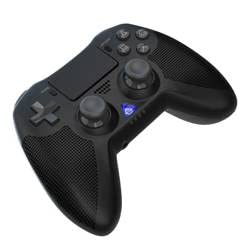
Resim 1: Ön view of the iPega PG-P4008 Wireless Game Controller. This image displays the controller's ergonomic design, dual analog sticks, D-pad, action buttons, touchpad, and the central LED indicator.
3. Kurulum ve Bağlantı
The PG-P4008 controller connects wirelessly via Bluetooth. Follow these steps to pair your controller with your device:
- Güç Açık: Ensure the controller is charged. Press and hold the PS düğmesi (or equivalent power button) to turn on the controller.
- Eşleştirme modu:
- For PS4/PS3: Connect the controller to the console using a USB cable. Once recognized, you can disconnect the cable for wireless play. The connection method is similar to the official P4 controller.
- For Android/iOS: Activate Bluetooth on your mobile device. On the controller, press and hold the SHARE button + PS button simultaneously until the LED indicator flashes rapidly, indicating pairing mode. Select "PG-P4008" (or similar) from your device's Bluetooth list to connect.
- For Windows PC: Ensure your PC has Bluetooth capability. On the controller, press and hold the PS button + OPTIONS button simultaneously until the LED indicator flashes rapidly. On your PC, go to Bluetooth settings, add a new device, and select "PG-P4008" (or similar) to pair.
- Başarılı Bağlantı: Once connected, the LED indicator on the controller will change to a solid color, indicating a successful pairing.
Not: No additional driver software is required for operation. The controller supports a stable connection up to 8 meters.
4. Kullanım Talimatları
LED Göstergesi:
The built-in colored LED light indicates the controller's operational status and player assignment, similar to the official PS4 controller. Different colors will signify different stages or player numbers.
Titreşimli geribildirim:
The controller features dual motors embedded in the handles, providing tactile vibration feedback to enhance your gaming immersion. This feedback will vary based on in-game events.
Dokunmatik yüzey:
The dual-point capacitive touchpad allows for intuitive control in games that support touch input, offering an additional layer of interaction.
Ses İşlevselliği:
Connect your 3.5mm earphones to the integrated jack on the controller to experience game audio directly, providing a private and immersive sound experience.
5. Bakım
- Keep the controller dry and away from moisture to prevent damage to internal components.
- Kumanda ünitesini düzenli olarak yumuşak, kuru bir bezle temizleyin. Sert kimyasallar veya aşındırıcı malzemeler kullanmaktan kaçının.
- Kontrol cihazını kullanılmadığı zaman serin ve kuru bir yerde saklayın.
- Kumanda cihazını aşırı sıcaklıklara veya doğrudan güneş ışığına maruz bırakmaktan kaçının.
- Do not attempt to disassemble or modify the controller, as this will void any potential warranty and may cause damage.
6. Sorun Giderme
- Kontrolör bağlanmıyor:
- Kontrol cihazının tam şarjlı olduğundan emin olun.
- Cihazınızda Bluetooth'un etkin olduğunu doğrulayın.
- Make sure the controller is in the correct pairing mode for your device (refer to Section 3).
- Hem kontrol cihazını hem de cihazınızı yeniden başlatmayı deneyin.
- Remove previous pairings from your device's Bluetooth list and try pairing again.
- Giriş gecikmesi veya bağlantı kesilmesi:
- 8 metrelik çalışma menzili içinde olduğunuzdan emin olun.
- Diğer kablosuz cihazlardan kaynaklanan paraziti en aza indirin.
- Check for any physical obstructions between the controller and the device.
- Titreşim çalışmıyor:
- Oynadığınız oyunun titreşim geri bildirimini desteklediğinden emin olun.
- Oyun içi ayarlardan titreşim özelliğinin etkinleştirildiğinden emin olun.
- Audio not working via 3.5mm jack:
- Ensure your earphones are properly plugged in.
- Check the volume settings on your device and in-game.
- Test with another pair of earphones to rule out earphone issues.
7. Özellikler
| Model Numarası | PG-P4008 |
| Marka | iPega |
| Bağlantı | Bluetooth (BT2.1+EDR) |
| kablosuz Menzil | 8 metreye kadar |
| Uyumlu Cihazlar | PS4, PS3, Android (10.0+), iOS (13.0+), Windows PC |
| Özel Özellikler | Wireless, Touchpad, Vibration, 6-axis Gyroscope, Built-in Speaker, 3.5mm Audio Jack |
| Düğme Miktarı | 17 |
| Güç Kaynağı | Pil ile çalışır |
8. Garanti ve Destek
Information regarding product warranty and customer support is not provided within this manual. Please refer to the product packaging or the retailer's webGaranti kapsamı ve müşteri desteğiyle nasıl iletişime geçileceği hakkında ayrıntılı bilgi için lütfen siteyi ziyaret edin.


