giriiş
Thank you for choosing the BUFFBEE Alarm Clock with Wireless Charging Station. This device combines a digital alarm clock with a versatile wireless charging stand, designed to charge your iPhone, Apple Watch, and AirPods simultaneously. It features a dimmable LED display, adjustable volume, and multiple safety protections to ensure efficient and secure charging. Please read this manual carefully before use to ensure proper operation and to maximize the lifespan of your product.
Kutuda Neler Var?
Paketinizi açtığınızda, lütfen aşağıdaki tüm öğelerin eksiksiz olarak içerip içermediğini kontrol edin:
- BUFFBEE Alarm Clock with Wireless Charging Station
- USB-C Şarj Kablosu
- Güç Adaptörü
- Kullanım Kılavuzu (bu belge)
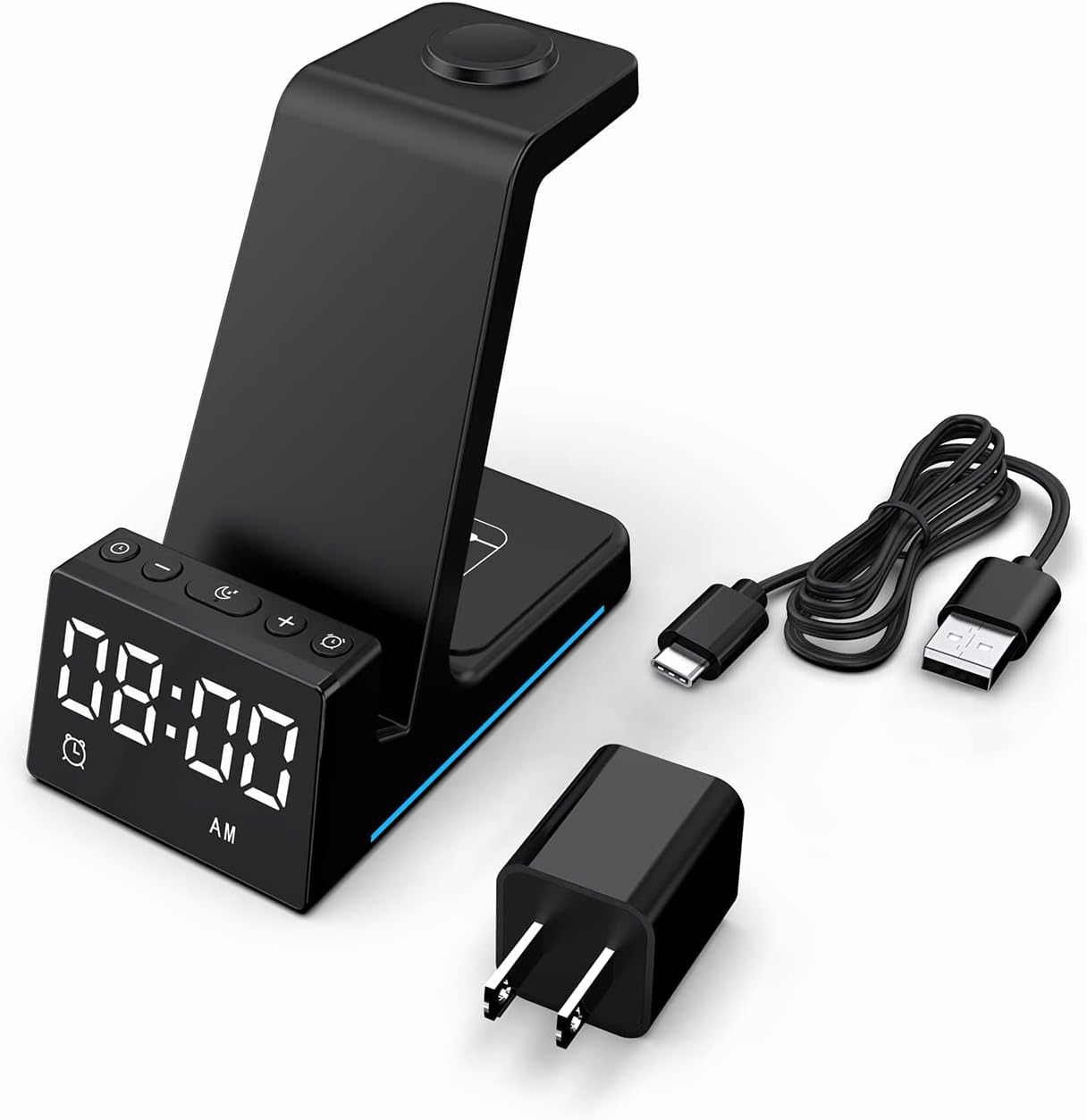
Resim: Ürün ambalajında yer alan tüm bileşenler.
Ürün Bittiview
The BUFFBEE Alarm Clock with Wireless Charging Station is designed for convenience and efficiency. It features dedicated charging areas for your smartphone, Apple Watch, and AirPods, alongside a clear digital clock display.
Temel Özellikler:
- Dijital Çalar Saat: Features adjustable brightness and volume, with 12/24 hour format options.
- Wireless Phone Charging: Supports 15W, 10W, 7.5W, and 5W output for various wireless charging enabled smartphones.
- Apple Watch'un Şarj Edilmesi: Dedicated magnetic charging spot for Apple Watch Series 2-7, SE.
- AirPod'ların Şarj Edilmesi: Wireless charging pad for AirPods 2 (with wireless charging case), AirPods 3, and AirPods Pro.
- Güvenlik Korumaları: Built-in overcharge, overvoltagAşırı ısınma ve aşırı akım koruması.

Image: The charging station with devices in place, highlighting its multi-device capability.

Image: Diagram illustrating the internal safety features and charging coils.
Kurmak
Follow these steps to set up your BUFFBEE Alarm Clock with Wireless Charging Station:
- Gücü bağlayın: Insert the USB-C end of the charging cable into the port on the back of the charging station. Plug the other end of the cable into the provided power adapter, then plug the adapter into a wall outlet. The digital display will light up, indicating power is connected.
- Cihazları Yerleştirin:
- Akıllı telefon: Place your wireless charging enabled smartphone vertically or horizontally on the main charging stand. Ensure it is centered for optimal charging.
- Apple Watch: Place your Apple Watch on the magnetic charging disc at the top of the stand.
- AirPods: Place your AirPods (with wireless charging case) on the flat charging pad at the base of the unit.
- Şarjı Doğrulayın: A blue indicator light will briefly illuminate when a device is correctly placed and charging. Your device's screen will also show a charging icon.
Video: Official product video demonstrating the setup and charging capabilities of the BUFFBEE Alarm Clock with Wireless Charging Station for iPhone, Apple Watch, and AirPods.

Image: Universal compatibility chart for different devices and charging wattagee.
Kullanım Talimatları
Zamanı Ayarlama
- Basılı tutun Zaman Ayarı button (usually marked with a clock icon) for 3 seconds. The hour digits will begin to flash.
- Kullanın + Ve - Saati ayarlamak için düğmeler.
- Basın Zaman Ayarı button again to switch to minute adjustment. The minute digits will flash.
- Kullanın + Ve - Dakikaları ayarlamak için düğmeler.
- Basın Zaman Ayarı Onaylamak ve zaman ayarlama modundan çıkmak için bir kez daha düğmeye basın.
- To switch between 12-hour and 24-hour format, briefly press the Zaman Ayarı button when not in setting mode.
Alarmı Ayarlama
- Basılı tutun Alarm kuruldu button (usually marked with an alarm clock icon) for 3 seconds. The alarm hour digits will flash.
- Kullanın + Ve - alarm saatini ayarlamak için düğmeler.
- Basın Alarm kuruldu button again to switch to alarm minute adjustment. The alarm minute digits will flash.
- Kullanın + Ve - Alarm dakikalarını ayarlamak için düğmeler.
- Basın Alarm kuruldu Alarm ayar modundan çıkmak için bir kez daha düğmeye basın.
- To activate or deactivate the alarm, briefly press the Alarm kuruldu düğmesine basın. Ekranda bir alarm simgesi belirecek/kaybolacaktır.
- When the alarm sounds, press any button to activate the snooze function (typically 9 minutes). To turn off the alarm completely, press and hold the Alarm kuruldu düğme.

Resim: Üzeriview of the digital alarm clock features.
Ekran Parlaklığını Ayarlama
The LED display has multiple brightness levels to suit your preference, especially for nighttime use.
- Basın Parlaklık button (usually marked with a sun icon) repeatedly to cycle through the available brightness levels (e.g., 100%, 40%, 3%, 1%, 0% off).
- Select the desired brightness level. The '0% off' setting turns the display completely off for undisturbed sleep.

Image: Visual representation of the 5-level adjustable brightness settings.
Alarm Sesi Ayarı
The alarm volume can be adjusted to your preferred level.
- While the alarm is sounding, or during alarm setting mode, press the Hacim button (usually marked with a speaker icon) to cycle through the available volume levels.
- İstediğiniz hacmi seçin.

Image: Illustration of the 3-level adjustable volume feature.
Bakım
To ensure the longevity and optimal performance of your charging station, follow these maintenance guidelines:
- Temizlik: Disconnect the power before cleaning. Use a soft, dry cloth to wipe the surface. Do not use abrasive cleaners, solvents, or chemical sprays.
- Sıvılardan Kaçının: Cihazı sudan ve diğer sıvılardan uzak tutun. Islak ellerle çalıştırmayın.
- Sıcaklık: Store and operate the device in a dry environment at room temperature. Avoid extreme heat or cold.
- İşleme: Cihazı dikkatli kullanın. Düşürmeyin veya sert darbelere maruz bırakmayın.
- Güç Kaynağı: Only use the provided power adapter and cable. Using unauthorized power sources may damage the device and void the warranty.
Sorun giderme
If you encounter any issues with your BUFFBEE Alarm Clock with Wireless Charging Station, please refer to the following troubleshooting guide:
| Sorun | Olası Neden | Çözüm |
|---|---|---|
| Device is not powering on. | Güç kablosu düzgün bağlanmamış; Güç adaptörü arızalı; Duvar prizi çalışmıyor. | Ensure the USB-C cable is securely connected to both the station and the power adapter. Try a different wall outlet. Verify the power adapter is functioning. |
| Smartphone/AirPods not charging wirelessly. | Device not placed correctly; Device not wireless charging compatible; Phone case too thick; Foreign objects on charging pad. | Reposition the device to ensure it is centered on the charging pad. Remove any thick phone cases or metallic objects. Confirm your device supports Qi wireless charging. |
| Apple Watch şarj olmuyor. | Watch not placed correctly; Watch charger not making contact; Watch model not supported. | Ensure the Apple Watch is securely placed on the magnetic charging disc. Remove any watch cases that might obstruct contact. This charger supports Apple Watch Series 2-7, SE. |
| Şarj işlemi yavaş veya kesintili. | Using a non-original power adapter/cable; Device overheating; Multiple devices charging simultaneously. | Use the provided power adapter and cable. Ensure the device is in a well-ventilated area. Charging multiple devices may slightly reduce individual charging speeds. |
| Çalar saat ekranı çok parlak/loş. | Parlaklık ayarının ayarlanması gerekiyor. | Basın Parlaklık button to cycle through the 5 brightness levels, including 'off'. |
| Alarm is not sounding or is too quiet/loud. | Alarm not set or deactivated; Volume level too low/high. | Verify the alarm is activated (alarm icon visible). Adjust the alarm volume using the Hacim düğme. |
Özellikler
| Özellik | Detay |
|---|---|
| Ürün Boyutları | 6.3 x 1.5 x 3.5 inç |
| Ürün Ağırlığı | 15.8 ons |
| Marka | BFFBEE |
| Bağlayıcı Türü | Kablosuz |
| Uyumlu Cihazlar | Cellular Phones, Apple Watch, AirPods (with wireless charging case) |
| Uyumlu Telefon Modelleri | Samsung Galaxy S10 series, iPhone 8 and newer, other Qi-enabled phones |
| Özel Özellik | Adjustable, Fast Charging, Wireless Charger, Wireless Charging |
| Giriş Voltage | 9 Volt |
| Toplam USB Bağlantı Noktaları | 1 (güç girişi için) |
| Netage | 15 watts (max output) |
| Şartname Karşılandı | Qi |
| Güç Kaynağı | AC Adapter (Battery Powered refers to internal clock battery backup, not main power) |
Garanti ve Destek
Your BUFFBEE Alarm Clock with Wireless Charging Station comes with a standard manufacturer's warranty. For specific warranty details, including duration and coverage, please refer to the warranty card included in your product packaging or contact BUFFBEE customer support directly.
If you require technical assistance, have questions about product operation, or need to report a defect, please reach out to BUFFBEE customer service through the contact information provided on the product packaging or the official BUFFBEE webLütfen destek ekibiyle iletişime geçerken ürün modelinizi ve satın alma tarihini hazır bulundurun.


