1. Ürün Bittiview
The NC GBS-8100 is a versatile video converter board designed for arcade game systems. It facilitates the conversion of VGA/SVGA/XGA/SXGA signals to CGA, RGBS, CVBS, or S-Video outputs, making it compatible with a wide range of display devices, including older arcade monitors and standard definition televisions. This board features true digital 24-bit A/D conversion for accurate color reproduction and offers user controls for image adjustment.
Temel Özellikler:
- Güç Girişi: DC 5V/2A via 6.3mm connector.
- Input Signal Support: VGA/SVGA/XGA/SXGA resolutions (640x480, 800x600, 1024x768, 1280x1024).
- Çıktı Seçenekleri: CGA (15K), VGA bypass, Video (CVBS), S-Video.
- Görüntü Kontrolü: Supports position and zoom adjustments.
- Renk Derinliği: True digital 24-bit A/D converter for 16.7-million color conversion.
- OSD Menüsü: English On-Screen Display for adjustments.
- Kullanıcı Denetimleri: Dedicated keys for Output Switch, Image Zoom, Image Position, and Output Adjust.
- Uyumluluk: Supports NTSC and PAL video standards.
Paket İçeriği:
- 1x Video Output Converter Board (GBS-8100)
- 1x Power supply wire

Figure 1: The GBS-8100 converter board along with the included power supply wire and a multi-color signal cable.
2. Kurulum ve Kurulum
This section provides instructions for connecting and setting up your GBS-8100 converter board.
2.1. Bileşen Tanımlaması
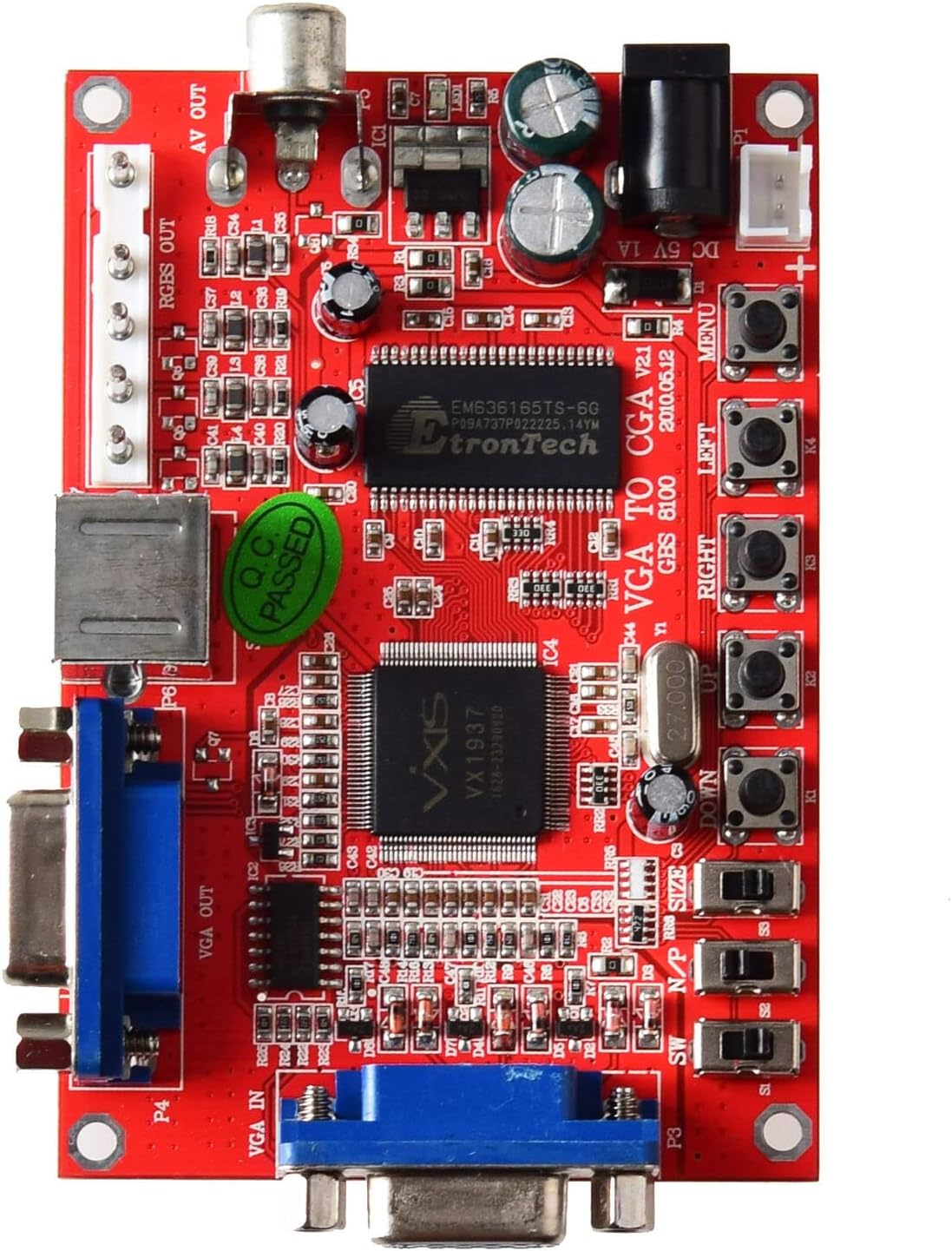
Şekil 2: Üst view of the GBS-8100 board, highlighting VGA IN, VGA OUT, AV OUT, RGBS OUT, S-Video port, DC 5V input, and control buttons.
- VGA IN (P3): Connect your source device (e.g., PC, game console) with a VGA output here.
- VGA OUT (P4): For VGA bypass, connect a VGA monitor here.
- RGBS/CGA OUT (P7): Connect to an arcade monitor or display that accepts RGBS or CGA signals.
- AV OUT (P5): Connect to a standard definition TV using a composite video cable.
- S-Video OUT (P6): Connect to a TV or display using an S-Video cable.
- DC 5V/2A Giriş: Connect the included power supply wire here. Ensure the power supply provides 5V DC at 2A.
- Kontrol Düğmeleri: Buttons for MENU, UP, DOWN, LEFT, RIGHT, Output Switch, Image Zoom, Image Position, Output Adjust.
2.2. Bağlantı Adımları
- Güç Bağlantısı: Connect the provided power supply wire to the DC 5V/2A input on the GBS-8100 board. Connect the other end to a suitable 5V DC power source (not included, typically a power adapter).
- Giriş kaynağı: Connect your VGA source (e.g., PC, arcade JAMMA board with VGA output) to the VGA IN (P3) port on the converter board.
- Çıkış Ekranı:
- İçin CGA/RGBS output: Connect your arcade monitor or display to the RGBS/CGA OUT (P7) liman.
- İçin Composite Video (AV) output: Connect your TV to the AV OUT (P5) liman.
- İçin S-Video output: Connect your TV to the S-Video OUT (P6) liman.
- İçin VGA Bypass: Connect a VGA monitor to the VGA OUT (P4) liman.
- Ses (İsteğe bağlı): If your source provides audio via VGA, ensure your display setup can handle it, or use a separate audio solution as this board primarily handles video.

Şekil 3: Yakın çekim view of the VGA IN, VGA OUT, and S-Video ports on the GBS-8100 board.
3. Kullanım Talimatları
Once connected, power on the GBS-8100 board and your display. The board will automatically detect the input signal. Use the onboard buttons to navigate the OSD menu and adjust settings.
3.1. Ekran Üstü Görüntüleme (OSD) Menüsü
Basın MENÜ button to access the OSD. Use the UP Ve AŞAĞI buttons to navigate through menu options, and SOL Ve SAĞ buttons to change values or select sub-menus.
3.2. Kullanıcı Kontrolleri
- Çıkış Anahtarı: Cycles through available output modes (CGA, Video, S-Video, VGA Bypass).
- Görüntü Yakınlaştırma: Adjusts the zoom level of the displayed image.
- Image Position: Adjusts the horizontal and vertical position of the image on the screen.
- Çıkış Ayarı: Fine-tunes specific output parameters.
3.3. Supported Input/Output Resolutions
| Kategori | Detaylar |
|---|---|
| Input Signal (Auto Scan) |
|
| Çıkış Sinyali |
|
4. Bakım
The GBS-8100 converter board is designed for durability and requires minimal maintenance.
- Temizlik: Use a soft, dry cloth to gently wipe the surface of the board. Avoid using liquid cleaners or solvents, as they may damage the electronic components.
- Çevre: Operate the board in a clean, dry environment, away from excessive dust, moisture, and extreme temperatures.
- İşleme: Özellikle güç açıkken bileşenlere dokunmaktan kaçınmak için kartı kenarlarından tutun.
- Kapat: Always disconnect power before making or changing any connections.
5. Sorun Giderme
If you encounter issues with your GBS-8100 converter board, refer to the following common problems and solutions:
| Sorun | Olası Neden / Çözüm |
|---|---|
| Ekranda görüntü yok. |
|
| Görüntü bozuk veya titriyor. |
|
| OSD menu not appearing or unresponsive. |
|
| Renkler hatalı. |
|
6. Özellikler
Detailed technical specifications for the GBS-8100 converter board.
| Parametre | Değer |
|---|---|
| Model Numarası | GBS-8100 |
| Güç Kaynağı Girişi | DC 5V/2A (6.3mm connector) |
| Input Signal Support | VGA/SVGA/XGA/SXGA (640x480, 800x600, 1024x768, 1280x1024) |
| Input Signal Frequencies |
|
| Çıkış Sinyali Türleri | CGA (15K), VGA (Bypass), Video (CVBS), S-Video |
| Output Signal Resolutions |
|
| Renk Dönüşümü | True digital 24-bit A/D converter (16.7 million colors) |
| OSD Dili | İngilizce |
| Boyutlar (Yaklaşık) | 3.94 x 3.15 x 1.18 inç (Paket Boyutları) |
| Ürün Ağırlığı | 3.52 ons (0.1 Kilogram) |
7. Garanti ve Destek
This section provides information regarding product warranty and customer support.
7.1. Garanti Bilgileri
Specific warranty details for the NC GBS-8100 converter board are typically provided at the point of purchase or within the product packaging. Please refer to your purchase receipt or contact the seller for precise warranty terms and conditions. Generally, electronic components may come with a limited manufacturer's warranty covering defects in materials and workmanship.
7.2. Müşteri Desteği
For technical assistance, troubleshooting beyond this manual, or inquiries regarding your product, please contact the seller or manufacturer directly. Contact information can often be found on the product packaging, the seller's websiteye veya satın alma belgelerinize bakın.
Genel sorularınız için lütfen ziyaret edin. NC Store on Amazon.