1. Giriş ve Üzeriview
The HP t430 Thin Client is a versatile, cloud-first device designed for desktop virtualization and cloud-based applications. It offers an intuitive experience for users and simplifies maintenance for IT administrators. Its compact design and efficient processing power contribute to a modern computing experience.
Temel özellikler şunlardır:
- Optimize Edilmiş Performans: Experience responsive performance with the Intel Celeron N4020 processor, operating at up to 2.8 GHz.
- Flexible Operating Systems: Available with Linux-based HP ThinPro or Windows 10 IoT Enterprise for Thin Clients.
- Verimli Bellek: Equipped with 4 GB DDR4 SDRAM for smooth operation.
- Entegre Grafikler: Features Intel UHD Graphics 600, supporting up to 4K display resolution.
- Kapsamlı Bağlantı: Includes USB-C for power, audio, and data, DisplayPort, HDMI, Gigabit Ethernet, and optional Wi-Fi.
- Kompakt ve Uyarlanabilir Tasarım: A sleek profile with a built-in VESA mount allows for flexible placement, including mounting behind a display.

Resim 1.1: Ön view of the HP t430 Thin Client, showcasing its compact design and front USB port.
2. Kurulum Kılavuzu
This section outlines the steps to set up your HP t430 Thin Client.
2.1. Paketin Açılması ve İçerik
Carefully unpack your HP t430 Thin Client and verify that all components are present:
- HP t430 Thin Client unit
- Güç Adaptörü
- HP USB Slim Business Keyboard
- Fare
2.2. Çevre Birimlerini Bağlama
- Ekranı Bağla: Use a DisplayPort or HDMI cable to connect your monitor to the corresponding port on the thin client. The device supports up to two displays simultaneously.
- Klavye ve Fareyi Bağlayın: Plug the USB keyboard and mouse into any available USB ports on the thin client.
- Ağa Bağlan: For a wired connection, connect an Ethernet cable from your network router or switch to the LAN port on the thin client. If using Wi-Fi (optional), ensure your device has the integrated Wi-Fi module.
- Gücü bağlayın: Plug the power adapter into the thin client's power input, then connect the power adapter to an electrical outlet.

Resim 2.1: Arka view of the HP t430 Thin Client, illustrating the various connectivity ports including USB, DisplayPort, HDMI, and Ethernet.
2.3. İlk Güç Açma
After connecting all peripherals and power, press the power button on the thin client. The device will boot up, and you will be presented with the operating system interface (HP ThinPro or Windows 10 IoT Enterprise).

Image 2.2: The HP t430 Thin Client positioned on a desk, connected to a monitor, keyboard, and mouse, ready for use.
3. Kullanım Talimatları
Your HP t430 Thin Client is designed for efficient operation in virtualized and cloud environments.
3.1. Güç Açma/Kapatma
- Açmak İçin: Cihazın ön tarafında bulunan güç düğmesine basın.
- Kapatmak İçin: Use the shutdown option within your operating system (HP ThinPro or Windows 10 IoT Enterprise). Avoid direct power disconnection during operation to prevent data corruption.
3.2. Operating System Navigation
Depending on your configuration, your thin client will run either HP ThinPro or Windows 10 IoT Enterprise. Familiarize yourself with the respective operating system's interface for accessing applications, settings, and network resources.
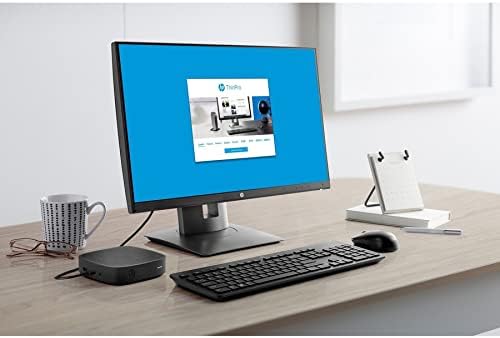
Image 3.1: A monitor connected to the HP t430 Thin Client, displaying the user interface of the HP ThinPro operating system.
3.3. Connecting to Virtual Desktops and Cloud Applications
The HP t430 Thin Client is pre-configured to connect to various virtualization platforms such as Citrix, VMware, and Microsoft RDP. Consult your IT administrator for specific connection details and credentials. Web browsers are also available for accessing cloud-based applications directly.
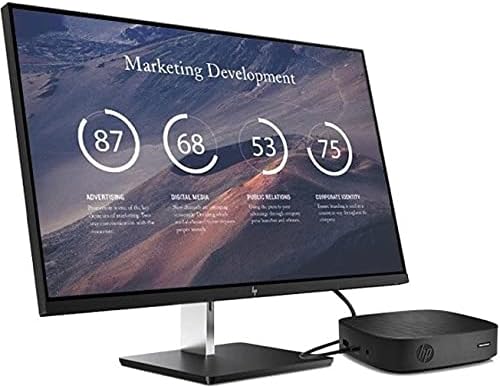
Image 3.2: The HP t430 Thin Client in a professional setting, connected to a monitor displaying a business-oriented dashboard with charts and data.
4. Bakım
Proper maintenance ensures the longevity and optimal performance of your HP t430 Thin Client.
4.1. Temizlik
- Dış: Hafifçe yumuşak, tüy bırakmayan bir bez kullanın.ampened with water or a mild, non-abrasive cleaner to wipe the exterior surfaces. Avoid harsh chemicals.
- Limanlar: Ensure ports are free of dust and debris. Use compressed air if necessary, holding the can upright to prevent liquid discharge.
4.2. Yazılım Güncellemeleri
Regularly apply operating system and security updates as recommended by HP or your IT department. HP manageability software can assist in deploying and managing these updates efficiently.
4.3. Çevresel Hususlar
Operate the thin client in a well-ventilated area, away from direct sunlight, excessive heat, and moisture. Ensure proper airflow around the device to prevent overheating.
5. Sorun Giderme
Bu bölüm karşılaşabileceğiniz yaygın sorunlara yönelik çözümler sunmaktadır.
5.1. Güç yok
- Verify the power adapter is securely connected to both the thin client and a working electrical outlet.
- Elektrik prizinin çalışır durumda olduğundan emin olmak için başka bir cihazla test edin.
- Ensure the power button on the thin client has been pressed.
5.2. Ekran Yok
- Check that the display cable (DisplayPort or HDMI) is securely connected to both the thin client and the monitor.
- Monitörün açık olduğundan ve doğru giriş kaynağına ayarlandığından emin olun.
- Try connecting the thin client to a different monitor or using a different display cable if available.
5.3. Ağ Bağlantı Sorunları
- Kablolu Bağlantı: Verify the Ethernet cable is properly connected to the thin client and the network router/switch. Check the network status lights on the thin client and router.
- Wi-Fi Bağlantısı: Ensure the Wi-Fi module is enabled in the operating system settings. Confirm you are connected to the correct network and have entered the password correctly.
- Restart the thin client and your network equipment (router/modem).
For persistent issues, refer to the HP support webSiteyi ziyaret edin veya BT yöneticinizle iletişime geçin.
6. Özellikler
Detailed technical specifications for the HP t430 Thin Client.
| Özellik | Şartname |
|---|---|
| Marka | HP |
| Model Adı | t430 |
| Model Numarası | 486Z0UT#ABA |
| İşletim Sistemi | HP ThinPro 64, Windows 10 IoT Enterprise for Thin Clients |
| İşlemci | Intel Celeron N4020 Dual-core (2 Core) |
| İşlemci Hızı | 1.10 GHz (en fazla 2.8 GHz patlama) |
| RAM Bellek | 4 GB DDR4 SDRAM |
| Depolamak | 32 GB SSD |
| Grafikler | Intel UHD Grafik 600 |
| Video Çıkışı | DisplayPort, HDMI, USB-C |
| Maksimum Ekran Çözünürlüğü | 3840 x 2160 piksel (4K) |
| Bağlantı | Gigabit Ethernet, Wi-Fi (optional) |
| USB Bağlantı Noktaları | 5 Total (including USB-C) |
| Boyutlar (Y x G x D) | 19.6 x 8.7 x 5 inç (yaklaşık) |
| Ağırlık | 4.3 Pound |
| Renk | Siyah |
| Uyumluluk | Energy Star, RoHS |
7. Garanti Bilgileri
The HP t430 Thin Client comes with a 3 yıllık üretici garantisi. Please retain your proof of purchase for warranty claims. For detailed terms and conditions, refer to the warranty documentation included with your product or visit the official HP support webalan.
8. Destek
For further assistance, technical support, or to download drivers and documentation, please visit the official HP support webalan:
You may also contact HP customer service directly through the contact information provided on their webalan.