giriiş
The Tzone TempU03 is a versatile temperature and humidity USB data logger designed for monitoring and recording environmental conditions. Its compact design and user-friendly interface make it suitable for various applications, including storage facilities, laboratories, greenhouses, and residential use. This device accurately tracks temperature and humidity levels over time, ensuring optimal conditions. The integrated LCD provides real-time readings, and USB connectivity facilitates seamless data transfer for analysis and record-keeping. This manual provides essential information for the proper setup, operation, and maintenance of your TempU03 data logger.
Ürün Özellikleri
- Kompakt Tasarım: This multi-use temperature and humidity data logger features a sleek, portable design for convenient monitoring.
- Ekranı Temizle: The large LCD screen displays temperature and humidity readings in real-time, allowing for easy data tracking.
- USB Bağlantısı: Simply connect the device to a computer via USB to access recorded data and configure settings.
- Geniş Menzil: Capable of measuring temperatures from -40°C to 70°C and humidity levels from 0% to 100% RH.
- Uzun Pil Ömrü: Powered by a replaceable CR2032 coin cell battery, ensuring extended operation without frequent battery changes.
Cihaz Bittiview

Şekil 1: Ön view of the Tzone TempU03 data logger, showing the LCD screen and control buttons.

Figure 2: Detailed diagram of the TempU03, highlighting the LCD screen elements (Alarm, Battery Life, Temp Unit, Temperature Value), Status Indicator Light (OK, Alarm), Start/Scroll/Mark button, Stop button, and USB Port.
The TempU03 features a clear LCD display for real-time data. It includes an 'OK' status indicator and an 'ALARM' indicator. Control is managed via 'Start/Scroll/Mark' and 'Stop' buttons. A USB port is located at the bottom for data transfer and configuration.
Kurmak
1. Pil Kurulumu
The TempU03 comes with a pre-installed CR2032 coin cell battery. If replacement is needed:
- Cihazdaki pil bölmesini bulun.
- Bölme kapağını açın.
- Yeni bir CR2032 pil takın ve kutupların doğru olduğundan (+/-) emin olun.
- Pil bölmesini sıkıca kapatın.
2. Software Installation (Optional for Advanced Configuration)
While the device can generate basic reports without software, advanced configuration (e.g., logging interval, alarm limits, temperature unit) requires the Tzone software. Refer to the included instructions or the manufacturer's website for software download and installation. It is recommended to install the software on a dedicated or test computer due to potential security warnings reported by some users.
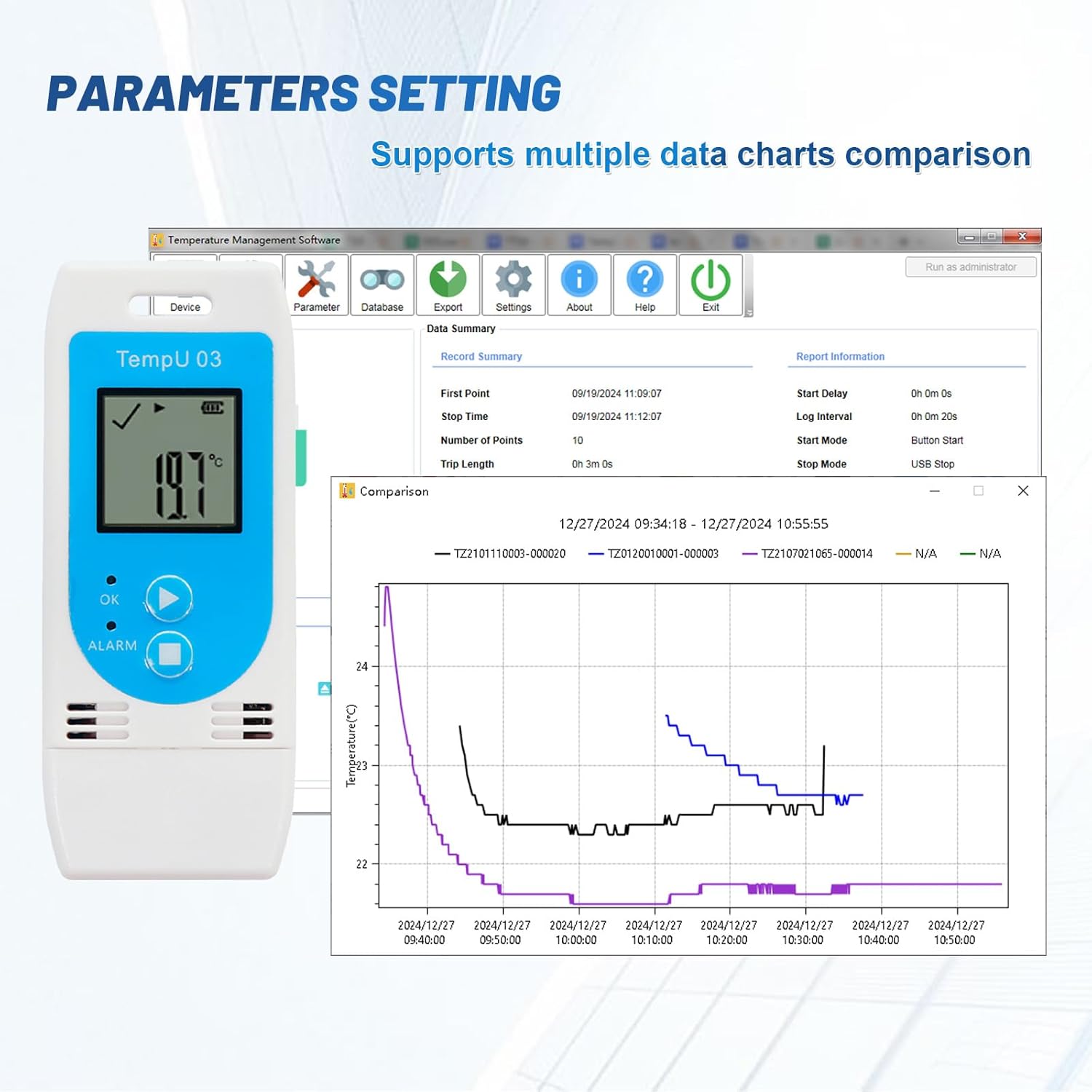
Figure 3: Screenshot illustrating the Tzone software interface for setting parameters such as logging interval, start mode, and comparing multiple data charts.
Kullanım Talimatları
1. Starting a New Data Run
To begin recording data:
- Press and hold the 'Start/Scroll/Mark' button for approximately 3 seconds until the 'OK' indicator light flashes.
- The device will begin logging data according to its current configuration.
- Note: Starting a new data run will erase any previously stored data on the device. Ensure all necessary data has been downloaded before initiating a new run.
2. Veri Kaydını Durdurma
Veri kaydını durdurmak için:
- Press and hold the 'Stop' button for approximately 3 seconds.
- The device will cease logging, and the 'OK' indicator light will turn off.
3. ViewGerçek Zamanlı Veriler
The LCD screen continuously displays the current temperature and humidity readings. Press the 'Start/Scroll/Mark' button briefly to cycle through different display modes or mark data points during logging.
4. Data Download and Report Generation
To retrieve recorded data:
- Connect the TempU03 to a computer's USB port.
- Cihaz, çıkarılabilir bir sürücü olarak görünecektir.
- Automatically generated PDF and CSV files containing the logged data from the last measurement run will be accessible.
- For more detailed analysis and custom reports, use the Tzone software.
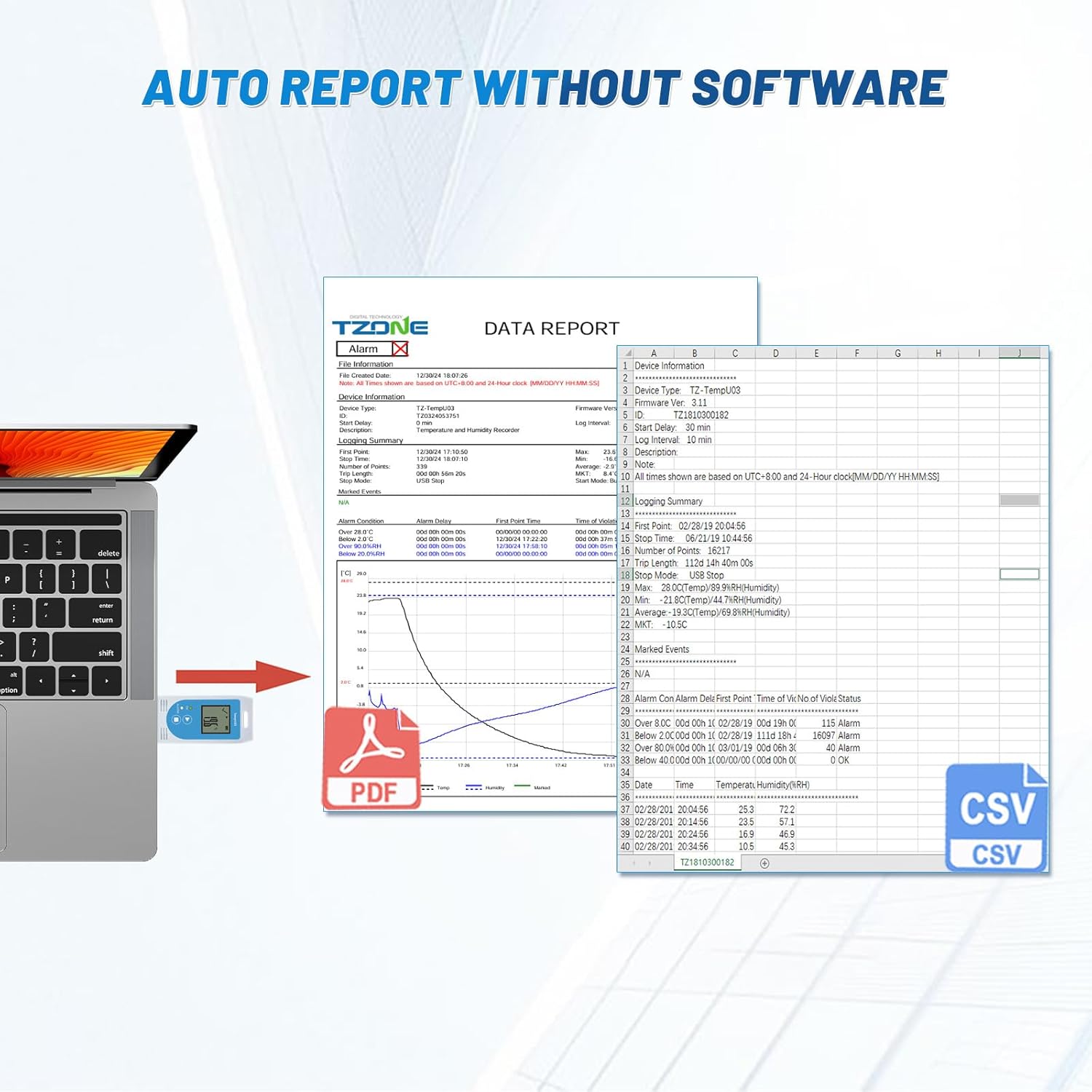
Figure 4: Illustration of the automatic report generation feature, showing the TempU03 connected to a laptop and displaying PDF and CSV file icons, indicating data can be accessed without additional software.
Bakım
1. Temizlik
Cihazı yumuşak, kuru bir bezle silin. Aşındırıcı temizleyiciler kullanmayın veya cihazı suya batırmayın.
2. Pil Değişimi
When the battery indicator on the LCD shows low power, replace the CR2032 battery as described in the Setup section.
3. Depolama
Uzun süre kullanılmayacaksa, cihazı doğrudan güneş ışığından ve aşırı sıcaklıklardan uzakta, serin ve kuru bir yerde saklayın.
Sorun giderme
| Sorun | Olası Neden | Çözüm |
|---|---|---|
| Cihaz açılmıyor. | Akü zayıf veya bitmiş; akü yanlış takılmış. | Replace the CR2032 battery; ensure correct polarity. |
| Hiçbir veri kaydedilmedi. | Logging not started; device stopped prematurely. | Ensure you press and hold the 'Start' button until the indicator flashes; avoid accidental 'Stop' button presses. |
| Cannot access data via USB. | Improper USB connection; computer driver issue. | Ensure the device is fully inserted into the USB port; try a different USB port or computer. |
| Hatalı okumalar. | Cihaz kalibre edilmemiş; çevresel parazit. | Refer to software for calibration options if available; ensure device is placed in a stable environment away from direct heat/cold sources or strong air currents. Note that accuracy may vary at extreme temperatures. |
Özellikler

Figure 5: Visual representation of the TempU03's physical dimensions and key performance specifications, including measurement ranges, accuracy, and data storage capacity.
- Model Numarası: SıcaklıkU03
- Ürün Ölçüleri: 9x3.7x1.6 cm
- Ürün Ağırlığı: 40 gr
- Ölçüm Aralığı (Sıcaklık): -40°C ila 70°C (-40°F ila 158°F)
- Ölçüm Aralığı (Nem): %0 ila %100 RH
- Doğruluk (Sıcaklık): ±0.5°C (-20°C to +40°C), ±1.0°C (other range)
- Doğruluk (Nem): ±%5 Bağıl Nem
- Veri Depolama Kapasitesi: 32000 kayıt
- Pil: 1 x CR2032 (dahil)
- Bağlantı: USB
- Renk: Mavi
Garanti ve Destek
For warranty information and technical support, please refer to the documentation provided with your purchase or contact Tzone customer service through their official webSite. Satın alma fişinizi, garanti talepleriniz için satın alma belgeniz olarak saklayın.

Figure 6: Image of the Certificate of Compliance for the Tzone TempU03, indicating adherence to various standards and regulations.
Uygulamalar
The Tzone TempU03 is suitable for a wide range of applications requiring temperature and humidity monitoring:

Figure 7: Collage showing various applications for the TempU03 data logger, including laboratory testing, cold chain transportation, medical refrigeration, food storage, greenhouse monitoring, and medical research.
- Laboratuvar testleri
- Cold Chain Transportation
- Tıbbi Buzdolapları
- Gıda Depolama
- Seralar
- Tıbbi Araştırma
- Environmental Monitoring in homes or offices

Figure 8: The TempU03 data logger shown hanging inside a refrigerator, demonstrating its use in cold environments and highlighting its clear LCD display for both temperature and humidity readings.


