1. Giriş
Thank you for choosing the SIGMA BC1200 WL Wireless Bicycle Computer. This device is designed to provide accurate and essential cycling data, enhancing your riding experience. It features a wireless transmission system for easy installation and a clear display for quick readability. This manual will guide you through the installation, operation, and maintenance of your new bicycle computer.
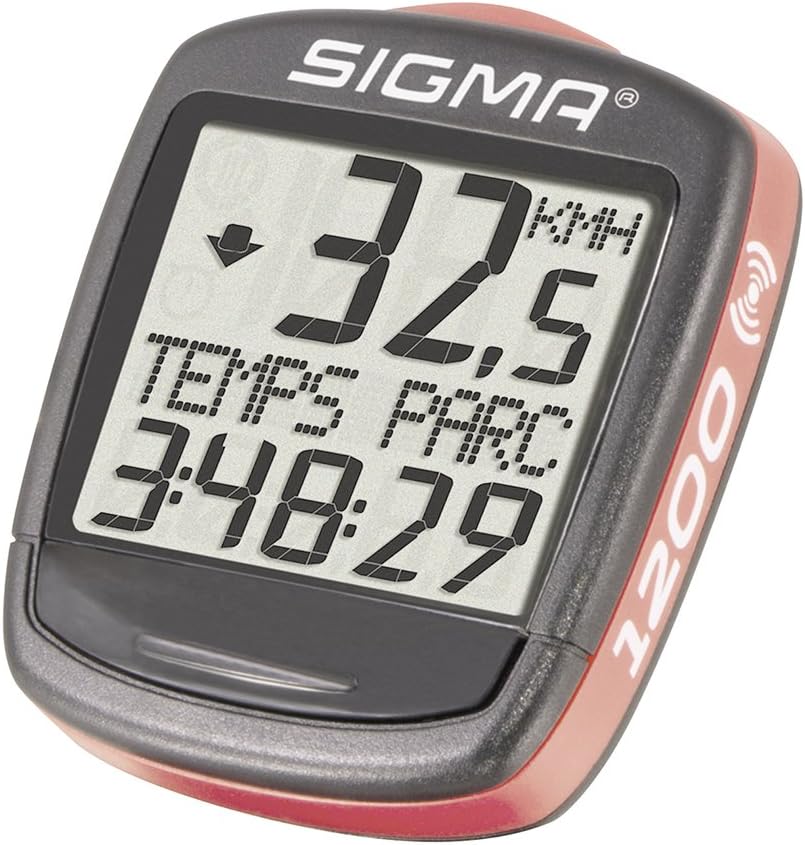
Image 1.1: The SIGMA BC1200 WL Wireless Bicycle Computer, showing its display with current speed and ride duration.
2. Güvenlik Bilgileri
- Always prioritize road safety. Do not operate the computer or adjust settings while riding.
- Ensure all components are securely mounted before each ride to prevent detachment.
- Cihazı aşırı sıcaklıklardan ve uzun süre doğrudan güneş ışığından uzak tutun.
- Cihazı kendiniz sökmeye veya onarmaya çalışmayın. Yardım için yetkili servis personeliyle iletişime geçin.
- Pilleri yerel yönetmeliklere uygun şekilde sorumlu bir şekilde atın.
3. Paket İçeriği
Paketinizde tüm öğelerin mevcut olduğundan emin olun:
- SIGMA BC1200 WL Bicycle Computer Unit
- Kablosuz Hız Sensörü
- Gidon/Gidon Boğazı Montajı
- Mıknatıs konuştu
- Mounting O-rings (various sizes)
- Kullanım Kılavuzu (bu belge)
- Pil (önceden takılı veya ayrı)
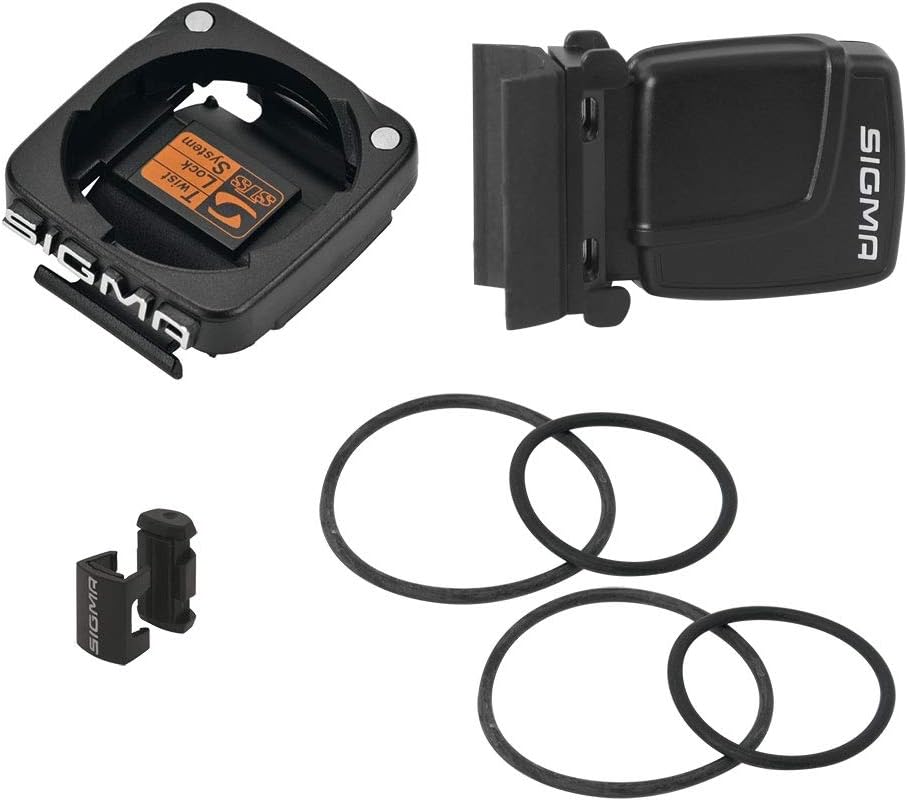
Image 3.1: Included components: computer mount, wireless speed sensor, spoke magnet, and mounting O-rings.
4. Kurulum ve Kurulum
4.1. Pil Kurulumu
The BC1200 WL uses one Lithium metal battery. If not pre-installed, open the battery compartment on the back of the computer unit and the speed sensor, insert the battery with the correct polarity, and close securely.
4.2. Mounting the Handlebar/Stem Mount
- Choose a suitable location on your handlebar or stem that does not obstruct your view veya kontrol edin.
- Place the mount on the desired position.
- Secure the mount using the provided O-rings. Wrap the O-rings around the mount and the handlebar/stem, hooking them onto the mount's tabs. Ensure it is tight and stable.
4.3. Mounting the Speed Sensor
- Attach the speed sensor to the front fork, on the same side as the spoke magnet will be.
- Use the provided O-rings to secure the sensor firmly to the fork.
- Position the sensor so that its marked area (usually a small arrow or line) aligns with the path of the spoke magnet.
4.4. Mounting the Spoke Magnet
- Attach the spoke magnet to a spoke on your front wheel.
- Adjust the magnet's position so that it passes the speed sensor with a gap of approximately 1-3 mm. The magnet should pass the sensor's marked area.
- Ensure the magnet is securely fastened and will not slip during riding.
4.5. Initial Setup (Wheel Size, Language, Units)
After battery installation, the computer will prompt you for initial settings:
- Dil Seçimi: Use the buttons (usually 'SET' and 'MODE') to navigate and select your preferred language (e.g., English, French, German). Confirm your selection.
- Unit Selection (KMH/MPH): Choose between kilometers per hour (KMH) and miles per hour (MPH) for speed and distance measurements.
- Tekerlek Boyutu Ayarı: This is crucial for accurate speed and distance readings. Refer to your bicycle tire's sidewall for the ETRTO or ISO size (e.g., 23-622 for 700x23C). Consult the table below or your tire manufacturer's specifications for the corresponding circumference in millimeters (mm). Enter this value into the computer. If your exact size is not listed, measure your wheel's circumference manually by rolling the wheel one full rotation and marking the distance.
- Zaman Ayarı: Set the current time (24-hour or 12-hour format).
Common Wheel Circumference Values (approximate):
| Lastik Boyutu | Çevre (mm) |
|---|---|
| 16 inç | 1272 |
| 20 inç | 1590 |
| 26x1.0 | 1953 |
| 26x1.5 | 2030 |
| 27.5 inç | 2100 |
| 29 inç | 2300 |
| 700x23C | 2096 |
| 700x38C | 2180 |
5. Kullanım Talimatları
5.1. İşlevler Bittiview
The SIGMA BC1200 WL offers 12 key functions:
- Geçerli hız: Displays your real-time speed.
- Maksimum Hız: Shows the highest speed achieved during the current ride.
- Ortalama sürat: Calculates your average speed for the current ride.
- Seyahat Mesafesi: Measures the distance covered in the current ride.
- Toplam mesafe: Accumulates the total distance covered since the computer was reset (or first used).
- Sürüş Süresi: Records the duration of the current ride.
- Total Ride Time: Accumulates the total time spent riding.
- Saat: Geçerli saati görüntüler.
- Speed Comparator: An arrow indicator shows if your current speed is above or below your average speed.
- Sıcaklık: Mevcut ortam sıcaklığını gösterir.
- Language Choice (x7): Allows selection from seven different languages.
- KMH/MPH Programming: Option to switch between metric and imperial units.
5.2. Düğme Fonksiyonları
The BC1200 WL typically has two main buttons, often labeled 'MODE' and 'SET' or similar, usually located on the bottom or back of the unit.
- MOD Düğmesi: Short press to cycle through different display functions (e.g., Trip Distance, Ride Time, Max Speed). Long press to enter or exit certain menus.
- Ayarlama düğmesi: Used to confirm selections, reset values, or enter setup mode. Short press for selection, long press for confirmation/reset.
5.3. Navigating Functions and Menus
İle view different functions, short press the MODE button. The display will change to show the next available data point. To enter settings or reset trip data, typically a long press of the SET button is required while on a specific function display.
5.4. Resetting Trip Data
To reset trip-specific data (Trip Distance, Ride Time, Average Speed, Max Speed) for a new ride:
- Ensure the computer is displaying one of the trip-related functions (e.g., Trip Distance).
- Press and hold the SET button for a few seconds until the values reset to zero.
- Note: Total Distance and Total Ride Time are cumulative and generally cannot be reset by the user.
6. Bakım
6.1. Temizlik
Bilgisayar ünitesini ve sensörü yumuşak bir bezle temizleyin.amp Bez kullanın. Aşındırıcı temizleyiciler veya çözücüler kullanmayın, çünkü bunlar ekranı veya cihazı hasar verebilir.asing. The device is watertight, but avoid submerging it in water or using high-pressure water jets.
6.2. Pil Değişimi
The battery life is approximately 2 years. When the display becomes dim or erratic, it's time to replace the battery. Open the battery compartment on the back of the computer unit (and the speed sensor if applicable), remove the old battery, and insert a new Lithium metal battery (CR2032 or equivalent) with the correct polarity. Securely close the compartment. You may need to re-enter some basic settings after battery replacement.
6.3. Depolama
When not in use for extended periods, store the computer in a cool, dry place away from direct sunlight. Removing the battery is recommended for very long storage periods to prevent leakage.
7. Sorun Giderme
- Hız Göstergesi Yok:
- Check if the computer unit is correctly seated in its mount.
- Verify the battery in both the computer and the speed sensor. Replace if necessary.
- Ensure the speed sensor and spoke magnet are correctly aligned and the gap is 1-3 mm.
- Check for any obstructions or damage to the sensor or magnet.
- Yanlış Hız/Mesafe:
- Re-check your wheel size setting. An incorrect circumference value will lead to inaccurate readings.
- Mıknatısın jant teline sağlam bir şekilde takıldığından ve kaymadığından emin olun.
- Ekran soluk veya boş:
- Replace the battery in the computer unit.
- Pilin doğru kutupla takıldığından emin olun.
- Yanıt Vermeyen Düğmeler:
- Yumuşak sıfırlama işlemi yapmak için pili çıkarıp tekrar takmayı deneyin.
- Düğmelerin etrafında kir veya toz birikmediğinden emin olun.
If problems persist after attempting these solutions, please contact SIGMA customer support.
8. Özellikler
| Özellik | Şartname |
|---|---|
| Örnek | BC1200 WL (Model No. 01960) |
| Marka | SIGMA |
| Fonksiyonlar | 12 (Current Speed, Max Speed, Avg Speed, Trip Distance, Total Distance, Ride Time, Total Ride Time, Clock, Speed Comparator, Temperature, Language Choice, KMH/MPH Programming) |
| Bağlantı Teknolojisi | Wireless (Kabellos) |
| Görüntü Türü | NEDEN OLMUŞ |
| Ekran Boyutu | 1.9 inç |
| Renk | Siyah |
| Ürün Ağırlığı | 23 Gram |
| Ürün Boyutları (U x G x Y) | 30x30x30 cm |
| Pil Türü | 1 Lityum Metal pil (CR2032) |
| Pil Ömrü | Yaklaşık 2 yıl |
| Dahil Bileşenler | Computer Sigma Baseline BC 1200 |
9. Garanti ve Destek
9.1. Garanti Bilgileri
SIGMA products are manufactured with high quality standards. For specific warranty terms and conditions, please refer to the warranty card included with your product or visit the official SIGMA webGenellikle, sınırlı garanti, satın alma tarihinden itibaren belirli bir süre boyunca üretim hatalarını kapsar.
9.2. Müşteri Desteği
For technical assistance, troubleshooting beyond this manual, or warranty claims, please contact SIGMA customer support. You can usually find contact information (phone, email, or support portal) on the official SIGMA websitenizde veya ürün ambalajınızda yer almalıdır.


