giriiş
Satın aldığınız için teşekkür ederizasing the Fenton FT210LED Party Speaker. This manual provides essential information for the safe and correct operation of your device. Please read it thoroughly before use and retain it for future reference.
The FT210LED is a versatile portable party speaker designed for various audio needs, featuring Bluetooth connectivity, a built-in MP3 player, AUX input, and a microphone for karaoke. Its integrated battery and trolley system ensure portability, while colorful LED lighting enhances the atmosphere.
Önemli Güvenlik Talimatları
- Cihazı çalıştırmadan önce tüm talimatları dikkatlice okuyunuz.
- Bu kılavuzu ileride başvurmak üzere saklayın.
- Yangın veya elektrik çarpmasını önlemek için üniteyi yağmura veya neme maruz bırakmayın.
- Güç kaynağı hacmini sağlayıntage, ünitede belirtilen gereksinimleri karşılamaktadır.
- C'yi açmayınasing. İçerisinde kullanıcı tarafından bakımı yapılabilecek parça bulunmamaktadır. Tüm bakımlar için yetkili personele başvurun.
- Üniteyi ısı kaynaklarının yakınına veya doğrudan güneş ışığına maruz bırakmayın.
- Sadece kuru bezle temizleyin.
- Havalandırma açıklıklarını kapatmayın.
- Yalnızca üretici tarafından belirtilen aparatları/aksesuarları kullanın.
- Disconnect the unit during lightning storms or when unused for long periods.
Paket İçeriği
Paketi açtıktan sonra, aşağıda listelenen tüm öğelerin eksiksiz ve iyi durumda olduğundan emin olun:
- Fenton FT210LED Party Speaker
- Kablolu Mikrofon
- Uzaktan kumanda
- Güç kablosu
- Kullanım Kılavuzu (bu belge)

Şekil 1: The Fenton FT210LED speaker shown with its accompanying remote control, power cable, and wired microphone.
Kurmak
1. Pilin Şarj Edilmesi
The FT210LED features an integrated rechargeable battery for portable use. Before first use, fully charge the speaker.
- Connect the provided power cable to the speaker's power input and a suitable wall outlet (230V / 50Hz).
- Şarj gösterge ışığı yanacaktır.
- Allow several hours for a full charge. The indicator light may change or turn off when fully charged (refer to the specific behavior of your unit's indicator).
The speaker can be operated while charging.
2. Hoparlörün Konumlandırılması
The FT210LED is designed for portability and can be used in various locations. It features a trolley system for easy transport.
- Using the Trolley System: Extend the retractable handle and tilt the speaker to roll it on its integrated wheels.
- Tripod üzerinde: The speaker is equipped with a hat (pole mount) for placement on a standard speaker tripod (not included). Ensure the tripod is stable and rated for the speaker's weight (11.55 kg).

Şekil 2: The base of the speaker, illustrating the wheels, retractable handle, and the pole mount for tripod placement.
Kullanım Talimatları
Kontrol Paneli Bittiview

Şekil 3: The main control panel located on the rear of the speaker, featuring media player controls, volume, tone adjustments, and input ports.

Şekil 4: Ayrıntılı view of the input section and control knobs on the speaker's rear panel.
Familiarize yourself with the control panel (Figures 3 & 4) before operation. Key controls include:
- Güç düğmesi: Hoparlörü AÇAR/KAPATIR.
- Işık Anahtarı: Controls the LED lighting.
- Medya Oynatıcısı: USB/MicroSD slots, display, and playback controls (Play/Pause, Next, Previous, Mode).
- Ses Düğmesi: Genel ses seviyesini ayarlar.
- Tiz Düğme: Yüksek frekansları ayarlar.
- Bas Düğmesi: Düşük frekansları ayarlar.
- Mikrofon Ses Seviyesi Düğmesi: Mikrofon ses düzeyini ayarlar.
- Yankı Düğmesi: Mikrofon için yankı efektini ayarlar.
- Mikrofon girişi: 6.3mm jack for microphone connection.
- AUX Girişi: Harici ses cihazları için 3.5 mm jak girişi.
- Harici DC12V: Input for external 12V power source (e.g., car battery, not for charging).
1. Açma/Kapama
Bulun GÜÇ switch on the control panel and toggle it to the ON position to power on the speaker. Toggle to KAPALI kapatmak.
2. Bluetooth Bağlantısı
Akıllı telefonunuzdan, tabletinizden veya dizüstü bilgisayarınızdan kablosuz olarak ses akışı yapın.
- Hoparlörü açın.
- Basın MOD button on the control panel or remote control until "Bluetooth" or "BT" appears on the display. The speaker will enter pairing mode, indicated by a flashing Bluetooth icon or sound.
- Cihazınızda Bluetooth'u etkinleştirin ve kullanılabilir cihazları arayın.
- Select "Fenton FT210LED" from the list.
- Once connected, the speaker will emit a confirmation sound, and the Bluetooth indicator will stop flashing.
- Artık cihazınızdaki sesleri hoparlörünüz aracılığıyla oynatabilirsiniz.
3. USB/MicroSD Oynatma
MP3 ses çal files directly from a USB flash drive or MicroSD card.
- USB flash sürücüyü sürücüye takın USB port or a MicroSD card into the MİKROSD yuva.
- The speaker will automatically switch to USB/MicroSD mode and begin playing audio. If not, press the MOD Doğru girişi seçmek için düğme.
- Oynatma kontrollerini kullanın (OYNAT/DURDUR, SONRAKİ, ÖNCESİ) on the control panel or remote control to manage playback.
4. AUX Girişi
Harici ses aygıtlarını 3.5 mm ses kablosu kullanarak bağlayın.
- 3.5 mm ses kablosunun (dahil değildir) bir ucunu şuraya bağlayın: AUX IN hoparlör üzerindeki bağlantı noktası.
- Connect the other end to the headphone jack or audio output of your external device (e.g., MP3 player, TV).
- Basın MOD Ekranda "AUX" görünene kadar düğmeye basın.
- Adjust the volume on both the speaker and your external device.
5. Mikrofon Kullanımı (Karaoke)
The speaker comes with a wired microphone for karaoke or public address.
- Kablolu mikrofonu şuraya bağlayın: MİKROFON GİRİŞİ jack on the control panel.
- Ensure the microphone's ON/OFF switch is in the ON konum.
- kullanarak mikrofonun sesini ayarlayın. MİKROFON SESİ topuz.
- Apply an echo effect using the YANKI topuz.

Şekil 5: The wired microphone, model DM-100, with its power switch.
6. LED Aydınlatma
The integrated colorful LED lights on the woofers can be turned on or off.
- Bulun IŞIK Kontrol panelini açın.
- Anahtarı şu konuma getirin: ON to activate the LED lights.
- Anahtarı şu konuma getirin: KAPALI to deactivate the LED lights.

Şekil 6: The speaker with its LED lights active, displaying blue and purple hues.

Şekil 7: Açısal bir view konuşmacının sunumuasing its dynamic green and blue LED lighting.
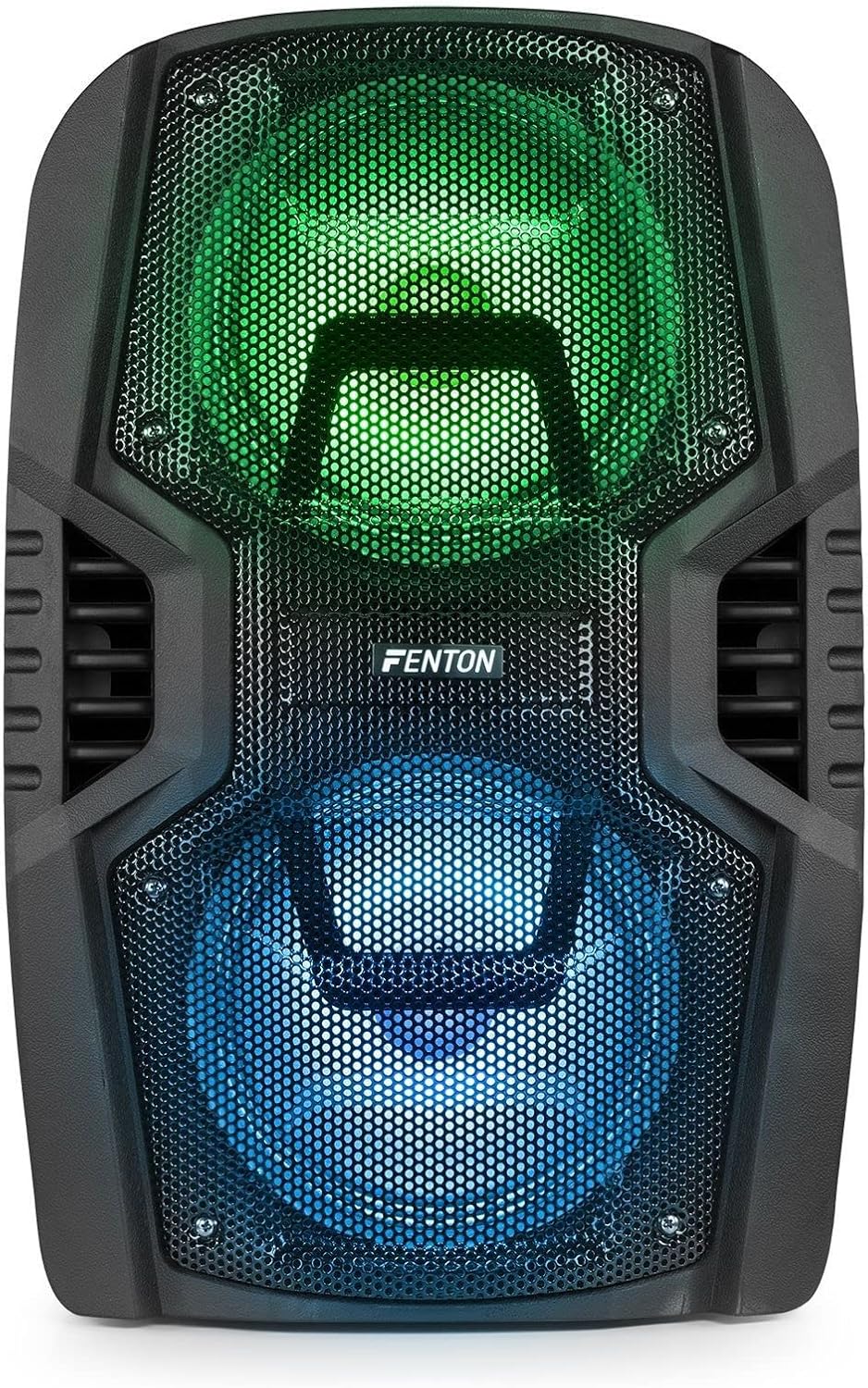
Şekil 8: The front of the speaker with its LED lights displaying vibrant green and blue colors.

Şekil 9: The speaker positioned in a room with low lighting, demonstrating the atmospheric effect of its blue LED lights.
Bakım
- Temizlik: Hoparlörün dış yüzeyini temizlemek için yumuşak, kuru bir bez kullanın. Aşındırıcı temizleyiciler, cilalar veya çözücüler kullanmayın.
- Depolamak: Uzun süre kullanılmayacaksa hoparlörü serin, kuru, doğrudan güneş ışığından ve aşırı sıcaklıklardan uzak bir yerde saklayın.
- Pil Bakım: To prolong battery life, avoid fully discharging the battery frequently. Recharge the battery periodically if the speaker is stored for a long time.
- Havalandırma: Aşırı ısınmayı önlemek için havalandırma açıklıklarının toz ve kirden arındırılmış olduğundan emin olun.
Sorun giderme
| Sorun | Olası Neden | Çözüm |
|---|---|---|
| Güç yok | Battery discharged; Power cable not connected; Power switch OFF. | Charge the battery; Connect power cable securely; Turn power switch ON. |
| Ses yok | Ses seviyesi çok düşük; Yanlış giriş modu seçildi; Cihaz düzgün bağlanmamış. | Increase volume; Select correct input (Bluetooth, USB, AUX); Reconnect device. |
| Bluetooth eşleştirmiyor | Speaker not in pairing mode; Device Bluetooth OFF; Too far from speaker. | Ensure speaker is in BT mode; Enable Bluetooth on device; Move device closer (within 10m). |
| Mikrofon çalışmıyor | Microphone OFF; Mic Vol too low; Microphone not connected. | Turn microphone ON; Increase Mic Vol; Connect microphone securely. |
| LED ışıklar çalışmıyor | Light switch OFF. | Turn Light switch ON. |
Özellikler
| Marka | Fenton |
| Model Numarası | FT210LED (170.022) |
| Güç Çıkışı | 700 B |
| Frekans Tepkisi | 50 Hz - 18000 Hz |
| Woofer'lar | Çift 10 inç |
| Pil | 7.4V / 3Ah |
| Bağlantı Hacmitage | 230 V / 50 Hz |
| Ses girişleri | Bluetooth, USB, MicroSD, AUX (3.5mm), Wired Microphone (6.3mm) |
| Özel Özellikler | Integrated LED lighting, Trolley system, Echo effect for microphone |
| Ürün Boyutları (U x G x Y) | 48.5x39.5x75.5 cm |
| Ürün Ağırlığı | 11.55 kilo |
| Üretici | Tronios BV |
Garanti ve Destek
Garanti bilgileri veya teknik destek için lütfen satın alma sırasında verilen belgelere bakın veya satıcınızla iletişime geçin. Garanti talepleri için satın alma belgenizi saklayın.


