1. Giriş
This manual provides essential information for the setup, operation, and maintenance of your Donner DDP-100 88-Key Weighted Action Digital Piano. Please read it thoroughly to ensure proper use and to maximize your instrument's lifespan.
Temel Özellikler:
- 88 Fully-Weighted Keys: Designed to precisely match finger strength changes, restoring the feel of an acoustic piano for stable and responsive touch.
- Gerçekçi Ses: Features a pure tone sampled from real acoustic grand pianos, utilizing AWM sampling technology for realistic and excellent sound quality.
- Çok Yönlü Bağlantı: Supports MP3 input, external sound systems, and headphones for varied practice and performance needs.
- Entegre Ampkaldırıcı: Dahili amplifier for direct sound output.
- Modern Tasarım: Wooden cabinet with a sliding key cover for key protection and a modern aesthetic.
- 128 Notalı Polifoni: Ensures complex musical passages can be played without notes cutting off.

Figure 1: The Donner DDP-100 Digital Piano in white, showcasing its full 88-key keyboard, integrated music stand, and three foot pedals.
2. Kurulum Talimatları
2.1 Paketin Açılması ve Bileşen Kontrolü
Carefully unpack all components from the packaging. Ensure all items listed below are present:
- Donner DDP-100 Digital Piano Unit
- Mobilya Sehpası
- Güç Adaptörü
- Kayar Anahtar Kapağı
- Three-Pedal Unit
- Müzik Dinlenme
2.2 Montaj
- Mobilya Sehpasını Monte Edin: Follow the instructions provided with the furniture stand to securely assemble its components.
- Attach the Piano Unit: Carefully place the DDP-100 digital piano unit onto the assembled furniture stand. Secure it using the provided screws or fasteners.
- Pedal ünitesini bağlayın: Locate the pedal unit cable and connect it to the corresponding port on the underside of the piano unit.
- Install the Music Rest: Müzik sehpasını piyanonun üst panelindeki belirlenmiş yuvalara yerleştirin.
- Güç Adaptörünü bağlayın: Plug the power adapter into the DC IN port on the piano's rear panel, then plug the adapter into a wall outlet.

Figure 2: Dimensions of the Donner DDP-100 Digital Piano, illustrating its compact design for home integration.
3. Kullanım Talimatları
3.1 Güç Açma/Kapatma ve Ses Kontrolü
- Güç Açık: Locate the 'POWER' button on the left side of the keyboard. Press it to turn on the piano. A red indicator light will illuminate.
- Ses Ayarı: Use the 'VOLUME' knob to adjust the overall sound level. Turn clockwise to increase volume, counter-clockwise to decrease.
- Kapat: Press the 'POWER' button again to turn off the piano.
Video 1: Bittiview of the Donner DDP-100 Digital Piano, demonstrating power on, volume control, and key action.
3.2 Playing the Piano
- Ağırlıklı Tuşlar: The 88 fully-weighted keys provide a realistic piano feel, with heavier touch in lower registers and lighter touch in higher registers.
- Pedallar: The three pedals (soft, sostenuto, sustain) allow for expressive playing, similar to an acoustic grand piano.
- Ses Kalitesi: The DDP-100 features a single, high-quality grand piano tone, sampled for authenticity.

Figure 3: Diagram illustrating the graded hammer action of the 88 weighted keys, providing a realistic playing experience.
3.3 Kulaklık Modu
For private practice, connect headphones to the 3.5mm headphone jack located on the rear panel. This mutes the internal speakers, allowing you to play without disturbing others.

Figure 4: Demonstrating the headphone mode for silent practice, ideal for shared living spaces.
3.4 Harici Cihaz Bağlantısı
The rear panel of the DDP-100 offers various ports for connecting external devices:
- MP3 Arayüzü: Connect an MP3 player for audio playback.
- USB Transmission Interface: Connect to a computer for MIDI data transfer.
- Audio Interface (IN/OUT): Connect to external audio systems or recording devices.
- Sustain Pedal Socket: For connecting the included three-pedal unit.
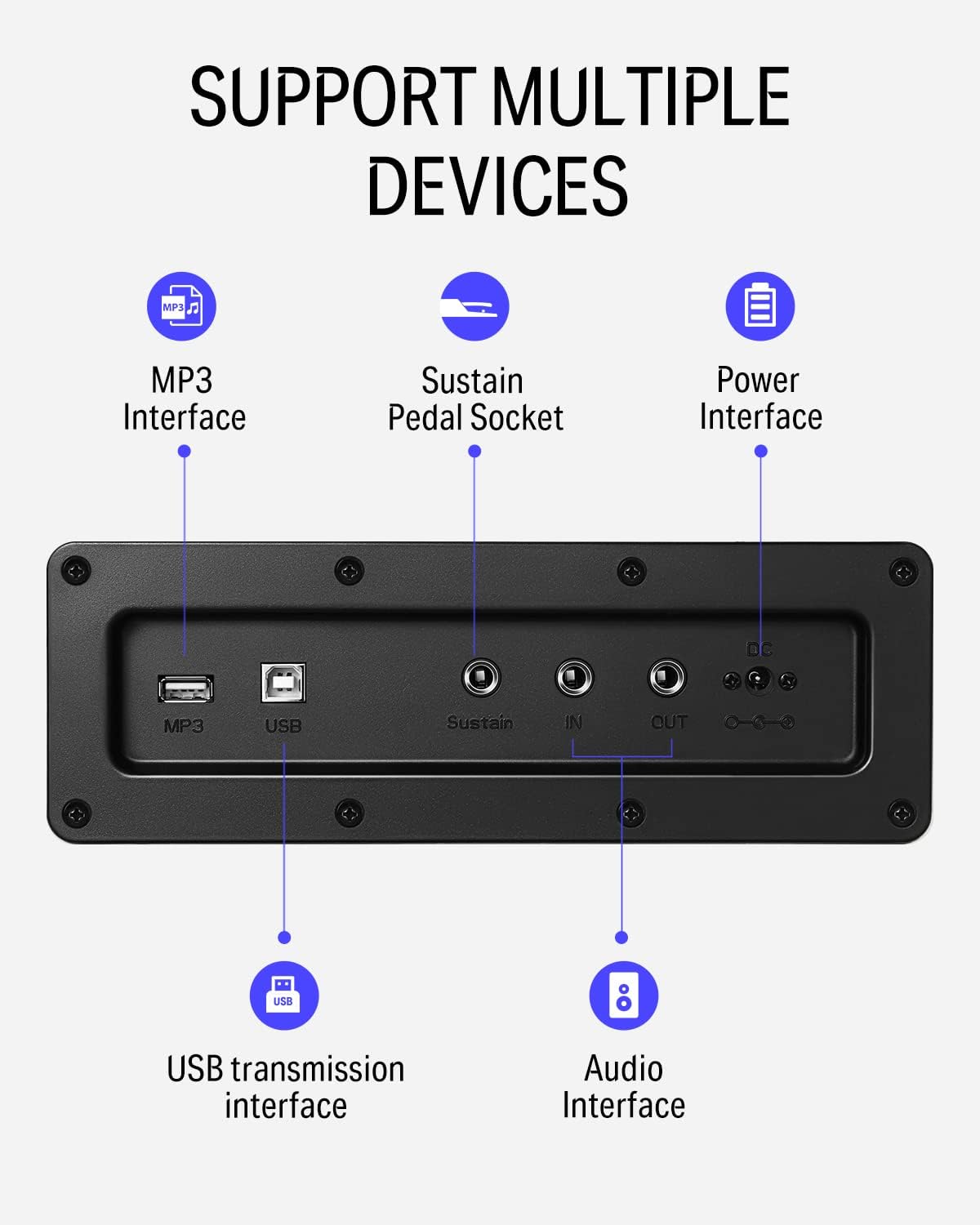
Şekil 5: Ayrıntılı view of the rear panel connectivity options, including MP3, USB, Sustain, and Audio In/Out ports.
Video 2: Demonstrates the versatility of the DDP-100 when connected to other devices, such as DJ equipment.
4. Bakım
4.1 Temizlik
- Use a soft, dry cloth to wipe the surface of the piano.
- İnatçı kirler için hafifçeampen the cloth with water and a mild, non-abrasive cleaner. Avoid excessive moisture.
- Do not use chemical solvents, alcohol, or abrasive cleaning agents, as these can damage the finish.
4.2 Depolama ve Bakım
- Keep the piano away from direct sunlight, heat sources, and excessive humidity to prevent damage to the wood and electronic components.
- Use the sliding key cover to protect the keys from dust and spills when not in use.
- Avoid placing heavy objects on the piano.
5. Sorun Giderme
5.1 Ses Yok
- Güç adaptörünün güvenli bir şekilde bağlandığından ve piyanonun açık olduğundan emin olun.
- Ses seviyesi düğmesini kontrol edin ve açık olduğundan emin olun.
- Kulaklık bağlıysa, dahili hoparlörleri etkinleştirmek için kulaklığı çıkarın.
- If connected to an external sound system, check the system's volume and connections.
5.2 Tuşlar Yanıt Vermiyor
- Piyanonun açık olduğundan emin olun.
- Yalnızca belirli tuşlar etkileniyorsa, müşteri desteğiyle iletişime geçin.
5.3 Abnormal Sound
- Check for loose connections of cables (power, pedals, audio).
- Ensure the volume is not set too high, causing distortion.
- If the issue persists, power cycle the unit (turn off, wait 10 seconds, turn on).
6. Özellikler
| Özellik | Detay |
|---|---|
| Marka | Döndür |
| Model Adı | DDP-100 |
| Anahtar Sayısı | 88 |
| Anahtar Türü | Fully-Weighted Action |
| Çok seslilik | 128-Note |
| Ses Kaynağı | AWM Sampling Technology (Grand Piano Tone) |
| Pedallar | 3-Pedal Unit (Sustain, Sostenuto, Soft) |
| Bağlantı | MP3 Interface, USB Transmission, Audio In/Out, 3.5mm Headphone Jack |
| Güç Kaynağı | Adaptör, Elektrik |
| Ürün Boyutları | 54.33"D x 16.14"G x 33.27"Y |
| Ürün Ağırlığı | 97.7 pound |
| Gövde Malzemesi | Odun |
| Renk | Beyaz |
7. Garanti ve Destek
For warranty information, please refer to the documentation included with your purchase or contact Donner customer support. General customer support is available for assistance with product inquiries, troubleshooting, and service requests.
For additional support, visit the official Donner websiteyi ziyaret edin veya müşteri hizmetleri kanallarıyla iletişime geçin.


