1. Giriş
Thank you for choosing the BOMGE 12-Channel Professional Audio Mixer. This manual provides essential information for the safe and efficient operation of your new audio mixer. Please read this manual thoroughly before use and retain it for future reference.
This professional audio mixer is designed for a wide range of applications, from home studios to live sound environments, offering versatile connectivity, digital effects, and robust performance.
2. Güvenlik Bilgileri
- Güç Kaynağı: Yalnızca belirtilen güç adaptörünü kullanın. Voltajın düşük olduğundan emin olun.tage bölgenizin gereksinimlerine uygundur.
- Su ve Nem: Do not expose the unit to rain, moisture, or excessive humidity. Avoid placing liquid-filled objects on the mixer.
- Havalandırma: Ünitenin etrafında yeterli havalandırma olduğundan emin olun. Havalandırma açıklıklarını kapatmayın.
- Isı Kaynakları: Cihazı radyatörler, ısıtma petekleri, sobalar veya diğer ısı üreten cihazlar gibi ısı kaynaklarından uzak tutun.
- Temizlik: Clean only with a dry cloth. Disconnect power before cleaning.
- Servis: Bu ünitenin bakımını kendiniz yapmaya çalışmayın. Tüm bakım işlemlerini yetkili servis personeline yaptırın.
- Topraklama: Elektrik çarpmasını önlemek için topraklamanın uygun olduğundan emin olun.
3. Ürün Bittiview ve Özellikler
The BOMGE 12-Channel Professional Audio Mixer integrates advanced features for comprehensive audio control and processing.

Resim 3.1: Ön view of the BOMGE 12-Channel Professional Audio Mixer.
- BOMGE PRO DSP 3.0: Features an upgraded DSP system with 24 integrated effects, including reverbs, choruses, and delays, for enhanced audio processing.
- USB Soundcard and Audio Interface: Allows direct recording and connection to MAC or PC, providing universal digital audio file compatibility for studio or personal use.
- Kablosuz Bluetooth Akışı: Equipped with Bluetooth for wireless audio input, offering a range of approximately 15 feet.
- 48V Fantom Gücü: Provides a reliable power source for both condenser and dynamic microphones.
- Anti-Feedback Function: Includes a built-in anti-feedback button to suppress microphone whistle while preserving original audio quality.
- 7 Bantlı Stereo Grafik Ekolayzır: Integrated equalizer for precise adjustment of audio intensity and frequency, ensuring balanced sound.

Image 3.2: Comparison highlighting the new design features, including 24 DSP chips and a 7-band equalizer.
4. Kurulum
Follow these steps to set up your BOMGE 12-Channel Audio Mixer:
- Paketin açılması: Carefully remove the mixer from its packaging. Inspect for any signs of damage.
- Atama: Mikseri sağlam, düz bir yüzeye yerleştirin ve ünitenin etrafında yeterli havalandırma olduğundan emin olun.
- Güç Bağlantısı: Connect the provided power adapter to the mixer's power input and then to a suitable electrical outlet. Do not power on the unit yet.
- Giriş Bağlantıları:
- Mikrofonlar: Connect XLR microphones to the XLR inputs (Channels 1-12).
- Hat Seviyesi Cihazlar: Connect instruments or other line-level devices to the 1/4-inch TRS/TS inputs.
- Stereo Girişler: Use the stereo line inputs for devices like keyboards or media players.

Image 4.1: Detail of the 12 input channels, featuring 2-in-1 design for XLR and 1/4-inch connections.
- Çıkış Bağlantıları:
- Ana Çıkışlar: Ana hoparlörlerinizi veya güç kaynağınızı bağlayın. amplifier to the MAIN OUTPUTS (L/R) using 1/4-inch TRS cables.
- Kulaklıklar: Connect headphones to the 1/4-inch HEADPHONE jack.
- Güç Açık: Once all connections are secure, switch on the mixer's power button.
5. Kullanım Talimatları
5.1 Temel İşlemler
- Kazanç Kontrolü: Adjust the GAIN knob for each input channel to set the input level. Aim for a strong signal without clipping (indicated by the PEAK LED).
- Eşitleme (EQ): Use the HIGH, MID, and LOW knobs on each channel to adjust the tonal characteristics of the input signal.
- Kanal Kısıcıları: Use the individual channel faders to control the volume of each input in the main mix.
- Main Faders: Adjust the MAIN L/R faders to control the overall output volume.
5.2 Bluetooth Bağlantısı
To stream audio wirelessly via Bluetooth:
- Activate Bluetooth mode on the mixer (refer to the display for mode selection).
- Mobil cihazınızda (akıllı telefon, tablet vb.) Bluetooth'u etkinleştirin.
- Arama available devices and select "BOMGE Mixer" (or similar name) to pair.
- Eşleştirme işlemi tamamlandıktan sonra, cihazınızdan gelen ses mikser üzerinden aktarılacaktır.

Image 5.1: Illustration of Bluetooth wireless streaming from a mobile device to the mixer.
5.3 USB/PC Connection
The mixer can connect to a computer for recording or playback:
- Mikseri bir USB kablosu kullanarak bilgisayarınıza bağlayın.
- Your computer should recognize the mixer as an audio interface. Select it as the input/output device in your operating system's sound settings or your Digital Audio Workstation (DAW) software.
- You can now record audio from the mixer to your computer or play audio from your computer through the mixer.
5.4 DSP Efektleri
The mixer features 24 integrated DSP effects:
- Use the FX/DSP section controls to browse and select desired effects (e.g., Reverb, Chorus, Delay).
- Adjust the PARAMETER knob to fine-tune the selected effect.
- Use the FX SEND knob on each channel to send a portion of that channel's signal to the effects processor.
- Adjust the FX RETURN fader to control the overall volume of the effects in the main mix.

Image 5.2: Display of the 24 integrated DSP effects available on the mixer.
5.5 Fantom Güç (+48V)
Phantom power is required for condenser microphones:
- Ensure all microphones are connected before activating phantom power.
- Press the +48V PHANTOM POWER button. An indicator light will illuminate.
- Dikkat: Do not connect or disconnect microphones while phantom power is active to prevent damage to equipment.

Image 5.3: Visual representation of the 48V Phantom Power feature.
5.6 7-Band Stereo Graphic Equalizer
The built-in graphic equalizer allows for precise frequency adjustments:
- Locate the 7-band graphic equalizer section on the mixer.
- Adjust the faders for each frequency band (e.g., 63Hz, 160Hz, 400Hz, 1kHz, 2.5kHz, 6.3kHz, 16kHz) to boost or cut specific frequencies in the main mix.
- Use this to tailor the overall sound to your environment or preference.
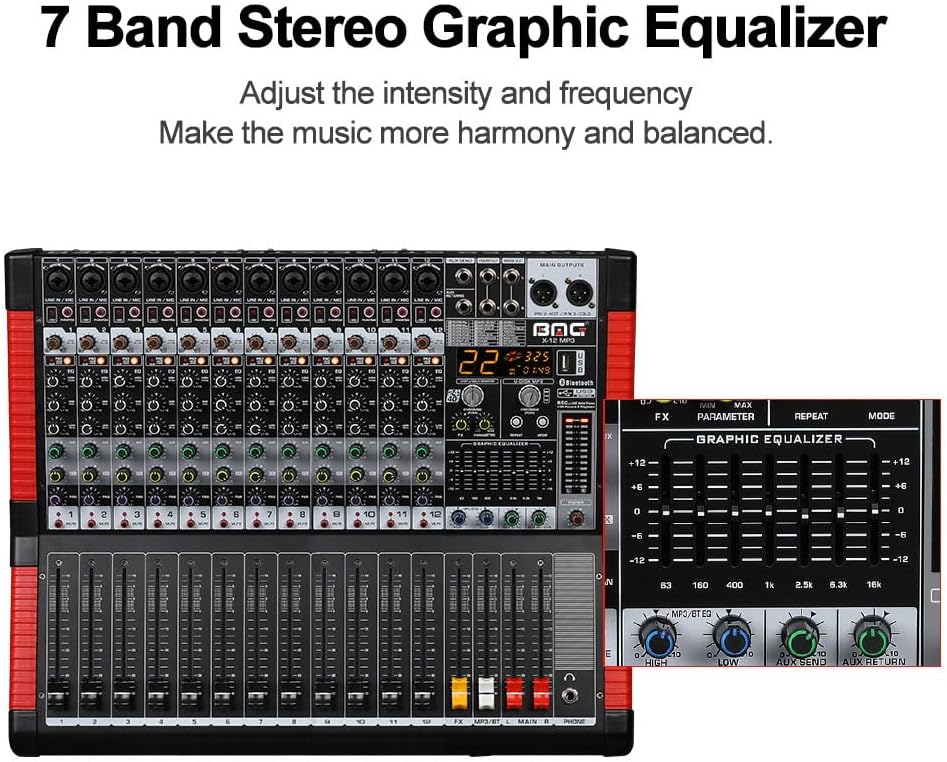
Image 5.4: Close-up of the 7-band stereo graphic equalizer controls.
6. Bakım
- Temizlik: Mikserin yüzeyini temizlemek için yumuşak, kuru bir bez kullanın. Aşındırıcı temizleyicilerden veya çözücülerden kaçının.
- Depolamak: When not in use, store the mixer in a cool, dry place, away from direct sunlight and extreme temperatures.
- Toz Koruması: Consider using a dust cover to protect the controls and faders from dust accumulation.
7. Sorun Giderme
- Ses Çıkışı Yok:
- Tüm güç bağlantılarını kontrol edin ve mikserin açık olduğundan emin olun.
- Verify that main output faders and individual channel faders are raised.
- Ensure speakers/amplifiers are powered on and connected correctly.
- Check input source connections and gain levels.
- Bozuk Ses:
- Reduce input GAIN levels if the PEAK LED is frequently illuminating.
- Lower channel faders or main faders if the output is clipping.
- Kablolarda hasar olup olmadığını kontrol edin.
- Uğultu veya Gürültü:
- Tüm ekipmanın uygun şekilde topraklandığından emin olun.
- Kablolarda veya bağlantılarda arıza olup olmadığını kontrol edin.
- Ses kablolarını güç kablolarından uzak tutun.
- Bluetooth Bağlantı Sorunları:
- Ensure the mixer is in Bluetooth mode and discoverable.
- Check that your device's Bluetooth is enabled and within range (approx. 15 ft).
- Cihazın eşleştirmesini kaldırıp yeniden eşleştirmeyi deneyin.
- Microphone Whistle (Feedback):
- Press the Anti-Feedback button on the mixer.
- Adjust microphone position relative to speakers.
- Reduce microphone gain or specific EQ frequencies causing feedback.
8. Özellikler

Resim 8.1: Ön, yan ve arka views with key dimensions of the 12-channel mixer.
| Özellik | Şartname |
|---|---|
| Marka | BOMBE |
| Model Numarası | 12 kanal |
| Kanal Sayısı | 12 |
| Bağlantı Teknolojisi | Bluetooth, USB |
| Çıkış Bağlantı Tipi | TRS |
| Güç Kaynağı | Kablolu Elektrik |
| Ürün Ağırlığı | 17.21 pound (yaklaşık 7.8 kg) |
| Paket Boyutları | 22.4 x 22.2 x 6.8 inç (yaklaşık 56.9 x 56.4 x 17.3 cm) |
9. Garanti ve Destek
For warranty information and technical support, please refer to the documentation included with your purchase or contact BOMGE customer service through their official channels. Keep your proof of purchase for any warranty claims.


