1. Giriş
This manual provides instructions for the proper use and maintenance of your Sena Parani A20 Bluetooth Intercom Headset. Please read this manual thoroughly before operating the device to ensure optimal performance and safety.
The Parani A20 is designed for motorcycle communication, offering features such as 4-way Bluetooth intercom, HD 2-way intercom, and smartphone connectivity for music and calls.
2. Paket İçeriği
The Sena Parani A20 package typically includes the following components:
- Parani A20 Headset Unit
- Hoparlör Seti
- Boom Mikrofonu
- Kablolu Mikrofon
- Montaj Clamp Kit
- USB Şarj Kablosu
- Kullanım Kılavuzu (bu belge)

Resim: Üzeriview of the Sena Parani A20 headset and its included components, such as the main unit, speakers, boom microphone, and wired microphone.
3. Kurulum ve Kurulum
3.1 Cihazı Şarj Etme
Before first use, fully charge the Parani A20 headset. Connect the USB charging cable to the headset and a power source. The charging time is approximately 2.5 hours.
3.2 Kulaklığın Takılması
The Parani A20 can be mounted to most motorcycle helmets using the included clamp kit. Ensure the mounting location allows for clear access to the controls and does not obstruct helmet functionality.
- Kaskınızın sol tarafında uygun bir yer seçin.
- Montaj klipsini güvenli bir şekilde takın.amp kask kabuğuna.
- Slide the Parani A20 main unit onto the mounted clamp yerine oturana kadar.

Image: The Sena Parani A20 headset unit attached to the side of a motorcycle helmet, showing its position relative to the helmet's structure.
3.3 Installing Speakers and Microphones
Install the speakers inside the helmet's ear pockets and route the microphone cable to the front of the helmet. Two microphone options are provided:
- Boom Mikrofon: Recommended for open-face or modular helmets. Position the microphone close to your mouth.
- Kablolu Mikrofon: Suitable for full-face helmets. Secure it inside the chin bar.
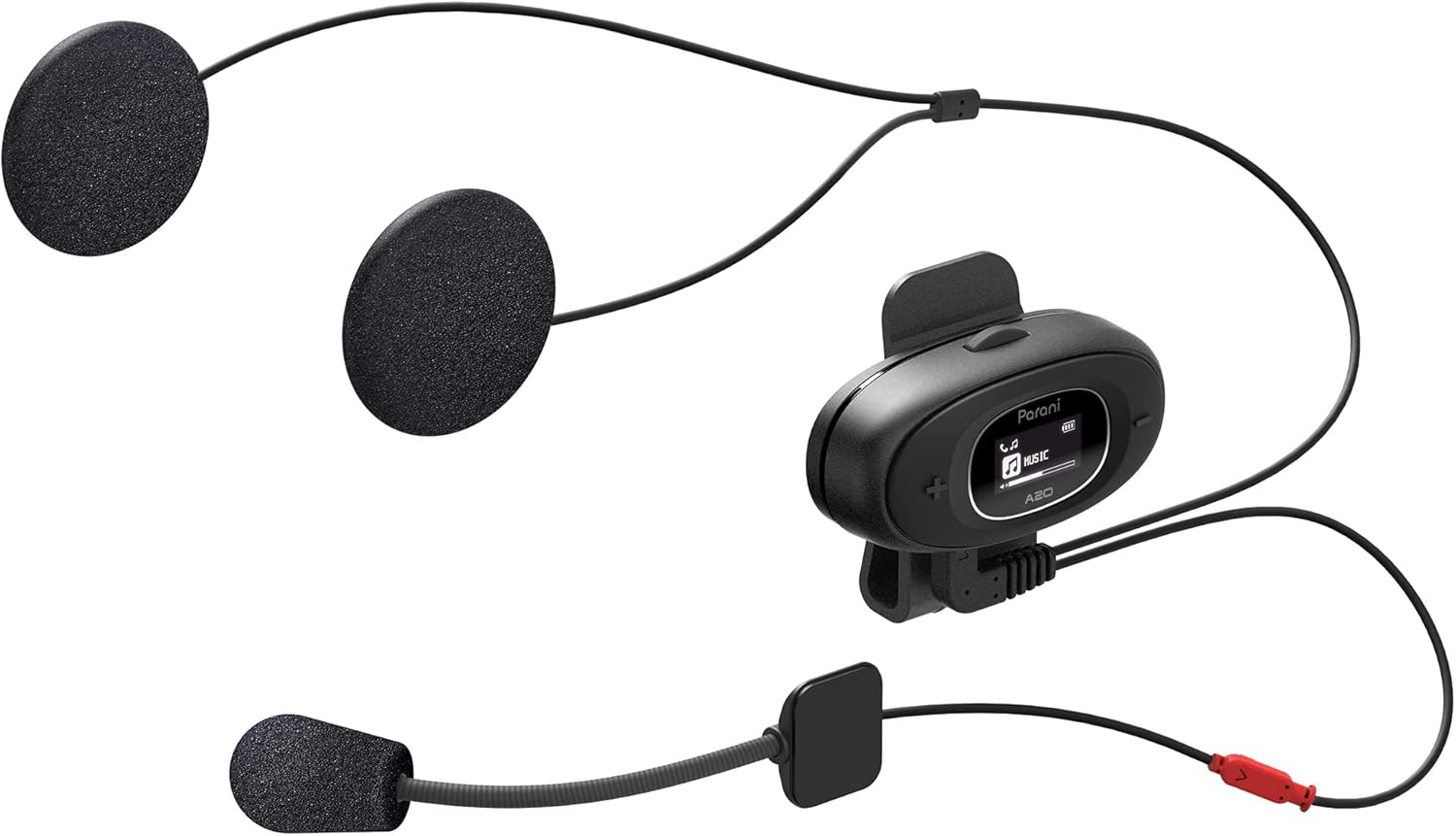
Image: The Sena Parani A20's speakers and both microphone types (boom and wired) are displayed, ready for installation inside a helmet.
4. Kullanım Talimatları
4.1 Güç Açma/Kapatma
- Güç Açık: Basılı tutun Orta Düğme 1 saniyeliğine.
- Kapat: Basılı tutun Orta Düğme 5 saniye boyunca.
4.2 Akıllı Telefonla Bluetooth Eşleştirme
To connect your Parani A20 to a smartphone for music, GPS, or phone calls:
- With the headset off, press and hold the Orta Düğme LED kırmızı ve mavi yanıp sönene kadar 5 saniye bekleyin; bu, eşleştirme modunu gösterir.
- On your smartphone, go to Bluetooth settings and select "Parani A20" from the list of available devices.
- Eşleştirme tamamlandığında LED mavi renkte yanıp sönecektir.
4.3 İnterkom İletişimi
The Parani A20 supports 4-way Bluetooth intercom and HD 2-way intercom with a range of up to 1 km (0.6 miles).
- İnterkomun Başlatılması: Kısaca basın Orta Düğme to initiate intercom with a paired Parani A20 unit.
- Intercom'un Sonlandırılması: Kısaca basın Orta Düğme Tekrar.
- Multi-way Intercom: Follow the specific pairing instructions in the full manual for connecting multiple units.

Resim: Ayrıntılı view of the Parani A20 unit, highlighting its LCD screen which displays intercom status and battery level, along with the control buttons.
4.4 Müzik Çalma ve Ses Seviyesi Kontrolü
- Oynat/Duraklat: Basın Orta Düğme during music playback.
- Sesi aç: Basın (+) Düğmesi.
- Sesi kıs: Basın (-) Buton.
- The Parani A20 offers exceptional sound quality with enhanced bass and clarity.
4.5 Telefon Görüşmeleri
- Cevap Çağrısı: Kısaca basın Orta Düğme.
- Çağrı Sonu: Kısaca basın Orta Düğme.
- Çağrıyı Reddet: Basılı tutun Orta Düğme 2 saniye boyunca.

Image: A motorcycle rider on the road, wearing a helmet equipped with the Sena Parani A20 intercom, demonstrating its use in a riding context.
5. Bakım ve Özen
- Keep the device dry. The Parani A20 is not water-resistant.
- Üniteyi yumuşak, damp bez. Sert kimyasallar veya solventler kullanmayın.
- Cihazı kullanılmadığında serin ve kuru bir yerde saklayın.
- Şarj portunun toz ve kirden arındırılmış olduğundan emin olun.
6. Sorun Giderme
6.1 Cihaz Açılmıyor
- Check battery level. Charge the device for at least 30 minutes.
- Ensure the power button is pressed correctly (hold for 1 second).
6.2 No Audio from Speakers
- Verify that the speakers are correctly plugged into the headset unit.
- Check the volume level on both the headset and your connected smartphone.
- Ensure the headset is properly paired with your audio source.
6.3 İnterkom Bağlantısı Kurmuyor
- Ensure both units are within the specified intercom range (up to 1 km).
- Re-pair the intercom units if connection issues persist.
- Herhangi bir engel veya müdahale olup olmadığını kontrol edin.
6.4 Fabrika Ayarlarına Sıfırlama
If the device is not functioning correctly, a factory reset may resolve the issue. Refer to the full manual for specific instructions on performing a factory reset.
7. Özellikler
| Model Adı | Parani A20 |
| Bluetooth Sürümü | 5.1 |
| interkom aralığı | 1 km'ye (0.6 mil) kadar |
| İnterkom Tipi | 4-way Bluetooth, HD 2-way |
| Şarj Süresi | Yaklaşık 2.5 saat |
| Frekans Spektrumu | 20 Hz - 10,000 Hz |
| Ağırlık | 240 gr |
| Boyutlar | 18.7x11.8x6.4 cm |
| Malzeme | Plastik |
| Suya Dayanıklılık | Suya dayanıklı değil |
| Uyumlu Cihazlar | Mobile phones, Motorcycles |
8. Garanti ve Destek
Garanti bilgileri ve teknik destek için lütfen resmi Sena web sitesine başvurun. webWeb sitesini ziyaret edin veya yerel bayinizle iletişime geçin. Garanti talepleri için satın alma belgenizi saklayın.
Çevrimiçi Kaynaklar: Ziyaret edin Sena webalan for the latest firmware updates, FAQs, and detailed product manuals.
9. Önemli Güvenlik Bilgileri
- Yol güvenliğini her zaman ön planda tutun. Cihazı sürüş esnasında dikkatinizi dağıtacak şekilde kullanmayın.
- Ensure the device is securely mounted to your helmet.
- Cihazı aşırı sıcaklıklara veya uzun süre doğrudan güneş ışığına maruz bırakmayın.
- Çocukların erişemeyeceği yerde saklayınız.


