1. Güvenlik Talimatları
Please read these safety instructions carefully before using the product. Keep this manual for future reference.
- Bu ürün yalnızca iç mekanda kullanım için tasarlanmıştır. Neme veya aşırı sıcaklıklara maruz bırakmayın.
- Cihazı açmaya veya üzerinde değişiklik yapmaya çalışmayın. Bu, garantiyi geçersiz kılabilir ve güvenlik riski oluşturabilir.
- Cihazı çocuklardan uzak tutunuz.
- Use only the provided micro-USB cable for charging.
- LED ışık kaynağına doğrudan bakmayın.
2. Paket İçeriği
Paketin içerisinde tüm ürünlerin mevcut olduğundan emin olun:
- ANSMANN Under-Cabinet Light M
- Mikro-USB şarj kablosu
- Kullanım Kılavuzu
3. Ürün Bittiview
The ANSMANN Under-Cabinet Light M is a versatile, rechargeable LED lamp designed for various indoor applications. It features a motion sensor, adjustable color temperatures, and a slim design for discreet placement.

Image 1: The ANSMANN Under-Cabinet Light M, showcasing its sleek, white design and integrated motion sensor.
Temel Özellikler:
- Pir hareket sensörü: Automatically activates the light when motion is detected in low-light conditions.
- Alacakaranlık Sensörü: Ensures the light only activates in dark environments, conserving battery life.
- Ayarlanabilir Renk Sıcaklığı: Choose between 3 color temperatures (cool white, neutral white, warm white) or activate all LEDs for maximum brightness.
- Kademesiz Karartma: Adjust brightness by holding down the control button.
- Şarj Edilebilir Pil: Integrated battery for cordless operation, charged via micro-USB.
- Manyetik Montaj: Easy installation and removal with a magnetic strip.

Image 2: Diagram illustrating the Micro-USB Port, On/Off button, and PIR motion sensor on the device.
4. Kurulum ve Kurulum
The Under-Cabinet Light M offers flexible installation options using its integrated magnetic strip.
Manyetik Montaj:
- Identify a suitable, clean, and dry surface for installation (e.g., inside a cabinet, under a shelf).
- The light comes with a fixed magnetic strip on its back. For non-metallic surfaces, use the included adhesive strip.
- Peel off the protective film from the adhesive strip and firmly press it onto the desired surface.
- Attach the Under-Cabinet Light M to the adhesive strip. The magnetic connection will hold it in place.
Resim 3: Yakın çekim view of the magnetic strip and the removable adhesive strip, demonstrating the mounting mechanism.

Resim 4: Örn.ample of the under-cabinet light installed in a modern kitchen setting, providing illumination over a countertop.
5. Operasyon
The Under-Cabinet Light M offers intuitive control for its lighting functions.
Güç Açma/Kapatma:
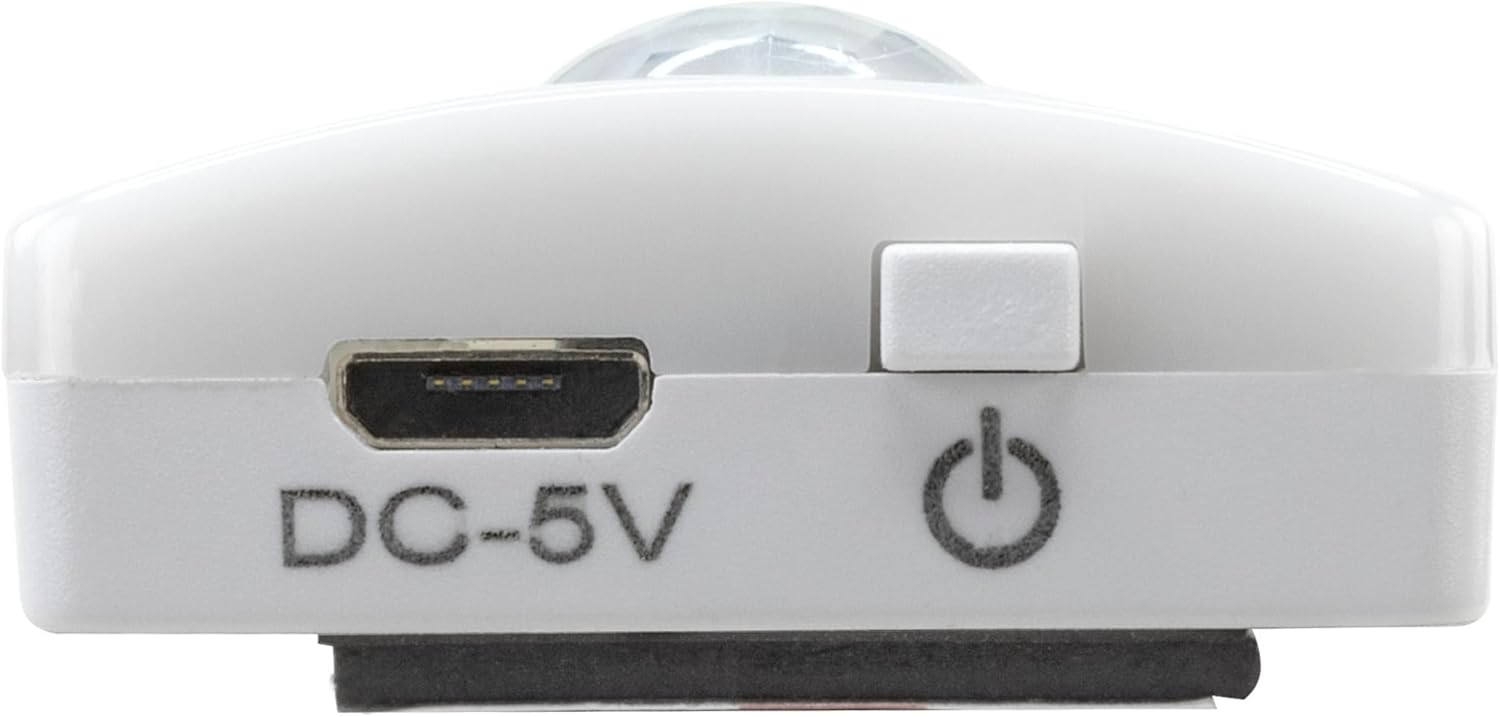
- Locate the On/Off button (refer to Image 2).
- Press the button once to turn the light on or off.
Renk Sıcaklığının Ayarlanması:
- With the light on, short press the control button repeatedly to cycle through the 3 available color temperatures: cool white, neutral white, and warm white.
- A fourth press will activate all LEDs for maximum brightness.
Karartma İşlevi:
- To adjust the brightness, press and hold the control button. The light will gradually dim or brighten. Release the button when the desired brightness level is reached.
Motion and Twilight Sensor:
- When the light is in motion sensor mode, it will automatically turn on when movement is detected within its range.
- The integrated twilight sensor ensures that the motion sensor only activates the light in dark environments, preventing unnecessary illumination during daylight hours.
6. Şarj Etme
The Under-Cabinet Light M is equipped with a rechargeable battery for convenient cordless use.
- When the battery is low, the light output may decrease or the light may not turn on.
- Gently detach the light from its magnetic mounting surface.
- Connect the provided micro-USB cable to the micro-USB port on the light (refer to Image 2).
- Connect the other end of the micro-USB cable to a suitable USB power source (e.g., USB wall adapter, computer USB port).
- Bir gösterge ışığı şarj durumunu gösterecektir (örneğin, şarj oluyorsa kırmızı, tamamen şarj olduysa yeşil).
- Once fully charged, disconnect the cable and reattach the light to its mounting surface.

Resim 5: Ayrıntılı view of the Micro-USB charging port and the On/Off button, essential for charging and operation.
7. Bakım
To ensure the longevity and optimal performance of your Under-Cabinet Light M, follow these simple maintenance guidelines:
- Clean the light regularly with a soft, dry cloth. Do not use abrasive cleaners or solvents.
- Ensure the motion sensor lens is kept clean and free from obstructions for proper function.
- Store the light in a cool, dry place if not in use for extended periods.
8. Sorun Giderme
If you encounter issues with your Under-Cabinet Light M, refer to the following common problems and solutions:
| Sorun | Olası Neden | Çözüm |
|---|---|---|
| Işık açılmıyor. | Pil bitmiş. | Charge the light using the micro-USB cable. |
| Hareket sensörü hareketi algılamıyor. | Ensure the sensor is clean and unobstructed. Check if the environment is dark enough for the twilight sensor to activate. | |
| Işık şarj olmuyor. | Arızalı kablo veya güç kaynağı. | Try a different micro-USB cable or USB power adapter. |
| Şarj portu kirli. | Gently clean the micro-USB port with a dry, soft brush. | |
| Işık titriyor veya sönük. | Pil zayıf. | Cihazı şarj edin. |
Bu çözümleri denedikten sonra sorun devam ederse lütfen müşteri desteğiyle iletişime geçin.
9. Özellikler
| Özellik | Detay |
|---|---|
| Model Numarası | 1600-0438 |
| Ürün Boyutları | 25 cm (Uzunluk x Genişlik x Yükseklik) (9.84 cm Uzunluk x 1.38 cm Genişlik x 0.51 cm Yükseklik) |
| Ürün Ağırlığı | 112 Gram (0.25 lbs) |
| Güç Kaynağı | Pil ile çalışır |
| Şarj Portu | Micro-USB (DC-5V) |
| Malzeme | Plastik |
| Renk | Beyaz |
| Kurulum Türü | Duvara Monte Edilebilir (Manyetik) |
| Oda Tipi | Dining Room, Kitchen, Wardrobe, Hallway, etc. |
10. Garanti ve Destek
ANSMANN products are manufactured with high-quality standards. For information regarding warranty terms and conditions, please refer to the documentation provided with your purchase or visit the official ANSMANN webalan.
For technical support or inquiries, please contact ANSMANN customer service through their official channels.


