giriiş
The HTC True Wireless Earbuds 2 offer a seamless audio experience with advanced features designed for comfort and convenience. These earbuds utilize the latest Bluetooth 5.1 technology for instant pairing and stable connections across various devices. Enjoy extended listening times, intuitive touch controls, and a comfortable, ergonomic fit for all-day use.

Image: HTC True Wireless Earbuds 2 in their pink charging case, showcasinkompakt tasarımı.

Image: A display of HTC True Wireless Earbuds 2 in three available colors: white, black, and pink.
Video: Bir yetkiliview of the HTC True Wireless Bluetooth Earbuds, highlighting key features and design.
Kutuda Neler Var?
Your HTC True Wireless Earbuds 2 package includes the following items:
- HTC True Wireless Earbuds 2 (Left and Right)
- USB-C Şarj Kablosu
- Rubber Eartips (Two pairs: Large and Small sizes, in addition to the pre-installed medium size)
- Şarj Kutusu
Video: An unboxing video for the HTC True Wireless Earbuds 2, showing the contents of the package.
Kurmak
1. Kulaklıkları ve Kutuyu Şarj Etme
Before first use, ensure both the earbuds and the charging case are fully charged. Connect the provided USB-C cable to the charging port on the case and plug the other end into a compatible USB power source. The indicator light on the case will show charging status. A full charge provides up to 8 hours of listening time for the earbuds and up to 32 hours total with the charging case.

Image: Pink HTC True Wireless Earbuds 2 and their charging case, illustrating the 30-hour combined battery life.
2. Cihazınızla Eşleştirme
- Şarj kutusunu açın. Kulaklıklar otomatik olarak eşleştirme moduna geçecektir.
- Cihazınızda (akıllı telefon, tablet, dizüstü bilgisayar) Bluetooth ayarlarına gidin.
- Select "HTC True Wireless Earbuds 2" from the list of available devices.
- Bağlantı kurulduktan sonra sesli bir uyarı duyacaksınız ve kulaklıklardaki gösterge ışığı değişecektir.
The earbuds utilize Bluetooth 5.1 for quick and stable connections. They are compatible with iOS, Android, and Windows devices.

Image: A diagram illustrating the quick pairing process and wide compatibility of the HTC True Wireless Earbuds 2 with various devices.
3. Achieving Optimal Comfort
The earbuds are ergonomically crafted for a secure and comfortable in-ear fit. Experiment with the included rubber eartips (small, medium, large) to find the size that provides the best seal and comfort for your ears. A proper fit enhances sound quality and noise isolation.

Image: A woman wearing pink HTC True Wireless Earbuds 2 while working on a laptop, emphasizing the ultra-lightweight comfort and ergonomic design.
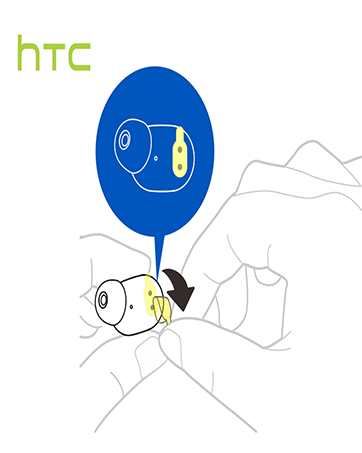
Image: A diagram illustrating the correct method for inserting an earbud to ensure a secure and comfortable fit.
Kullanım Talimatları
Dokunmatik Kontroller
The HTC True Wireless Earbuds 2 feature intuitive touch controls on each earbud for easy management of your audio and calls:
- Oynat/Duraklat: Tap left/right earbud once.
- Cevap Çağrısı: Tap left earbud once.
- Aramayı Kapat: Tap right earbud once.
- Çağrıyı Reddet: Tap and hold left/right earbud for 2 seconds.
- Önceki parça: Tap and hold left earbud for 2 seconds.
- Sonraki Parça: Tap and hold right earbud for 2 seconds.
- Sesi aç: Tap left earbud twice.
- Sesi kıs: Tap right earbud twice.
- Voice Assistant'ı etkinleştirin: Tap left/right earbud three times.

Image: A visual guide detailing the simple touch controls for the pink HTC True Wireless Earbuds 2.

Image: A visual guide detailing the simple touch controls for the black HTC True Wireless Earbuds 2.
Tek Kulaklık Kullanımı
You can use either earbud independently for mono audio or calls. Simply take one earbud out of the case, and it will automatically connect to your device. This feature allows for versatility depending on your listening needs.

Image: Two smartphones connected to individual pink HTC True Wireless Earbuds 2, showcasing the versatility of using one or both earbuds.

Image: A diagram illustrating the versatility of using one or both black HTC True Wireless Earbuds 2 with different devices.
Bakım
Temizlik ve Bakım
- Kulaklıkları ve şarj kutusunu düzenli olarak yumuşak, kuru bir bezle temizleyin.
- Gerekirse kulak uçlarını çıkarın ve hafif sabun ve suyla temizleyin, tekrar takmadan önce tamamen kuruduklarından emin olun.
- Aşındırıcı malzemeler veya sert kimyasallar kullanmaktan kaçının.
Suya Dayanıklılık
The HTC True Wireless Earbuds 2 are IPX5 waterproof, meaning they are protected against low-pressure water jets from any direction. This makes them suitable for workouts and light rain. However, they are not designed for submersion in water.
Sorun giderme
HTC True Wireless Earbuds 2 kulaklıklarınızla ilgili herhangi bir sorunla karşılaşırsanız, lütfen aşağıdaki yaygın çözümlere bakın:
| Sorun | Çözüm |
|---|---|
| Kulaklıklar eşleşmiyor | Ensure earbuds are charged. Place them back in the case, close, then reopen to re-enter pairing mode. Check your device's Bluetooth settings and forget/remove previous connections if necessary. |
| Bir kulaklıktan ses gelmiyor | Her iki kulaklığın da şarjının dolu olduğundan emin olun. Her ikisini de kutusuna geri koyup tekrar çıkarmayı deneyin. Cihazınızla yeniden eşleştirin. |
| Dokunmatik kontroller yanıt vermiyor | Ensure earbuds are clean and dry. Restart your device and re-pair the earbuds. |
| Kötü ses kalitesi | Adjust the eartips for a better seal. Ensure your device is within the 10m Bluetooth range. Check for interference from other wireless devices. |
Özellikler
| Özellik | Detay |
|---|---|
| Model Adı | HTC True Wireless Kulaklıklar 2 |
| Ürün Model Numarası | HTC TWS3 |
| Bağlantı Teknolojisi | Kablosuz (Bluetooth 5.1) |
| Pil Ömrü (Kulaklıklar) | Tek şarjla 8 saate kadar |
| Pil Ömrü (Şarj Kutusuyla) | 32 saate kadar |
| Şarj Kutusu Pil Kapasitesi | 500 mAh |
| Su Direnç Seviyesi | IPX5 (Suya Dayanıklı) |
| Kontrol Türü | Touch Control (Volume, Play/Pause, Call Management, Voice Assistant) |
| Kulak Yerleşimi | Kulakta |
| Frekans Aralığı | 20-20,000 Hz |
| Ürün Ağırlığı | 2.82 ons |
| Ürün Boyutları | 1.71 x 1.71 x 1.36 inç |
Garanti ve Destek
HTC provides a 12-month warranty for the True Wireless Earbuds 2. For any support inquiries or warranty claims, please contact HTC customer service through their official webÜrünün satın alındığı site veya perakendeci.
Daha fazla bilgi için resmi web sitesini ziyaret edin HTC Mağazası Amazon'da.


