1. Ürün Bittiview
The Anderic OEM NSRCFNA21 Smart Remote is an original equipment manufacturer (OEM) replacement remote control specifically designed for various Insignia TV models. This remote provides seamless functionality and user-friendly operation, ensuring reliable control over your television.
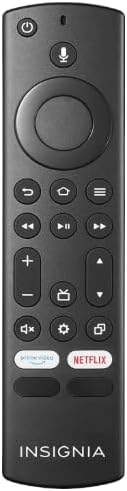
Resim 1.1: The Anderic OEM NSRCFNA21 Smart Remote. This image displays the front view of the black remote control, featuring various buttons for power, voice control, navigation, volume, channel, and dedicated streaming service buttons.
Temel özellikler şunlardır:
- Original Quality: An authentic OEM product, ensuring performance and reliability comparable to the remote originally supplied with your TV.
- Kullanıcı Dostu Tasarım: Intuitive buttons and controls for easy navigation, volume adjustment, channel changes, and access to various TV functions.
- Güvenilir Performans: Provides a stable and responsive connection for accurate command execution.
2. Kurulum ve Eşleştirme Talimatları
To ensure proper functionality, the remote control must be paired with your Insignia TV. Follow these steps carefully:
- TV'yi sıfırla: Unplug your Insignia TV from its power source. Wait for approximately 30 seconds.
- Power On TV: Plug the TV back into the power source and turn it on. Allow the TV to fully boot up.
- Eşleştirmeyi Başlat: Once the TV has completely booted up and is displaying content, press and hold the Ev button on the Anderic NSRCFNA21 remote control for up to 30 seconds.
- Remote Update (if prompted): Your TV may display a message indicating that the remote needs an update. If prompted, allow the TV to proceed with the update. This process may take 1 to 3 minutes to complete.
- Doğrulama: After the update (if any) and pairing process, test the remote's functions (e.g., volume, channel, navigation) to confirm successful pairing.
If the remote does not pair after following these steps, repeat the process or refer to the troubleshooting section.
3. Uzaktan Kumandanın Çalıştırılması
The Anderic NSRCFNA21 remote control features an intuitive layout for easy operation of your Insignia TV. Below are the general functions of the primary buttons:
- Güç Düğmesi: Televizyonu açar veya kapatır.
- Ses Kontrol Düğmesi: Activates voice commands for searching content or controlling the TV.
- Navigation Pad (Directional Buttons and Select): Menülerde gezinmek ve öğeleri seçmek için kullanılır.
- Ana menü tuşu: Returns to the TV's main home screen.
- Geri Düğmesi: Önceki ekrana veya menüye döner.
- Menü/Seçenekler Düğmesi: Accesses additional menu options or settings.
- Sesi Aç/Kapat: Adjusts the TV's audio volume.
- Kanal Yukarı/Aşağı: TV kanallarını değiştirir.
- Sessiz tuşu: Televizyonun sesini kapatır veya açar.
- Ayarlar Düğmesi: Televizyonun ayarlar menüsünü açar.
- Giriş/Kaynak Düğmesi: Changes the TV's input source (e.g., HDMI 1, HDMI 2).
- Dedicated Streaming Service Buttons: Provides quick access to popular streaming applications (e.g., Amazon Prime Video, Netflix).
4. Uyumluluk
The Anderic OEM NSRCFNA21 Smart Remote is compatible with the following Insignia TV models:
- NS24DF310NA21
- NS39DF310NA21
- NS50DF710NA21
- NS55DF710NA21
This remote also replaces the following models:
- NSRCFNA19 Rev B Fire
- NSRCFNA19revB
- NSRCFNA21 Fire
- NSRCFNA21 Rev E
- NSRCFNA21-Rev-E
Ensure your TV model is listed above for optimal performance.
5. Bakım
Proper maintenance can extend the life and functionality of your remote control.
- Pil Değişimi: The remote requires two AAA batteries. Replace batteries when the remote's responsiveness decreases or it stops functioning. Ensure correct polarity when inserting new batteries.
- Temizlik: Use a soft, dry cloth to clean the remote's surface. Avoid using liquid cleaners or abrasive materials, as these can damage the remote.
- Depolamak: Kumandayı kuru bir yerde, aşırı sıcaklıklardan ve doğrudan güneş ışığından uzakta saklayın.
6. Sorun Giderme
If you encounter issues with your Anderic NSRCFNA21 Smart Remote, try the following troubleshooting steps:
- Uzaktan Kumanda Yanıt Vermiyor:
- Check the batteries. Replace them with fresh AAA batteries, ensuring correct polarity.
- Uzaktan kumanda ile televizyonun sensörü arasında herhangi bir engel olmadığından emin olun.
- Bölüm 2'de açıklandığı gibi eşleştirme işlemini yeniden deneyin.
- Aralıklı İşlevsellik:
- Bu, pil gücünün düşük olduğunu gösterebilir. Pilleri değiştirin.
- Televizyonun sensörünün etkili menzili içinde olduğunuzdan emin olun.
- Pairing Fails:
- Confirm your TV model is listed in the compatibility section (Section 4).
- Ensure the TV is fully booted up before attempting to hold the Home button.
- Try unplugging the TV for a longer period (e.g., 1-2 minutes) before plugging it back in and re-attempting pairing.
Bu adımları denedikten sonra sorunlar devam ederse, daha fazla yardım için müşteri desteğiyle iletişime geçin.
7. Özellikler
| Marka | Anderik |
| Model Numarası | NSRCFNA21 Rev B |
| Uyumlu Cihazlar | Insignia Televisions |
| Güç Kaynağı | 2 adet AAA pil (gerekli) |
| Ürün Ağırlığı | 1.76 ons |
| Paket Boyutları | 6.3 x 2.95 x 0.67 inç |
| Renk | Siyah |
| Üretici | Dan's Electronics Etc., Inc. |
8. Garanti ve Destek
For warranty information or technical support, please contact the manufacturer, Anderic (Dan's Electronics Etc., Inc.). Refer to the product packaging or the official Anderic webAyrıntılı iletişim bilgileri ve garanti koşulları için lütfen siteyi ziyaret edin.
Ziyaret edebilirsiniz Amazon'daki Anderic Mağazası Daha fazla bilgi için.


