giriiş
Thank you for choosing the VirtuFit Adjustable Basketball Hoop, Model VF06041. This manual provides essential information for the safe assembly, operation, and maintenance of your new basketball system. Please read all instructions carefully before assembly and use to ensure proper function and longevity of the product. Keep this manual for future reference.
Güvenlik Bilgileri
Adherence to the following safety guidelines is crucial to prevent injury and damage to the product:
- Yetişkin Denetimi: Basketbol potasını kullanırken çocuklar her zaman bir yetişkinin gözetimi altında olmalıdır.
- Uygun Montaj: Ensure all parts are correctly assembled and tightened according to the instructions. Failure to do so can result in instability and potential injury.
- Temel Kararlılık: Always fill the base completely with water or sand before use to ensure maximum stability. Do not use the hoop if the base is empty or insufficiently filled.
- Avoid Hanging: Do not hang on the rim, net, or any part of the backboard or pole. This can cause the unit to tip over, leading to serious injury or product damage.
- Kullanmadan Önce Kontrol Edin: Before each use, inspect the hoop for any loose parts, damage, or signs of wear. Do not use if any components are compromised.
- Hava Koşulları: Avoid using the hoop in strong winds or severe weather. Store the hoop indoors or secure it properly during adverse weather conditions.
- Temiz bölge: Ensure the playing area around the hoop is clear of obstacles and other people to prevent collisions.
- Yüksekliği Ayarlama: Only adjust the height when no one is directly underneath the backboard. Ensure the locking mechanism is securely engaged after adjustment.
Paket İçeriği
Please verify that all components are present before beginning assembly. If any parts are missing or damaged, contact VirtuFit customer support.
- Backboard with Rim and Net
- Ayarlanabilir Direk Bölümleri
- Temel Ünite
- Basketbol
- Hava pompası
- Assembly Hardware (bolts, nuts, washers, tools if included)
Kurulum ve Montaj
Follow these steps carefully to assemble your VirtuFit Adjustable Basketball Hoop.
Adım 1: Tabanı Birleştirin
Place the base unit on a flat, level surface. Attach any wheels or support brackets to the base as indicated in the separate assembly diagram (not provided in this text). Ensure they are securely fastened.
Step 2: Connect Pole Sections
Connect the adjustable pole sections. Ensure the height adjustment mechanism is correctly aligned and secured. Insert the bottom pole section into the base unit. Secure it with the provided hardware (e.g., bolts, pins).
Step 3: Attach Backboard and Rim
Carefully attach the backboard to the top pole section. Then, attach the rim to the backboard. Ensure all bolts are tightened firmly. Finally, attach the net to the rim.

Resim: Yakın çekim view of the VirtuFit basketball backboard, showing the orange rim and white net securely attached.
Step 4: Fill the Base
Once the hoop is fully assembled, fill the base unit with water or sand through the designated opening. Filling the base completely is critical for stability and safety. Securely close the cap after filling.

Image: The fully assembled VirtuFit Adjustable Basketball Hoop, including the base, pole, backboard, rim, net, and accompanying basketball and pump.
Kullanım Talimatları
Yüksekliğin Ayarlanması
The VirtuFit basketball hoop is adjustable from 170 cm to 215 cm. To adjust the height:
- Loosen the locking mechanism on the pole (e.g., knob, pin, or lever).
- Carefully slide the upper pole section to the desired height. Ensure no one is standing directly under the backboard during this process.
- Securely tighten the locking mechanism to fix the pole at the chosen height. Verify that the pole is stable before use.
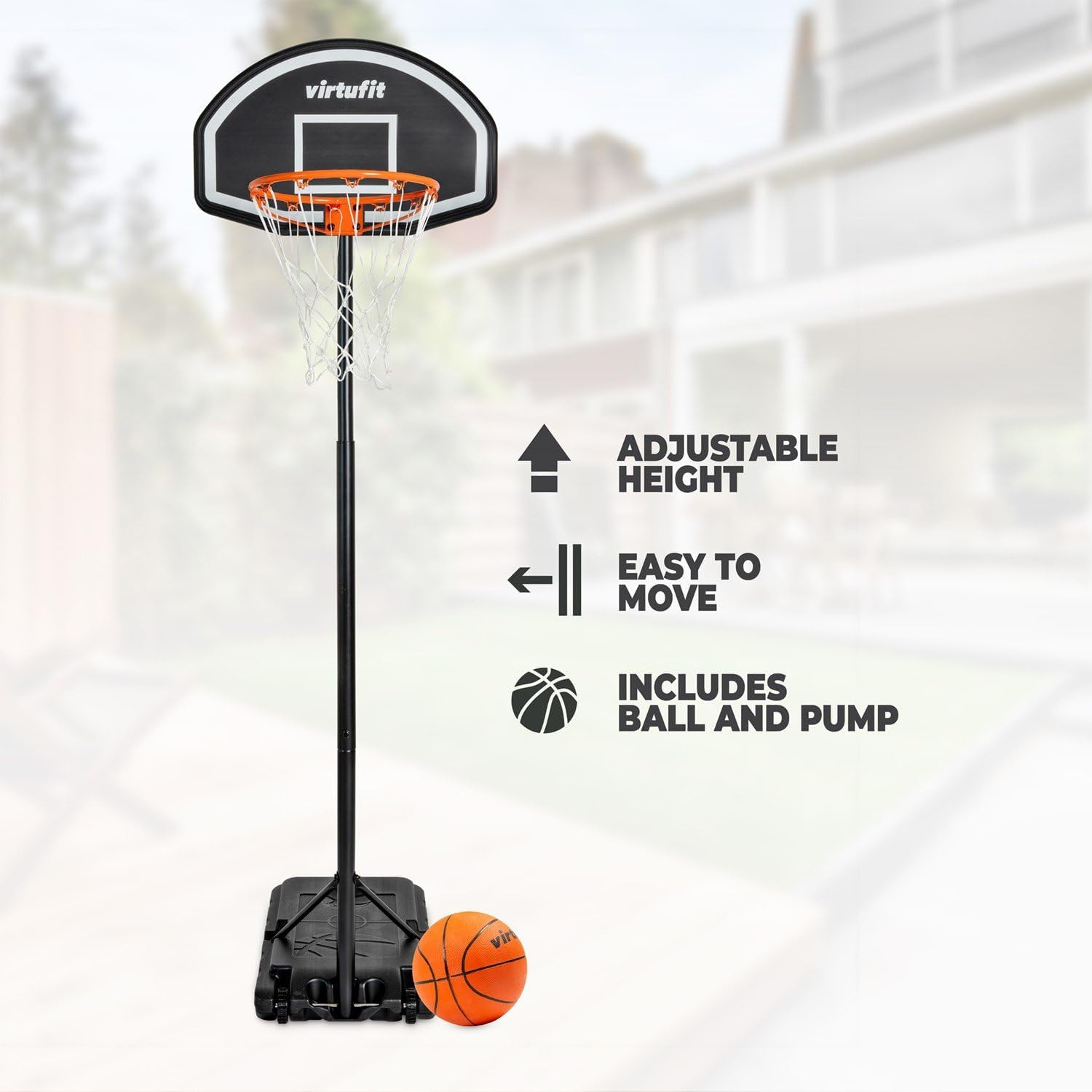
Image: The VirtuFit basketball hoop highlighting its key features: adjustable height, ease of movement, and the inclusion of a basketball and pump.
Çemberi Hareket Ettirmek
The base is designed for easy portability. To move the hoop:
- Ensure the base is filled for stability during movement.
- Carefully tilt the hoop onto its wheels (if equipped) or lift the front edge slightly.
- Roll or slide the hoop to the desired location. Avoid dragging the base if it does not have wheels, as this can cause damage.
- Once in position, ensure the base is flat and stable before use.
Inflating the Basketball
Use the included air pump to inflate the basketball to the recommended pressure, typically indicated on the ball itself. Do not overinflate.
Bakım
Regular maintenance will extend the life of your basketball hoop.
- Temizlik: Clean the backboard, rim, and pole with a damp bez ve yumuşak sabunla temizleyin. Aşındırıcı temizleyicilerden kaçının.
- Bağlantı Elemanlarını Kontrol Edin: Periodically check all bolts, nuts, and screws for tightness. Retighten as necessary.
- Base Level: Ensure the base remains filled and level. Refill water or sand if levels drop due to evaporation or leakage.
- Ağ Değişimi: Replace the net if it becomes worn or damaged.
- Depolamak: During prolonged periods of non-use or in harsh weather, consider lowering the hoop to its minimum height or storing it indoors to protect it from elements.
Sorun giderme
| Sorun | Olası Neden | Çözüm |
|---|---|---|
| Hoop is unstable or wobbly. | Base not fully filled; loose fasteners. | Ensure the base is completely filled with water or sand. Check and tighten all assembly bolts. |
| Yükseklik ayarlama mekanizması sıkışmış durumda. | Dirt or debris in the mechanism; overtightened. | Clean the adjustment mechanism. Apply a silicone-based lubricant if necessary. Do not force it. |
| Net is torn or damaged. | Wear and tear; excessive force. | Replace the net with a new one. |
Özellikler
- Marka: VirtuFit
- Model Numarası: VF06041
- Ayarlanabilir yükseklik: 170 cm ila 215 cm
- Çerçeve Malzemesi: Polietilen (PE)
- Renk: Siyah
- Ürün Ağırlığı: 9.3 Kilogram
- Ürün Ölçüleri: 75 x 215 x 45 cm (approximate, assembled at max height)
- Montaj Tipi: Floor Mount (with fillable base)
Garanti ve Destek
VirtuFit products are designed for quality and durability. For warranty information, specific terms, or technical support, please refer to the warranty card included with your purchase or visit the official VirtuFit website. If you have questions or require assistance, please contact VirtuFit customer service directly.
Üretici: VirtuFit
Webalan: VirtuFit Official Store on Amazon.nl


