1. Giriş
Thank you for choosing the PRITOM Tronpad 7-inch Android 10 Tablet PC. This manual provides essential information to help you set up, operate, and maintain your new device. Please read these instructions carefully before use to ensure optimal performance and longevity of your tablet.
2. Ürün Bittiview
The PRITOM Tronpad tablet features a 7-inch HD IPS display, a Quad-Core processor, 32GB of internal storage, and runs on Android 10. It includes dual cameras, Wi-Fi, and Bluetooth connectivity, designed for general use and entertainment.
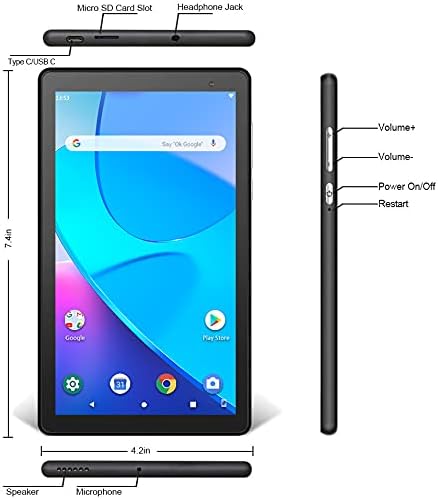
Resim: Ön ve yan view of the PRITOM Tronpad tablet, highlighting the location of its ports and buttons. These include the Micro SD Card Slot, Headphone Jack, Type C/USB C port, Speaker, Microphone, Volume Up and Down buttons, Power On/Off button, and a dedicated Restart button.
Fiziksel Bileşenler:
- Mikro SD Kart Yuvası: Depolama kapasitesini genişletmek için.
- Kulaklık girişi: Kablolu kulaklıkları bağlamak için.
- Type C/USB C Port: Şarj ve veri aktarımı için.
- Konuşmacı: Ses çıkışı.
- Mikrofon: Ses girişi için.
- Ses Düğmeleri (+/-): Ses seviyesini ayarlamak için.
- Güç Açma/Kapatma Düğmesi: To power the device on or off, or to put it to sleep/wake it up.
- Yeniden Başlat Düğmesi: A dedicated button for restarting the tablet if it becomes unresponsive.
3. Kurulum
3.1 İlk Şarj
Before first use, fully charge your tablet. Connect the provided USB-C cable to the tablet's USB-C port and the other end to a compatible power adapter. The charging indicator will typically show the charging status on the screen.
3.2 Açma/Kapatma
- Açmak İçin: Press and hold the Power On/Off button until the PRITOM logo appears.
- Kapatmak İçin: Press and hold the Power On/Off button until a power menu appears on the screen. Select "Power off" and confirm.
- Uyumak/Uyanmak: Briefly press the Power On/Off button to put the tablet to sleep or wake it up.
3.3 İlk Kurulum Sihirbazı
Tablet ilk açıldığında, ilk kurulum süreci boyunca size rehberlik edecektir:
- Dil Seçimi: Tercih ettiğiniz dili seçin.
- Wi-Fi Bağlantısı: İnternete bağlanmak için Wi-Fi ağınızı seçin ve şifreyi girin.
- Google hesabı: Sign in with your existing Google account or create a new one. This is necessary to download apps from the Google Play Store.
- Tarih & Saat: Doğru tarih ve saati ayarlayın veya ağın otomatik olarak ayarlamasına izin verin.
- Güvenlik: Set up a screen lock (PIN, pattern, or password) for security.
4. Kullanım Talimatları
4.1 Temel Gezinme
Tablette gezinme için dokunmatik hareketler kullanılıyor:
- Musluk: Bir öğeyi seçmek veya bir uygulamayı açmak için.
- Dokun ve Basılı Tut: Bağlamsal menülere erişmek veya simgeleri taşımak için.
- Tokatlamak: Sayfalar veya listeler arasında gezinmek için.
- Tutam: Görüntüleri yakınlaştırmak veya uzaklaştırmak için web sayfalar.
4.2 Wi-Fi Bağlantısı
- Git Ayarlar > Ağ ve internet > Wifi.
- Wi-Fi'yi aç/kapat On.
- Listeden istediğiniz ağı seçin ve istendiğinde şifreyi girin.
4.3 Bluetooth Eşleştirme
- Git Ayarlar > Bağlı cihazlar > Bluetooth.
- Bluetooth'u aç/kapat On.
- Ensure the device you want to pair is in pairing mode.
- Mevcut cihazlar listesinden cihazınızı seçin ve eşleştirmeyi tamamlamak için ekrandaki yönergeleri izleyin.
4.4 Kameranın Kullanımı
The tablet is equipped with dual cameras (front and rear).

Image: The PRITOM Tronpad tablet being used to capture a moment with its dual camera functionality.
- Açın Kamera uygulama.
- Ön ve arka kameralar arasında geçiş yapmak için kamera simgesine dokunun.
- Fotoğraf çekmek veya video kaydını başlatmak/durdurmak için deklanşöre dokunun.
4.5 Uygulama Yönetimi
- Uygulamalar yükleniyor: Açın Google Play Mağazası app, search for your desired app, and tap "Install".
- Uygulamaları Kaldırma: Tap and hold the app icon on the home screen or app drawer, then drag it to "Uninstall" or select "App info" and then "Uninstall". Alternatively, go to Ayarlar > Uygulamalar ve bildirimlerUygulamayı seçin ve "Kaldır" seçeneğine dokunun.
4.6 Depolama Yönetimi
The tablet comes with 32GB of internal storage. You can expand this using a Micro SD card.
- To Insert Micro SD Card: Gently insert the Micro SD card into the designated slot until it clicks into place.
- To Manage Storage: Git Ayarlar > Depolamak ile view depolama kullanımını ve yönetimini files.
4.7 Pil Yönetimi
Pil ömrünü optimize etmek için:
- Ekran parlaklığını rahat edeceğiniz bir seviyeye ayarlayın.
- Kullanmadığınız zaman Wi-Fi ve Bluetooth'u kapatın.
- Arka planda çalışan kullanılmayan uygulamaları kapatın.
- Pil Tasarrufu modunu etkinleştirin Ayarlar > Pil.
5. Bakım
5.1 Tabletin Temizlenmesi
Use a soft, lint-free cloth to clean the screen and body of the tablet. Avoid using harsh chemicals or abrasive materials, which can damage the screen or finish.
5.2 Yazılım Güncellemeleri
Periodically check for software updates to ensure your tablet has the latest features and security patches. Go to Ayarlar > Sistem > Sistem güncellemesi.
5.3 Veri Yedekleme
Regularly back up important data to a cloud service (like Google Drive) or an external storage device to prevent data loss.
6. Sorun Giderme
If you encounter issues with your PRITOM Tronpad tablet, try the following solutions:
- Tablet yanıt vermiyor: Press and hold the Power On/Off button for about 10-15 seconds to force a restart. Alternatively, use the dedicated Restart button if available (refer to Product Overview diyagram).
- Yavaş performans: Close unused apps, clear cache (Settings > Storage > Cached data), or restart the tablet. Consider uninstalling rarely used apps to free up storage.
- Wi-Fi bağlantı sorunları: Wi-Fi'nin etkin olduğundan emin olun. Wi-Fi yönlendiricinizi ve tabletinizi yeniden başlatın. Ağı unutun ve yeniden bağlanın.
- Pil şarj olmuyor: Ensure the USB-C cable and power adapter are securely connected and functional. Try a different cable or adapter.
- Uygulamalar çöküyor: Clear the app's cache and data (Settings > Apps & notifications > [App Name] > Storage & cache). If the issue persists, uninstall and reinstall the app.
If these steps do not resolve the issue, please contact PRITOM customer support for further assistance.
7. Özellikler
| Özellik | Şartname |
|---|---|
| Marka | PRİTOM |
| Model Adı | Tronpad Tablet |
| Ekran Boyutu | 7 inç |
| Ekran Çözünürlüğü | 1024x600 |
| İşletim Sistemi | Android 10 |
| İşlemci | Dört çekirdekli |
| Veri deposu | 1 GB |
| Sabit Disk / Flash Bellek Boyutu | 32 GB |
| Kablosuz Tip | 802.11bgn (Wi-Fi) |
| Arka Webkam Çözünürlüğü | 2.2 MP |
| Ürün Ağırlığı | 8.8 ons |
| Ürün Boyutları | 7.5 x 4.3 x 0.4 inç |
| Ortalama Pil Ömrü | 6 Saat |
8. Garanti ve Destek
8.1 Garanti Bilgileri
PRITOM products are designed for quality and reliability. For specific warranty terms and conditions, please refer to the warranty card included with your product or visit the official PRITOM webalan.
8.2 Müşteri Desteği
If you have any questions, issues, or require technical assistance, please contact PRITOM customer support. The PRITOM team aims to provide attentive service and will respond to inquiries promptly, typically within 24 hours.
You can often find support contact information (such as email) on the PRITOM brand store page or within the product packaging.


