1. Giriş
This user manual provides detailed instructions for the operation and maintenance of your Sunbuck AS-60BU Home Audio Amplifier Stereo Receiver. This 2-channel amplifier is designed to enhance your home audio experience, offering versatile input options including Bluetooth 5.0, USB, SD card, AUX, CD, Line-in, and microphone inputs. Please read this manual thoroughly before using the product to ensure proper function and safety.

Figure 1: Sunbuck AS-60BU Amplifier and Remote Control
2. Güvenlik Talimatları
- Bu cihazı yağmura veya neme maruz bırakmayın.
- Kapağı çıkarmayın. İçeride kullanıcı tarafından onarılabilecek parça bulunmamaktadır. Bakım işlemlerini yetkili personele yaptırın.
- Ünitenin çevresinde yeterli havalandırma olduğundan emin olun. Havalandırma açıklıklarını kapatmayın.
- Connect only to a grounded AC power outlet.
- Elektrik prizlerine veya uzatma kablolarına aşırı yükleme yapmayın.
- Üniteyi ısı kaynaklarının yakınına veya doğrudan güneş ışığına maruz bırakmayın.
- Şimşekli fırtınalar sırasında veya uzun süre kullanılmadığında elektriği kesin.
- Çocukların erişemeyeceği yerde saklayınız.
3. Paket İçeriği
Paketinizde tüm öğelerin bulunduğunu doğrulayın:
- Sunbuck AS-60BU Ampalıcı
- AC Güç Kablosu
- Kullanım Kılavuzu (bu belge)
- Uzaktan kumanda

Şekil 2: Kutuda Neler Var?
4. Ürün Bittiview
4.1 Ön Panel

Şekil 3: Ön ve Arka Panel Düzeni
| Özellik | Tanım |
|---|---|
| GÜÇ AÇIK / KAPALI) | Ünitenin ana güç anahtarı. |
| AUX GİRİŞİ | Harici ses cihazlarını bağlamak için 3.5 mm jak. |
| Giriş Seçici | Rotary knob to select audio input source: LINE, CD, AUX, MEDIA PLAYER. |
| BAS Kontrolü | Düşük frekanslı ses çıkışını ayarlar. |
| TİZ Kontrolü | Yüksek frekanslı ses çıkışını ayarlar. |
| EKO Kontrolü | Mikrofon girişleri için yankı efektini ayarlar. |
| M.TONE Control | Adjusts the microphone tone. |
| MIC SES Kontrolü | Adjusts the volume of the microphone inputs. |
| ANA SES | Main volume control for all audio output. |
| USB/SD/MMC Port | Input for USB flash drives and SD/MMC cards for media playback. |
| MEDIA PLAYER Display & Buttons | Digital display and controls (MODE, Play/Pause, Previous, Next) for USB/SD/Bluetooth playback. |
| MİK 1 / MİK 2 | 6.35 mm mikrofon giriş jakları. |
4.2 Arka Panel
| Özellik | Tanım |
|---|---|
| CD L/R IN | RCA stereo input for CD players. |
| LINE L/R IN | RCA stereo input for general line-level audio sources. |
| FM Anteni | Connection point for the FM radio antenna. |
| DC Güç Girişi | Güç girişi için ampcankurtaran. |
| Speaker Output (L/R) | Pasif hoparlörleri (4-16 ohm) bağlamak için kullanılan bağlantı terminalleri. |
5. Kurulum
Follow these steps to set up your Sunbuck AS-60BU ampkaldırıcı:
- Hoparlör Bağlantısı: Connect your passive speakers to the "Speaker Output (L/R)" binding posts on the rear panel. Ensure correct polarity (+ to + and - to -) for optimal sound. This amplifier supports speakers with an impedance range of 4 to 16 ohms.
- Ses Kaynağı Bağlantısı:
- For CD players, connect RCA cables from the CD player's output to the "CD L/R IN" on the ampcankurtaran.
- For other line-level devices (e.g., tape drive, tuner), connect RCA cables to the "LINE L/R IN".
- For devices with a 3.5mm output (e.g., smartphones, tablets), use a 3.5mm audio cable to connect to the "AUX INPUT" on the front panel.
- For PC connection, use appropriate cables to connect your PC's audio output to either the LINE IN or AUX IN.

Şekil 4: Bağlantı Şeması
- FM Anten Bağlantısı: If you plan to use the FM radio function, connect an FM antenna to the "FM Antenna" terminal on the rear panel.
- Güç Bağlantısı: Sağlamak amplifier's POWER switch is in the OFF position. Connect the supplied AC power cord to the "DC Power Input" on the rear panel and then to a suitable wall outlet.
6. Kullanım Talimatları
6.1 Güç Açma/Kapatma
Açmak için amplifier, basın GÜÇ switch to the ON position. The LED display will illuminate. To turn off, press the GÜÇ KAPALI konuma getirin.
6.2 Giriş Seçimi
Döndür Giriş Seçici knob on the front panel to choose your desired audio source (LINE, CD, AUX, MEDIA PLAYER). When selecting MEDIA PLAYER, you can then use the MODE button on the front panel or remote to switch between USB, SD, and Bluetooth modes.
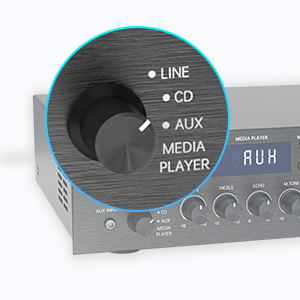
Figure 5: Input Selector
6.3 Bluetooth Bağlantısı
Bluetooth ile bağlanmak için:
- Ayarla Giriş Seçici to MEDIA PLAYER.
- Basın MOD Ekranda "BLUETOOTH" veya "BT" görünene kadar düğmeye basın.
- Mobil cihazınızda (akıllı telefon, tablet, dizüstü bilgisayar) Bluetooth'u etkinleştirin ve kullanılabilir cihazları arayın.
- Select "SUNBUCK" or "AS-60BU" from the list to pair.
- Once paired, you can stream audio wirelessly from your device to the ampcankurtaran.
The Bluetooth range is approximately 40+ feet, but can be affected by obstacles and interference.

Şekil 6: Bluetooth Bağlantısı
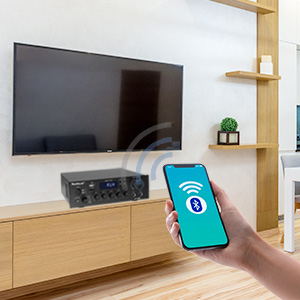
Figure 7: Bluetooth Connection Indicator
6.4 USB/SD Kart Oynatma
To play media from a USB drive or SD/MMC card:
- Insert your USB flash drive or SD/MMC card into the corresponding port on the front panel.
- Ayarla Giriş Seçici to MEDIA PLAYER.
- The amplifier will automatically detect and begin playing supported audio file(MP3, WAV, WMA, APE, FLAC).
- Use the Play/Pause, Previous, and Next buttons on the front panel or remote to control playback.
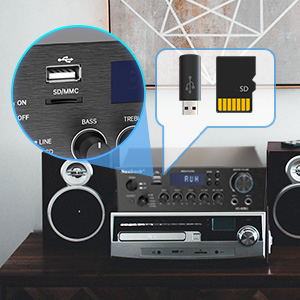
Figure 8: USB/SD Card Slots
6.5 Mikrofon Kullanımı
Connect up to two microphones to the MIC 1 and MIC 2 jacks on the front panel. Adjust the MİKROFON SESİ, YANKI, Ve M.TONE controls to achieve your desired sound for karaoke or public address.

Figure 9: Ideal for Karaoke and Home Entertainment
6.6 FM Radyo
FM radyoyu kullanmak için:
- Ensure an FM antenna is connected to the rear panel.
- Ayarla Giriş Seçici to MEDIA PLAYER.
- Basın MOD Ekranda "FM" görünene kadar düğmeye basın.
- Use the Previous/Next buttons to scan for stations. Note that this model cannot fix and save FM stations.

Figure 10: FM Mode Display
6.7 Ses Ayarlamaları
Kullanın BAS, TİZ, Ve ANA SES knobs on the front panel to fine-tune your audio output. The ANA SES controls the overall sound level.
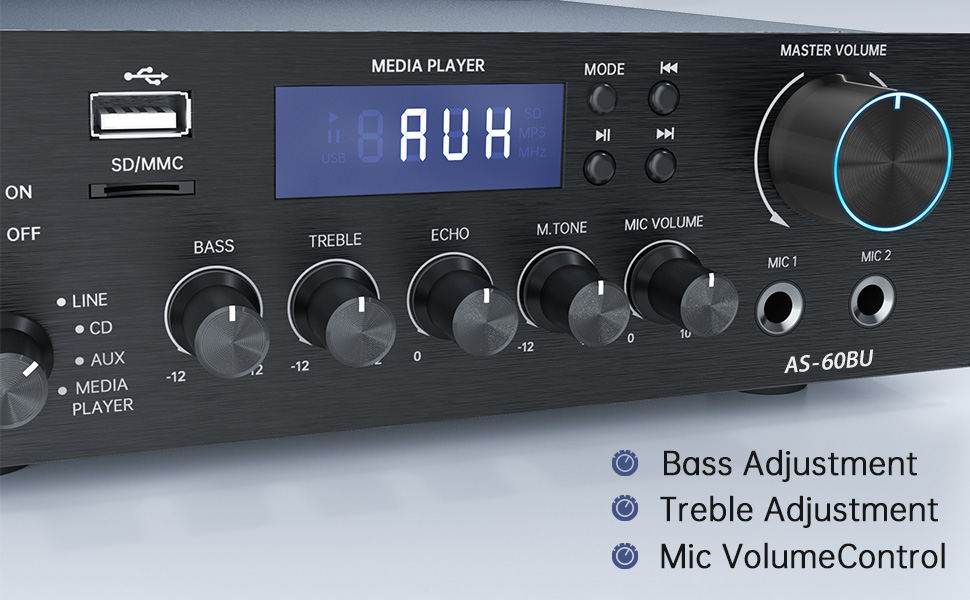
Figure 11: Audio Adjustment Controls
Video 1: Demonstration of Sunbuck AS-60BU amplifier features and sound quality.
7. Bakım
- Temizlik: Cihazın dış yüzeyini temizlemek için yumuşak ve kuru bir bez kullanın. ampLifier. Sıvı temizleyiciler veya aerosoller kullanmayın.
- Depolamak: Uzun süre kullanılmayacaksa, saklayın ampSerin, kuru ve doğrudan güneş ışığından ve aşırı sıcaklıklardan uzak bir yerde saklayın.
- Havalandırma: Aşırı ısınmayı önlemek için havalandırma açıklıklarının toz ve kirden arındırılmış olduğundan emin olun.
8. Sorun Giderme
| Sorun | Olası Neden | Çözüm |
|---|---|---|
| Ses çıkışı yok. | Incorrect input selected, loose speaker connections, low volume. | Verify input selection, check speaker wiring polarity and tightness, increase MASTER VOLUME. |
| Bluetooth connection unstable or short range. | Obstacles between device and amplifier, interference, device too far. | Reduce distance between devices, remove obstacles, avoid other wireless devices. |
| Uzaktan kumanda çalışmıyor. | Dead batteries, line of sight blocked. | Replace batteries, ensure clear path to amplifier'in IR alıcısı. |
| Settings not saved after power off. | This is normal behavior for some settings (e.g., input mode). | Re-select desired input mode after powering on. |
| Bozuk ses. | Input signal too high, speaker impedance mismatch, faulty cables. | Reduce source volume, ensure speakers are within 4-16 ohm range, check/replace cables. |
9. Özellikler
- Modeli: AS-60BU
- Güç Çıkışı: MAX 400W x 2 (RMS 70W x 2)
- Kanallar: 2-Kanal
- Hoparlör Empedansı: 4-16 ohm
- Çıkış Empedansı: 0.1 ohm
- Girişler: 2 x RCA Audio (CD, Line), 2 x Microphone (6.35mm), USB 2.0, SD Card, Bluetooth 5.0, AUX In (3.5mm), FM Radio
- Supported Audio Formats (USB/SD): MP3, WAV, WMA, APE, FLAC
- Ürün Ölçüleri: 8.27 x 7.68 x 2.44 inç
- Ağırlık: 3.24 Pound
- Üretici: JS Electronics Limited
- İlk Mevcut: 9 Eylül 2021
10. Garanti ve Destek
Sunbuck products are designed for reliability and performance. For warranty information or technical support, please refer to the contact details provided with your purchase documentation or visit the official Sunbuck webSite. Satın alma fişinizi, garanti talepleriniz için satın alma belgeniz olarak saklayın.
For further assistance, you may contact the manufacturer, JS Electronics Limited.


