1. Giriş
Welcome to the user manual for your Ulefone Armor X9 Rugged Phone. This guide provides essential information on setting up, operating, maintaining, and troubleshooting your device. The Ulefone Armor X9 is designed for durability and performance, featuring robust protection and advanced functionalities.
Key features of your Ulefone Armor X9 include:
- IP68/IP69K Grade 360 All Round Protection: Zorlu ortamlara dayanıklı olarak üretildi.
- Android 11 İşletim Sistemi: Enjoy the latest Android experience.
- 4 GB RAM + 128 GB ROM: Ample memory and storage for your applications and data.
- 16MP Triple Rear Camera: Capture high-quality photos and videos.
- Massive 5580mAh Battery Capacity: Uzun kullanım süresi.
- Triple Navigation System: Enhanced positioning accuracy.
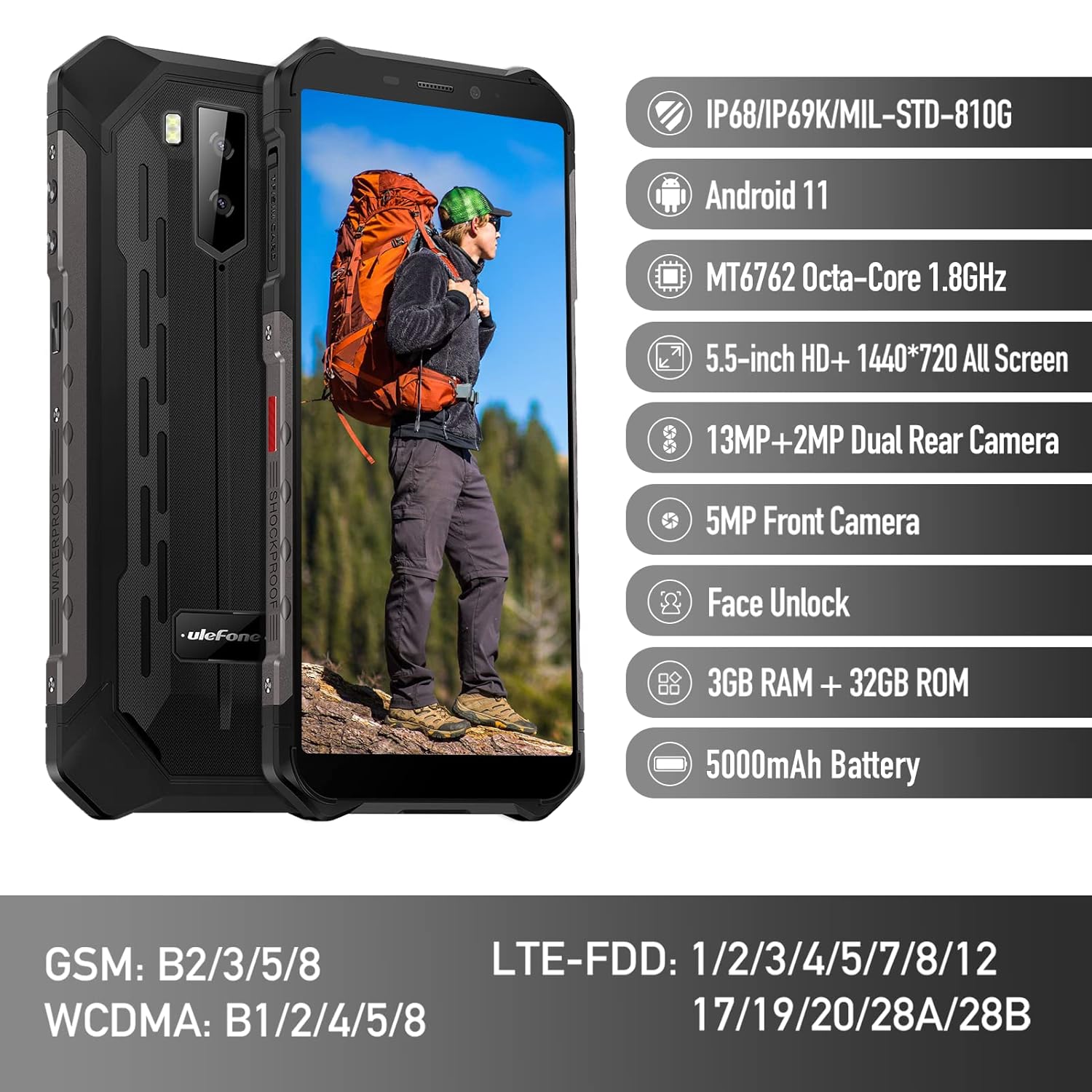
Figure 1: Ulefone Armor X9 Rugged Phone overview, highlighting its robust design and core specifications like IP68/IP69K rating, Android 11, Octa-Core processor, 5.5-inch HD+ screen, 13MP+2MP dual rear camera, 5MP front camera, Face Unlock, 3GB RAM + 32GB ROM, and 5000mAh battery.
2. Kurulum
2.1. SIM Kart ve TF Kart Takılması
The Ulefone Armor X9 supports dual SIM cards and a TF (microSD) card for expandable storage. Follow these steps to install them:
- Telefonun yan tarafında bulunan SIM kart tepsisini bulun.
- Tepsiyi açmak için verilen SIM çıkarma aracını kullanın.
- Carefully place your Nano-SIM cards into the designated slots (SIM1 and SIM2).
- If using a TF card, place it into the dedicated TF card slot. Note that some configurations may share a slot between SIM2 and the TF card.
- Gently push the tray back into the phone until it is flush with the device body. Ensure the tray is properly sealed to maintain water and dust resistance.

Figure 2: Illustration of the dual SIM and TF card tray, showing how to insert SIM1, SIM2, and a TF card into the Ulefone Armor X9.
2.2. İlk Şarj
Before first use, it is recommended to fully charge your Ulefone Armor X9. Use the provided USB cable and power adapter.
- USB kablosunu telefonunuzun şarj portuna bağlayın.
- USB kablosunun diğer ucunu güç adaptörüne bağlayın.
- Güç adaptörünü duvar prizine takın.
- Ekranda şarj göstergesi belirecektir. Pil simgesi doluluk seviyesini gösterene kadar telefonunuzun şarj olmasını bekleyin.
2.3. Açma/Kapama
- Açmak İçin: Ulefone logosu görünene kadar Güç düğmesini (genellikle sağ tarafta bulunur) basılı tutun.
- Kapatmak İçin: Ekranda güç seçenekleri menüsü görünene kadar Güç düğmesini basılı tutun. "Kapat" seçeneğini seçin ve onaylayın.
- Yeniden başlatmak: Güç seçenekleri menüsünden "Yeniden Başlat" seçeneğini seçin ve onaylayın.
3. Kullanım Talimatları
3.1. Temel Gezinme (Android 11)
Your Ulefone Armor X9 runs on Android 11, offering an intuitive user interface. Common gestures and navigation include:
- Yukarı kaydırın: Uygulama çekmecesine erişin.
- Aşagı kaydır: Open the notification panel and quick settings.
- Musluk: Bir öğe seçin veya bir uygulama açın.
- Uzun basma: Bağlamsal menülere erişin veya simgeleri taşıyın.
- Yakınlaştırmak için sıkıştırma: Görüntüleri yakınlaştırın veya uzaklaştırın ve web sayfalar.

Figure 3: Screenshots of the Android 11 interface on the Ulefone Armor X9, showing settings menus, quick toggles, and the sound recorder application.

Figure 4: The 5.5-inch 18:9 All Screen display of the Ulefone Armor X9, showcasing its immersive viewing experience with an image of a skier.
3.2. Kamera Kullanımı
Your phone is equipped with a 16MP Triple Rear Camera and a Front Camera. To use the camera:
- Ana ekranınızdan veya uygulama çekmecenizden "Kamera" uygulamasını açın.
- Fotoğraf çekmek için deklanşöre dokunun.
- Gerektiğinde fotoğraf ve video modları arasında geçiş yapın.
- Tap the icon to switch between the front and rear cameras.
- En iyi sonuçlar için çeşitli kamera modlarını ve ayarlarını keşfedin.
3.3. Bağlantı
The Ulefone Armor X9 supports various connectivity options:
- Wifi: Mevcut ağlara bağlanmak için Ayarlar > Ağ ve İnternet > Wi-Fi'ye gidin.
- Bluetooth: Go to Settings > Connected devices > Bluetooth to pair with Bluetooth devices.
- KÜRESEL KONUMLAMA SİSTEMİ: The phone features AGPS for accurate location services. Ensure location services are enabled in Settings > Location.
- USB BAĞLANTI: Connect your phone to a computer using a USB cable for data transfer or charging.
3.4. Yüz Tanıma Kilidini Açma
For convenient and secure unlocking, your Ulefone Armor X9 supports Face Unlock:
- Ayarlar > Güvenlik > Yüz Tanıma Kilidi'ne gidin.
- Yüzünüzü kaydetmek için ekrandaki talimatları izleyin.
- Ensure good lighting and hold the phone at eye level during registration.
- Kayıt işlemi tamamlandıktan sonra, ön kameraya bakarak telefonunuzun kilidini açabilirsiniz.
4. Bakım
4.1. Temizlik ve Bakım
To maintain the performance and appearance of your rugged phone:
- Ekranı ve gövdeyi yumuşak, tiftiksiz bir bezle silin.
- İnatçı kirler için hafif bir d kullanın.amp Kumaşı sert kimyasallardan veya aşındırıcı malzemelerden uzak tutun.
- Ensure all port covers are securely closed to maintain water and dust resistance, especially after charging or using headphones.

Figure 5: The Ulefone Armor X9's 360° All Protection Design, showcasing its superior materials and superb durability against impacts and harsh conditions.
4.2. Su ve Toz Direnci (IP68/IP69K)
The Ulefone Armor X9 is rated IP68/IP69K, meaning it is resistant to dust and water immersion. However, this resistance is not permanent and may decrease over time with normal wear. To ensure optimal protection:
- Do not intentionally submerge the phone in water for extended periods or beyond specified depths.
- Avoid exposing the phone to high-pressure water or extreme temperatures.
- Ensure all port covers are tightly sealed before exposure to water or dust.
- Telefon ıslanırsa, şarj etmeden veya herhangi bir bağlantı noktasını açmadan önce iyice kurulayın.
4.3. Pil Bakımı
To prolong the life of your 5580mAh Lithium Polymer battery:
- Aşırı sıcaklıklardan (sıcak veya soğuk) kaçının, çünkü bunlar pil performansını düşürebilir.
- Yalnızca orijinal şarj cihazını ve kablosunu veya onaylı uyumlu aksesuarları kullanın.
- Pilinin tamamen boşalmasına sık sık izin vermeyin. Çok düşük seviyelere ulaşmadan önce şarj edin.
5. Sorun Giderme
If you encounter issues with your Ulefone Armor X9, try the following troubleshooting steps:
5.1. Telefon Açılmıyor
- Pilinin dolu olduğundan emin olun. Telefonu en az 30 dakika şarj cihazına bağlayın.
- Yeniden başlatmayı zorlamak için Güç düğmesini 10-15 saniye basılı tutun.
5.2. Şarj Sorunları
- Verify that the charging cable and adapter are working correctly. Try a different charger if available.
- Şarj portunun temiz ve kalıntılardan arındırılmış olduğundan emin olun.
- Make sure the charging cable is fully inserted into the port. Some rugged phone ports may require a firm connection due to protective covers.
5.3. SIM/TF Card Not Detected
- Ensure the SIM/TF card is correctly inserted into the tray and the tray is fully seated.
- Telefonu yeniden başlatın.
- Check if the SIM card is active with your network provider.
5.4. App Crashes or Freezing
- Sorunlu uygulamayı kapatıp yeniden açın.
- Uygulamanın önbelleğini ve verilerini temizleyin (Ayarlar > Uygulamalar > [Uygulama Adı] > Depolama ve önbellek).
- Uygulamanın en son sürüme güncellendiğinden emin olun.
- Telefonu yeniden başlatın.
5.5. Fabrika Ayarlarına Sıfırlama
Sorunlar devam ederse, fabrika ayarlarına sıfırlama işlemi sorunu çözebilir. Uyarı: Bu işlem telefonunuzdaki tüm verileri silecektir. Devam etmeden önce önemli verilerinizi yedekleyin.
- Ayarlar > Sistem > Sıfırlama seçeneklerine gidin.
- "Tüm verileri sil (fabrika ayarlarına sıfırla)" seçeneğini seçin.
- Kararınızı onaylayın ve istendiğinde PIN/şifrenizi girin.
6. Özellikler
Below are the detailed specifications for the Ulefone Armor X9:

Figure 6: Details of the Ulefone Armor X9's Octa-Core Processor, highlighting its power-efficient yet powerful performance, along with 3GB RAM and 32GB ROM, and support for up to 256GB TF card extendable storage.
| Özellik | Şartname |
|---|---|
| İşletim Sistemi | Android 11.0 |
| Veri deposu | 3 GB (Note: Feature bullets mention 4GB RAM, please verify actual model) |
| Bellek Depolama Kapasitesi | 32 GB (Expandable with TF card up to 256GB. Feature bullets mention 128GB ROM, please verify actual model) |
| CPU Modeli | MT6762 Sekiz Çekirdekli 1.8GHz (Note: Specifications list 'Snapdragon', but image indicates MT6762. Please verify actual model) |
| Ürün Boyutları | 15.8x7.75x1.38 cm |
| Ürün Ağırlığı | 472 gr |
| Piller | 1 adet Lityum Polimer pil (5580mAh, dahil) |
| Kablosuz İletişim | Cellular, Bluetooth, USB, Wi-Fi |
| Küresel Konumlama Sistemi | AGPS |
| Özel Özellikler | Rear Camera, Face Unlock, IP68/IP69K, MIL-STD-810G |
| Görüntülemek | 5.5-inch HD+ 1440*720 All Screen |
| Arka Kamera | 13MP+2MP Dual Rear Camera (Note: Feature bullets mention 16MP Triple Rear Camera, please verify actual model) |
| Ön Kamera | 5MP Ön Kamera |
| Renk | Siyah |
| Üretici | Ulefone |
Note: Specifications are based on available product data and may vary slightly. Please refer to your product packaging for the most accurate information. There are discrepancies between feature bullets, specifications, and image text regarding RAM, ROM, CPU, and camera megapixels. This manual uses the most frequently cited or detailed information, with notes for clarification.
7. Garanti ve Destek
7.1. Garanti Bilgileri
Your Ulefone Armor X9 is covered by a manufacturer's warranty. The specific terms and duration of the warranty may vary by region and retailer. Please refer to the warranty card included in your product packaging or contact your point of purchase for detailed information regarding warranty coverage and claims.
7.2. Müşteri Desteği
For technical assistance, troubleshooting beyond this manual, or warranty inquiries, please contact Ulefone customer support or your authorized dealer. You can typically find contact information on the official Ulefone websitenizde veya ürün dokümanlarınızda.
- Visit the official Ulefone website for FAQs, software updates, and support contact details.
- Destek ekibiyle iletişime geçerken satın alma fişinizi ve ürün seri numaranızı elinizin altında bulundurun.


