giriiş
This manual provides essential information for the proper use and maintenance of your USB Programming Cable. This cable is designed to connect your compatible radio to a personal computer, enabling you to program settings and frequencies using appropriate software.
Ürün Özellikleri
| Marka | NC |
| Uzunluk | 100 cm (39.37 inç) |
| Ağırlık | 30 gr (1.06 ons) |
| Pim Çapı | 3.5 mm |
| Arayüz Türü | USB 2.0 |
| Bağlayıcı Türü | Auxiliary, USB 2.0 |
| Kablo Tipi | USB |
| Renk | Siyah |
| Özel Özellik | Dolaşmayan |
| Bağlayıcı Cinsi | Erkek-Erkek |
| Şekil | Yuvarlak |
| Uyumlu Cihazlar | PC |
| İç/Dış Mekan Kullanımı | Açık Hava, Kapalı Alan |
Paket İçeriği
- 1 × USB Programming Cable for YAESU & VERTEX Radio
Compatible Radio Models
This programming cable is compatible with the following YAESU & VERTEX radio models:
- VX-1R
- VX-2R
- VX-3R
- VX-5R
- VX-168
- VX-160
- FT-60R
- ...and other single-hole series YAESU & VERTEX radios.
Kurulum Talimatları
- Sürücü Yazılımını Yükleyin: Before connecting the cable, ensure you have installed the necessary USB driver software for the programming cable on your computer. This software is typically provided with the cable or available for download from the manufacturer's webalan.
- Install Radio Programming Software: Obtain and install the specific programming software for your radio model (e.g., YAESU or VERTEX programming software). This software is essential for configuring your radio.
- Connect Cable to PC: Insert the USB end of the programming cable into an available USB port on your computer.
- Kabloyu radyoya bağlayın: Carefully insert the 3.5mm pin end of the cable into the programming port of your compatible radio. Ensure a secure connection.
- Radyoyu Aç: Radyonuzu açın.
- Programlama Yazılımını Başlatma: Open the radio programming software on your computer.
- Configure Software Port: Within the programming software, navigate to the communication settings or port settings. Select the correct COM port that corresponds to the newly connected USB programming cable. This port number can usually be found in your computer's Device Manager under "Ports (COM & LPT)".
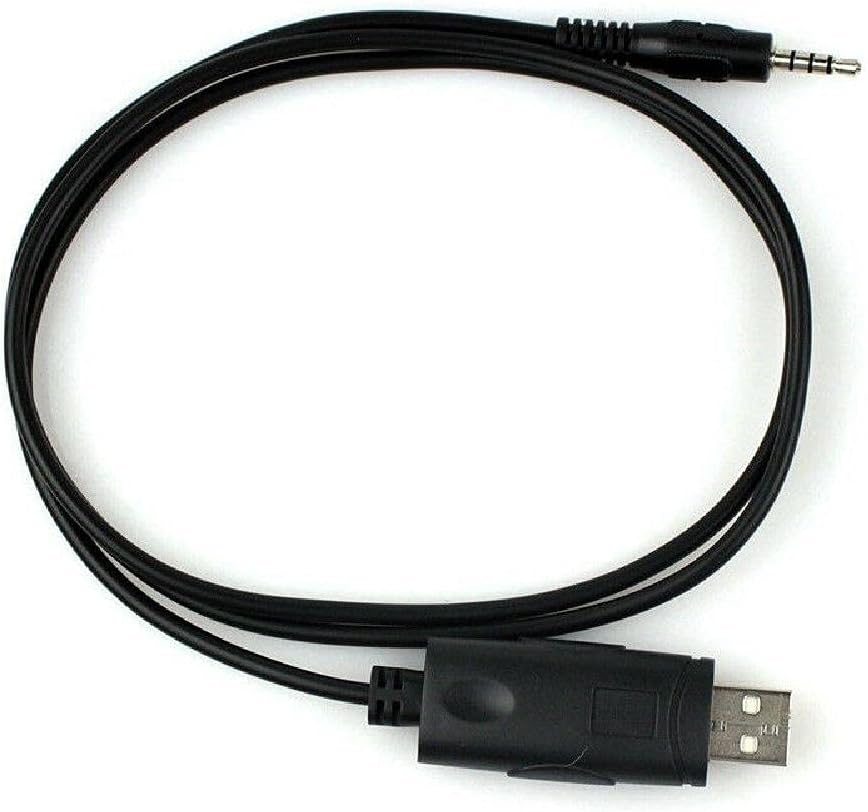
Image: The USB Programming Cable, showing both the USB and 3.5mm pin connectors.
Kullanım Talimatları
Once the cable is connected and the software is configured, you can proceed with programming your radio:
- Radyo Verilerini Okuyun: In the programming software, locate the option to "Read from Radio" or "Download from Radio." This will transfer the current settings from your radio to the software.
- Ayarları Değiştir: Make the desired changes to frequencies, channels, tones, and other settings within the software interface.
- Write Data to Radio: After making modifications, use the "Write to Radio" or "Upload to Radio" function to transfer the new settings from the software back to your radio.
- Doğrulamak: After writing, it is recommended to read the data from the radio again to confirm that the new settings have been successfully applied.

Image: The programming cable in a coiled state, highlighting its flexibility and compact design.
Bakım
- Depolamak: Kabloyu serin, kuru ve doğrudan güneş ışığından ve aşırı sıcaklıklardan uzak bir yerde saklayın.
- Temizlik: Kablo ve konektörleri temizlemek için yumuşak, kuru bir bez kullanın. Sıvı temizleyiciler veya çözücüler kullanmayın.
- İşleme: Avoid bending the cable sharply or pulling on the connectors to disconnect. Always grasp the connector housing when plugging or unplugging.
- Denetleme: Periodically inspect the cable for any signs of damage, such as frayed wires or bent pins. Do not use a damaged cable.
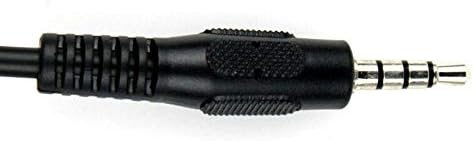
Resim: Ayrıntılı view of the 3.5mm pin connector, showing its structure.
Sorun giderme
- Cable Not Recognized by PC:
- Ensure USB drivers are correctly installed. Check Device Manager for any yellow exclamation marks next to the USB device.
- Bilgisayarınızda farklı bir USB bağlantı noktası deneyin.
- Bilgisayarınızı yeniden başlatın.
- Verify the cable is securely connected to both the PC and the radio.
- Programming Software Cannot Connect to Radio:
- Confirm the correct COM port is selected in the programming software.
- Ensure the radio is powered on and in programming mode (if applicable for your radio model).
- Check that the cable is fully inserted into the radio's programming jack.
- Verify that the programming software is the correct version for your radio model.
- Programlama Hataları:
- Telsizin pilinin yeterince dolu olduğundan emin olun.
- Avoid disconnecting the cable during a read or write operation.
- Consult your radio's specific programming guide for any unique requirements or procedures.
Önemli Notlar
- This cable is designed for data transfer between a radio and a PC for programming purposes only.
- Always use the appropriate and official programming software for your specific radio model.
- Unauthorized modifications to the cable or radio may void warranties and could lead to malfunction.
Resmi Ürün Videoları
Şu an için bu ürüne ait resmi bir ürün videosu bulunmamaktadır.
Garanti ve Destek
Garanti bilgileri veya teknik destek için lütfen satın alma işleminizle birlikte verilen belgelere bakın veya doğrudan üreticiyle iletişime geçin. Garanti talepleriniz için satın alma belgenizi saklayın.