giriiş
This manual provides detailed instructions for the assembly, operation, and maintenance of your FLEXISPOT E4 Classic Electric Standing Desk. Please read this manual thoroughly before use to ensure proper function and longevity of your product.

Figure 1: The FLEXISPOT E4 Classic Electric Standing Desk, featuring a bamboo contour desktop and silver frame, set up with dual monitors in an office environment.
Güvenlik Bilgileri
- Kullanmadan önce tüm bileşenlerin güvenli bir şekilde sabitlendiğinden emin olun.
- Çalışma sırasında çocukları ve evcil hayvanları masadan uzak tutun.
- Do not overload the desk beyond its specified weight capacity (220 lbs).
- Sıvıları doğrudan kontrol paneli veya motor parçalarının üzerine dökmekten kaçının.
- Temizlik veya bakımdan önce gücü kesin.
- Yalnızca sağlanan güç adaptörünü kullanın.
Paket İçeriği
Montaja başlamadan önce lütfen tüm parçaların mevcut olduğundan emin olun. Herhangi bir parça eksik veya hasarlıysa, müşteri hizmetleriyle iletişime geçin.
- Bamboo Contour Whole-Piece Desktop (55"x28")
- Silver Frame Legs (Dual Motor)
- Kontrol Paneli
- Güç Adaptörü ve Kablosu
- Montaj Donanımı (vidalar, aletler, vb.)
- Kullanım Kılavuzu (bu belge)
Kurulum ve Montaj
Bu ürün için montaj gereklidir. Lütfen aşağıdaki adımları dikkatlice izleyin.
- Bileşenleri Paketinden Çıkarın: Tüm parçaları ambalajından dikkatlice çıkarın ve çizilmeleri önlemek için temiz ve yumuşak bir yüzeye serin.
- Ayakları Masaüstüne Takın: Position the desktop upside down. Align the leg frames with the pre-drilled holes on the underside of the desktop. Secure them using the provided screws and tools.
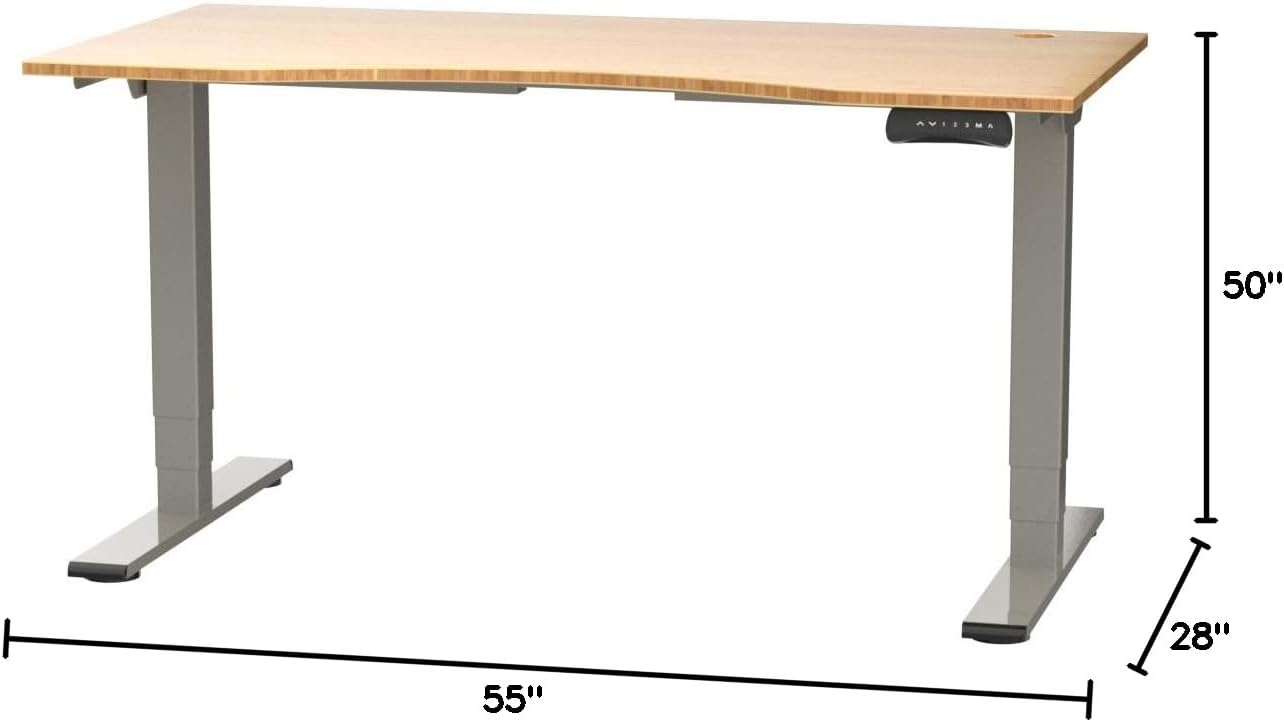
Figure 2: Desk dimensions indicating 55 inches width, 28 inches depth, and adjustable height up to 50 inches.
- Denetim Masası'nı yükleyin: Mount the control panel to the desired location on the underside of the desktop, typically on the front edge for easy access. Connect the control panel cable to the motor control box.

Figure 3: The programmable control panel with LED display, up/down buttons, and memory presets (1, 2, 3, M, A).
- Gücü bağlayın: Plug the power adapter into the control box, and then plug the power cable into a standard electrical outlet.
- Kablo yönetimi: Utilize the two cable management holes on the desktop to route and organize your cables, preventing clutter.

Figure 4: Detail showing the integrated cable management holes and the water-resistant surface of the bamboo desktop.
- İlk Kalibrasyon: After assembly and power connection, the desk may require an initial calibration. Refer to the "Operating Instructions" section for details on resetting or calibrating the desk.
Kullanım Talimatları
Yükseklik Ayarı
The FLEXISPOT E4 Classic desk features a dual-motor lift system for smooth and quiet height adjustments.
- Masayı Kaldır: Basılı tutun Yukarı Ok button (▲) on the control panel. The desk will move upwards.
- Alt Masa: Basılı tutun Aşağı Ok button (▼) on the control panel. The desk will move downwards.
- Release the button at your desired height. The desk can adjust from 24.4 inches to 50 inches.
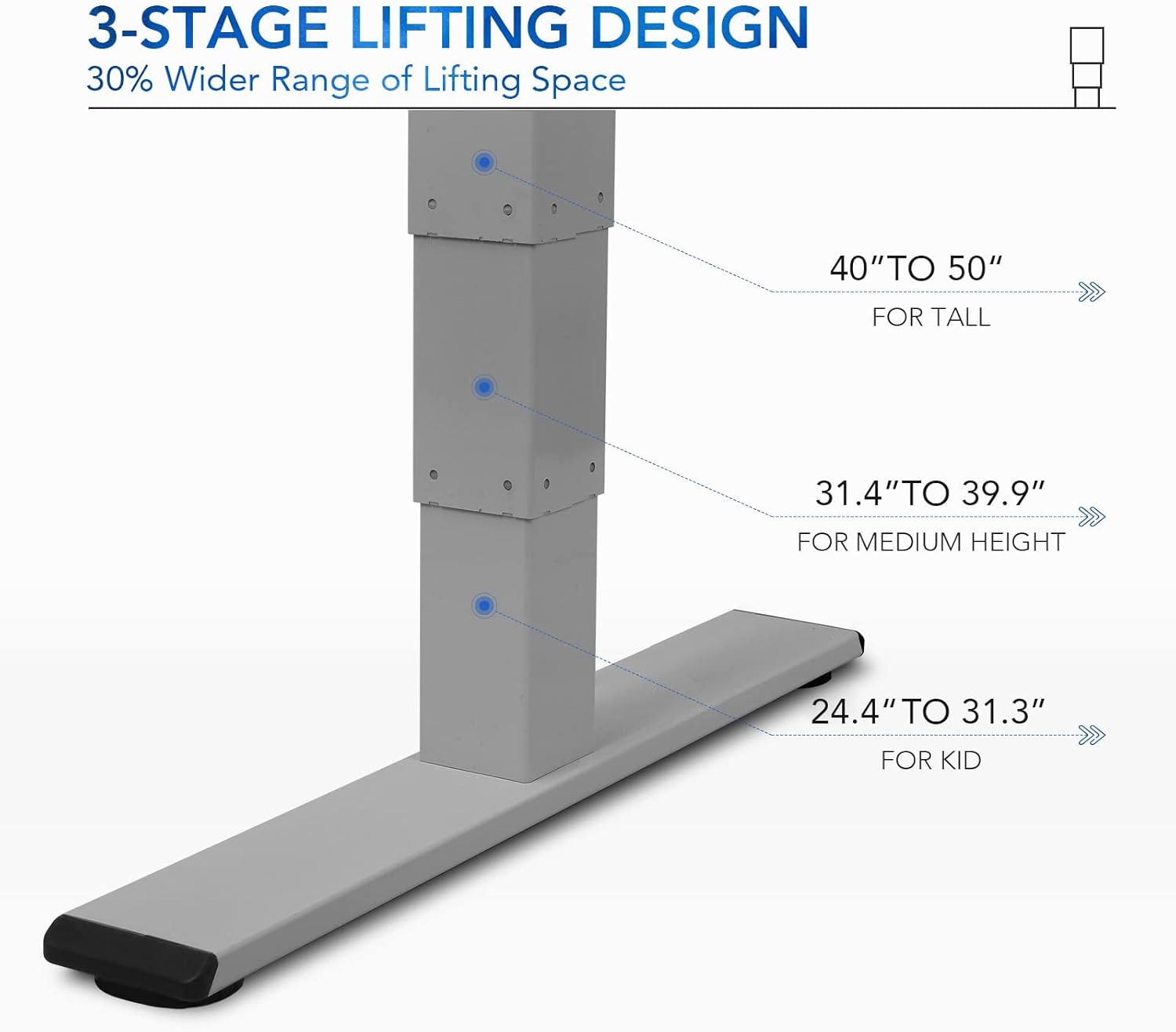
Şekil 5: 3'lertage lifting design provides a wide range of height adjustments, suitable for various user heights, from 24.4" (kid) to 50" (tall).
Programmable Memory Presets
Kontrol paneli, hızlı ayarlamalar için üç adede kadar tercih edilen yükseklik ayarını kaydetmenize olanak tanır.
- Bellek Pozisyonu Ayarla:
- Yukarı/Aşağı tuşlarını kullanarak masayı istediğiniz yüksekliğe ayarlayın.
- Basın "M" button. The LED display will show "S-".
- Within 3 seconds, press one of the number buttons ("1", "2", veya "3") to save the current height to that preset. The display will show "S-1", "S-2", or "S-3" to confirm.
- Bir Hafıza Pozisyonunu Hatırlama: İlgili sayı düğmesine basmanız yeterlidir ("1", "2", veya "3"Masa, kaydedilen yüksekliğe otomatik olarak hareket edecektir.
Sit/Stand Reminder
The "A" button can be used to set a reminder to switch between sitting and standing positions.
- Consult the full manual for detailed instructions on setting and customizing the sit/stand reminder function.
Ergonomic Curved Design
The 55"x28" desktop features an ergonomic curved design for enhanced comfort and efficiency during work or study.

Figure 6: The ergonomic curved edge of the desktop, designed to provide a more comfortable and natural working posture.
Bakım
- Temizlik: Masanın yüzeyini ve çerçevesini yumuşak bir bezle silin.amp cloth. Avoid abrasive cleaners or harsh chemicals. The bamboo surface is designed to be water-resistant, making it easy to clean.
- Motor Bakımı: The dual-motor system is designed for low noise and durability. No specific user maintenance is required for the motors.
- Kablo yönetimi: Periodically check that all cables are neatly routed through the cable management holes and are not pinched or tangled.
- Bağlantı Elemanı Kontrolü: Tüm vida ve bağlantı elemanlarının sıkılığını ara sıra kontrol edin. Gerekirse tekrar sıkın.
Sorun giderme
| Sorun | Olası Neden | Çözüm |
|---|---|---|
| Masa hareket etmiyor. | Power cable disconnected; overload protection activated; motor error. | Check power connections. Reduce weight on desk. Unplug and replug power after 10 minutes. Perform a reset (see below). |
| Masa dengesiz hareket ediyor veya alışılmadık sesler çıkarıyor. | Loose fasteners; obstruction; motor synchronization issue. | Check and tighten all assembly screws. Ensure no obstructions under the desk. Perform a reset. |
| LED display shows an error code (e.g., "E01", "RST"). | System error; need for reset. | Sıfırlama Prosedürü: Press and hold the Down Arrow button until the desk reaches its lowest position and then slightly rises. Release the button. If the error persists, unplug the desk for 10 minutes and try again. |
| Bellek ön ayarları çalışmıyor. | Ön ayarlar doğru şekilde kaydedilmedi. | Re-save your desired memory positions following the "Programmable Memory Presets" instructions. |
If the issue persists after attempting these solutions, please contact FLEXISPOT customer support.
Özellikler
| Özellik | Detay |
|---|---|
| Örnek | E4 Classic |
| Marka | ESNEKLİK |
| Masaüstü Malzemesi | Bamboo Contour Whole-Piece Board |
| Çerçeve Malzemesi | Alloy Steel (Silver Frame) |
| Ürün Boyutları (D x G x Y) | 28"D x 55"G x 50"Y (Maksimum Yükseklik) |
| Yükseklik Ayar Aralığı | 24.4" ila 50" |
| Kaldırma Sistemi | Dual Motor, 3-Stage Lifting |
| Ağırlık Kapasitesi | 220 lbs'ye kadar |
| Özel Özellikler | Electric Height Adjustment, Programmable Memory Presets, Sit/Stand Reminder, Curved Ergonomic Design, Cable Management Holes, Waterproof Surface |
| Montaj Gerekli | Evet |
Garanti ve Destek
FLEXISPOT products are designed for durability and performance. For specific warranty details regarding your E4 Classic Electric Standing Desk, please refer to the warranty card included with your purchase or visit the official FLEXISPOT webalan.
For technical support, troubleshooting assistance, or to inquire about replacement parts, please contact FLEXISPOT customer service:
- Webalan: www.flexispot.com
- E-posta: support@flexispot.com
- Telefon: yetkiliye başvurun webbölgesel iletişim numaraları için site.
When contacting support, please have your product model (E4 Classic) and purchase information ready.


