1. Üzeriview
The Nokia XR20 is a rugged 5G smartphone designed for durability and performance. This manual provides essential information for its setup, operation, and maintenance.

Resim 1.1: Ön ve arka view of the Nokia XR20 5G smartphone.
Temel Özellikler:
- Sağlam Tasarım: MIL-STD-810H compliant, IP68 dust and water resistance, Corning Gorilla Glass Victus.
- Görüntülemek: 6.67-inch FHD+ (1080x2400) display.
- Kamera: 48MP main camera with 13MP ultrawide lens, 8MP front camera.
- Performans: Qualcomm Snapdragon 480 5G processor, 6GB RAM, 128GB internal storage (expandable up to 512GB with MicroSD).
- Bağlantı: 5G, Wi-Fi 6, Bluetooth 5.1, NFC, GPS.
- Pil: 4630 mAh battery with 18W wired and 15W wireless charging support.
- İşletim Sistemi: Android 11 (upgradable to Android 14), with guaranteed OS upgrades and security updates.
2. Başlarken
2.1. Kutudan Çıkarma ve Paket İçeriği
Başlamadan önce pakette tüm öğelerin mevcut olduğundan emin olun:

Image 2.1: Contents of the Nokia XR20 package, including the phone, power adapter, USB-C cable, SIM tray ejector, and screen protector.
- Nokia XR20 Smartphone
- Güç Adaptörü
- USB C Tipi Kablo
- SIM Tepsisi Çıkarıcı
- Ekran Koruyucu (önceden takılmış veya dahil)
2.2. SIM ve MicroSD Kartların Takılması
- Telefonun yan tarafında bulunan SIM/MicroSD kart yuvasını bulun.
- SIM kart tepsisi çıkarma aracını tepsinin yanındaki küçük deliğe yerleştirin ve tepsi dışarı çıkana kadar sıkıca bastırın.
- Place your Nano-SIM card(s) and/or MicroSD card into the designated slots on the tray. Ensure the gold contacts face downwards. The Nokia XR20 supports Dual SIM functionality.
- Tepsiyi yerine oturana kadar dikkatlice telefona doğru itin.
2.3. İlk Şarj ve Güç Açma
- Connect the USB Type-C cable to the phone's charging port and the power adapter. Plug the adapter into a wall outlet.
- Allow the phone to charge for at least 30 minutes before first use, or until the battery indicator shows sufficient charge.
- To power on, press and hold the Power button (located on the side) until the Nokia logo appears.
2.4. Taşıyıcı Uyumluluğu
The Nokia XR20 is an unlocked device compatible with all GSM carriers, including AT&T, Boost, Cricket, H2O Wireless, Metro, Net10, Simple Mobile, T-Mobile, and Tracfone. It is not compatible with Verizon. Please confirm 5G network availability with your preferred carrier.

Image 2.2: The Nokia XR20 is compatible with various GSM carriers.
3. Telefonunuzu Kullanma
3.1. Temel Gezinme
The Nokia XR20 runs on Android 11 (upgradable). Navigate using on-screen gestures or the navigation bar at the bottom of the display.
- Ana Ekran: Farklı ana ekranlara erişmek için sola veya sağa kaydırın.
- Uygulama Çekmecesi: için ekranın altından yukarı doğru kaydırın. view tüm yüklü uygulamalar.
- Bildirimler ve Hızlı Ayarlar: Bildirimlere ve hızlı ayarlara erişmek için ekranın üstünden aşağı doğru kaydırın.
3.2. Kamera Fonksiyonları
The Nokia XR20 features a dual rear camera system (48MP main, 13MP ultrawide) and an 8MP front camera.

Image 3.1: The Nokia XR20 features a 48MP dual camera system with ZEISS optics.
- Ana ekranınızdan veya uygulama çekmecenizden Kamera uygulamasını açın.
- Fotoğraf çekmek için deklanşöre dokunun.
- Ekranda sola veya sağa kaydırın viewfinder to switch between photo, video, and other modes (e.g., Portrait, Night, Panorama).
- Arka ve ön kameralar arasında geçiş yapmak için kamera değiştirme simgesine dokunun.
- Utilize the 13MP ultrawide lens for broader landscape shots or group photos.
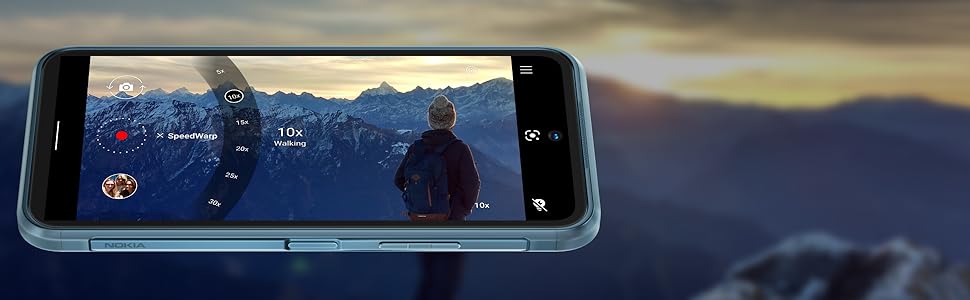
Image 3.2: The camera interface offers various modes and settings for capturing photos and videos.
3.3. 5G Connectivity
The Nokia XR20 supports 5G networks, offering faster download and upload speeds where available. Ensure your SIM card and mobile plan support 5G.

Image 3.3: Experience superfast 5G connectivity for quick data transfers.
3.4. Google Asistan
Access Google Assistant by saying "Hey Google" or by long-pressing the dedicated Google Assistant button on the side of the device. Use it for voice commands, information retrieval, and smart home control.

Image 3.4: Google Assistant provides hands-free help and information.
3.5. Parmak İzi Sensörü
The fingerprint sensor is integrated into the side power button for convenient and secure unlocking. To set it up, go to Ayarlar > Güvenlik > Parmak İzi Kilidi Açma ve ekrandaki talimatları izleyin.
4. Bakım ve Onarım
4.1. Dayanıklılık Özellikleri
The Nokia XR20 is built to withstand challenging environments:
- IP68 Derecesi: Toz girişine ve 1.5 metreye kadar su altında 60 dakika süreyle daldırmaya karşı koruma sağlar.
- MIL-STD-810H standardına uygun: Tested against military standards for drops, temperature extremes, and other environmental factors.
- Corning Gorilla Glass Victus: The display is protected by the toughest Gorilla Glass available, offering enhanced scratch and drop resistance.

Image 4.1: The Nokia XR20 is designed to be water-resistant.
4.2. Cihazınızı Temizleme
To clean your Nokia XR20, use a soft, lint-free cloth. For stubborn dirt or smudges, slightly dampen the cloth with water. Avoid using harsh chemicals, abrasive cleaners, or compressed air, as these can damage the device's protective coatings or seals.
4.3. Yazılım Güncellemeleri
Nokia provides 2 years of OS upgrades and up to 4 years of monthly security updates for the XR20 to ensure your device remains secure and up-to-date with the latest features.

Image 4.2: Regular software updates ensure your phone remains secure and performs optimally.
4.4. Pil Bakımı
The Nokia XR20 is equipped with a 4630 mAh non-removable battery. To maximize battery life:
- Aşırı sıcaklıklardan kaçının.
- Use the provided charger or a compatible 18W wired or 15W wireless charger.
- Optimize screen brightness and disable unnecessary features like GPS or Bluetooth when not in use.
5. Sorun Giderme
This section addresses common issues you might encounter with your Nokia XR20.
5.1. Cihaz Açılmıyor
- Pilin şarjlı olduğundan emin olun. Telefonu şarj cihazına bağlayın ve tekrar açmayı denemeden önce birkaç dakika bekleyin.
- Zorla yeniden başlatmayı gerçekleştirmek için Güç düğmesini en az 10-15 saniye basılı tutun.
5.2. Ağ Bağlantı Sorunları
- Check if your SIM card is correctly inserted (refer to Section 2.2).
- Verify that your mobile data is enabled in Quick Settings or Ayarlar > Ağ ve internet > Mobil ağ.
- Ensure your device is compatible with your carrier (refer to Section 2.4).
- Telefonunuzu yeniden başlatın.
5.3. Şarj Sorunları
- Ensure the charging cable and adapter are securely connected to both the phone and the power outlet.
- Try using a different compatible USB-C cable and power adapter.
- Şarj portunda herhangi bir kalıntı veya hasar olup olmadığını kontrol edin.
5.4. Ekran Tepki Vermiyor
- Güç düğmesine 10-15 saniye basılı tutarak zorunlu yeniden başlatma işlemini gerçekleştirin.
- Sorun devam ederse müşteri desteği ile iletişime geçin.
6. Teknik Özellikler

Image 6.1: Physical dimensions and weight of the Nokia XR20.
| Özellik | Şartname |
|---|---|
| Model Numarası | TA-1371 |
| Boyutlar | 171.6 x 81.5 x 10.6 mm (6.76 x 3.21 x 0.42 inç) |
| Ağırlık | 248 gr (8.75 ons) |
| İşletim Sistemi | Android 11 (Android 14'e yükseltilebilir) |
| İşlemci | Qualcomm SM4350 Snapdragon 480 5G (8 nm) Octa-core |
| Veri deposu | 6 GB |
| Dahili Depolama | 128 GB |
| Genişletilebilir Depolama | MicroSDXC up to 512 GB (uses shared SIM slot) |
| Görüntülemek | 6.67 inches IPS LCD, 1080 x 2400 pixels (FHD+), 20:9 ratio, Corning Gorilla Glass Victus |
| Arka Kamera | 48 MP, f/1.8 (wide) + 13 MP, f/2.4 (ultrawide) with ZEISS optics |
| Ön Kamera | 8 MP, f/2.0 (geniş açı) |
| Pil | Li-Po 4630 mAh, çıkarılamaz |
| Şarj etme | 18W wired, 15W wireless |
| Bağlantı | Wi-Fi 802.11 a/b/g/n/ac/6, Bluetooth 5.1, NFC, GPS (L1+L5), USB Type-C 3.0 |
| Sensörler | Side-mounted Fingerprint, Accelerometer, Gyro, Proximity, Compass, Barometer |
| Dayanıklılık | IP68 dust/water resistant, MIL-STD-810H compliant, Corning Gorilla Glass Victus |
7. Garanti ve Destek
7.1. Üretici Garantisi
The Nokia XR20 comes with a manufacturer's warranty. Please refer to the warranty card included in your product packaging or visit the official Nokia webKapsama süresi ve hizmet prosedürleri de dahil olmak üzere ayrıntılı hüküm ve koşullar için lütfen siteyi ziyaret edin.
7.2. Müşteri Desteği
For further assistance, technical support, or service inquiries, please visit the official Nokia support website or contact their customer service helpline. Contact information can typically be found on the Nokia websitenizde veya ürün dokümanlarınızda.


