1. Ürün Bittiview
The Zemismart Smart Curtain Robot is an intelligent device designed to automate the opening and closing of your curtains. It offers multiple control options including the Tuya App, RF remote control, and voice commands via smart assistants like Alexa, Google Assistant, and Siri. This device is compatible with various curtain track types, providing convenience and smart home integration.
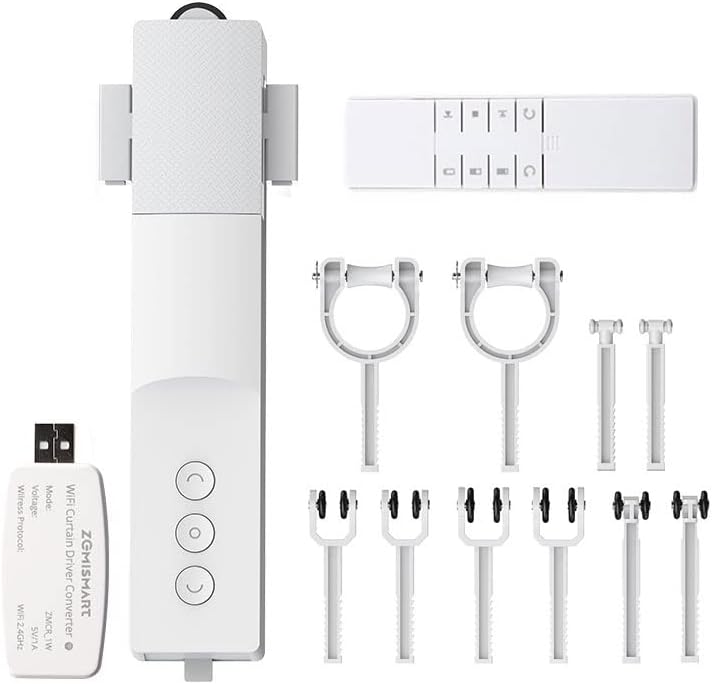
Image 1.1: The Zemismart Smart Curtain Robot, including the main unit, remote control, and various adapters for different curtain rails.
Temel Özellikler:
- Kolay Kurulum: No screws or complex tools required.
- Çoklu Kontrol Seçenekleri: Tuya App/Smart Life App, RF 433 remote control, Voice Control (Alexa, Google Assistant, Siri).
- Entegre Pil: 3000mAh lithium battery for long standby time.
- Solar Panel Support: Optional solar panel for continuous charging (sold separately).
- Strong Load-Bearing: 10 kg'a kadar olan perdeleri destekler.
- Geniş Uyumluluk: Suitable for Roman rods (20-28mm), I-rails (width 12.8-14mm, height ≥12mm), and U-rails (width >15mm, height >12.7mm, gap width 6.5-8mm).
- Zamanlayıcı Fonksiyonu: Schedule curtain opening and closing times.
- Position Memory: Remembers preferred open/close positions.
2. Güvenlik Bilgileri
Lütfen kurulum ve kullanımdan önce tüm güvenlik talimatlarını okuyun ve anlayın. Bu talimatlara uyulmaması elektrik çarpmasına, yangına veya ciddi yaralanmaya neden olabilir.
- Cihazı sudan ve yüksek nemden uzak tutun.
- Cihazı sökmeye, onarmaya veya değiştirmeye çalışmayın. Yardım için müşteri desteğiyle iletişime geçin.
- Ensure the curtain track is securely installed and can support the weight of the curtains plus the device.
- Keep children and pets away from moving curtains and the device during operation.
- Sadece belirtilen şarj aksesuarlarını kullanın.
- Cihazı aşırı sıcaklıklara maruz bırakmayın.
3. Paket İçeriği
Paketinizde tüm bileşenlerin mevcut olduğunu doğrulayın:
- Smart Curtain Robot Main Unit
- RF Uzaktan Kumanda
- USB WiFi Dongle (for App control)
- Adapters for Roman Rods
- Adapters for U-Rails
- Adapters for I-Rails
- Kullanım Kılavuzu (bu belge)
4. Kurulum ve Kurulum
The Zemismart Smart Curtain Robot is designed for quick and easy installation, typically taking around 30 seconds per unit.
Uyumluluk Kontrolü:
Ensure your curtain track or rod is compatible with the device. Refer to the specifications below:
- Roman Rods: Çap 20-28 mm
- I-Rails: Width 12.8-14mm, Height ≥12mm
- U-Rails: Width >15mm, Height >12.7mm, Gap Width 6.5-8mm
Not: This motor is not compatible with telescopic rods.
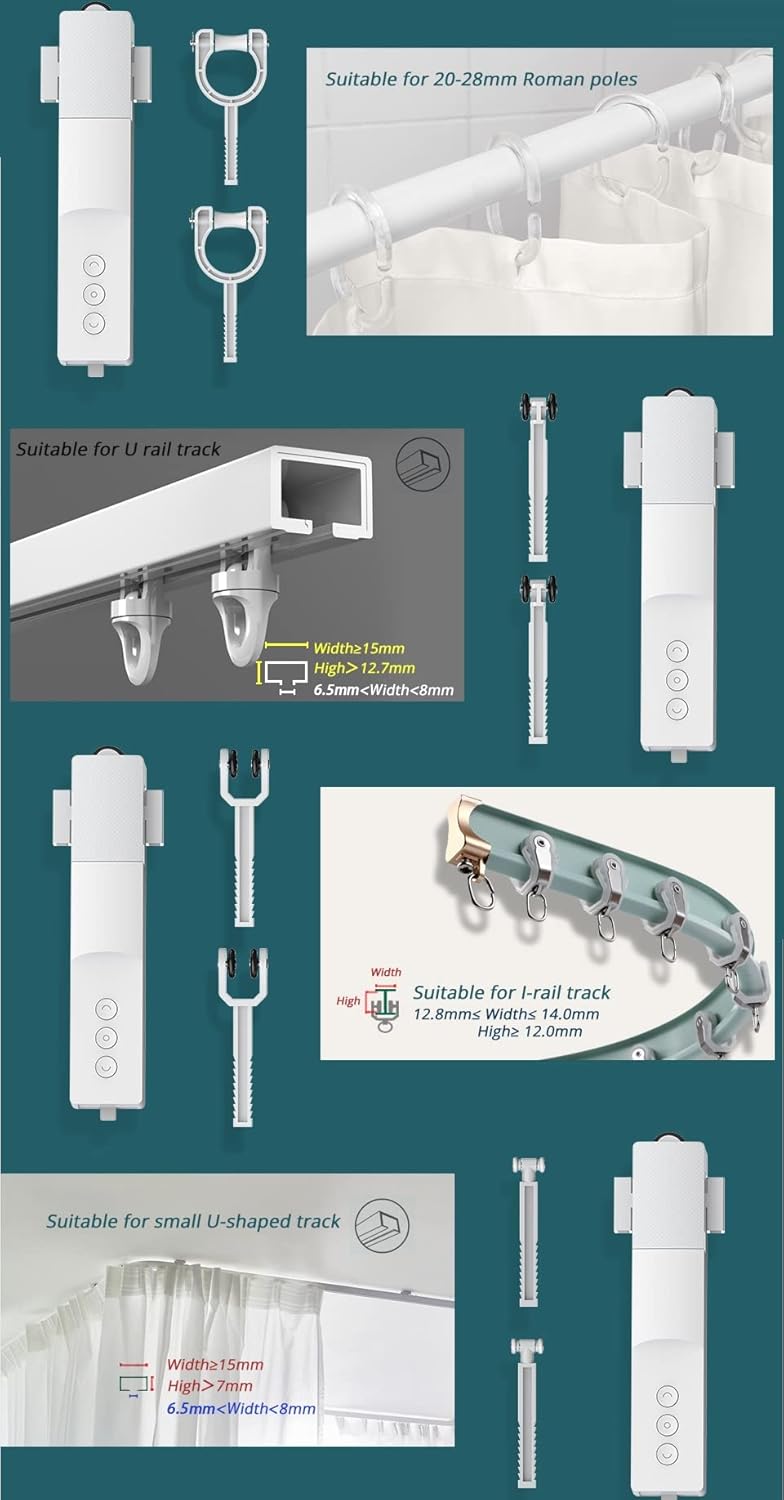
Image 4.1: Visual guide for compatible curtain rod and rail dimensions.
Kurulum Adımları:
- Select Appropriate Adapters: Based on your curtain type (Roman rod, U-rail, or I-rail), choose the correct set of adapters from the package.
- Attach Adapters to Robot: Securely attach the chosen adapters to the main unit of the Smart Curtain Robot.
- Mount the Robot: Gently clip or slide the robot with its adapters onto your curtain rod or rail. Ensure it is firmly in place and can move freely along the track.
- İlk Güç Açma: Robotu açmak için üzerindeki güç düğmesine basın.
- Pairing (Optional): If using the Tuya App, plug in the WiFi dongle and follow the app's instructions to pair the device.

Image 4.2: The installation process is quick and straightforward for various rail types.
5. Operasyon
Cihazı Şarj Etme:
The Smart Curtain Robot has a built-in 3000mAh lithium battery. Charge the device using the provided USB cable. For continuous power, an optional solar panel can be connected (sold separately).

Image 5.1: The device features a 3000mAh battery, offering extended standby time on a single charge.

Image 5.2: The Smart Curtain Robot can be powered by an optional solar panel, eliminating the need for frequent charging.
Kontrol Yöntemleri:
The Smart Curtain Robot offers versatile control options:
- Tuya App / Smart Life App: Download the Tuya or Smart Life app from your smartphone's app store. Follow the in-app instructions to add and control your device. The app allows remote control, timer settings, and percentage-based opening/closing.
- RF Uzaktan Kumanda: Use the included RF remote to open, close, or stop the curtains. The remote supports continuous movement or inching mode, and can control multiple robots simultaneously or individually.
- Ses Kontrolü: Integrate the device with Alexa, Google Assistant, or Siri for hands-free operation. Once connected, you can use voice commands like "Alexa, open the living room curtains."

Image 5.3: Voice control integration with smart assistants like Google, Alexa, and Siri for convenient operation.
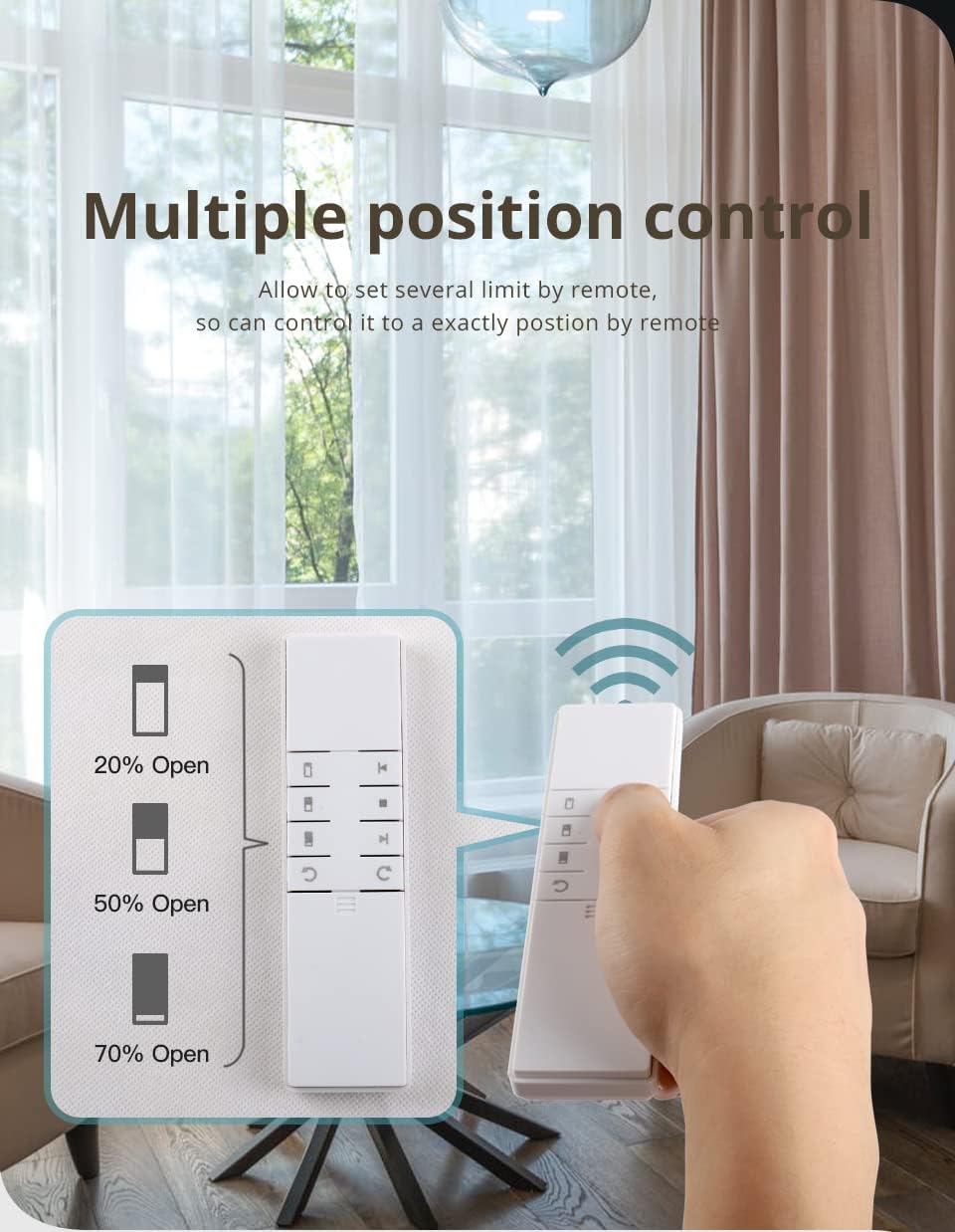
Image 5.4: The RF remote allows for precise control, including setting multiple intermediate open positions.
Curtain Opening Modes:
- Single Open: For curtains that open from one side (e.g., left to right). One robot unit is sufficient.
- Double Open (Center Open): For curtains that open from the middle. This requires two robot units. Install them oppositely so they move away from each other.

Image 5.5: The robot supports both single-sided and double-sided curtain opening configurations.
Timer and Position Settings:
Utilize the Tuya/Smart Life app to set schedules for your curtains. You can program them to open at sunrise and close at sunset, or any specific time. The device also features position memory, allowing you to set and recall specific open percentages (e.g., 20%, 50%, 70% open).

Image 5.6: Set custom timers via the app for automated curtain operation.
6. Bakım
To ensure optimal performance and longevity of your Zemismart Smart Curtain Robot, follow these maintenance guidelines:
- Temizlik: Cihazı yumuşak ve kuru bir bezle silin. Aşındırıcı temizleyiciler veya çözücüler kullanmayın.
- Pil Bakım: Recharge the battery when indicated by the device or app. If using the solar panel, ensure it is clean and exposed to sufficient sunlight.
- Ray Kontrolü: Periodically check your curtain track or rod for any obstructions or damage that might impede the robot's movement.
- Donanım Yazılımı Güncellemeleri: Check the Tuya/Smart Life app for any available firmware updates to ensure your device has the latest features and bug fixes.
7. Sorun Giderme
If you encounter issues with your Smart Curtain Robot, refer to the following common problems and solutions:
| Sorun | Olası Neden | Çözüm |
|---|---|---|
| Robot hareket etmiyor. | Low battery, obstruction, incorrect installation. | Charge the battery. Check for any physical obstructions on the track. Re-install the robot ensuring it's securely attached. |
| Uzaktan kumanda çalışmıyor. | Remote battery low, not paired, out of range. | Replace remote battery. Re-pair the remote with the robot (refer to pairing instructions). Ensure you are within range. |
| Uygulama kontrolü çalışmıyor. | WiFi dongle not connected, poor WiFi signal, device offline in app. | Ensure the WiFi dongle is plugged in and powered. Check your home WiFi connection. Verify the device status in the Tuya/Smart Life app. Re-pair if necessary. |
| Perdeler tamamen açılıp kapanmıyor. | Limits not set correctly, track obstruction. | Reset and re-calibrate the open/close limits via the app or remote. Check the curtain track for any resistance. |
If the problem persists, please contact Zemismart customer support for further assistance.
8. Özellikler
| Özellik | Şartname |
|---|---|
| Marka | zemismart |
| Örnek | Akıllı Perde Robotu |
| ASIN | B09CKY2WL8 |
| Ağırlık | 233 gram |
| Malzeme | Akrilonitril Bütadien Stiren (ABS) |
| Renk | Beyaz |
| Pil Türü | Lityum iyon |
| Pil Kapasitesi | 3000 mAh |
| Maksimum Yük Kapasitesi | 10 kilo |
| Roman Rod Compatibility | Çap 20-28 mm |
| I-Rail Compatibility | Width 12.8-14mm, Height ≥12mm |
| U-Rail Compatibility | Width >15mm, Height >12.7mm, Gap Width 6.5-8mm |
9. Garanti ve Destek
Zemismart is committed to providing quality products and customer satisfaction. If you require assistance with installation, operation, or encounter any issues with your product, please contact our customer support team.
- All inquiries will receive a response within 12 hours, accounting for time differences.
- We offer a 100% refund if the product has a verifiable problem.
For support, please refer to the contact information provided with your purchase or visit the official Zemismart webalan.


