1. Giriş
The Logitech Rally Bar Mini is an all-in-one video bar engineered for small to medium-sized meeting rooms. This device integrates a camera, speakers, and microphones into a single unit, providing a streamlined solution for video conferencing. It is designed for ease of use, offering plug-and-play functionality and advanced features for a high-quality meeting experience.
Key features include outstanding optical performance, AI-driven audio enhancements for clear sound, and robust remote management capabilities via Logitech Sync. The system is expandable, allowing for the addition of Rally Mic Pods to extend audio pickup range and provide convenient access to mute controls, ensuring everyone in the room is seen and heard clearly.

Figure 1.1: Logitech Rally Bar Mini
2. Kutuda Neler Var?
Upon unpacking your Logitech Rally Bar Mini, please verify that all components are present:
- Logitech Rally Bar Mini unit
- USB kablosu
- Kullanım Kılavuzu (bu belge)
- Mounting Options (e.g., table stand, wall mount)

Figure 2.1: Rally Bar Mini with typical accessories
3. Kurulum
Follow these steps to set up your Rally Bar Mini for optimal performance:
- Atama: Position the Rally Bar Mini centrally in your meeting room, ideally below or above the main display. Ensure it has a clear line of sight to all participants.
- Montaj: Use the provided mounting options to secure the device. The table stand allows for placement on a flat surface, while optional wall mounts can be used for a more permanent installation.
- Güç Bağlantısı: Connect the power adapter to the Rally Bar Mini and plug it into a power outlet.
- USB Bağlantısı: Connect the supplied USB cable from the Rally Bar Mini to your meeting room computer or dedicated appliance.
- Ağ Bağlantısı (Opsiyonel): For remote management and software updates, connect the Rally Bar Mini to your network via Ethernet.
- Mic Pods (Optional): If using additional Rally Mic Pods, connect them to the Rally Bar Mini using the appropriate cables. Up to three mic pods can be added to extend audio pickup.
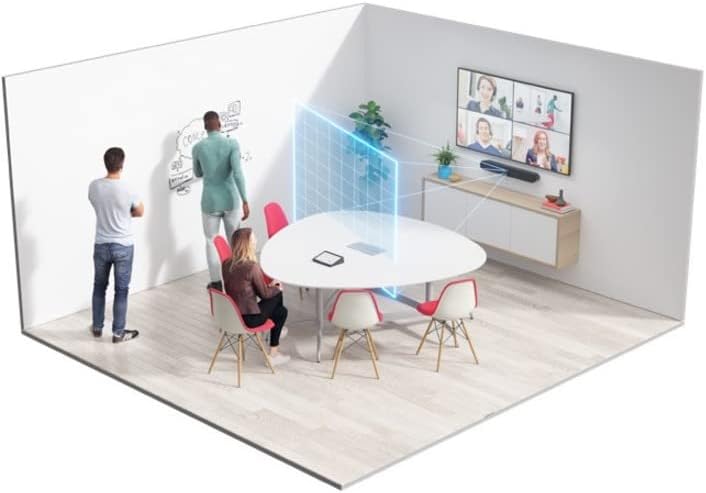
Şekil 3.1: Ör.ample room setup with Rally Bar Mini
4. Çalıştırma
The Rally Bar Mini is designed for intuitive operation, integrating seamlessly with popular video conferencing platforms.
- Tak ve Çalıştır: Once connected, the Rally Bar Mini functions as a standard USB camera, speaker, and microphone, compatible with most video conferencing applications.
- Cihaz Modu: The Rally Bar Mini can operate in appliance mode, running video conferencing software directly on the device without the need for an external computer. Refer to your platform's documentation for specific setup instructions.
- Yapay Zeka Video Zekası: The integrated camera features AI-driven framing to automatically keep participants in view.
- Ses İyileştirmeleri: Advanced sound pickup and noise suppression technologies ensure clear audio for all participants.
- Remote Management with Logitech Sync: Utilize the Logitech Sync platform to monitor device health, deploy firmware updates, and adjust settings remotely. This cloud-based platform provides centralized control over your meeting room devices.

Figure 4.1: Logitech Sync Dashboard for remote management
5. Bakım
Regular maintenance ensures the longevity and optimal performance of your Rally Bar Mini.
- Temizlik: Gently wipe the exterior surfaces of the device with a soft, dry cloth. Avoid using abrasive cleaners or solvents. For the camera lens, use a lens cleaning cloth.
- Yazılım Güncellemeleri: Periodically check for and install firmware updates via Logitech Sync. Updates often include performance improvements, new features, and bug fixes.
- Kablo yönetimi: Hasar görmesini önlemek için tüm kabloların düzgün bir şekilde organize edildiğinden ve gerilim altında olmadığından emin olun.
6. Sorun Giderme
If you encounter issues with your Rally Bar Mini, refer to the following common troubleshooting steps:
- Video/Ses Yok:
- Ensure all cables (power, USB) are securely connected.
- Verify that the Rally Bar Mini is selected as the default camera, microphone, and speaker in your video conferencing application settings.
- Restart the Rally Bar Mini by unplugging and re-plugging the power cable.
- Kötü Video Kalitesi:
- İnternet bağlantı hızınızı kontrol edin.
- Kamera lensinin temiz ve herhangi bir engel içermediğinden emin olun.
- Verify that the room lighting is adequate and not causing excessive glare.
- Kötü Ses Kalitesi:
- Ensure no objects are blocking the microphones or speakers on the device.
- Check for excessive background noise in the room.
- If using Mic Pods, ensure they are properly connected and positioned.
- Cihaz tanınmadı:
- USB kablosunu bilgisayarınızdaki farklı bir USB bağlantı noktasına bağlamayı deneyin.
- Bilgisayarınızın işletim sisteminin güncel olduğundan emin olun.
- Install or update the necessary drivers (usually automatically detected).
For more detailed troubleshooting or persistent issues, consult the Logitech support website veya müşteri hizmetleriyle iletişime geçin.
7. Özellikler
| Özellik | Detay |
|---|---|
| Marka | Logitech |
| Model Numarası | 960-001336 |
| Renk | Grafit |
| Ürün Boyutları (UxGxY) | 31 x 7.5 x 7.5 inç |
| Ürün Ağırlığı | 13.2 pound |
| Donanım Platformu | PC |
| Maksimum Ekran Çözünürlüğü | Tam HD |
| Arka Webkam Çözünürlüğü | 12 MP |
| Video Yakalama Çözünürlüğü | 720p |
| Fotoğraf Sensörü Teknolojisi | CMOS |
| Kablosuz Tip | 802.11a/b/g/n/ac |
| Bağlantı Teknolojisi | USB |
| Güç Kaynağı | Kablolu Elektrik |
| İlk Mevcut Tarih | 18 Mayıs 2021 |
8. Garanti ve Destek
The Logitech Rally Bar Mini comes with a manufacturer's warranty. For specific warranty terms, duration, and conditions, please refer to the warranty information included with your product packaging or visit the official Logitech support website. Logitech provides comprehensive support resources, including FAQs, troubleshooting guides, and contact options for technical assistance.
En güncel destek bilgileri ve kaynakları için lütfen şu adresi ziyaret edin: www.logitech.com/support


