giriiş
This manual provides essential information for setting up, operating, maintaining, and troubleshooting your HP M27fw 27-inch Full HD (FHD) monitor. Please read these instructions carefully before using your monitor to ensure optimal performance and safety.
Paket İçeriği
Paketin tüm bileşenlerinin mevcut olduğunu doğrulayın:
- HP M27fw 27-inch FHD Monitor
- Monitör Standı (Taban ve Boyun)
- Güç Adaptörü ve Güç Kablosu
- 1 HDMI 1.4 Cable (with HDCP support)
- 1 VGA Cable
- Documentation (Quick Setup Guide, Warranty Information)
Kurmak
1. Monitör Standının Montajı
- Monitör ve stand bileşenlerini ambalajından dikkatlice çıkarın.
- Standın boyun kısmını monitör paneline takın. Yerine sağlam bir şekilde oturduğundan emin olun.
- Attach the stand base to the stand neck. Tighten any screws if provided, ensuring a stable connection.
2. Monitörün Bağlanması
Before connecting, ensure your computer and monitor are powered off.
- Video Kablosunu bağlayın: Connect one end of the HDMI or VGA cable to the corresponding port on your computer's graphics card. Connect the other end to the HDMI or VGA input port on the back of the HP M27fw monitor.
- Güç Kablosunu Bağlayın: Connect the power adapter to the monitor's power input port, then plug the power cord into a grounded electrical outlet.
- Güç Açık: Power on your computer, then press the power button on the monitor.
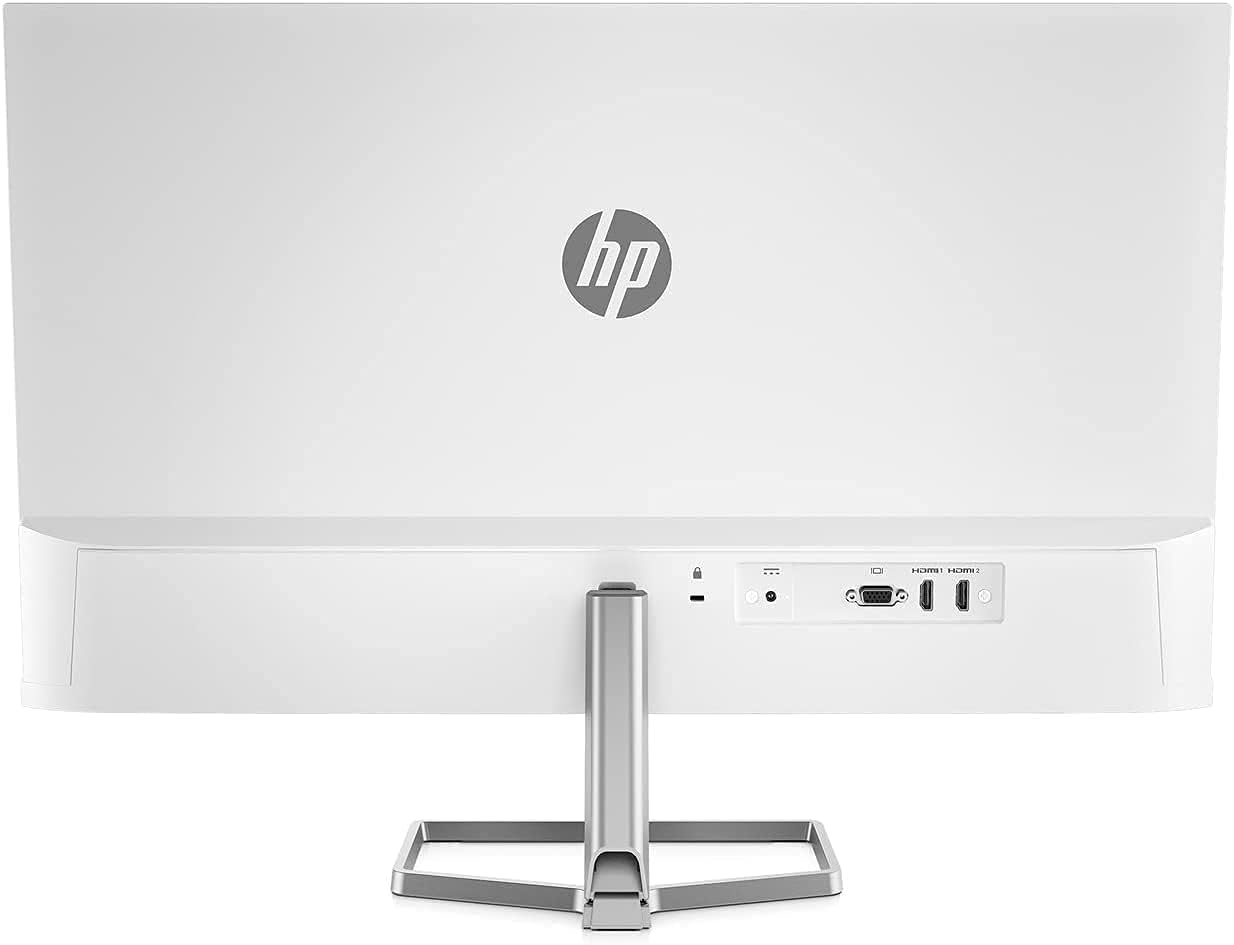
Monitörü Çalıştırma
Güç Açık/Kapalı
Monitörü açmak veya kapatmak için monitörün sağ alt köşesinde bulunan güç düğmesine basın.
Ekran Üzeri Görüntü (OSD) Kontrolleri
The OSD menu allows you to adjust various display settings. Buttons for OSD navigation are typically located on the bottom right bezel.
- Parlaklık: Adjusts the display's luminance.
- Çıkış: OSD menüsünü kapatır.
- Bilgi: Displays monitor information such as resolution and refresh rate.
- Yönetmek: Accesses power-saving options and other system settings.
- Güç kontrolü: Manages power-related functions.
- Giriş Kontrolü: Selects the active video input source (HDMI or VGA).
- Menü Kontrolü: Navigates through OSD options.
- Resim: Adjusts image-specific settings like sharpness and aspect ratio.
- Renk: Modifies color temperature, contrast, and other color-related settings.
Key Display Features
- Full HD (FHD) Resolution: Enjoy crisp visuals at 1920 x 1080 pixels.
- 75Hz Yenileme Hızı: Provides smoother motion compared to standard 60Hz displays.
- AMD FreeSync: Synchronizes the monitor's refresh rate with your graphics card's frame rate to reduce screen tearing and stuttering. Ensure your graphics card supports AMD FreeSync for this feature to function.
- Düşük Mavi Işık Modu: Reduces blue light emissions to minimize eye strain during extended use without significantly affecting color quality.
- Yansıma Önleyici Ekran: Minimizes reflections for better viewçeşitli aydınlatma koşullarında.

Monitörün Ayarlanması
Eğim Ayarı
The HP M27fw monitor allows for tilt adjustment to optimize your viewing angle. Gently hold both sides of the monitor panel and tilt it forwards or backwards to your desired position.

Bakım
Monitörü Temizleme
- Temizlemeden önce daima monitörü kapatın ve güç kablosunu çıkarın.
- Hafifçe yumuşak, tüy bırakmayan bir bez kullanın.ampened with water or a non-abrasive screen cleaner to wipe the display surface.
- Monitör c içinasinYumuşak ve kuru bir bez kullanın. Sert kimyasallar veya aşındırıcı malzemeler kullanmaktan kaçının.
Genel Bakım
- Monitörün veya kablolarının üzerine ağır cisimler koymaktan kaçının.
- Monitörü doğrudan güneş ışığına, aşırı sıcağa veya neme maruz bırakmayın.
- Monitörün etrafında yeterli havalandırma olduğundan emin olun.
Sorun giderme
Monitörünüzle ilgili sorunlarla karşılaşırsanız aşağıdaki yaygın çözümlere başvurun:
- Güç Yok:
- Güç kablosunun hem monitöre hem de çalışan bir elektrik prizine güvenli bir şekilde bağlandığından emin olun.
- Güç adaptörünün monitöre doğru şekilde bağlı olduğundan emin olun.
- Monitörün açık olduğundan emin olmak için güç düğmesine basın.
- Sinyal Yok / Ekran Boş:
- Check that the video cable (HDMI or VGA) is firmly connected to both the monitor and your computer.
- Bilgisayarınızın açık olduğundan ve uyku modunda olmadığından emin olun.
- Use the monitor's OSD menu (Input Control) to select the correct input source.
- Try a different video cable or port on your computer/monitor if available.
- Image Issues (e.g., Vertical Line, Flickering, Distortion):
- Tüm kablo bağlantılarında gevşeklik veya hasar olup olmadığını kontrol edin.
- Ensure your computer's display resolution and refresh rate are set correctly (e.g., 1920x1080 at 75Hz).
- If using AMD FreeSync, ensure it is enabled in both the monitor's OSD and your graphics card settings.
- If a persistent line or distortion appears, try connecting the monitor to a different computer or using a different video cable to rule out external factors. If the issue persists, the monitor may require service.
- Renkler Yanlış:
- Adjust color settings (Color, Contrast, Brightness) through the OSD menu.
- Ekran kartı sürücülerinizin güncel olduğundan emin olun.
Özellikler
| Özellik | Şartname |
|---|---|
| Marka | HP |
| Model Numarası | M27fw |
| Ekran Boyutu | 27 inç |
| Çözünürlük | FHD 1920 x 1080 Pixels |
| En Boy Oranı | 16:9 |
| Yenileme Hızı | 75 Hz |
| Tepki Süresi | 5 Milisaniye |
| Görüntü Türü | NEDEN OLMUŞ |
| Ekran Yüzeyi Açıklaması | Glossy (Anti-Glare) |
| Parlaklık | 300 cd/m² |
| Kontrast Oranı | 1000:1 |
| ViewAçı | 170 Derece |
| Piksel Aralığı | 0.311 mm |
| Bağlantı Teknolojisi | HDMI, VGA |
| Total Number of HDMI Ports | 1 |
| Uyarlanabilir Senkronizasyon | AMD FreeSync |
| Ek Özellikler | Anti Glare Screen, Low Blue Light Mode, On-Screen Controls |
| Renk | Beyaz |
| Ürün Boyutları (D x G x Y) | 1.35" Derinlik x 23.93" Genişlik x 14.01" Yükseklik (ayaklık hariç) |
| Ağırlık | 7.05 lb (without stand) |
| VESA Montajı | Not VESA mount compatible |
Garanti ve Destek
Your HP M27fw monitor is covered by a limited warranty. For detailed warranty information, please refer to the documentation included in your package or visit the official HP support website. For technical assistance, troubleshooting, or service inquiries, contact HP customer support.
HP Desteği Webalan: www.hp.com/support