Ürün Bittiview
This manual provides detailed instructions for the installation, operation, and maintenance of your NC Car Radio 1 Din MP5 Player (Model SWM 9702). This versatile unit features a 7-inch retractable HD screen, Bluetooth connectivity, GPS navigation, USB support, iOS/Android Mirror Link, and FM radio. It is designed to enhance your in-car entertainment and navigation experience.

Şekil 1.1: The NC Car Radio MP5 Player unit shown with its essential components, including the main head unit, two wiring harnesses for power and speakers, a GPS antenna for navigation, and the user operation manual. This image provides a comprehensive view of what is included in the product package.
Kurulum ve Yükleme
1. Paket İçeriği
Kuruluma başlamadan önce, lütfen pakette tüm bileşenlerin mevcut olduğundan emin olun:
- Main Head Unit (Car Radio MP5 Player)
- GPS Anteni
- Disassembly Keys (2)
- Power Cords (2) - for rear tail cable plus front connections
- Kullanıcı Kullanım Kılavuzu
2. Kablo Bağlantıları
Proper wiring is crucial for the functionality of the car radio. Refer to the wiring diagram provided with the unit for specific connections. Below are general guidelines:
- Güç Bağlantısı: Connect the yellow wire to constant 12V (B+), the red wire to accessory 12V (ACC), and the black wire to ground.
- Hoparlör Bağlantıları: Connect the speaker wires to your vehicle's speaker system. Ensure correct polarity for optimal sound.
- Anten Bağlantısı: Aracın radyo antenini bağlayın.
- GPS Anteni: Connect the provided GPS antenna to the designated port on the rear of the unit. Position the antenna in a location with a clear view En iyi sinyal alımı için gökyüzünün.
- Arka View Kamera Girişi (İsteğe Bağlı): Arka tarafı takıyorsanız view camera (not included with this specific model), connect its video output to the "REVERSE IN" RCA port and its power to the reverse light circuit.
- RCA Çıkışları: Utilize the 2 audio outputs for connecting to external ampkaldırıcılar veya subwoofer'lar.
- USB Bağlantı Noktaları: The unit features 2 rear tail cable USB ports and a front USB port for media playback and phone connectivity.
Not: Incorrect wiring can damage the unit or your vehicle's electrical system. If you are unsure, consult a professional installer.
3. Ünitenin Montajı
Insert the 1-DIN unit into your vehicle's dashboard opening. Secure it using the provided mounting brackets or screws. Ensure the retractable screen mechanism has sufficient clearance to extend and retract without obstruction.
Kullanım Talimatları
1. Temel İşlevler
- Güç Açma/Kapatma: Press the power button (usually the VOL knob) to turn the unit on or off.
- Ses Kontrolü: Rotate the VOL knob to adjust the volume.
- Mod Seçimi: Use the "MODE" button or the touchscreen interface to switch between functions like Radio, USB, AUX, Bluetooth, and Navigation.
- Radyo (FM): Access the FM radio function to scan for stations (87.5~108MHz).
- USB Oynatma: Insert a USB drive into the front or rear USB ports to play audio (MP3/WMA/WAV/APE/FLAC), video, or view pictures (JPG).
- AUX İşlevi: Connect external audio devices via the front AUX audio input.

Şekil 2.1: Bir fazlaview of the diverse functionalities offered by the car radio, including Mirrorlink for phone integration, GPS Navigation, WiFi connectivity, Reverse Image display, Bluetooth for hands-free calls and audio streaming, Aux In for external devices, USB support for media, a responsive Capacitive touchscreen, support for high-quality audio formats like FLAC/APE, 1080P video playback, Driving Record capability, and FM Radio.
2. Gelişmiş Özellikler
- Bluetooth Function (Version 4.0):
- Eşleştirme: Enable Bluetooth on your mobile device and search for the car radio (e.g., "CarBT"). Select and pair.
- Eller Serbest Arama: Once paired, you can make and receive calls directly through the unit.
- Ses akışı: Play music from your phone wirelessly via Bluetooth.
- Mirror Link (Mobile Phone Interconnection):
- Android: Supports USB and WiFi screencasting. You can operate your phone from the car screen.
- Apple (iOS): Supports WiFi screencasting. The phone screen is mirrored to the player.
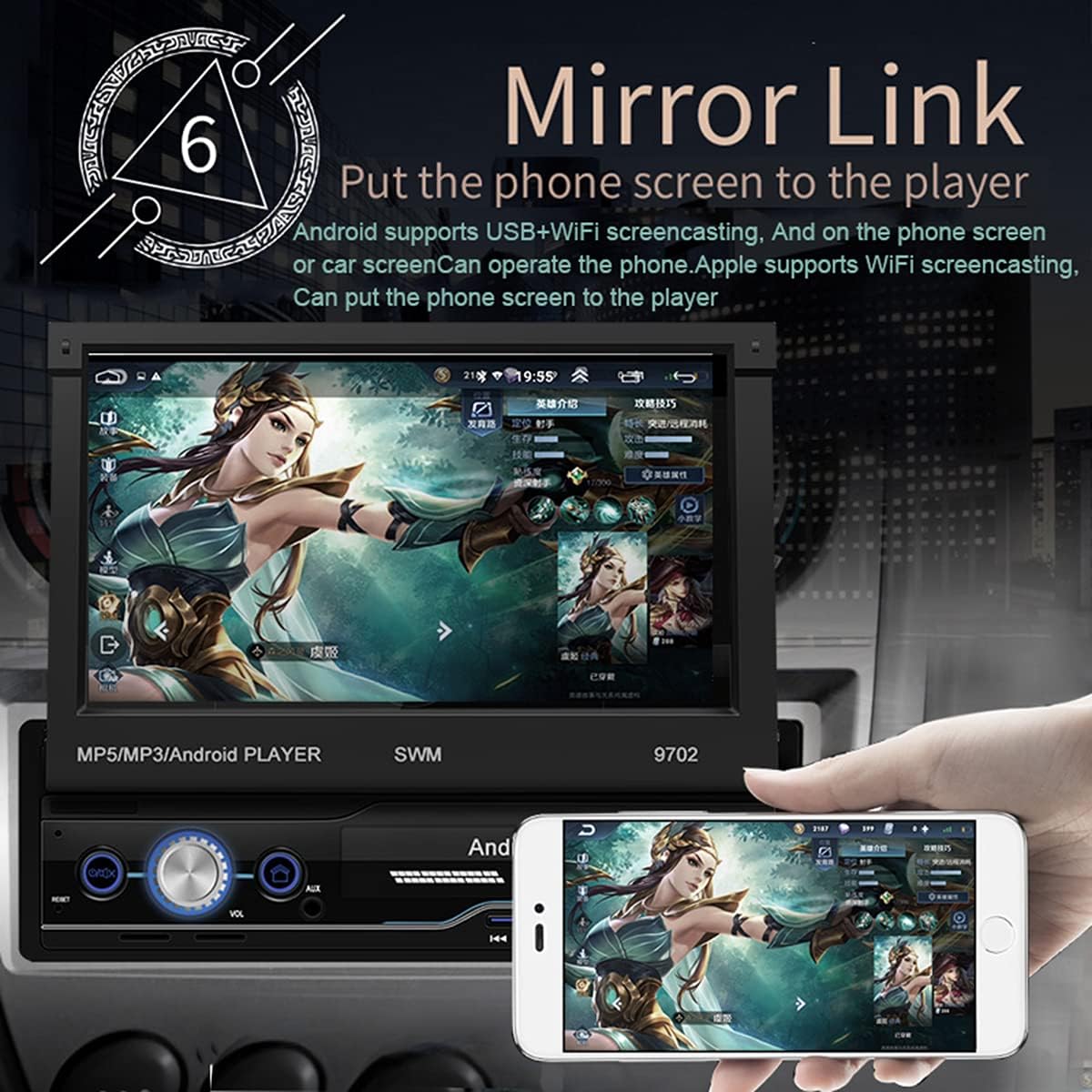
Şekil 2.2: The Mirror Link function in action, showing a smartphone's display content, such as a game, being mirrored onto the car radio's 7-inch retractable screen. This feature allows for seamless integration and control of mobile applications directly from the car's display.
- GPS navigasyon:
- The unit comes with built-in offline maps (Europe).
- Supports online real-time traffic maps and quick positioning.
- Access navigation applications through the touchscreen.

Şekil 2.3: The GPS navigation interface on the car radio screen, showing a detailed map with route guidance and estimated travel time. Icons for popular navigation applications are also visible, highlighting the unit's capability for multiple navigation options and real-time traffic updates.
- Arka View İşlev:
- Uyumlu bir arka view camera is connected (optional, not included), the screen automatically displays the rear view image when the vehicle is put into reverse.
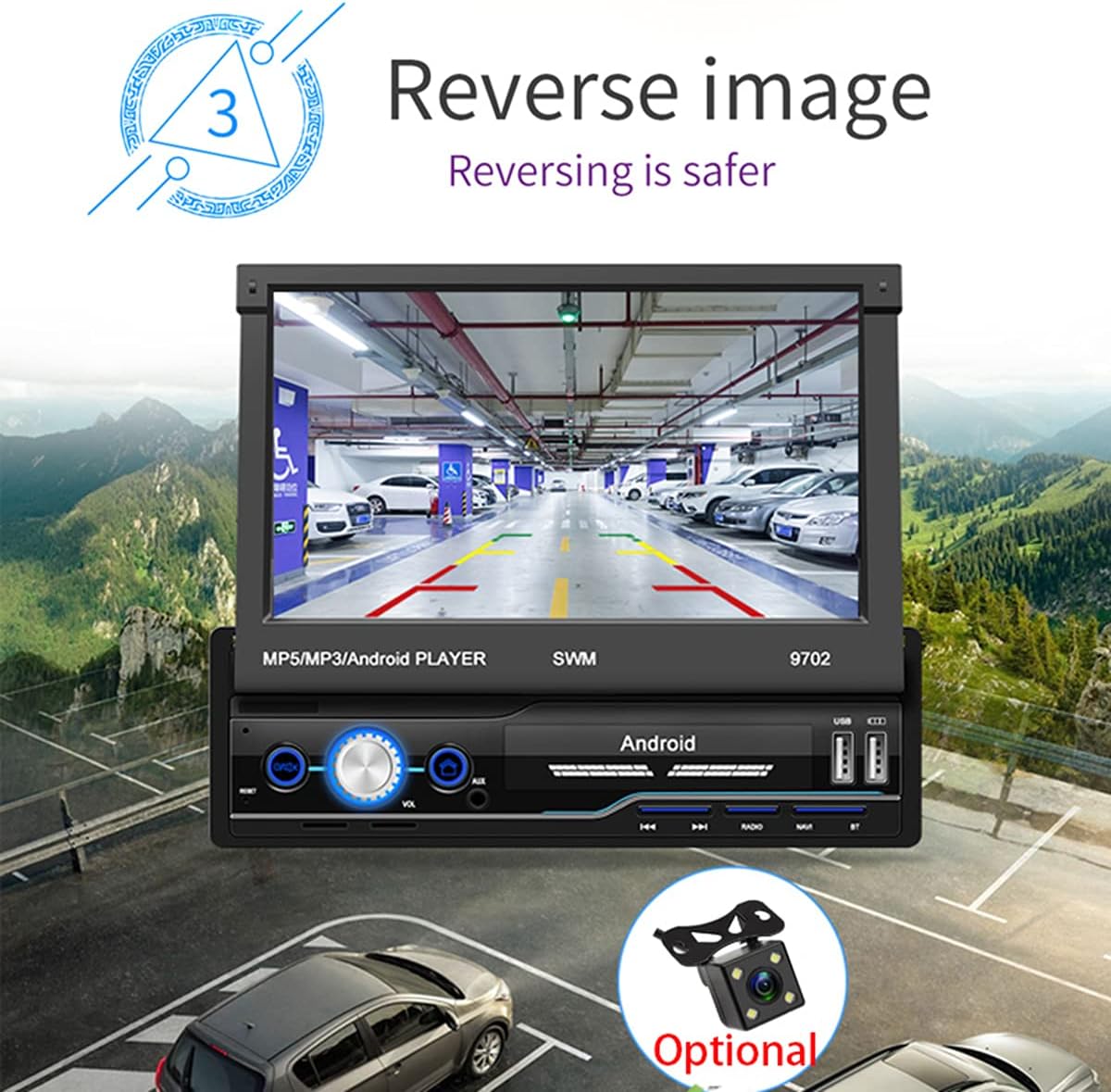
Şekil 2.4: The reverse image feature in operation, displaying a clear view from a rear camera on the car radio's screen. This function enhances safety during parking and reversing maneuvers by providing a wide-angle view of the area behind the vehicle, complete with guiding lines.
- WIFI Internet Access:
- Connect to a mobile hotspot or available Wi-Fi networks to access online features, download apps, and browse the internet.

Şekil 2.5: The car radio's screen showcasing a variety of application icons, including social media, navigation, and entertainment apps, demonstrating the unit's WiFi connectivity and ability to run Android applications. This feature allows users to access online content and services directly from the car's display.
- Direksiyon Kontrol Fonksiyonu:
- The unit supports learning functions for your original car's steering wheel controls. This allows you to control basic functions (e.g., volume, track skip) without taking your hands off the wheel.
- Navigate to "Steering Learn" in the settings menu to configure.
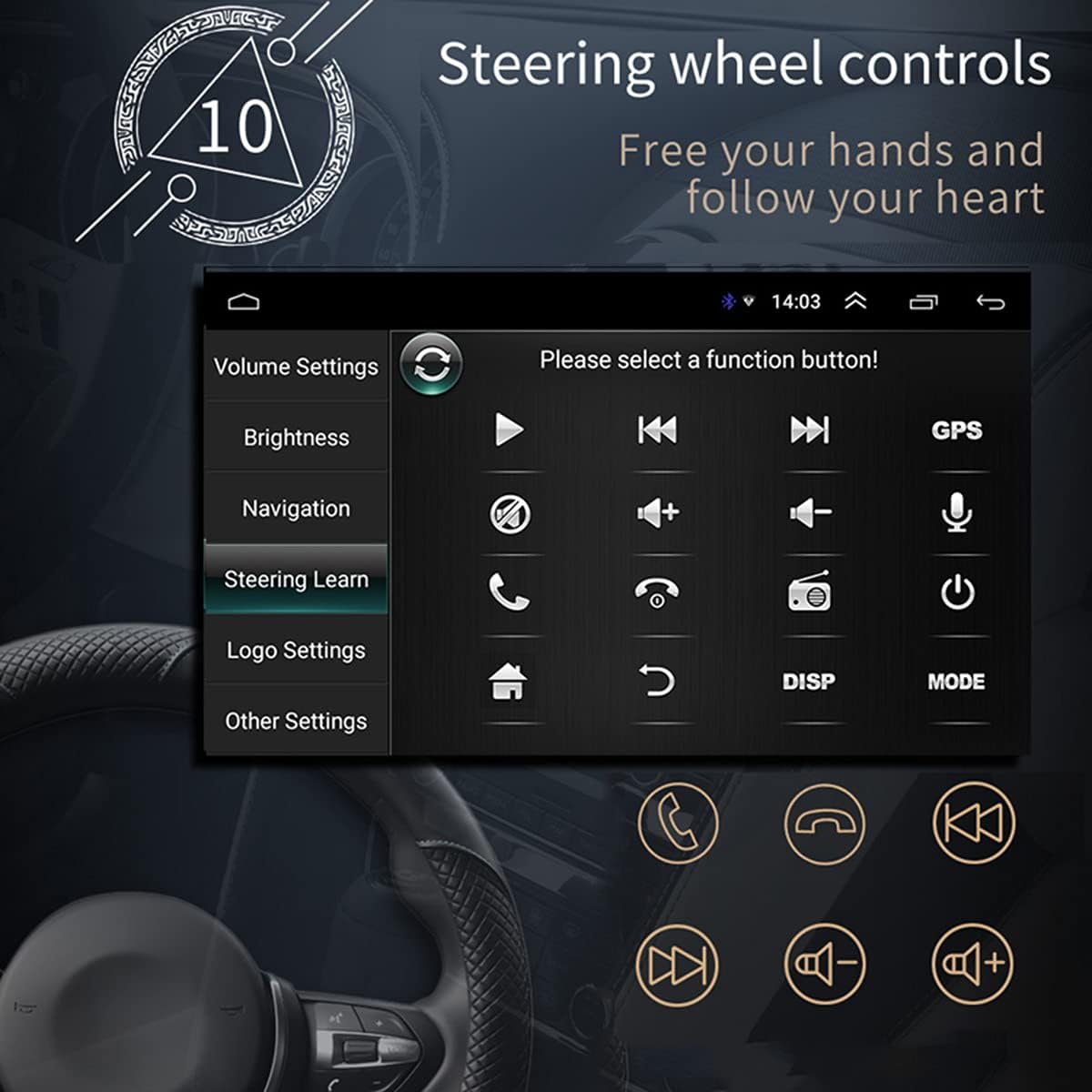
Şekil 2.6: The steering wheel control learning interface on the car radio, showing options to configure various functions like volume, track control, and call handling directly from the vehicle's steering wheel buttons. This feature enhances driving safety and convenience by keeping hands on the wheel.
- Uygulama Kurulumu:
- As an Android system, you can install compatible applications directly onto the unit.
- Car Logo Replacement:
- Customize the boot-up logo to match your car's brand. (Factory setting password: 1111)
Bakım
- Ekran Temizleme: Ekranı nazikçe silmek için yumuşak, tiftiksiz bir bez kullanın. İnatçı lekeler için hafifçe silin.ampBezi su veya ekran temizleyicisiyle silin. Aşındırıcı malzemelerden veya sert kimyasallardan kaçının.
- Genel Temizlik: Üniteyi toz ve kalıntılardan uzak tutun. Havalandırma deliklerini ve düğmeleri temizlemek için yumuşak bir fırça veya basınçlı hava kullanın.
- Yazılım Güncellemeleri: Üreticinin periyodik olarak kontrol edin webEn iyi performansı sağlamak ve yeni özelliklere erişmek için mevcut yazılım güncellemeleri hakkında bilgi almak üzere siteyi ziyaret edin veya destek ekibiyle iletişime geçin.
- Aşırı Sıcaklıklardan Kaçının: Üniteyi aşırı sıcağa veya soğuğa maruz bırakmayın; bu, performansını ve kullanım ömrünü etkileyebilir.
Sorun giderme
| Sorun | Olası Neden | Çözüm |
|---|---|---|
| Güç Yok | Incorrect wiring (power/ground), blown fuse, vehicle battery issue. | Check power and ground connections. Verify vehicle fuses. Ensure battery has sufficient charge. |
| Ses Yok | Ses seviyesi çok düşük, sessize alma etkinleştirilmiş, hoparlör kablolaması yanlış, hoparlörler hasarlı. | Increase volume. Check if mute is on. Verify speaker connections and polarity. Test with different audio source. |
| GPS Sinyali Kayboldu/Zayıf | GPS anteni düzgün bağlanmamış veya engellenmiş, cihaz uydu sinyalinin zayıf olduğu bir alanda bulunuyor. | Ensure GPS antenna is securely connected and placed in a clear line of sight to the sky. Move to an open area. |
| Bluetooth Bağlanmıyor | Bluetooth not enabled on phone/unit, incorrect pairing, interference. | Her iki cihazda da Bluetooth'un etkinleştirildiğinden emin olun. Önceki eşleştirmeleri silin ve yeniden eşleştirin. Cihaza daha yaklaşın. |
| Ekran Geri Çekilmiyor/Uzamıyor | Tıkanma, mekanik sorun. | Check for any physical obstructions. Do not force the screen. If issue persists, contact support. |
| Dokunmatik Ekran Tepki Vermiyor | Software glitch, screen dirty, physical damage. | Restart the unit. Clean the screen. If issue persists, contact support. |
Özellikler
| Özellik | Detay |
|---|---|
| Örnek | KAY 9702 |
| Cilttage | 12V |
| Sistem | Android |
| Yapılandırma | 1G+16G |
| Ekran Modeli | 7 inç HD |
| Ekran Çözünürlüğü | 1024*600 |
| Panel Boyutu | 188*58 mm |
| Güç | 60W |
| Çalışma Sıcaklığı | -10~60 santigrat derece |
| Bluetooth Modeli | Sürüm 4.0 |
| Güç Ampkaldırıcı çip | TDA7388 |
| Radyo frekansı | FM 87.5~108MHz |
| Built-in Offline Map | Avrupa |
| USB Arayüzü | 2 rear tail cable plus front |
| RCA Terminal Introduction | 2 audio outputs, 2 audio inputs, 2 video inputs, 1 reversing input, 1 video output |
| Front AUX Audio Input | Evet |
| DVR İşlevi | Destek |
| Desteklenen Resim Formatı | JPG |
| Desteklenen Ses Biçimleri | MP3 / WMA / WAV / APE / FLAC |

Şekil 3.1: An illustration of the unit's 4-core Cortex-A7 processor, emphasizing its efficient architecture and manufacturing process (28nm/40nm). This powerful CPU ensures better performance and faster operation for all functions.

Şekil 3.2: The audio playback interface on the car radio, demonstrating support for high-fidelity lossless audio formats such as APE and FLAC. This ensures a superior listening experience with native sound quality, powered by the TDA7388 high-power ampkaldırıcı IC.
Garanti ve Destek
Garanti bilgileri, teknik destek veya servis talepleriniz için lütfen doğrudan satıcı veya üreticiyle iletişime geçin. Satın alma belgenizi saklayın.
You can visit the official NC Store on Amazon for more information and product updates: NC Store