giriiş
This manual provides detailed instructions for the installation, operation, and maintenance of your NC SWM 9702 Car Radio 1 Din MP5 Player. Please read this manual thoroughly before using the product to ensure proper functionality and safety. Keep this manual for future reference.
Ürün Özellikleri
- 7-Inch HD Retractable Screen: Provides a clear and intuitive display for navigation, video playback, and system controls.
- Android İşletim Sistemi: Offers a familiar interface and access to various applications.
- Bluetooth 4.0 Bağlantısı: Supports hands-free calling and audio streaming for safe driving.
- Ayna Bağlantı Fonksiyonu: Seamlessly projects your smartphone screen (iOS/Android) onto the player's display via USB or WiFi.
- GPS navigasyon: Built-in GPS with support for offline maps (Europe) and real-time traffic updates.
- Arka View Kamera Girişi: Enhances parking safety with automatic display when reversing (camera optional/included with this model).
- FM Radyo: High-quality radio tuner with a frequency range of 87.5~108MHz.
- USB & AUX Input: Multiple connectivity options for media playback from USB drives and external audio devices.
- Direksiyon Kontrol Desteği: Allows integration with your vehicle's steering wheel controls for convenient operation.
- Lossless Audio Support: Compatible with APE/FLAC and other popular audio formats.
- 4-Core CPU: Ensures smooth performance and faster operation.
Kutuda Neler Var?
Aşağıda listelenen tüm bileşenlerin paketinizde mevcut olduğunu doğrulayın:
- 1 x Android Head Unit (SWM 9702)
- 1 x GPS Anteni
- 2 x Sökme Anahtarı
- 2 x Power Cords (Wiring Harnesses)
- 1 x Arka View Camera (4LED)
- 1 x USB Kablosu

Figure 1: All components included in the NC SWM 9702 package.
Kurulum ve Yükleme
Bu ürün için profesyonel kurulum önerilir. Kuruluma başlamadan önce aracın elektriğinin kesildiğinden emin olun.
Kurulum Öncesi Kontrol Listesi
- Ensure your vehicle's dashboard has a 1-DIN slot.
- Gather necessary tools (screwdrivers, wire strippers, electrical tape, multimeter).
- Identify your vehicle's wiring harness for power, speakers, and accessories.
Kablolama Bağlantıları
Refer to the provided wiring diagram (usually on the unit or in a separate sheet) for precise connections. Below are general guidelines:
- Sarı Kablo (B+): Sabit 12V güç kaynağına bağlayın.
- Kırmızı Kablo (ACC): Anahtarlı 12V güce (ateşleme) bağlayın.
- Siyah Kablo (GND): Araç şasi topraklamasına bağlayın.
- Mavi Kablo (ANT): Güç antenine bağlayın veya amplifier uzaktan açma.
- Hoparlör Kabloları: Aracın ilgili hoparlör kablolarına bağlayın (örneğin, ön sol için Beyaz/Beyaz-Siyah, ön sağ için Gri/Gri-Siyah, arka sol için Yeşil/Yeşil-Siyah, arka sağ için Mor/Mor-Siyah).
- Reverse Input Wire: Otomatik kamera gösterimi için aracın geri vites lambasına bağlanır.
- GPS Anteni: GPS antenini cihazın arkasındaki özel bağlantı noktasına bağlayın ve görüş alanı açık bir yere monte edin. view gökyüzüne ait (örneğin, gösterge paneli, A sütunu).
- Arka View Kamera: Connect the camera's video output to the "CAM IN" or "REVERSE VIDEO" input on the unit. Power the camera from the reverse light circuit.
Ünitenin Montajı
- Carefully slide the head unit into the 1-DIN mounting sleeve until it clicks into place.
- Ürünle birlikte verilen montaj braketlerini veya vidaları kullanarak ürünü sabitleyin.
- Gösterge paneli kaplamalarını tekrar birleştirin.
Kullanım Talimatları
Temel İşlemler
- Güç Açma/Kapatma: Press the power button (usually VOL knob) to turn the unit on or off.
- Ses Kontrolü: Rotate the VOL knob or use the on-screen controls.
- Ekran Geri Çekme: The screen automatically retracts when the unit is turned off or can be manually retracted/extended via a dedicated button.
- Ana Ekran: Tap the Home icon to return to the main menu.
Bluetooth Hands-free and Audio
- Baş ünitenizdeki Bluetooth menüsüne gidin.
- Cep telefonunuzda Bluetooth'u etkinleştirin ve kullanılabilir cihazları arayın.
- Select "SWM 9702" (or similar name) from the list and pair.
- Once connected, you can make/receive calls and stream audio directly through the car speakers.
Ayna Bağlantı Fonksiyonu
This feature allows you to display your smartphone's screen on the head unit.
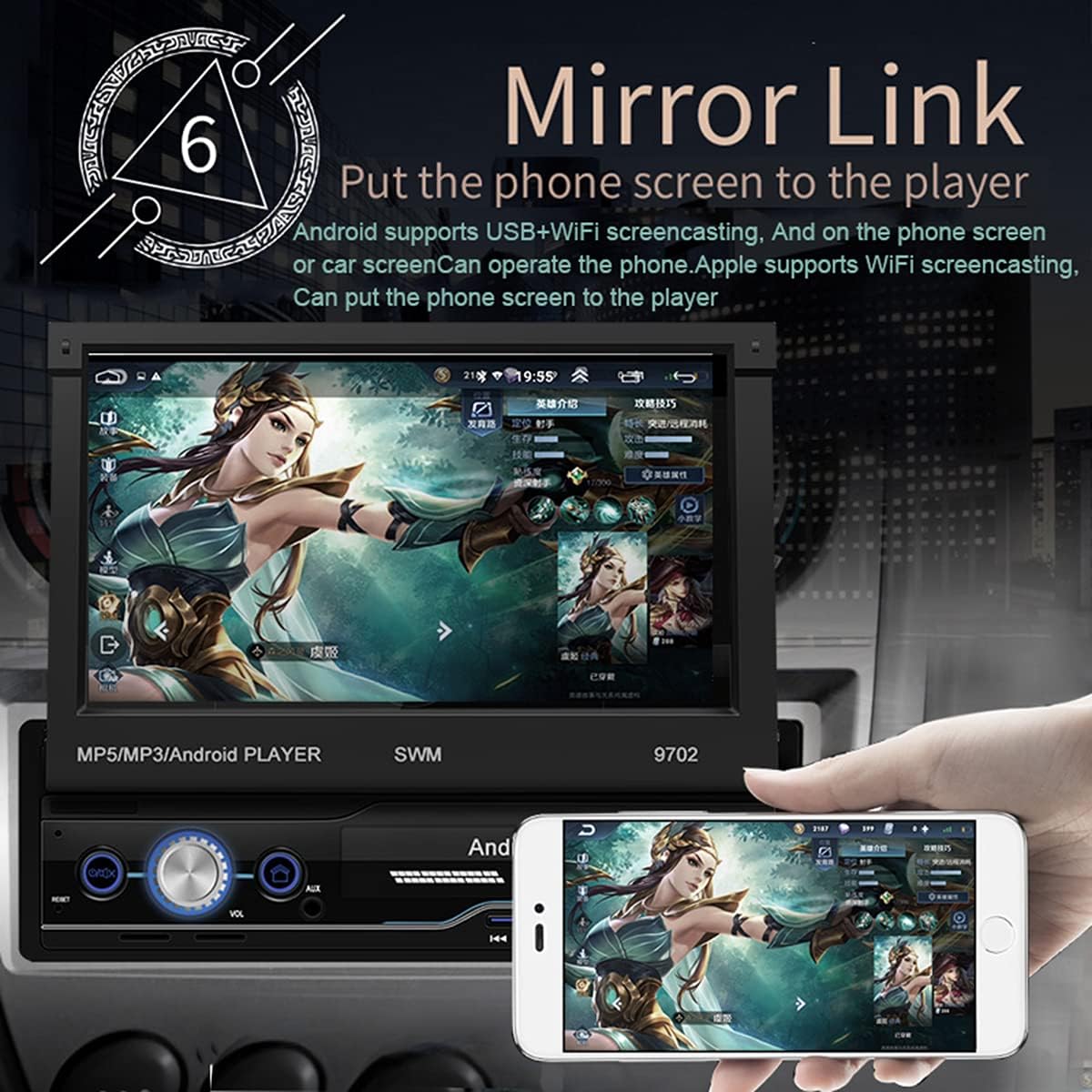
Figure 2: Mirror Link in action, showing a smartphone screen duplicated on the car radio display.
- Android için: Connect your phone via USB or WiFi. Follow the on-screen prompts to enable USB debugging or WiFi mirroring. You can control the phone from the car screen.
- For iOS (Apple): Connect via WiFi. The phone screen will be mirrored to the player. Control is typically from the phone itself.
GPS Navigasyon
The unit comes with pre-installed offline maps for Europe and supports online navigation.

Figure 3: GPS Navigation interface showing map data and route details.
- Tap the "Navigation" or "GPS" icon on the home screen.
- Select your preferred navigation application (e.g., Google Maps, Waze, or the pre-installed offline map).
- Varış noktanızı girin ve sesli ve görsel yönlendirmeleri takip edin.
Arka View Kamera Fonksiyonu
When properly installed, the unit automatically displays the rear view Araç geri vitese alındığında.
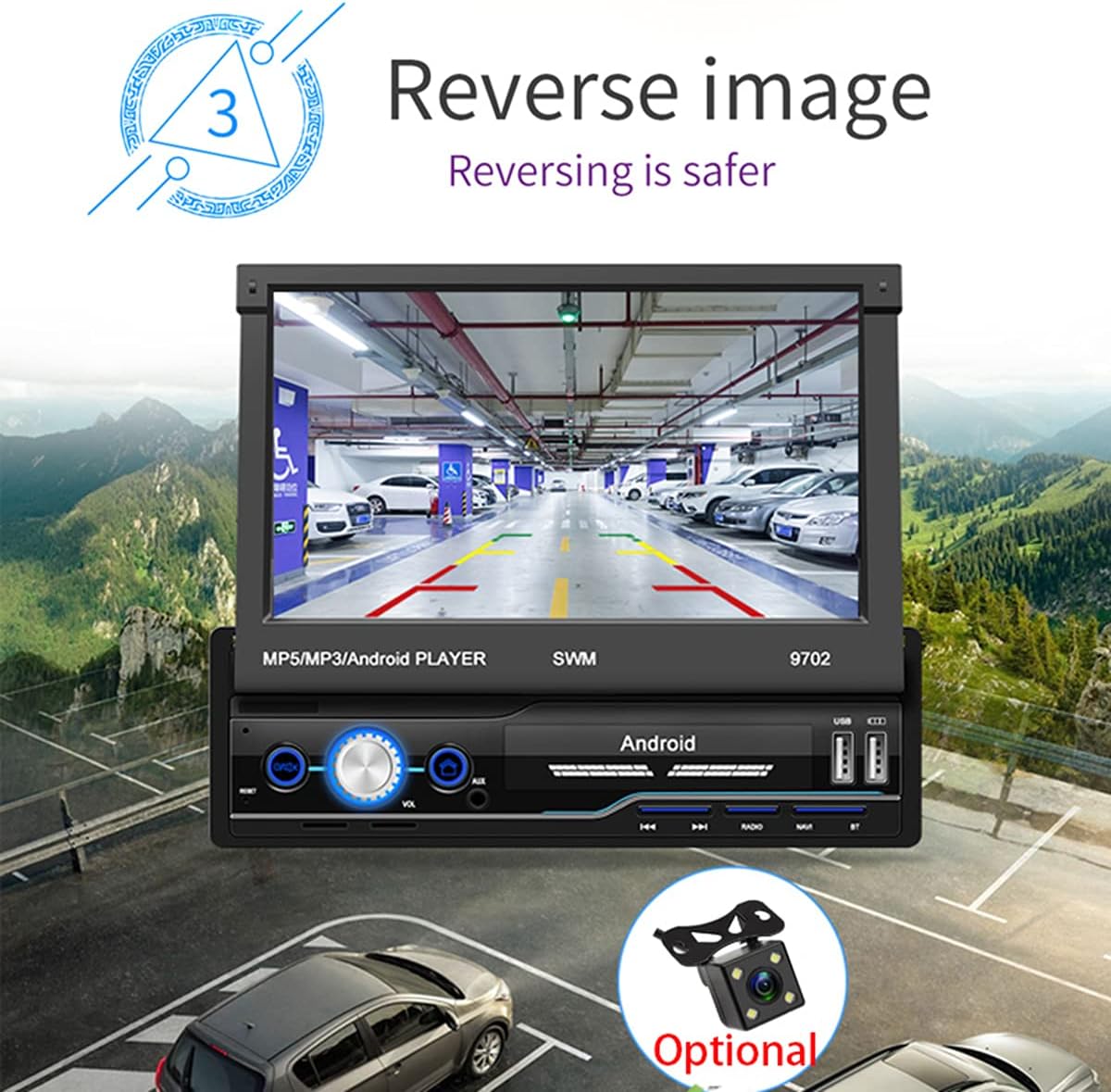
Şekil 4: Arka view camera display for safer reversing.
- Arka tarafın güvenli olduğundan emin olun view camera is correctly wired to the unit and the vehicle's reverse light circuit.
- When shifting into reverse, the screen will automatically switch to the camera view.
FM Radyo
- Ana ekrandaki "Radyo" simgesine dokunun.
- Tarama işlevini kullanarak mevcut istasyonları otomatik olarak arayabilir ve kaydedebilirsiniz.
- Frekansa göre manuel olarak ayarlayın veya kaydedilmiş ön ayarlardan birini seçin.
USB and AUX Playback
- USB BAĞLANTI: Insert a USB flash drive into the USB port. The unit will automatically detect and allow you to browse and play audio/video/picture files.
- YARDIMCI: Connect an external audio device (e.g., MP3 player) to the AUX input using a 3.5mm audio cable. Select "AUX" as the source.
Direksiyon Kontrolü Öğrenme
If your vehicle has steering wheel controls, you can configure them to operate the head unit.
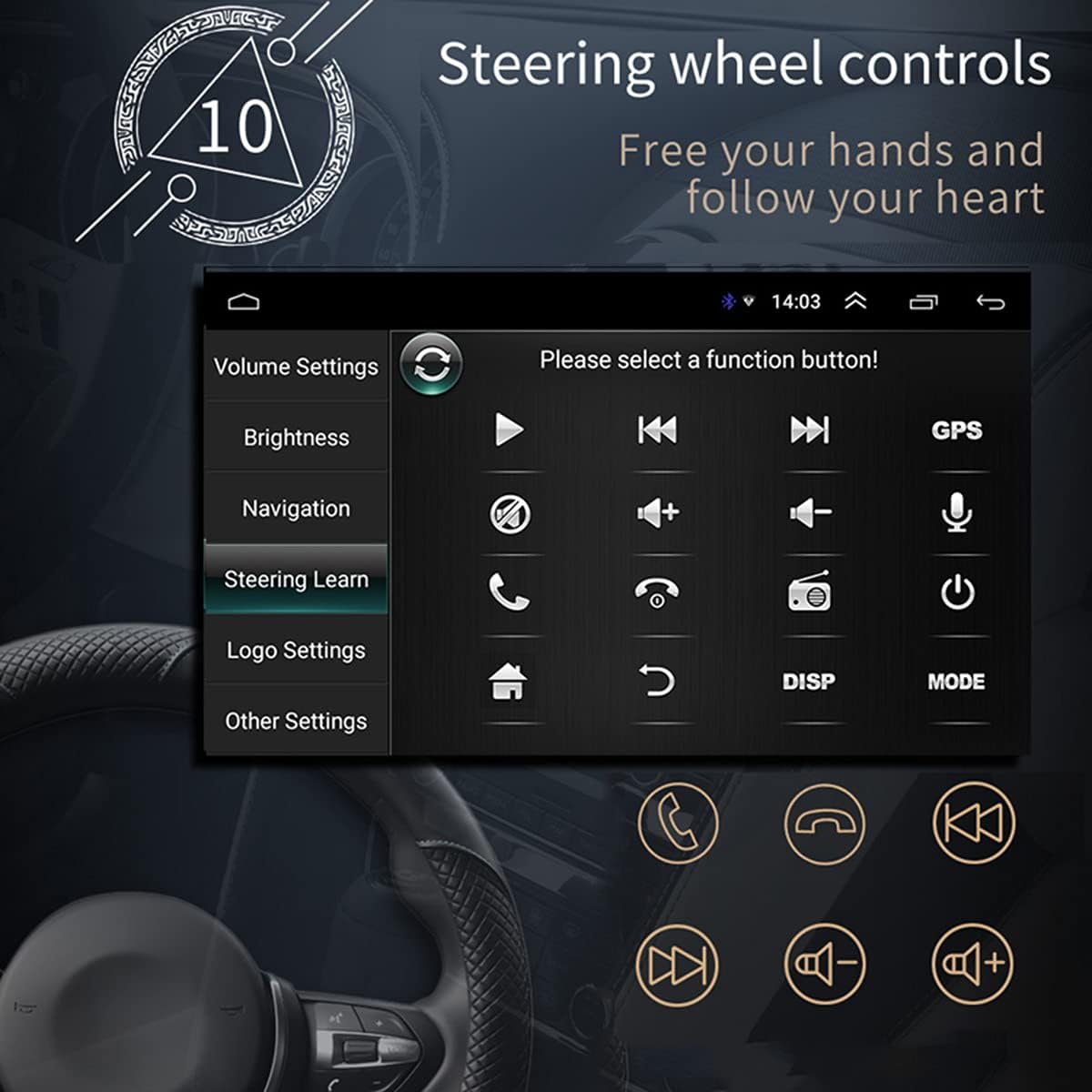
Şekil 5: Direksiyon Kontrolü öğrenme arayüzü.
- Go to "Settings" > "Steering Wheel Learning" or "SWC".
- Follow the on-screen instructions to assign functions to your steering wheel buttons. This typically involves pressing a button on the screen, then pressing the corresponding button on your steering wheel.
WiFi Bağlantısı
Connect the unit to a WiFi hotspot for online features and app downloads.

Figure 6: WiFi connection enables access to online applications.
- "Ayarlar" > "Ağ ve İnternet" > "Wi-Fi" bölümüne gidin.
- Wi-Fi'yi açın ve listeden istediğiniz ağı seçin.
- İstenirse şifreyi girin ve bağlanın.
APE/FLAC Lossless Audio Playback
The unit supports high-quality audio formats for superior sound experience.

Figure 7: Music player interface demonstrating APE/FLAC support.
- Sesinizi sağlayın files are in supported formats (MP3, WMA, WAV, APE, FLAC).
- Play them from a USB drive or other connected media.
Bakım
- Ekranın Temizlenmesi: Ekranı nazikçe silmek için yumuşak, tüy bırakmayan bir bez kullanın. Aşındırıcı temizleyiciler veya çözücüler kullanmayın.
- Genel Temizlik: Cihazın toz ve kirden arındırılmış halde kalmasını sağlayın. Havalandırma delikleri ve düğmeler için yumuşak bir fırça veya basınçlı hava kullanın.
- Yazılım Güncellemeleri: Üreticinin periyodik olarak kontrol edin website or the unit's settings for available software updates to ensure optimal performance and new features.
Sorun giderme
Sorunlarla karşılaşırsanız, destek ekibiyle iletişime geçmeden önce aşağıdaki yaygın sorunlar ve çözümlerine göz atın.
| Sorun | Olası Neden | Çözüm |
|---|---|---|
| Ünite açılmıyor. | Incorrect wiring (B+ or ACC), blown fuse, vehicle battery issue. | Check power connections (Yellow and Red wires), inspect fuses, ensure vehicle battery is charged. |
| Hoparlörlerden ses gelmiyor. | Speaker wires incorrectly connected, volume too low, mute enabled, incorrect audio source. | Verify speaker wiring, increase volume, check mute setting, select correct audio source (FM, USB, AUX, BT). |
| GPS signal weak or not found. | GPS antenna improperly installed or obstructed, unit not receiving satellite signals. | Ensure GPS antenna is mounted in a clear location (e.g., dashboard), check antenna connection. |
| Mirror Link çalışmıyor. | Incorrect USB cable, USB debugging not enabled (Android), incompatible phone. | Use original or high-quality USB cable, enable USB debugging in phone developer options, check compatibility list. |
| Arka view Kamerada görüntü yok. | Camera not powered, video input wire disconnected, reverse trigger wire not connected. | Check camera power supply, verify video cable connection, ensure reverse trigger wire is connected to reverse light. |
Özellikler
| Özellik | Detay |
|---|---|
| Örnek | KAY 9702 |
| Cilttage | 12V |
| Sistem | Android |
| Yapılandırma | 1G RAM + 16G Storage |
| Ekran Boyutu | 7 Inches (HD Retractable) |
| Ekran Çözünürlüğü | 1024*600 |
| Panel Boyutu | 188*58 mm |
| Panel Aydınlatma | Mavi |
| Güç Çıkışı | 60W |
| Çalışma Sıcaklığı | -10~60 santigrat derece |
| Bluetooth Sürümü | 4.0 |
| Güç Ampkaldırıcı çip | TDA7388 |
| Radyo frekansı | FM 87.5~108MHz |
| GPS Navigasyon | Support (Built-in offline map: Europe) |
| Wireless WIFI | Destek |
| Mobil İnternet | Support (Apple/Android) |
| USB Arayüzü | 2 rear tail cable plus front |
| RCA Terminal Introduction | 2 audio outputs, 2 audio inputs, 2 video inputs, 1 reversing input, 1 video output |
| Front AUX Audio Input | Evet |
| DVR İşlevi | Destek |
| Car Logo Replacement | Destek |
| Desteklenen Resim Formatı | JPG |
| Fabrika Ayarları Şifresi | 1111 |
Garanti ve Destek
For warranty information, technical support, or service inquiries, please refer to the purchase documentation or contact the retailer/manufacturer directly. Keep your proof of purchase for warranty claims.
Manufacturer: N\\C
İlk Yayınlanma Tarihi: 29 Temmuz 2021