StarTech.com 2 Port Dual Monitor HDMI KVM Switch
Model: SV231DHU34K6
1. Giriş
This instruction manual provides detailed information on the installation, operation, and maintenance of your StarTech.com 2 Port Dual Monitor HDMI KVM Switch. This device allows you to control two computers from a single set of peripherals, including two HDMI monitors, a keyboard, a mouse, and other USB devices, supporting resolutions up to 4K at 60Hz.
2. Güvenlik Bilgileri
Bu ürünü kullanmadan önce lütfen tüm talimatları okuyun ve anlayın. Bu talimatlara uyulmaması elektrik çarpmasına, yangına veya ciddi yaralanmaya neden olabilir.
- Elektriksel tehlikeler: Do not use damaged or frayed cables. Exposed wires can lead to electric shocks. Ensure all cables are properly connected and secured to prevent accidental disconnection.
- Isı Birikimi: Overloaded or tightly bundled cables can overheat and pose a fire hazard. Ensure adequate ventilation and avoid bundling power cables.
- Zarar: Adaptörleri her zaman kablosundan değil, fişinden tutarak çıkarın. Kablosundan çekmek, elektrik çarpmasına veya yanıklara yol açabilecek canlı telleri açığa çıkarabilir.
3. Ürün Bittiview
The StarTech.com SV231DHU34K6 KVM switch is designed to streamline your workspace by enabling control of two computers with dual 4K HDMI displays and shared USB peripherals. Its robust steel housing ensures durability.
3.1. Temel Özellikler
- Supports dual 4K (3840 x 2160) resolution at 60Hz per monitor.
- HDMI 2.0, HDCP 2.2, and HDR10 support.
- Integrated 2-port USB 3.0 Hub (5Gbps) for sharing peripherals.
- Four USB 2.0 HID ports for keyboard and mouse.
- Hotkey and front-panel push-button switching.
- EDID and HDCP signal emulation for fast, seamless switching.
- Supports stereo analog and 7.1 digital audio.
- OS Independent compatibility (Windows, Mac, Linux).
3.2. Ön panel

Şekil 1: Ön Panel Düzeni
- HID USB Port: For connecting a keyboard or mouse.
- 5G USB Port: Yüksek hızlı USB 3.0 cihazlarını bağlamak için.
- Computer Selection Buttons (1, 2): Press to switch to the corresponding computer.
- SEÇ Düğmesi: Used for various functions, including auto-scan activation.
3.3. Arka Panel
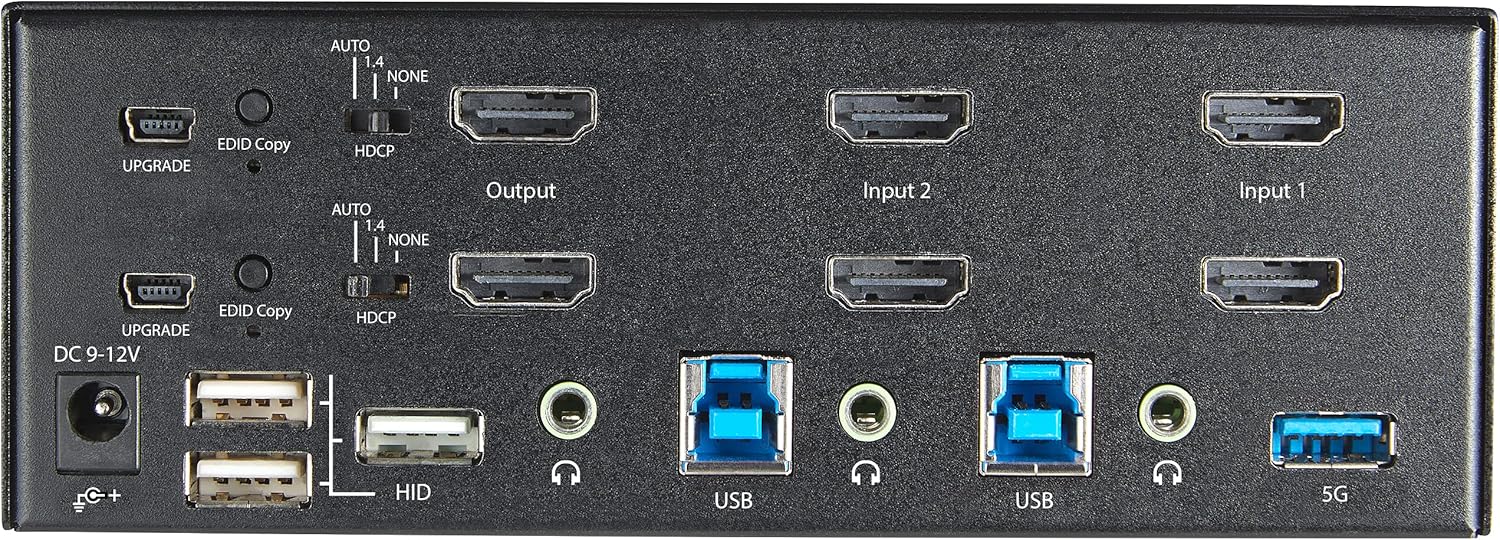
Şekil 2: Arka Panel Düzeni
- DC 9-12V Güç Girişi: Birlikte verilen güç adaptörünü bağlayın.
- YÜKSELTME Bağlantı Noktası: Ürün yazılımı güncellemeleri için.
- EDID Copy Button/Switch: Manages Extended Display Identification Data.
- HDCP Anahtarı: Manages High-bandwidth Digital Content Protection.
- Output (HDMI): Connect to your monitors.
- Input 1/Input 2 (HDMI): Connect to the HDMI outputs of your computers.
- USB (B Tipi): Connect to the USB 3.0 ports of your computers.
- HID USB Ports (Type-A): For additional keyboard/mouse connections or other low-power USB devices.
- Audio Jacks (3.5mm): For connecting speakers/headphones and microphones.
- 5G USB Port (Type-A): Yüksek hızlı USB 3.0 cihazlarını bağlamak için.
4. Kurulum
4.1. Kutuda Neler Var?
- 1 x KVM Switch (SV231DHU34K6)
- 1 x Evrensel Güç Adaptörü (NA/JP, EU, UK, ANZ)
- 4 x Kauçuk Ayaklar
- 1 x Hızlı Başlangıç Kılavuzu
Note: HDMI cables, USB 3.0 Type-A to Type-B cables, and audio cables are not included and must be purchased separately.
4.2. Bağlantı Talimatları
KVM anahtarınızı bağlamak için şu adımları izleyin:
- Monitörleri Bağlayın: Connect your two HDMI monitors to the 'Output' HDMI ports on the rear panel of the KVM switch.
- Bilgisayarları Bağlayın (HDMI): Connect the HDMI outputs from Computer 1 to the 'Input 1' HDMI ports on the KVM switch. Repeat for Computer 2 and 'Input 2'. Ensure both HDMI outputs from each computer are connected for dual monitor support.
- Bilgisayarları Bağlayın (USB): Connect the USB 3.0 Type-B ports on the KVM switch to the USB 3.0 Type-A ports on Computer 1 and Computer 2 using appropriate USB 3.0 cables. These connections enable keyboard, mouse, and USB hub functionality.
- Çevre Birimlerini Bağlayın:
- Connect your keyboard and mouse to the 'HID' USB ports on the front or rear panel.
- Connect other USB devices (e.g., printer, scanner, webcam) to the '5G' USB 3.0 ports on the front or rear panel.
- Ses Bağlantısı (İsteğe bağlı): If desired, connect your speakers/headphones and microphone to the 3.5mm audio jacks on the rear panel.
- Gücü bağlayın: Connect the included universal power adapter to the 'DC 9-12V' power input on the rear panel, then plug it into a power outlet. The KVM switch will power on automatically.

Figure 3: KVM Switch with Ports for Connection
5. KVM Anahtarının Çalıştırılması
5.1. Bilgisayarlar Arasında Geçiş Yapma
You can switch between connected computers using either the front-panel push buttons or hotkey commands.
- Front-Panel Buttons: Press the '1' or '2' button on the front panel to directly switch to Computer 1 or Computer 2, respectively.
- Kısayol Tuşu Değiştirme: Use keyboard hotkey combinations to switch computers. The default hotkey sequence is typically Scroll Lock, Scroll Lock, [1 or 2]. Refer to the Quick-Start Guide for a complete list of hotkey commands and customization options. A buzzer sound confirms the switch.
5.2. EDID and HDCP Emulation
The KVM switch includes EDID (Extended Display Identification Data) and HDCP (High-bandwidth Digital Content Protection) signal emulation. This feature ensures that your monitors remain synced and desktop settings are maintained when switching between computers, preventing display resolution changes or window rearrangement.
5.3. USB Hub İşlevselliği
The integrated USB 3.0 hub allows you to share two USB 3.0 peripherals (connected to the 5G ports) and four USB 2.0 HID peripherals (connected to the HID ports) between the connected computers. Devices connected to these ports will function as if directly connected to the currently selected host computer.
5.4. Ses Desteği
The KVM switch supports both digital audio (via HDMI, 7.1 Channel Audio) and separate 3.5mm stereo analog audio (2 Channel Audio). Ensure your displays and sources support the desired audio format for full compatibility.
6. Bakım
KVM anahtarınızın uzun ömürlü ve optimum performans göstermesini sağlamak için aşağıdaki bakım yönergelerini izleyin:
- Temizlik: Cihazın dış yüzeyini temizlemek için yumuşak, kuru bir bez kullanın. Sıvı veya aerosol temizleyiciler kullanmayın.
- Havalandırma: Ensure the KVM switch is placed in a well-ventilated area. Do not block any ventilation openings.
- Kablo yönetimi: Keep cables organized and untangled to prevent damage and ensure proper airflow. Avoid excessive bending or crimping of cables.
- Depolamak: Uzun süre kullanılmayacaksa, cihazı serin ve kuru bir yerde, doğrudan güneş ışığından ve aşırı sıcaklıklardan uzakta saklayın.
7. Sorun Giderme
KVM anahtarınızla ilgili sorunlarla karşılaşırsanız, aşağıdaki yaygın sorunlara ve çözümlere bakın:
- Görüntü Yok veya Çözünürlük Hatalı:
- Ensure all HDMI cables are securely connected to both the KVM switch and your computers/monitors.
- Verify that your HDMI cables are rated for 4K 60Hz if you are using 4K displays. Longer cables (e.g., over 3m/10ft) may require higher quality or active cables.
- Check the display settings on your computers to ensure they are configured for the correct resolution and refresh rate.
- Try power cycling the KVM switch and monitors.
- Klavye/Fare Yanıt Vermiyor:
- Ensure the USB Type-B cables are securely connected from the KVM switch to your computers.
- Verify that your keyboard and mouse are connected to the designated HID USB ports.
- Klavyeyi/fareyi doğrudan bilgisayara bağlayarak çalışıp çalışmadıklarını kontrol edin.
- Some specialized keyboards/mice with advanced features may require direct connection or specific drivers.
- USB Aygıtları Algılanmadı:
- Ensure the USB Type-B cables are connected from the KVM switch to your computers.
- Verify that the USB device is connected to the appropriate 5G USB 3.0 port.
- Some high-power USB devices may require an external power source or a powered USB hub connected to the KVM's 5G port.
- Ses Sorunları:
- Check all 3.5mm audio cable connections.
- Verify audio output settings on your computers.
- Ensure your monitors or audio devices support the HDMI audio format being sent.
- Slow Switching Time:
- The KVM switch is designed for fast switching. If experiencing delays, ensure EDID and HDCP emulation are functioning correctly.
- Ensure all cables are of good quality and properly seated.
If the problem persists after attempting these solutions, please contact StarTech.com technical support.
8. Özellikler
| Kategori | Şartname |
|---|---|
| Model Numarası | SV231DHU34K6 |
| KVM Bağlantı Noktaları | 2 |
| Monitors Supported | 2 |
| Video Türü | HDMI2.0 |
| Desteklenen Çözünürlükler | 3840Hz'de 2160 x 60'a kadar |
| HDCP Desteği | HDCP2.2 |
| HDR Desteği | HDR10 |
| USB Hub | 2 Portlu USB 3.0 (5 Gbps) |
| USB HID Bağlantı Noktaları | 4x USB 2.0 |
| Ses Desteği | HDMI (7.1 Channel), Analog Stereo (3.5mm) |
| Liman Seçimi | Push Button, Hotkeys |
| Malzeme | Çelik |
| Renk | Siyah |
| Ürün Boyutları (U x G x Y) | 6.3 x 3.9 x 2.3 inç (16.0 x 10.0 x 5.8 cm) |
| Ürün Ağırlığı | 1.8 lb (0.8 kg) |
| Güç Kaynağı | AC Adaptörü (Dahil) |
| Giriş Voltage | 100 - 240 AC |
| Güç Tüketimi | 36W |
| Çalışma Sıcaklığı | 0℃ ila 40℃ (32℉ ila 104℉) |
| Depolama Sıcaklığı | -10°C ila 60°C (14℉ ila 140℉) |
| Nem | %0 ila %80 RH (yoğuşmasız) |
9. Garanti ve Destek
This StarTech.com KVM Switch (Model: SV231DHU34K6) is backed by a 2 yıllık garantiStarTech.com ayrıca şunları da sağlar: ücretsiz ömür boyu teknik destekTeknik destek veya garanti talepleri için lütfen resmi StarTech.com adresini ziyaret edin. websitesine gidin veya müşteri destek ekibiyle iletişime geçin.
Daha fazla bilgi için şu adresi ziyaret edin: www.startech.com


