1. Giriş
The ION Audio Boombox Deluxe Stereo is a versatile audio system designed to provide a range of listening experiences. It combines classic audio playback options with modern connectivity, featuring an AM/FM radio, a cassette player, Bluetooth streaming, and USB/Micro SD card playback. This manual provides detailed instructions for setting up, operating, and maintaining your device.

Şekil 1: Ön view of the ION Audio Boombox Deluxe Stereo, showcasing its dual speakers, cassette deck, and radio tuner display.
2. Kutuda Neler Var?
- Boombox Deluxe Unit
- Güç kablosu
- Hızlı başlangıç Kılavuzu
3. Kurulum
3.1 Ünitenin Güçlendirilmesi
The Boombox Deluxe can be powered using the included AC power cable or by batteries for portable use. Insert the AC power cable into the AC IN port on the back of the unit and plug it into a standard wall outlet. For battery operation, open the battery compartment (typically on the bottom or back) and insert the required D-cell batteries (not included), ensuring correct polarity.
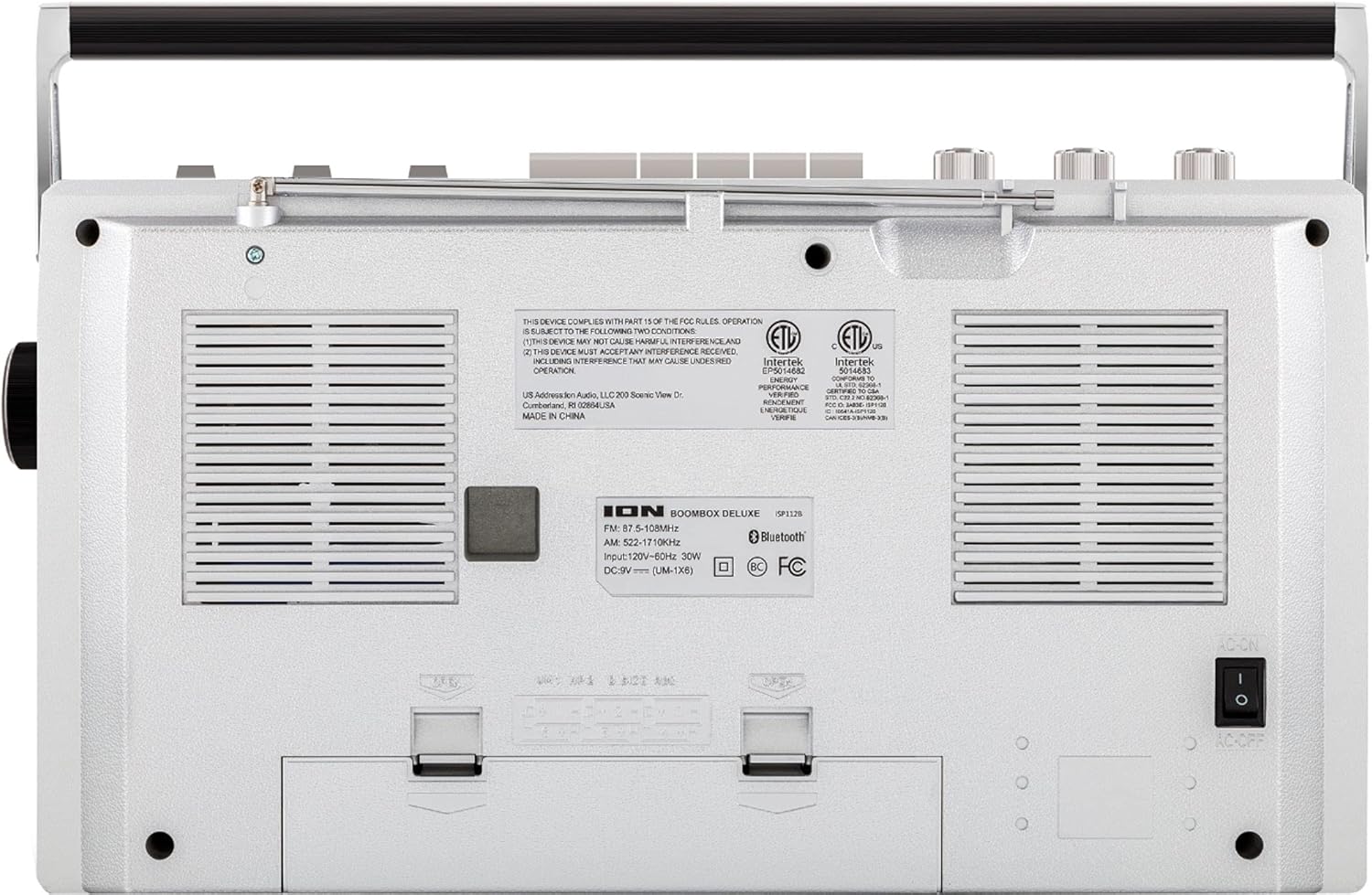
Figure 2: Rear panel of the Boombox Deluxe, highlighting the AC power input and battery compartment location.
3.2 Anten Ayarı
For optimal AM/FM radio reception, extend the telescopic antenna located on the top of the unit. Adjust its position for the clearest signal.
4. Kullanım Talimatları
4.1 Genel Kontroller
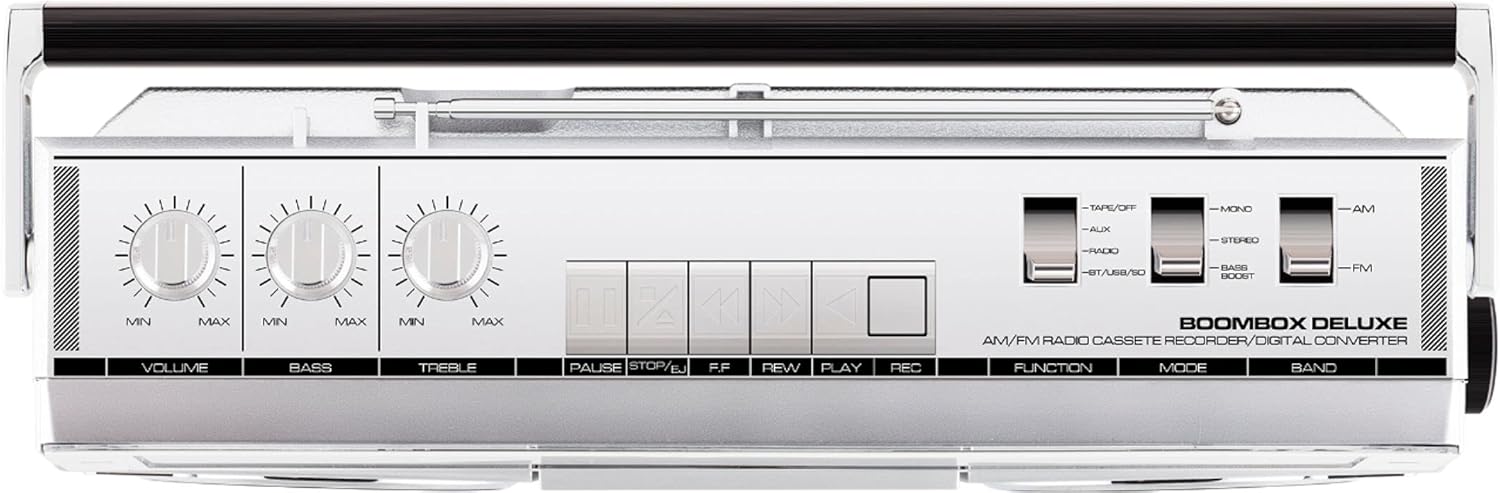
Figure 3: Top panel controls, including Volume, Bass, Treble knobs, and cassette playback buttons.
- Ses Düğmesi: Genel ses çıkış seviyesini ayarlar.
- Bas Düğmesi: Düşük frekanslı ses çıkışını ayarlar.
- Tiz Düğme: Yüksek frekanslı ses çıkışını ayarlar.
- Fonksiyon Anahtarı: Selects between Tape/Off, Aux, Radio, and BT/USB/SD modes.
- Mod Anahtarı: Selects between Mono, Stereo, and Bass Boost audio modes.
- Bant Değiştirme: AM ve FM radyo frekans bantları arasında seçim yapar.
4.2 Telsiz Çalışması
- Ayarla Fonksiyon Düğmesi 'Radyo'ya.
- Ayarla Bant Anahtarı to 'AM' or 'FM'.
- Kullanın Ayar Düğmesi to select your desired radio station. The frequency will be displayed on the tuner scale.
4.3 Kaset Çalar Kullanımı
- Ayarla Fonksiyon Düğmesi to 'Tape/Off'.
- Basın Durdur/Çıkar kaset bölmesini açmak için düğme.
- Insert a cassette tape with the open edge facing upwards. Close the compartment.
- Basın Oynamak Oynatmayı başlatmak için düğmesine basın.
- Kullanmak Rewind (REW) Ve Hızlı İleri (FF) Bant üzerinde gezinmek için düğmeler.
- Basmak Duraklama Oynatmayı geçici olarak durdurmak için. Devam etmek için tekrar basın.
- Basmak Durdur/Çıkar to stop playback and eject the tape.
- To record, ensure the Fonksiyon Düğmesi is set to 'Tape/Off' and press the Record (REC) düğmeye aynı anda bas Oynamak düğme.
4.4 Bluetooth Bağlantısı

Figure 4: Side panel with USB and Micro SD card slots, and playback controls for digital media.
- Ayarla Fonksiyon Düğmesi to 'BT/USB/SD'. The unit will enter Bluetooth pairing mode, indicated by a flashing LED.
- On your Bluetooth-enabled device (e.g., smartphone, tablet), search for 'ION Boombox Deluxe' in the Bluetooth settings.
- Select 'ION Boombox Deluxe' to pair. Once connected, a confirmation tone will sound, and the LED will stop flashing.
- You can now stream audio from your device to the Boombox Deluxe. Use your device's controls or the boombox's playback buttons (Play/Pause, Next/Previous Track) for media control.
4.5 USB/Micro SD Oynatma
- Ayarla Fonksiyon Düğmesi to 'BT/USB/SD'.
- Insert a USB flash drive or Micro SD card (with compatible audio files) into the respective slot on the side of the unit.
- The unit will automatically detect and begin playing audio files.
- Use the playback control buttons (Play/Pause, Next/Previous Track, Delete) on the side panel to manage your music.
4.6 Yardımcı Giriş

Figure 5: Side panel with headphone output and auxiliary input jacks.
- Ayarla Fonksiyon Düğmesi to 'Aux'.
- Harici bir ses cihazını (örneğin, MP3 çalar, CD çalar) şuraya bağlayın: AUX IN 3.5 mm ses kablosu (dahil değildir) kullanarak jakı bağlayın.
- Audio from the connected device will play through the boombox speakers. Control playback from your external device.
5. Özellikler
- Integrated Stereo System with Dual Speakers
- Bluetooth Kablosuz Akış
- AM/FM Radyo Tuneri
- Kaset Çalar/Kaydedici
- USB ve Micro SD Kart Oynatma
- Auxiliary Input for External Devices
- Adjustable Bass and Treble Controls
- Portable Design with Carry Handle
6. Özellikler
| Şartname | Detay |
|---|---|
| Marka | ION Ses |
| Örnek | Boombox Deluxe |
| Bağlantı Teknolojisi | Bluetooth, USB |
| Hoparlör Tipi | Stereo |
| Güç Kaynağı | Battery Powered (D-cell), AC Power |
| Renk | Siyah, Gümüş |
| Ürün Ağırlığı | 8.93 pound |
| Paket Boyutları | 18.1 x 11.1 x 7.6 inç |
7. Sorun Giderme
- Güç Yok:
Ensure the AC power cable is securely connected to both the unit and a working power outlet. If using batteries, check that they are inserted correctly and are not depleted. - Zayıf Radyo Sinyali:
Fully extend the telescopic antenna and adjust its position. Try relocating the unit to an area with better signal reception, away from potential interference sources like other electronic devices. - Cassette Tape Not Playing/Recording:
Ensure the tape is inserted correctly and the cassette compartment is fully closed. Check that the tape is not tangled or damaged. For recording, ensure both Play and Record buttons are pressed simultaneously. - Bluetooth Bağlanmıyor:
Make sure the Boombox Deluxe is in 'BT/USB/SD' mode and in pairing mode (flashing LED). Ensure Bluetooth is enabled on your external device and it is within range (typically 30 feet). Try unpairing and re-pairing the device. - No Sound from USB/Micro SD:
Verify that the USB drive or Micro SD card is inserted correctly and contains compatible audio files (e.g., MP3). Ensure the volume is turned up on the boombox.
8. Bakım
- Temizlik: Cihazın dış yüzeyini temizlemek için yumuşak, kuru bir bez kullanın. Sıvı temizleyiciler veya çözücüler kullanmayın.
- Kaset Çalar Bakımı: Bant başlıklarını ve sıkıştırma silindirlerini periyodik olarak pamuklu çubukla hafifçe temizleyin.ampened with isopropyl alcohol to ensure optimal playback and recording quality.
- Pil Depolama: Cihaz uzun süre kullanılmayacaksa, sızıntıyı ve hasarı önlemek için pilleri çıkarın.
9. Garanti ve Destek
This product is offered as an Amazon Renewed item. Amazon Renewed products are professionally inspected and tested to work and look like new. If you are not satisfied with your purchase, renewed products are eligible for replacement or refund under the Amazon Renewed Guarantee. For specific details regarding the Amazon Renewed Guarantee, please refer to the Amazon Renewed program terms and conditions on the Amazon webalan.
For further assistance or technical support, please contact ION Audio customer service or refer to their official webDestek kaynakları için site.


