giriiş
The Vieta Pro Note True Wireless Earphones are designed to provide a high-quality audio experience with advanced features. These earphones utilize Bluetooth 5.1 for stable wireless connectivity, offer Active Noise Cancellation (ANC) up to -30dB, and include an integrated microphone for clear communication. With IPX4 water resistance, they are suitable for various activities. The charging case extends the total battery life to up to 20 hours.
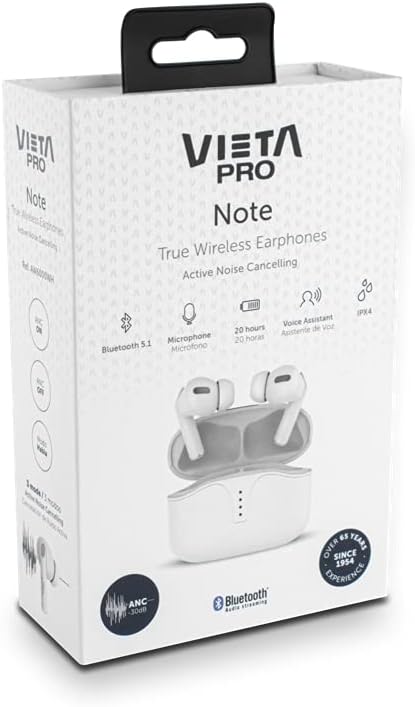
Image: Vieta Pro Note True Wireless Earphones in their retail packaging, highlighting key features like Bluetooth 5.1, microphone, 20 hours battery, Voice Assistant, and IPX4 rating.
Kurmak
1. İlk Şarj
Before first use, fully charge the earphones and the charging case. Connect the provided USB Type-C cable to the charging port on the case and to a power source. The LED indicators on the case will show the charging status and remaining battery level.
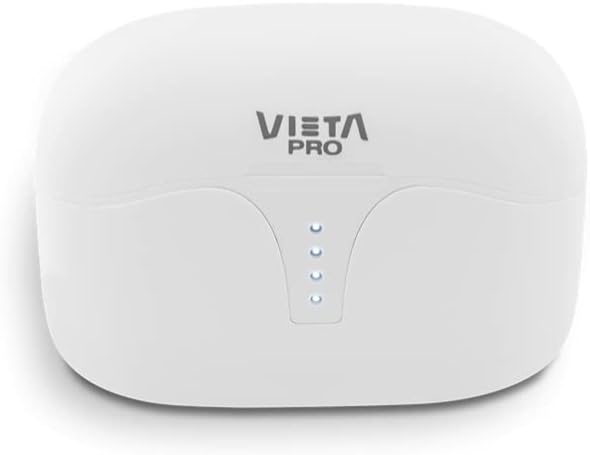
Resim: Üst view of the Vieta Pro Note charging case, showing the four LED indicators that display battery status.
2. Bir Cihazla Eşleştirme
- Kulaklıkların şarjlı olduğundan ve şarj kutusunun içinde yer aldığından emin olun.
- Şarj kutusunun kapağını açın. Kulaklıklar otomatik olarak eşleştirme moduna girecektir.
- Akıllı telefonunuzda veya Bluetooth özellikli cihazınızda Bluetooth ayarlarına gidin.
- Select "Vieta Pro Note" from the list of available devices.
- Once connected, a confirmation sound will play, and the earphones will be ready for use.
The Vieta Pro Note earphones feature Dual Master Technology, meaning both earbuds can function independently. You can use either the left or right earbud alone after initial pairing.
Image: The Vieta Pro Note True Wireless Earphones removed from their open charging case, ready for pairing or use.
Kullanım Talimatları
1. Güç Açma/Kapatma
- Güç Açık: Open the charging case lid, or take the earphones out of the case. They will automatically power on and attempt to connect to the last paired device.
- Kapat: Kulaklıkları şarj kutusuna geri yerleştirin ve kapağı kapatın. Kulaklıklar otomatik olarak kapanacak ve şarj olmaya başlayacaktır.
2. Dokunmatik Kontroller
The Vieta Pro Note earphones feature a touch control panel on each earbud for various functions:

Resim: Yakın çekim view of the left Vieta Pro Note earbud, showing the touch-sensitive area and microphone.
- Oynat/Duraklat: Her iki kulaklığa da bir kez dokunun.
- Sonraki Parça: Sağ kulaklığa iki kez dokunun.
- Önceki parça: Sol kulaklığa iki kez dokunun.
- Sesi aç: Sağ kulaklığa üç kez dokunun.
- Sesi kıs: Sol kulaklığa üç kez dokunun.
- Çağrıyı Cevapla/Sonlandır: Her iki kulaklığa da bir kez dokunun.
- Çağrıyı Reddet: Kulaklıklardan birini 2 saniye basılı tutun.
- Voice Assistant'ı etkinleştirin: Kulaklıklardan birini 3 saniye basılı tutun.
3. Aktif Gürültü Önleme (ANC) Modları
The earphones offer three noise cancellation modes:
- Aktif Gürültü Önleme (ANC): Reduces ambient noise by up to -30dB, ideal for noisy environments.
- Talk Mode (Transparency Mode): Allows you to hear your surroundings and engage in conversations without removing the earphones.
- Devre dışı bırakıldı: Turns off noise cancellation for a standard listening experience.
To switch between ANC modes, press and hold the touch panel on the sol earbud for approximately 2 seconds until you hear a voice prompt indicating the mode change.
Bakım
1. Temizlik
- Kulaklıklarınızı ve şarj kutusunu yumuşak, kuru ve tiftiksiz bir bezle düzenli olarak temizleyin.
- Aşındırıcı temizleyiciler, çözücüler veya aerosol spreyler kullanmayın.
- Küçük, yumuşak bir fırça veya pamuklu çubuk kullanarak kulak uçlarındaki ve hoparlör ağındaki kulak kirini veya kalıntıları nazikçe temizleyin.
2. Depolama
When not in use, store the earphones in their charging case to protect them from dust, damage, and to ensure they remain charged.
3. Suya Dayanıklılık (IPX4)
The Vieta Pro Note earphones are rated IPX4 for water resistance. This means they are resistant to splashing water from any direction. They are suitable for use during workouts or in light rain. However, they are Olumsuz designed for submersion in water or exposure to pressurized water jets. Do not use them in a shower or while swimming.
Sorun giderme
- Ses Yok: Ensure earphones are charged, connected to your device, and volume is turned up on both the earphones and your device.
- Eşleştirilemiyor: Make sure Bluetooth is enabled on your device and the earphones are in pairing mode. Try turning Bluetooth off and on again on your device. If issues persist, try resetting the earphones (refer to the full manual for specific reset instructions if available).
- Aralıklı Bağlantı: Ensure there are no obstructions between the earphones and your device. Keep the device within the Bluetooth range (typically 10 meters/33 feet).
- Kulaklıklar Şarj Edilmiyor: Check that the charging cable is securely connected and the charging case has power. Ensure the earbuds are correctly seated in the charging case.
Özellikler
| Model Numarası | AW6000WH |
| Marka | Vieta Pro |
| Bağlantı | Bluetooth 5.1 |
| Gürültü Önleme | Active Noise Cancellation (-30dB) |
| Mikrofon | Entegre |
| Suya Dayanıklılık | IPX4 |
| Kulaklık Pil Ömrü | 5 saate kadar |
| Toplam Pil Ömrü (kılıfla birlikte) | 20 saate kadar |
| Şarj Portu | USB Tip-C |
| Kontrol Türü | Dokunmatik Kontrol, Ses Kontrolü |
| Form Faktörü | Kulak içi |
| Malzeme | Plastik |
Garanti ve Destek
For warranty information, technical support, or further assistance, please refer to the official Vieta Pro webSite üzerinden satın alabilir veya müşteri hizmetleri departmanıyla iletişime geçebilirsiniz. Satın alma belgenizi garanti talepleriniz için saklayın.


