giriiş
Welcome to your new Matrix Fitness TF30 Treadmill with XER Console. This manual provides essential information for the safe and effective operation, setup, maintenance, and troubleshooting of your treadmill. Designed for a comfortable and high-performance running experience, the TF30 combines robust construction with advanced technology to enhance your fitness journey.

Figure 1: Matrix Fitness TF30 Treadmill with XER Console, showcasing its sleek design and integrated console.
Güvenlik Bilgileri
Before operating the treadmill, please read and understand all safety instructions. Failure to do so may result in serious injury or equipment damage.
- Acil durdurma: Always attach the safety key clip to your clothing before starting a workout. In case of an emergency, pulling the safety key or pressing the emergency stop button will immediately halt the treadmill.
- Gümrükleme: Ensure adequate clearance around the treadmill (at least 6 feet behind and 2 feet on each side) for safe operation and emergency dismount.
- Ayakkabı: Koşu bandını kullanırken daima uygun spor ayakkabısı giyin.
- Çocuklar ve Evcil Hayvanlar: Çalışma sırasında çocukları ve evcil hayvanları koşu bandından uzak tutun.
- Tıbbi Durumlar: Yeni bir egzersiz programına başlamadan önce, özellikle önceden var olan bir sağlık sorununuz varsa, bir doktora danışın.
- Güç: Connect the treadmill to a properly grounded outlet. Do not use extension cords.
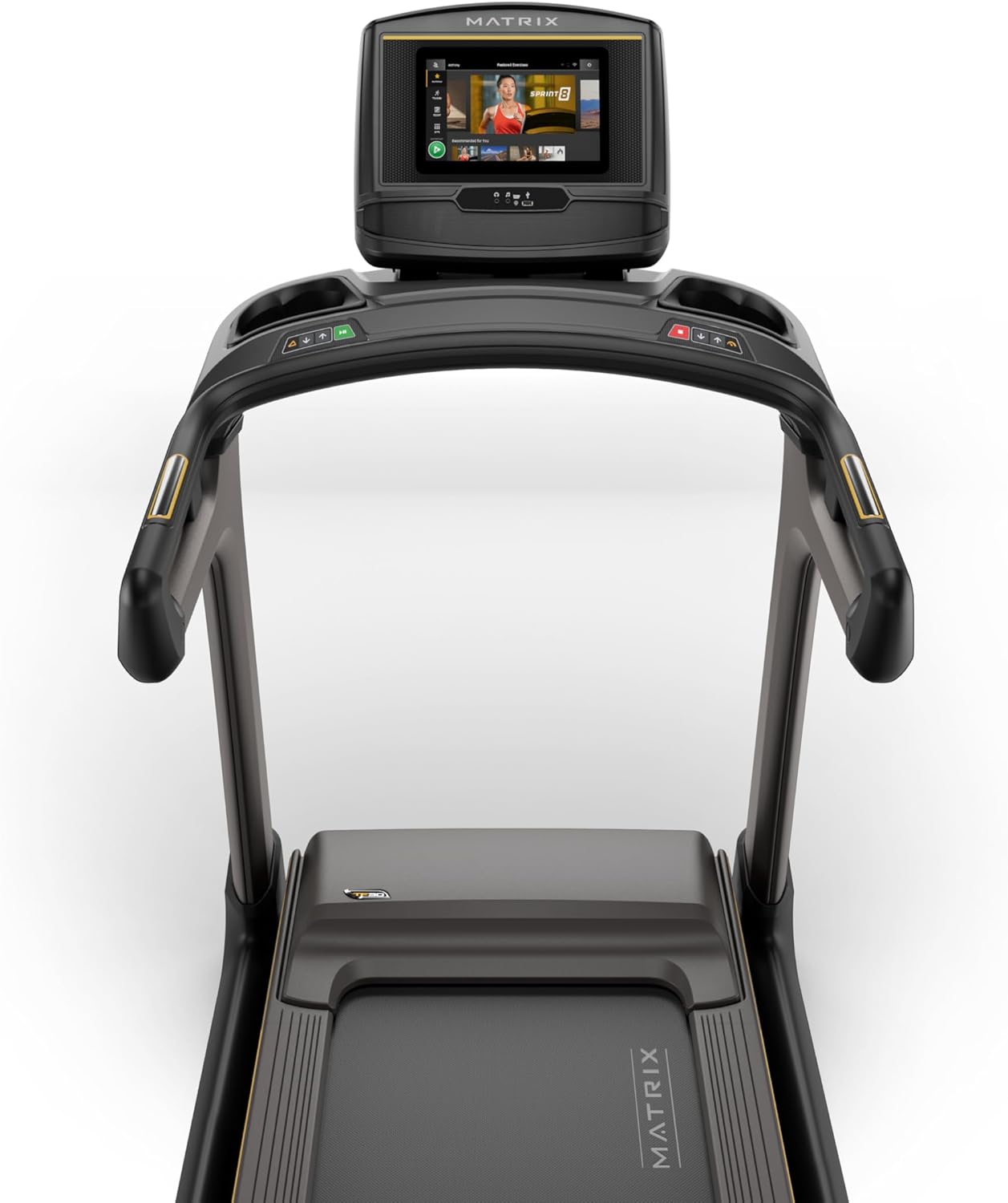
Figure 2: Close-up of the XER Console, highlighting the emergency stop button and safety key attachment point.
Kurmak
The Matrix Fitness TF30 Treadmill requires some assembly. Please ensure all components listed below are present before beginning assembly.
Dahil Bileşenler:
- Koşu Bandı Çerçevesi
- Direkler
- Mast Botları
- Konsol Tabanı
- Gidon
- Gidon Kılıfları
- Gidona Takılan Kapaklar
- Çerçeve Kaplama Setleri
- Arka Kapak
- Güç Kablosu
- Güvenlik Anahtarı
- Donanım Kiti
For detailed assembly instructions, please refer to the separate assembly guide provided with your product. Ensure the treadmill is placed on a flat, stable surface.
Kullanım Talimatları
Your TF30 Treadmill is equipped with advanced features for an optimal workout.
Temel Özellikler:
- Koşu Yüzeyi: A spacious 20" x 55" running surface provides ample room for comfortable strides.
- Speed & Incline: Adjust speed from 0.5 to 12.5 mph and incline from 0% to 15% to customize your workout intensity.
- Johnson Drive System: Experience quiet, durable, and responsive performance with the continuous-duty drive system.
- Ultimate Deck System: Benefit from a heavy-duty frame, extra-thick deck, and industrial-grade cushioning for superior comfort and joint protection.
- Yerden Tasarruf Sağlayan Tasarım: The treadmill features a near 90-degree fold for convenient storage when not in use.

Figure 3: Diagram illustrating key features of the TF30 Treadmill, including its folding design, running surface, motor, incline, speed, and cushioning.

Figure 4: Demonstrating the space-saving folding capability of the TF30 Treadmill.
XER Console Operation:
The 10-inch touchscreen XER Console offers a rich interactive experience.
- Entegre Uygulamalar: Stream entertainment from popular apps like Netflix, YouTube, and Spotify directly on the console.
- Egzersiz Programları: Access 12 built-in programs, including Sprint 8, and integrate with iFIT and Virtual Active for diverse workout experiences and scenic routes.
- Bağlantı: Connect via Bluetooth FTMS to third-party apps and use Bluetooth HR with the included strap for heart rate monitoring.
- Kablosuz Şarj: Conveniently charge your compatible smartphone by placing it on the designated wireless charging pad on the console.
- Kullanıcı Profesyonelfiles: The console supports multiple user profiles, allowing personalized settings and tracking for each user.

Figure 5: The XER Console, highlighting its 10-inch touchscreen and integrated apps for entertainment and diverse workouts.

Figure 6: The XER Console's interface showing various entertainment applications available for use during workouts.

Figure 7: The XER Console displaying a virtual active scenic route, enhancing the immersive workout experience.
Bakım
Düzenli bakım, koşu bandınızın uzun ömürlü olmasını ve optimum performans göstermesini sağlar.
- Temizlik: Wipe down the treadmill and console after each use with a damp Ter ve tozu temizlemek için bir bez kullanın. Aşındırıcı temizleyicilerden kaçının.
- Kayış Yağlama: Periodically check and lubricate the running belt according to the instructions in your detailed product manual to ensure smooth operation and prevent wear.
- Belt Tension & Alignment: Inspect the running belt for proper tension and alignment. Adjust as needed to prevent slipping or rubbing.
- Motor Alanı: Motorun etrafındaki alanı temiz tutun ve toz ile kirden arındırın, böylece uygun havalandırma sağlanır.
Sorun giderme
If you encounter issues with your treadmill, refer to the following common troubleshooting tips.
| Sorun | Olası Neden | Çözüm |
|---|---|---|
| Koşu bandı çalışmıyor. | Power cord not connected, circuit breaker tripped, safety key not engaged. | Ensure power cord is securely plugged in. Check household circuit breaker. Ensure safety key is fully inserted. |
| Koşu bandı kayıyor veya tereddüt ediyor. | Belt tension too loose, belt needs lubrication. | Adjust belt tension according to manual. Lubricate the running belt. |
| Çalışma sırasında olağandışı gürültü. | Gevşek parçalar, motor sorunları, kayış sürtünmesi. | Inspect for loose bolts and tighten. Check belt lubrication. If noise persists, contact customer support. |
| Konsol ekranı boş veya yanıt vermiyor. | Güç sorunu, yazılım hatası. | Ensure power is connected. Try restarting the treadmill by unplugging and re-plugging. |
For more complex issues, please refer to the comprehensive troubleshooting section in your full user manual or contact Matrix Fitness customer support.
Özellikler
| Şartname | Değer |
|---|---|
| Marka | Matris |
| Model Adı | Matrix Fitness TF30 Treadmill |
| Stil | TF30 Treadmill with XER Console |
| Ürün Boyutları (UxGxY) | 77"D x 35"G x 62"Y |
| Katlanmış Boyut | 42"x35"x71" |
| Ürün Ağırlığı | 294 Pound |
| Maksimum Ağırlık Önerisi | 350 Pound |
| Running Surface (Deck Length x Deck Width) | 55 İnç x 20 İnç |
| Maksimum Hız | Saatte 12.5 Mil |
| Minimum Hız | Saatte 0.5 Mil |
| Maksimum Eğim Yüzdesitage | %15 |
| Maksimum Beygir Gücü | 3.25 Beygir Gücü |
| Görüntü Türü | LCD (10 Inches Screen Size) |
| Program Sayısı | 12 |
| Güç Kaynağı | Kablolu Elektrik |
| Montaj Gerekli | Evet |
| Ölçülen Metrikler | Mesafe |

Figure 8: Dimensions of the Matrix Fitness TF30 Treadmill.
Garanti ve Destek
Your Matrix Fitness TF30 Treadmill is backed by a comprehensive manufacturer's warranty:
- Çerçeve: Ömür Boyu Garanti
- Motor and Cushioning: Ömür Boyu Garanti
- Konsol: 5 yıl parça / 1 yıl işçilik
- Frame (Parts/Labor): 5 yıl parça / 2 yıl işçilik
For customer support or warranty claims, please contact Matrix Fitness USA directly.


