giriiş
This manual provides detailed instructions for the installation, operation, maintenance, and troubleshooting of your GIGABYTE GeForce RTX 3080 Vision OC 10G graphics card. This high-performance graphics card is designed for demanding visual tasks, powered by NVIDIA's Ampere architecture, featuring 2nd Generation RT Cores, 3rd Generation Tensor Cores, and 10GB GDDR6X memory. It incorporates the WINDFORCE 3X Cooling System for efficient thermal management and RGB Fusion 2.0 for customizable lighting.
Kurulum ve Yükleme
1. Sistem Gereksinimleri
- Bir adet çift genişlikli x16 grafik yuvasına sahip PCI Express uyumlu anakart.
- Minimum 750W power supply with two 8-pin PCIe power connectors.
- Microsoft Windows 10 64-bit or Linux 64-bit operating system.
- 32GB system memory recommended for optimal performance.
- Sürücü indirme işlemi için internet bağlantısı gereklidir.
2. Paket İçeriği
- GIGABYTE GeForce RTX 3080 Vision OC 10G Graphics Card
- Kullanım Kılavuzu (bu belge)
3. Fiziksel Kurulum
- Sisteminizi hazırlayın: Bilgisayarınızı kapatın ve tüm kabloları çıkarın. Bilgisayar kasasını açın.
- PCIe yuvasını bulun: Anakartınızda kullanılabilir bir PCI Express x16 yuvası bulun.
- Yuva kapaklarını çıkarın: Remove the necessary expansion slot covers from the back of your computer case to accommodate the graphics card.
- Ekran kartını takın: Ekran kartını PCIe yuvasıyla dikkatlice hizalayın ve yerine iyice oturana kadar sıkıca bastırın. PCIe yuvasındaki kilitleme klipsinin yerine oturduğundan emin olun.

Resim: Ön view of the GIGABYTE GeForce RTX 3080 Vision OC 10G Graphics Card, showcasing the triple WINDFORCE fans and the white/silver shroud design.
- Kartı güvence altına alın: Fasten the graphics card to the computer case using screws.
- Güç kablolarını bağlayın: Connect the two 8-pin PCIe power connectors from your power supply to the corresponding ports on the graphics card. Ensure a firm connection.
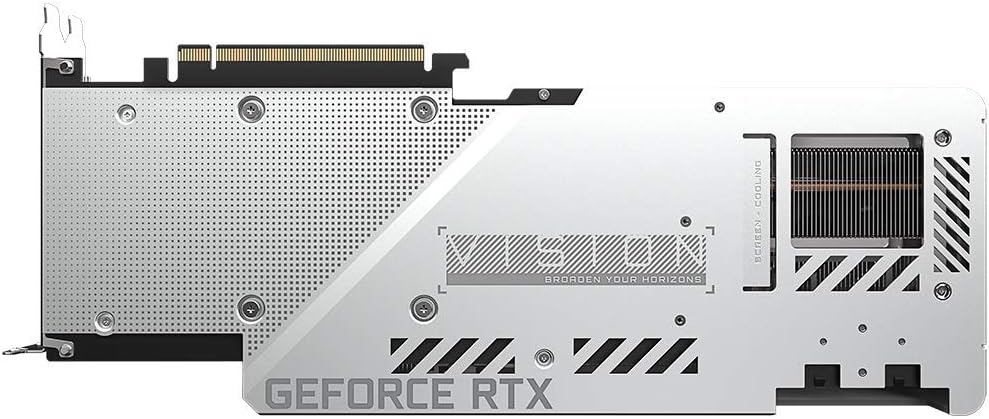
Resim: Arka view of the GIGABYTE GeForce RTX 3080 Vision OC 10G Graphics Card, highlighting the protective metal backplate with ventilation cutouts and the GeForce RTX branding.
- Davayı kapat: Bilgisayar kasasının kapağını yerine takın ve tüm kabloları yeniden bağlayın.
- Connect display: Monitörünüzü ekran kartındaki görüntü çıkışlarından birine (HDMI veya DisplayPort) bağlayın.
Kullanım Talimatları
1. Sürücü Kurulumu
- Güç açık: Turn on your computer. The system may boot into a lower resolution or use a generic display driver.
- Sürücüleri indirin: Resmi GIGABYTE'ı ziyaret edin webalan (www.gigabyte.com) veya NVIDIA'nın resmi webalan (www.nvidia.com/drivers).
- Select product: Navigate to the support section and locate the drivers for the GeForce RTX 3080 series.
- Sürücüleri yükleyin: Download the latest recommended drivers and follow the on-screen instructions to complete the installation. A system restart may be required.
2. Yazılım Yapılandırması
- GIGABYTE Control Center / AORUS Engine: For advanced control over your graphics card, including fan speed adjustment, overclocking profiles, and RGB Fusion 2.0 lighting customization, download and install the GIGABYTE Control Center or AORUS Engine software from the GIGABYTE webalan.
- NVIDIA GeForce Deneyimi: Install NVIDIA GeForce Experience for optimal game settings, driver updates, and access to features like ShadowPlay.
Bakım
- Toz Giderimi: Ekran kartı fanları ve soğutucularındaki tozu düzenli olarak basınçlı hava kullanarak temizleyin. Temizlemeden önce sistemin kapalı ve fişinin çekilmiş olduğundan emin olun.
- Fan Denetimi: Periodically check the fans for any obstructions or unusual noises.
- Sürücü Güncellemeleri: Keep your graphics drivers updated to ensure optimal performance and stability.
Sorun giderme
Ekran Çıkışı Yok
- Monitör kablosunun ekran kartına ve monitöre güvenli bir şekilde bağlı olduğundan emin olun.
- Grafik kartının PCIe yuvasına tam olarak oturduğundan emin olun.
- Check that all required PCIe power connectors are securely attached to the graphics card.
- Mümkünse farklı bir ekran kablosu veya monitörle test edin.
Sistem Kararsızlığı veya Çökmeleri
- Güç kaynağınızın minimum watt'ı karşıladığından emin oluntage requirement (750W).
- Grafik sürücülerinizi en son sürüme güncelleyin.
- Monitor GPU temperatures using software like GIGABYTE Control Center to check for overheating.
- Yüklü diğer sürücüler veya yazılımlarla çakışma olup olmadığını kontrol edin.
Zayıf Performans
- Sürücülerin doğru şekilde yüklendiğinden ve güncel olduğundan emin olun.
- Verify that the graphics card is running at its intended clock speeds (can be checked with monitoring software).
- Check background applications that might be consuming system resources.
- Ensure your system's BIOS/UEFI is updated.
Özellikler
| Grafik İşlem Birimi | NVIDIA GeForce RTX 3080 |
| Video Belleği | 10GB GDDR6X |
| Bellek Arayüzü | 320 bitlik |
| Saati Artır | 1800 MHz |
| Bellek Hızı | 19000 MHz |
| Çıkış Portları | DisplayPort, HDMI |
| Maksimum Dijital Çözünürlük | 7680x4320 (via DisplayPort 1.4a) |
| Çok-view | 4 |
| Kartın Boyutları (Uzunluk x Genişlik x Yükseklik) | 12.6 x 4.96 x 2.17 inç (320 x 126 x 55 mm) |
| Önerilen PSU | 750W |
| Güç Konnektörleri | 2x 8-pin |
| PCI Ekspres | 4.0x16 |
| Model Numarası | GV-N3080VISION OC-10GD 2.0 |
Garanti Bilgileri
GIGABYTE products are covered by a limited warranty. The specific terms and duration of the warranty may vary by region and product. Please refer to the official GIGABYTE website or your product's packaging for detailed warranty information and registration procedures. Keep your proof of purchase for warranty claims.
Teknik Destek
For technical assistance, driver downloads, FAQs, and further support, please visit the official GIGABYTE support webalan:
Ayrıca, GIGABYTE müşteri hizmetlerine, web sitelerinde yer alan iletişim bilgilerini kullanarak da ulaşabilirsiniz. webBölgenize özel site.