1. Giriş
Thank you for choosing the EDIS 40W Speakers, Model EA014. This manual provides essential information for the safe and efficient use of your new speaker system. Please read this manual thoroughly before installation and operation, and retain it for future reference.
2. Güvenlik Bilgileri
Güvenli çalışmayı sağlamak ve hasarı önlemek için lütfen aşağıdaki önlemlere uyun:
- Hoparlörleri suya veya neme maruz bırakmayın.
- Havalandırma açıklıklarını kapatmayın.
- Place the speakers on a stable surface to prevent falling.
- Yalnızca üniteyle birlikte verilen güç adaptörünü kullanın.
- Çocukların erişemeyeceği yerde saklayınız.
- Şimşekli fırtınalar sırasında veya uzun süre kullanılmadığında elektriği kesin.
3. Paket İçeriği
Lütfen paketinizde tüm öğelerin mevcut olduğundan emin olun:
- EDIS 40W Speakers (2 units)
- Kızılötesi Uzaktan Kumanda
- Güç kablosu
- Ses Bağlantı Kabloları
- Kullanım Kılavuzu (bu belge)
4. Ürün Bittiview
The EDIS 40W Speakers are designed to deliver clear audio. They feature a robust design with a steel grille for protection and offer multiple input options.
4.1 Speaker Units

Şekil 1: Ön view of the EDIS 40W Speakers. Each speaker unit features two drivers and a protective steel grille.
4.2 Uzaktan Kumanda
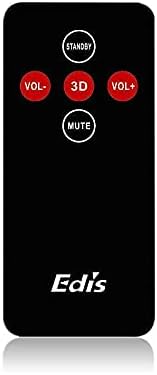
Figure 2: The infrared remote control for the EDIS 40W Speakers. It includes buttons for power, volume adjustment, 3D audio mode, and mute.
4.3 Media Player Panel

Figure 3: The integrated USB and SD Card Media Player panel. This panel allows direct playback from USB drives and SD/MMC memory cards.
5. Kurulum
Follow these steps to set up your EDIS 40W Speakers:
- Atama: Position the speakers on a flat, stable surface or mount them securely to a wall. Ensure adequate space for ventilation.
- Ses Kaynağını Bağlayın: Connect your audio source (e.g., computer, TV, interactive whiteboard) to the speaker system using the appropriate audio cables.
- Güç Bağlantısı: Connect the power cable to the main speaker unit and then plug it into a standard electrical outlet.
- Güç Açık: Press the power button on the main speaker unit or the 'STANDBY' button on the remote control to turn on the speakers.
6. Kullanım Talimatları
Your EDIS 40W Speakers can be operated using the integrated controls or the infrared remote control.
6.1 Uzaktan Kumandanın Kullanımı
- YANINDA OLMAK: Press to turn the speakers on or off (standby mode).
- SES+: Sesi açın.
- SES-: Sesi azaltın.
- SESSİZ: Ses çıkışını sessize alın veya açın.
- 3D: Activate or deactivate the 3D audio effect.
6.2 Using the Media Player Panel
Insert a USB drive or SD/MMC card into the respective slot on the media player panel.
- TARİFİ: Press to switch between input sources (e.g., AUX, USB, SD Card).
- PREVIOUS (◀◀): Önceki parçaya atlayın.
- PLAY/PAUSE (►▌▌): Geçerli parçayı oynatın veya duraklatın.
- NEXT (►►): Bir sonraki parçaya atlayın.
- NEDEN OLMUŞ: Indicates power status or playback activity.
7. Bakım
Proper maintenance ensures the longevity of your speakers:
- Temizlik: Hoparlör yüzeylerini temizlemek için yumuşak, kuru bir bez kullanın. Sıvı temizleyiciler veya aşındırıcı malzemeler kullanmayın.
- Depolamak: Hoparlörleri uzun süre saklayacaksanız, güç bağlantısını kesin ve serin ve kuru bir yerde saklayın.
- Havalandırma: Ensure that the speaker's ventilation openings are not obstructed to prevent overheating.
8. Sorun Giderme
If you encounter issues with your EDIS 40W Speakers, refer to the following common problems and solutions:
| Sorun | Olası Neden | Çözüm |
|---|---|---|
| Güç yok | Power cable not connected; power outlet not working | Güç kablosu bağlantısını kontrol edin; farklı bir priz deneyin. |
| Ses yok | Volume too low; incorrect input source; audio cable loose/faulty | Increase volume; press MODE to select correct input; check audio cable connections. |
| Uzaktan kumanda çalışmıyor | Batteries depleted; obstruction between remote and speaker; remote not pointed correctly | Replace remote batteries; remove obstructions; point remote directly at the speaker's IR receiver. |
| USB/SD kart oynatılmıyor | Yanlış file format; card/drive not inserted correctly; corrupted media | Emin olmak files are compatible (e.g., MP3); reinsert media; try a different USB drive/SD card. |
9. Özellikler
| Özellik | Şartname |
|---|---|
| Marka | EDIS |
| Model Numarası | EA014 |
| Maksimum Hoparlör Çıkış Gücü | 40 Watt |
| Renk | Gri |
| Ürün Ağırlığı | 8 kilo |
| Kontrol Yöntemi | Uzak |
| Bağlantı Teknolojisi | Kablolu |
| Güç Kaynağı | Kablolu Elektrik |
| Ses Çıkışı Modu | Çevrelemek |
| Montaj Tipi | Ayakta |
| Malzeme | Odun |
| Hoparlör Tipi | Dış mekan |
| Özel Özellikler | Ampcankurtaran |
| Uyumlu Cihazlar | Tüm cihazlar |
| Çevresel Ses Kanalı Yapılandırması | 2 |
10. Garanti ve Destek
Garanti bilgileri ve müşteri desteği için lütfen satın alma sırasında sağlanan belgelere bakın veya satıcınızla iletişime geçin. Herhangi bir garanti talebi için satın alma belgenizi saklayın.


