1. Giriş ve Üzeriview
Capture your driving experience with the Ring Automotive RSDC2000 Smart Dash Cam. This advanced dash cam features Full HD 1080p resolution at 30 frames per second, providing clear and detailed video footage. Integrated Wi-Fi and a G-sensor ensure easy connectivity and automatic incident recording. The Ring Connect app allows convenient access and control, while the compact 2-inch screen offers easy viewing. Its sleek black design ensures it blends seamlessly with your vehicle's interior, making it an essential accessory for safe and secure driving.

Image: The Ring Smart Dash Cam RSDC2000 shown with its magnetic mount and a smartphone displaying the Ring Connect application, highlighting its connectivity features.
2. Ürün Özellikleri
- Secure Recording: Works in conjunction with Ring Connect to save, store, and easily share captured content.
- G-Sensörü: Automatically saves moments during a collision, ensuring critical footage korunmuştur.
- Kolay Kurulum: Simple setup with a magnetic mount and included trim tool for quick and secure placement.
- App and Wi-Fi Connectivity: Stay connected with the Ring Connect app and Wi-Fi features for convenient viewing and sharing of footage.
- Yüksek Kaliteli Video: Enjoy crystal-clear videos captured in Full HD 1080p at 30fps.
- Park Modu: Records collisions even when the vehicle is parked, providing continuous surveillance.
- Mikro SD Kart Yuvası: Supports up to 32GB capacity for ampKayıtların saklanması.
- Kompakt Tasarım: Smaller than a credit card, ensuring an unobstructed view Sürüş sırasında.
- Geniş Alan View: 120 derecelik alan view to capture a comprehensive view Yolun.

Image: Diagram illustrating the secure recording capabilities, including G-sensor, parking mode, and Micro SD card slot.

Image: Visual representation of the dash cam's compact size, comparing it to a credit card and showing its dimensions.
3. Kutuda Neler Var?
The Ring Smart Dash Cam RSDC2000 package includes the following components:
- Ring Smart Dash Cam RSDC2000 Body
- 3.5m 12V DC Power Cable with USB
- Manyetik Dağı
- Hızlı Başlangıç Talimatları
- Kırpma Kaldırma Aracı
- Recording Window Sticker
- Spare Self-Adhesive Pad

Image: An illustration detailing all items included in the product packaging, such as the dash cam unit, power cable, magnetic mount, and tools.
4. Kurulum
Follow these steps to set up your Ring Smart Dash Cam RSDC2000:
- Montaj Konumunu Seçin: Ön camınızda net görüş sağlayan bir yer seçin. view of the road and does not obstruct your driving visibility. The area should be clean and dry.
- Attach Magnetic Mount: Secure the magnetic mount to the chosen location on your windshield using the adhesive pad. Ensure it is firmly attached.
- Araç Kamerasını Takın: The dash cam unit easily attaches to the magnetic mount. Ensure it clicks securely into place.
- Gücü bağlayın: Plug the 3.5m 12V DC power cable into the dash cam and then into your vehicle's cigarette lighter socket. Route the cable neatly along the windshield edge using the included trim removal tool to tuck it under the vehicle's trim for a clean installation.
- Micro SD Kartı Takın: Insert a compatible Micro SD card (up to 32GB, not included) into the designated slot on the dash cam.
- İlk Güç Açma: Once connected to power, the dash cam should power on automatically. Follow any on-screen prompts for initial setup, such as setting the date and time.
- Download Ring Connect App: Download the Ring Connect app from your smartphone's app store. This app will allow you to connect to your dash cam via Wi-Fi for viewing and managing footage.

Image: The dash cam mounted on a car's windshield, demonstrating its discreet placement and ease of installation.
5. Kullanım Talimatları
The Ring Smart Dash Cam RSDC2000 is designed for straightforward operation:
- Otomatik Kayıt: The dash cam will automatically begin recording when your vehicle's ignition is turned on. Footage is recorded in Full HD 1080p at 30 frames per second.
- Döngü Kaydı: When the Micro SD card is full, the dash cam will automatically overwrite the oldest unprotected footage, kayda devam etmek için.
- G-Sensor (Incident Detection): In the event of a sudden impact or collision, the built-in G-sensor will automatically detect the event and lock the current video segment, preventing it from being overwritten by loop recording.
- Park Modu: When enabled, the dash cam can continue to monitor your vehicle for impacts even when parked. If an impact is detected, it will automatically record and save the footage.
- Using the 2-inch Screen: The integrated 2-inch screen allows for real-time viewing of the recording, playback of saved footage, and navigation through the device's menu settings.
- Wi-Fi and Ring Connect App: Connect your smartphone to the dash cam's Wi-Fi network. Open the Ring Connect app to view canlı footage, download recorded videos to your phone, adjust settings, and share clips.

Image: A driver's perspective showing the dash cam mounted on the windshield, illustrating its wide 120-degree field of view and clear recording capabilities.
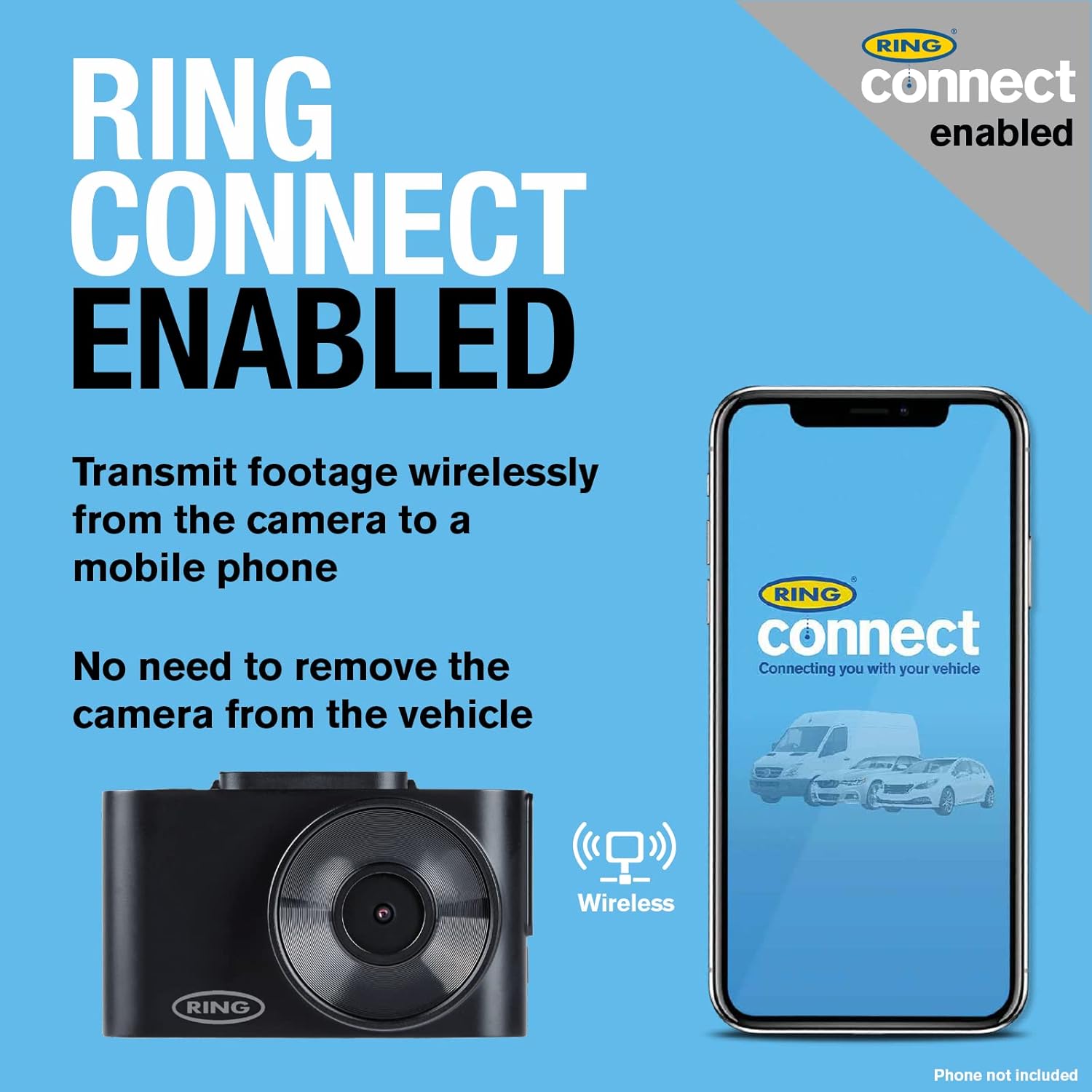
Image: The dash cam and a smartphone with the Ring Connect app, demonstrating the wireless connectivity for footage transmission without removing the camera.
6. Bakım
Proper maintenance ensures the longevity and optimal performance of your Ring Smart Dash Cam RSDC2000:
- Lensi temizleyin: Regularly wipe the camera lens with a soft, lint-free cloth to ensure clear recordings. Avoid abrasive cleaners.
- Ekranı Temizleyin: Use a microfiber cloth to gently clean the 2-inch display screen.
- Mikro SD Kart Yönetimi: It is recommended to format the Micro SD card periodically (e.g., once a month) using the dash cam's menu settings. This helps maintain card health and prevents data corruption. Back up any important footagBiçimlendirmeden önce e.
- Donanım Yazılımı Güncellemeleri: Check the Ring Automotive website or the Ring Connect app for any available firmware updates. Keeping your dash cam's firmware up-to-date can improve performance and add new features.
- Sıcaklık Hususları: Avoid exposing the dash cam to extreme temperatures for prolonged periods. If the vehicle is parked in direct sunlight on a hot day, consider removing the dash cam or shading it.
- Kablo Denetimi: Güç kablosunu periyodik olarak aşınma veya hasar belirtileri açısından kontrol edin. Gerekirse değiştirin.
7. Sorun Giderme
If you encounter issues with your Ring Smart Dash Cam RSDC2000, refer to the following common troubleshooting steps:
- Dash Cam Açılmıyor:
- Güç kablosunun hem araç kamerasına hem de aracın çakmak soketine güvenli bir şekilde bağlı olduğundan emin olun.
- Check if the vehicle's cigarette lighter socket is receiving power (e.g., by testing with another device).
- Try a different 12V power source if available.
- Kayıt Sorunları (Kayıt Yok/Bozuk) Files)
- Mikro SD kartın doğru şekilde takıldığından emin olun.
- Format the Micro SD card using the dash cam's menu. If issues persist, try a different, high-quality Micro SD card.
- Hafıza kartının dolu olup olmadığını ve döngüsel kayıt özelliğinin etkinleştirilmiş olup olmadığını kontrol edin.
- Wi-Fi Bağlantı Sorunları:
- Araç kameranızda ve akıllı telefonunuzda Wi-Fi'nin etkinleştirildiğinden emin olun.
- Hem araç kameranızı hem de akıllı telefonunuzu yeniden başlatın.
- Ensure you are within close proximity to the dash cam for a stable Wi-Fi connection.
- Kötü Video Kalitesi:
- Kamera lensini temizleyin.
- Lens üzerindeki koruyucu filmin (varsa) çıkarıldığından emin olun.
- Check the video resolution settings in the dash cam's menu or the Ring Connect app.
- Dash Cam Freezes/Unresponsive:
- Press and hold the power button to force a restart.
- If a reset button is available (refer to quick start guide), use a thin object to press it.
If these steps do not resolve the issue, please refer to the official Ring Automotive support resources or contact customer service.
8. Özellikler
| Özellik | Şartname |
|---|---|
| Model Adı | Ring Automotive RSDC2000 Smart Dash Cam 2000 |
| Model Numarası | RSDC2000 |
| Marka | Yüzük |
| Renk | Siyah |
| Ekran Boyutu | 2 inç |
| Bağlantı Teknolojisi | Wifi |
| Video Kayıt Çözünürlüğü | 1080p (Tam HD) |
| Alanı View | 120 Derece |
| Montaj Tipi | Windshield Mount (Magnetic) |
| Özel Özellikler | Integrated Display, App Control, Loop Recording, Integrated Speaker, Integrated Microphone, Parking Monitor, Integrated Wi-Fi |
| Uyumlu Cihazlar | Araba |
| Pil Bileşimi | Lityum-iyon (1 adet dahil) |
| Şarj edilebilir pil | Evet |
9. Garanti ve Destek
For warranty information, please refer to the documentation provided with your product or visit the official Ring Automotive website. Information regarding spare parts availability and guaranteed software updates is not directly available in this manual.
For technical support, troubleshooting assistance beyond this manual, or inquiries about spare parts and software updates, please contact Ring Automotive customer service directly. You can typically find contact details on their official webSitede veya ürünün hızlı başlangıç kılavuzunda.
Ring Automotive Official Webalan: www.ringotomotiv.com


