1. Giriş
This manual provides instructions for the installation, operation, and troubleshooting of your ARRIS Touchstone TM804G DOCSIS 3.0 Telephone Modem. The TM804G is designed to provide high-speed data access and up to four lines of Voice over IP (VoIP) telephone service over your cable network. It features DOCSIS 3.0 technology for enhanced internet speeds and reliability.
2. Temel Özellikler
- DOCSIS 3.0 compliant for high-speed internet.
- Four (4) dedicated VoIP telephone ports.
- Supports download speeds up to 343 Mbps.
- Two independent 96MHz RF tuners.
- Ethernet connectivity for network devices.
3. Paket İçeriği
Paketinizin aşağıdaki öğeleri içerdiğini doğrulayın:
- ARRIS Touchstone TM804G Telephone Modem
- Güç Adaptörü
- Ethernet kablosu
- Belgeler (Hızlı Başlangıç Kılavuzu, Güvenlik Bilgileri)
Note: A backup battery is sold separately and is not included in the standard package.
4. Fiziksel Özellikler
4.1 Ön Panel Göstergeleri
The front panel of the TM804G modem features several LED indicators that provide status information.

Şekil 1: Ön view of the ARRIS Touchstone TM804G Telephone Modem. This image shows the modem's black casing with ventilation holes on top and a row of green LED indicator lights on the right side of the front panel.
| Gösterge | Durum | Tanım |
|---|---|---|
| GÜÇ | Katı Yeşil | Modem açık. |
| DS (Aşağı Akış) | Katı Yeşil | Aşağı akış kanalı bağlı. |
| ABD (yukarı akış) | Katı Yeşil | Yukarı akış kanalı bağlı. |
| ÇEVRİMİÇİ | Katı Yeşil | The modem is registered and online. |
| BAĞLANTI | Katı Yeşil | An Ethernet device is connected. |
| TEL1-4 | Katı Yeşil | Telephone line is active. |
4.2 Arka Panel Bağlantı Noktaları
The rear panel provides all necessary connection ports for the modem.
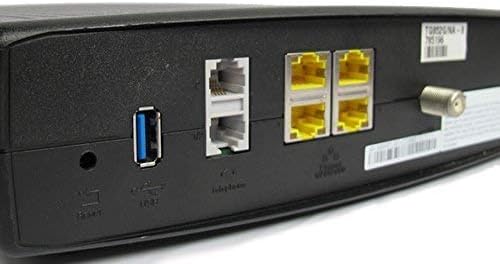
Şekil 2: Arka view of the ARRIS Touchstone TM804G Telephone Modem. This image displays the back of the modem, featuring a coaxial cable connector, four yellow Ethernet ports, two grey telephone ports (RJ-11), a USB port, a reset button, and the power input.
- KOAKSİYEL: Kablo duvar prizine bağlanır.
- ETHERNET (LAN): Four (4) RJ-45 ports for connecting to a computer or router.
- TEL1-4 (RJ-11): Four (4) telephone ports for connecting to telephones or a home telephone wiring system.
- USB BAĞLANTI: (Functionality may vary or be disabled by your service provider).
- SIFIRLA: Recessed button to reset the modem to factory defaults (use with caution).
- GÜÇ: Güç adaptörüne bağlanır.
5. Kurulum ve Kurulum
Follow these steps to install your ARRIS Touchstone TM804G modem.
- Koaksiyel Kabloyu Bağlayın: Connect one end of a coaxial cable to the COAXIAL port on the modem and the other end to a cable wall outlet. Ensure the connection is finger-tight.
- Ethernet Kablosunu Bağlayın: Connect one end of the Ethernet cable to one of the ETHERNET ports on the modem and the other end to your computer's network port or your wireless router's WAN/Internet port.
- Telefon Hatlarını Bağlayın: If using telephone service, connect your telephone(s) or home telephone wiring to the TEL1, TEL2, TEL3, or TEL4 ports on the modem using standard RJ-11 telephone cables.
- Güç Adaptörünü Bağlayın: Güç adaptörünü modemin POWER portuna bağlayın ve ardından adaptörü elektrik prizine takın.
- Güç Açık: The modem will automatically power on. Observe the front panel indicator lights. The POWER, DS, US, and ONLINE lights should eventually turn solid green, indicating a successful connection to the cable network and internet. The TEL lights will illuminate when telephone lines are active.
- Hizmeti Etkinleştir: Contact your Internet Service Provider (ISP) to activate the modem. You will need to provide them with the MAC address and serial number, typically found on a label on the bottom or back of the modem.
Important: Do not connect the modem to a power outlet until all other connections are made.
6. Kullanım Talimatları
Once the modem is successfully installed and activated, it operates automatically.
- İnternet girişi: Any device connected via Ethernet to the modem (or through a connected router) should have internet access once the ONLINE light is solid green.
- Telefon Hizmeti: If your service plan includes VoIP, connected telephones will have dial tone and function once the corresponding TEL lights are solid green.
- İzleme Durumu: Refer to the front panel LED indicators (Section 4.1) to monitor the modem's operational status.
7. Bakım
- Temizlik: Keep the modem clean and free of dust. Use a soft, dry cloth to wipe the exterior. Do not use liquid cleaners or aerosols.
- Havalandırma: Modemin aşırı ısınmasını önlemek için iyi havalandırılan bir yere yerleştirildiğinden emin olun. Havalandırma deliklerini kapatmayın.
- Donanım Yazılımı Güncellemeleri: Firmware updates are typically managed automatically by your Internet Service Provider. Do not attempt to manually update the firmware unless instructed by your ISP.
- Restarting the Modem: If you experience connectivity issues, try restarting the modem by unplugging the power adapter for 10-15 seconds and then plugging it back in.
- Fabrika ayarları: The recessed RESET button on the rear panel can be used to restore factory default settings. This should only be done if instructed by your ISP, as it will erase all custom configurations. To perform a factory reset, use a paperclip to press and hold the RESET button for at least 10 seconds.
8. Sorun Giderme
If you encounter problems with your modem, refer to the following common issues and solutions.
| Sorun | Olası Neden | Çözüm |
|---|---|---|
| Güç Yok | Güç adaptörü bağlı değil veya priz arızalı. | Ensure power adapter is securely connected to the modem and a working electrical outlet. Check the POWER LED. |
| İnternet Erişimi Yok | Coaxial cable loose, modem not activated, or ISP outage. |
|
| No Dial Tone on Phone | Telephone cable loose, TEL light off, or service issue. |
|
| Yavaş İnternet Hızı | Network congestion, old router, or ISP issue. |
|
For further assistance, contact your Internet Service Provider's technical support.
9. Özellikler
| Model Numarası | TM804G |
| DOCSIS Standard | DOCSIS 3.0 |
| Internet Download Speed | 343 Mbps'ye kadar (İnternet servis sağlayıcısına bağlı olarak) |
| VoIP Bağlantı Noktaları | 4 (RJ-11) |
| Ethernet Bağlantı Noktaları | 4 (RJ-45) |
| Bağlantı Teknolojisi | Ethernet |
| Boyutlar (U x G x Y) | Yaklaşık 11.81 x 9.13 x 2.56 inç |
| Ağırlık | Yaklaşık 2.16 pound |
| Uyumlu İSS'ler | Optimum, Mediacom (and others, check with your provider) |
10. Garanti ve Destek
Bu ürün Amazon Renewed ürünü olarak sunulmaktadır. Amazon Renewed ürünleri, yeni gibi çalışması ve görünmesi için profesyonelce incelenir ve test edilir. Satın alımınızdan memnun kalmazsanız, Amazon Renewed Garantisi kapsamında değişim veya para iadesi hakkınız bulunmaktadır.
For technical support, troubleshooting, or service-related inquiries, please contact your Internet Service Provider (ISP) directly. Your ISP is responsible for the activation, configuration, and ongoing support of the modem on their network.


