1. Giriş
This manual provides detailed instructions for the installation, operation, and maintenance of your Athom Smart Wall Switch. This device is designed to integrate seamlessly with Apple HomeKit, offering convenient control via Siri voice commands, remote access, and scheduling features. It supports both no-neutral line and neutral line electrical systems, making it versatile for various installations.
2. Güvenlik Bilgileri
- Kurulum, sökme veya bakım işlemlerinden önce daima devre kesiciden elektriği kesin.
- Kurulum, yetkili bir elektrikçi tarafından veya yerel elektrik yönetmeliklerine uygun olarak yapılmalıdır.
- Anahtarı ıslak elle çalıştırmayın.
- Ensure the switch is installed in a dry environment, away from moisture and extreme temperatures.
- Verify correct wiring connections to prevent damage to the switch or connected appliances.
3. Paket İçeriği
Lütfen paketi aşağıdaki öğeler açısından kontrol edin:
- Athom Smart Wall Switch (3-Key)
- Kullanıcı Kılavuzu
- Capacitor (for no-neutral line installations)
- Montaj Vidaları

Image: Contents of the Athom Smart Wall Switch package, including the switch, manual, capacitor, and screws.
4. Ürün Bittiview
The Athom Smart Wall Switch features a sleek glass panel with three touch-sensitive buttons for manual control. A Wi-Fi indicator is located on the top left of the panel. The rear of the switch houses the wiring terminals for electrical connection.
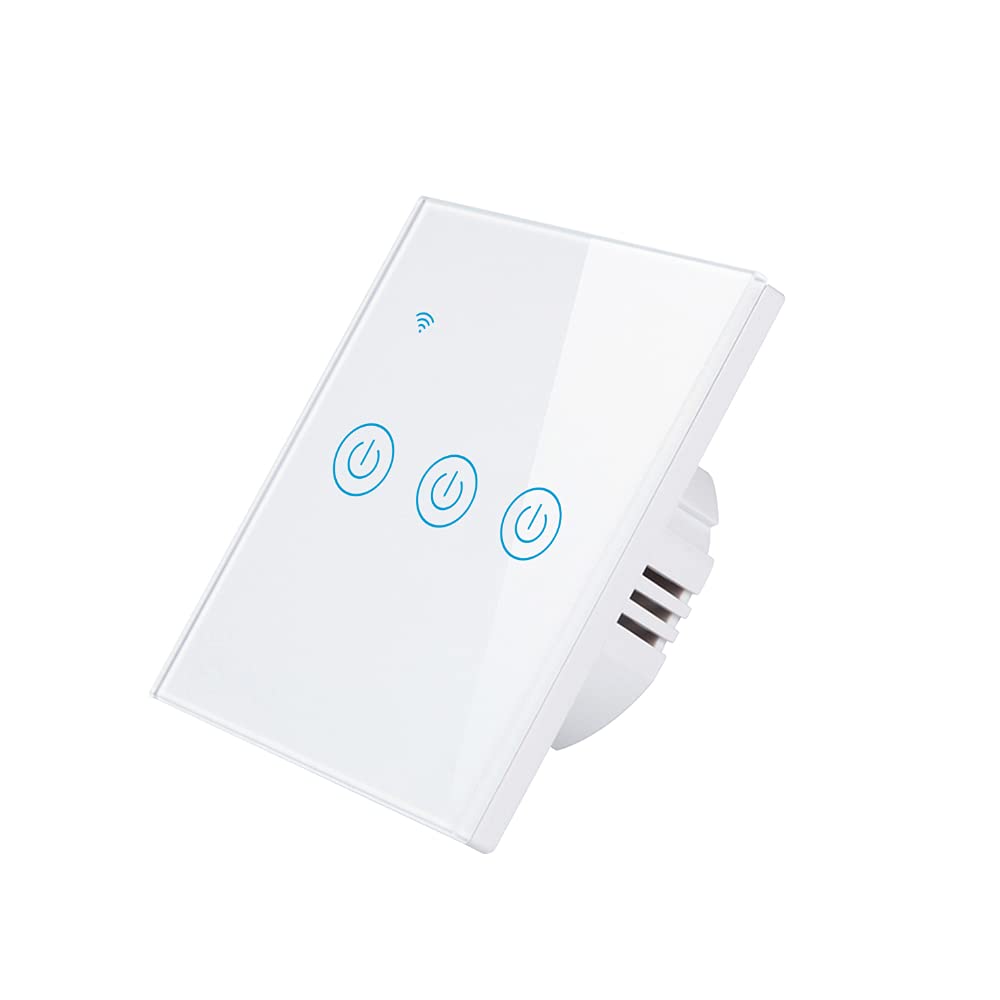
Resim: Ön view of the Athom Smart Wall Switch, showing the three touch-sensitive buttons and Wi-Fi indicator.

Image: Display of multiple Athom Smart Wall Switches, highlighting compatibility with Apple HomeKit.
5. Kurulum ve Kurulum
5.1 Kablolama Şemaları
The Athom Smart Wall Switch supports both no-neutral line and neutral line installations. Please identify your home's wiring configuration before proceeding.
5.1.1 No Neutral Line Mode
This mode is common in older installations where a neutral wire is not present at the switch box. A capacitor must be installed across the light fixture for proper operation.

Image: Detailed wiring diagram illustrating the connection for the Athom Smart Wall Switch when a neutral line is not available, including capacitor installation across the bulb.
5.1.2 Neutral Line Mode
For installations where a neutral wire is available in the switch box, connect the Live (L) wire to the 'L' terminal, the Neutral (N) wire to the 'N' terminal, and the Load wires (L1, L2, L3) to their respective terminals. The capacitor is not required in this mode.
5.2 Kurulum Adımları
- Gücü Kapatın: Devre kesicinizi bulun ve değiştireceğiniz şaltere giden elektriği kapatın. Ses seviyesi göstergesi kullanarak elektriğin kapalı olduğunu doğrulayın.tage test cihazı.
- Eski Anahtarı Kaldır: Mevcut duvar plakasını ve şalteri dikkatlice çıkarın. Kabloları ayırın.
- Akıllı Anahtarı Kablolayın: Connect the wires to the Athom Smart Wall Switch according to the appropriate wiring diagram (Section 5.1). Ensure all connections are secure.
- Anahtarı Monte Edin: Kablolu anahtarı yavaşça duvar kutusuna itin ve verilen montaj vidalarıyla sabitleyin.
- Duvar Plakasını Takın: Yeni duvar plakasını takın.
- Gücü Geri Yükle: Sigortadan elektriği tekrar açın.
- Pair with HomeKit: Follow the instructions in Section 6.1 to pair your switch with Apple HomeKit.
6. Kullanım Talimatları
The Athom Smart Wall Switch offers multiple control methods:
6.1 Apple HomeKit ve Siri Ses Kontrolü
The switch is designed for direct integration with Apple HomeKit without requiring a separate app or registration. To add the switch to HomeKit:
- Ensure your iPhone, iPad, or iPod Touch is connected to the same 2.4GHz Wi-Fi network as the switch.
- Apple Home uygulamasını açın.
- Tap the '+' icon in the top right corner and select 'Add Accessory'.
- Scan the HomeKit setup code located on the switch or in the manual.
- Follow the on-screen prompts to assign the switch to a room and give it a name.
Once added, you can control the switch using Siri. For example, şöyle diyelim: "Hey Siri, oturma odasının ışığını aç."
6.2 Uzaktan Kumanda
After successfully adding the switch to Apple HomeKit, you can control it remotely using the Home app on your Apple devices. Ensure your Home Hub (e.g., Apple TV, HomePod, or iPad) is set up and online to enable remote access.
6.3 Zamanlama ve Planlama
Utilize the Apple Home app to set up schedules and automations for your smart switch. You can configure lights or appliances to turn on or off at specific times, or based on other conditions like sunrise/sunset or sensor triggers.
7. Bakım
- Temizlik: Gently wipe the switch's glass panel with a soft, dry cloth. Avoid using abrasive cleaners or solvents.
- Donanım Yazılımı Güncellemeleri: Periodically check for firmware updates through the Apple Home app to ensure optimal performance and security.
- Çevresel Koşullar: Ensure the switch is not exposed to excessive heat, cold, or humidity, which can affect its lifespan and functionality.
8. Sorun Giderme
- Anahtar Yanıt Vermiyor:
- Devre kesicinin açık olup olmadığını kontrol edin.
- Tüm kablo bağlantılarının sağlam olduğundan emin olun.
- If in no-neutral mode, ensure the capacitor is correctly installed across the light fixture.
- Try resetting the switch by turning off power at the breaker for 10 seconds, then turning it back on.
- Cannot Connect to HomeKit:
- Wi-Fi ağınızın 2.4 GHz olduğundan emin olun. Switch, 5 GHz ağlarını desteklemez.
- Check that your iPhone/iPad is connected to the same 2.4GHz Wi-Fi network.
- Eşleştirme işlemi sırasında Wi-Fi yönlendiricinize daha yakın bir konuma geçin.
- If the issue persists, try resetting the switch to factory defaults (refer to specific reset procedure if available, otherwise power cycle).
- Lights Flicker (No Neutral Mode):
- This often indicates an issue with the capacitor installation or a low-wattage bulb. Ensure the capacitor is correctly wired across the light fixture.
- Some very low-wattage LED bulbs may still flicker; consider using a compatible bulb or a neutral line installation if possible.
9. Özellikler
| Marka | Athom |
| Örnek | Smart Wall Switch 3-Key EU Dual Mode |
| Cilttage | 220-240VAC, 50-60Hz |
| Grup başına yük | 5-200W |
| Boyutlar | 86x86x35mm |
| Çalışma Modu | Kapalı, Akıllı Anahtar |
| Güncel Derecelendirme | 10 Amps |
| Çalışma Hacmitage | 240 Volt |
| Bağlayıcı Türü | Kablosuz |
| Uluslararası Koruma Derecelendirmesi | IP54 |
| Pozisyon Sayısı | 3 |
| Denetleyici Türü | Apple HomeKit |
| Kontrol Yöntemi | Uzak |
| Bağlantı Protokolü | Wi-Fi (2.4GHz b/g/n) |
| Merkez Gereksinimi | HAYIR |
| Çalışma Sıcaklığı | -20°C ila 50°C |
| Sertifikalar | CE, RoHS |
10. Garanti ve Destek
For warranty information and technical support, please refer to the documentation provided with your purchase or visit the official Athom webSite. Satın alma fişinizi, garanti talepleriniz için satın alma belgeniz olarak saklayın.


