giriiş
This manual provides detailed instructions for the setup, operation, and maintenance of your Brydge 11 MAX+ Wireless Keyboard Case. Designed to enhance your iPad experience, this keyboard case features a multi-touch trackpad, a magnetic SnapFit case, and Bluetooth 5.0 connectivity for seamless integration.
Kutuda Neler Var?
- 1 x Brydge 11 MAX+ Keyboard Case
- 1 x Kullanım Kılavuzu
- Charging Cable (USB-C, may be included depending on region/bundle)

Kurulum işlemine başlamadan önce lütfen tüm öğelerin eksiksiz olduğundan emin olun.
Uyumluluk
The Brydge 11 MAX+ Wireless Keyboard Case is compatible with the following iPad models:
- iPad Pro 11 inç (1., 2., 3. ve 4. nesiller)
- iPad Air 11 inç (4., 5. nesil ve M2)
Not: This keyboard case is not designed for use with the 11-inch iPad Pro (M4).
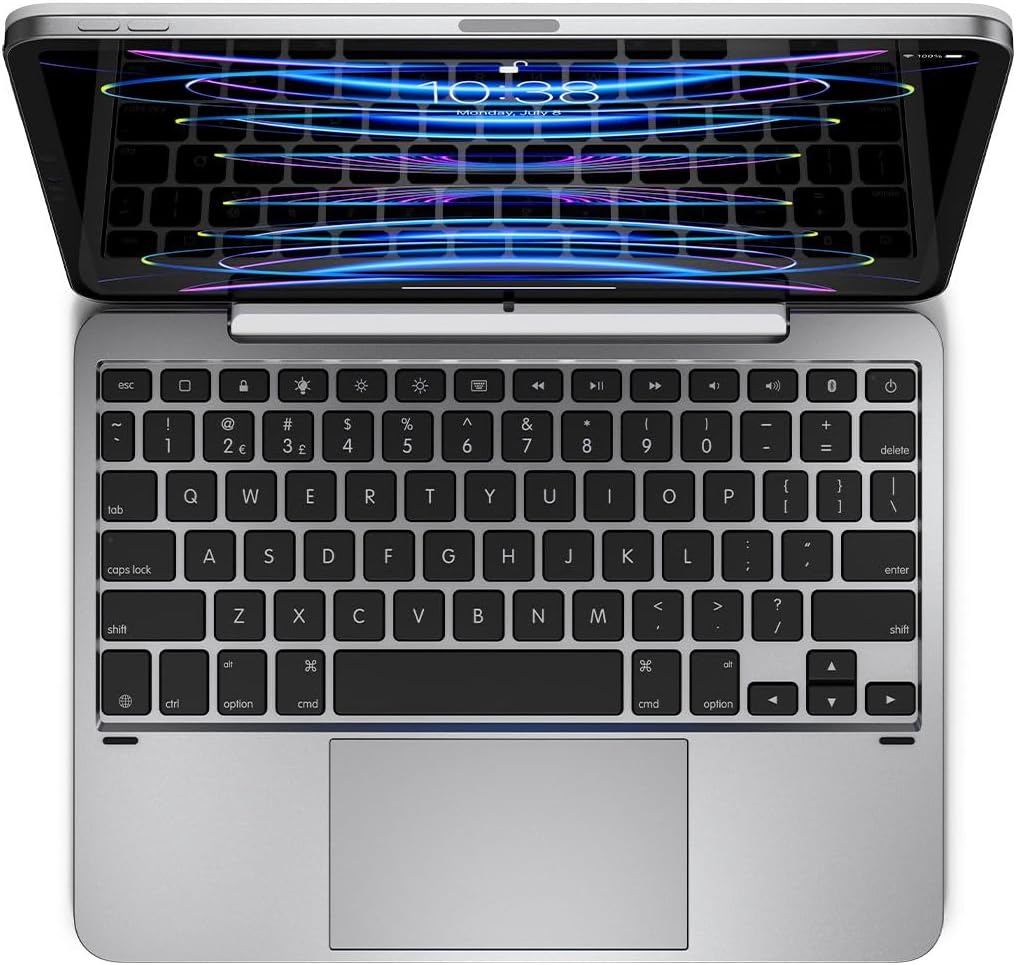
Kurmak
1. iPad'inizi Bağlama
- Align your iPad with the magnetic back cover of the Brydge 11 MAX+ case.
- The iPad will securely snap into place due to the integrated magnets.
- Ensure the iPad is firmly attached before use. The magnetic connection allows for easy attachment and removal, enabling quick transitions between laptop and tablet modes.

2. Bluetooth Eşleştirme
- Turn on your Brydge 11 MAX+ keyboard.
- iPad'inizde şuraya gidin: Ayarlar > Bluetooth.
- Select "Brydge 11.0 MAX+" from the list of available devices.
- İstendiğinde eşleştirme kodunu onaylayın.

3. Ürün Yazılımı Güncellemeleri
To ensure optimal performance and access to the latest features, regularly check for firmware updates using the Brydge Connect app. Download the app from the App Store on your iPad.
Kullanım Talimatları
1. Using the Multi-Touch Trackpad
The integrated multi-touch trackpad supports various iPadOS gestures for efficient navigation. Refer to your iPad's iPadOS settings for a complete list of supported gestures and customization options.

2. Adjusting Backlit Keys
The keyboard features adjustable backlit keys with three brightness levels. Use the dedicated backlight keys on the top row of the keyboard to cycle through the brightness settings or turn the backlight off.

3. Pil Ömrü ve Şarj
The Brydge 11 MAX+ offers extended battery life, providing up to 3 months of use on a single charge. When the backlight is used consistently, battery life is approximately 40 hours. To charge the keyboard, connect a USB-C cable to the charging port located on the side of the keyboard.

4. Ayarlama ViewAçılar
The keyboard case allows for a 135° screen rotation, providing flexible viewing angles for various tasks, from typing to media consumption.

Bakım
To maintain your Brydge 11 MAX+ Wireless Keyboard Case, follow these guidelines:
- Dış yüzeyleri yumuşak, damp Bez. Sert kimyasallardan veya aşındırıcı temizleyicilerden kaçının.
- Keep the keyboard free from dust and debris. Use compressed air to clean between keys if necessary.
- Cihazı uzun süre aşırı sıcaklıklara veya doğrudan güneş ışığına maruz bırakmaktan kaçının.
Sorun giderme
If you encounter issues with your Brydge 11 MAX+ keyboard case, consider the following:
- Klavye bağlanmıyor: Ensure Bluetooth is enabled on your iPad and the keyboard is powered on. Try unpairing and re-pairing the keyboard.
- Dokunmatik yüzey yanıt vermiyor: Check that the keyboard is fully charged. Restart your iPad and the keyboard. Ensure no settings are disabling trackpad functionality in iPadOS.
- Tuşlar çalışmıyor: Verify the keyboard is charged and connected. If specific keys are unresponsive, try cleaning around them.
- Pilin çabuk bitmesi: Reduce backlight brightness or turn it off when not needed. Ensure the keyboard is fully charged before use.
For further assistance, refer to the official Brydge support resources.
Özellikler
| Ürün Boyutları | 9.75 x 7.34 x 0.66 inç (9.8"U x 7.3"G x 0.7"Y) |
| Ürün Ağırlığı | 1.65 pound |
| Üretici | Köprü |
| Ürün Model Numarası | BRY4033 |
| Piller | 1 Lityum İyon pil gereklidir (dahil) |
| Bağlantı Teknolojisi | Bluetooth 5.0 |
| Özel Özellikler | Backlit, Multi-Touch Trackpad |
| Klavye Arka Aydınlatma Renk Desteği | Single Color (3 brightness levels) |
| Ekran Döndürme | 135°'ye kadar |
Garanti ve Destek
The Brydge 11 MAX+ Wireless Keyboard Case comes with a 1-year limited hardware warranty. For detailed warranty information, product support, FAQs, and contact options, please visit the official Brydge webalan.
Resmi Ürün Videosu:


