giriiş
This manual provides detailed instructions for the Google Pixel Buds A-Series wireless earbuds. These earbuds are designed to deliver high-quality audio and feature a comfortable, secure fit with multiple eartip sizes and a stabilizer arc. They are compatible with Android, iOS, and other Bluetooth 4.0+ devices.
Kutuda Neler Var?
- Google Pixel Buds A-Series Earbuds
- Şarj Kutusu
- USB-C Şarj Kablosu
- Eartips (Small, Medium, Large)
- Hızlı Başlangıç Kılavuzu (bu dijital kılavuza dahil değildir)

Image: Google Pixel Buds A-Series earbuds securely placed within their white charging case, which is open to reveal the earbuds.
Kurmak
1. İlk Eşleştirme
For Android Devices (One-Tap Pairing):
- Ensure your Android device is unlocked and has Bluetooth enabled.
- Open the charging case of your Pixel Buds A-Series next to your Android device.
- A pairing notification will appear on your device's screen. Tap to connect.
- Follow any on-screen prompts to complete the setup, including installing the Pixel Buds app for additional features.
For iOS and Other Bluetooth 4.0+ Devices:
- Kulaklıklar şarj kutusundayken kapağı açın.
- Press and hold the pairing button on the back of the charging case until the status light begins to pulse white.
- On your device, navigate to Bluetooth settings and select "Pixel Buds A-Series" from the list of available devices.
- Cihazınızda eşleştirmeyi doğrulayın.
2. Güvenli Bir Uyum Sağlamak
The Pixel Buds A-Series come with three sizes of eartips (small, medium, large) and a flexible stabilizer arc to ensure a comfortable and secure fit.
- Experiment with different eartip sizes to find the best seal for your ears. A good seal is crucial for optimal sound quality and bass response.
- Gently insert each earbud into your ear, rotating slightly until the stabilizer arc tucks comfortably into your ear's concha.

Resim: Yakın çekim view of a single Google Pixel Bud A-Series earbud, highlighting its ergonomic design, eartip, and stabilizer arc.
Kullanım Talimatları
1. Dokunmatik Kontroller
The Pixel Buds A-Series feature touch controls on the outer surface of each earbud.
- Tek Dokunuş: Sesi oynat/duraklat, Çağrıyı cevapla/sonlandır.
- Çift Dokunma: Skip forward a track, Decline call.
- Üçlü Dokunma: Skip backward a track.
- Basılı Tut: Activate Google Assistant (Android only), or hear notifications.
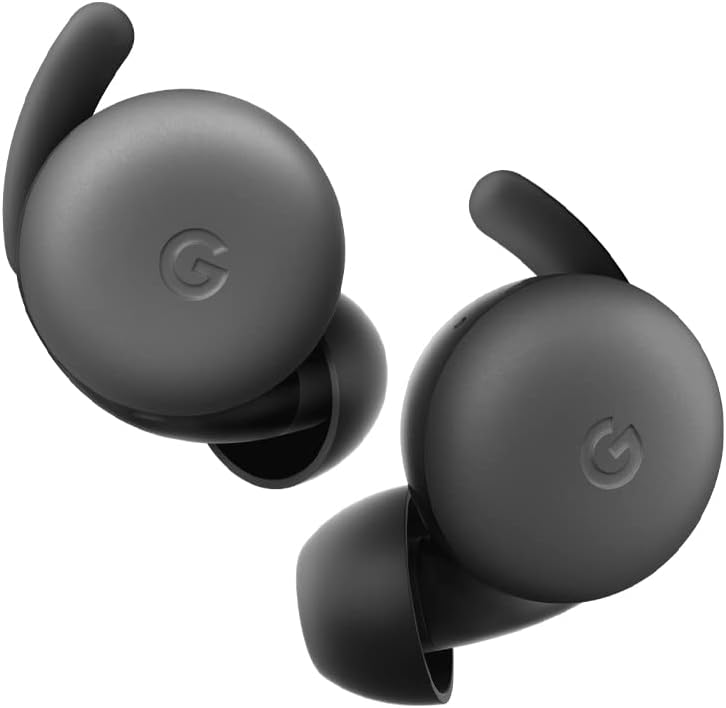
Image: A pair of Google Pixel Buds A-Series earbuds, showcasing their compact design and the 'G' logo on the touch-sensitive surface.
2. Google Asistan Entegrasyonu
With a compatible Android device, you can access Google Assistant directly from your Pixel Buds A-Series.
- Say "Hey Google" or "Ok Google" to activate the Assistant hands-free.
- Alternatively, press and hold either earbud to speak to Google Assistant.
- You can ask for directions, check weather, control music, or have notifications read aloud.
3. Şarj Etme
The Pixel Buds A-Series provide up to 5 hours of listening time or 2.5 hours of talk time on a single charge. The charging case extends this to up to 24 hours of total listening time.
- To charge the earbuds, place them inside the charging case. The indicator light on the case will show their charging status.
- To charge the case, connect it to a USB-C power source using the provided cable. The case's indicator light will show its charging status.
Bakım
1. Temizlik
- Regularly clean your earbuds and charging case to maintain performance and hygiene.
- Use a soft, dry, lint-free cloth to wipe the exterior of the earbuds and case.
- For eartips, gently remove them and clean with a mild soap solution and water, then rinse and dry thoroughly before reattaching.
- Aşındırıcı malzemeler veya sert kimyasallar kullanmaktan kaçının.
2. Depolama
- Always store the Pixel Buds A-Series in their charging case when not in use to protect them and keep them charged.
- Serin, kuru ve aşırı sıcaktan ve doğrudan güneş ışığından uzak bir yerde saklayınız.
Sorun giderme
If you encounter issues with your Pixel Buds A-Series, try the following steps:
- Ses Yok veya Bağlantı Kesikli:
- Her iki kulaklığın da şarjlı olduğundan emin olun.
- Cihazınızda Bluetooth'un etkinleştirildiğinden ve kulaklıkların bağlı olduğundan emin olun.
- Try placing the earbuds back in the case, closing the lid for a few seconds, then reopening to reset the connection.
- Telefonunuzun Bluetooth ayarlarından cihazı unutun ve yeniden eşleştirin.
- Ensure your device is within the Bluetooth range (up to 10 meters).
- Kulaklıklar Şarj Edilmiyor:
- Şarj kutusunun kendisinin şarjlı olduğundan emin olun.
- Verify that the earbuds are correctly seated in the charging case.
- Kulaklıkların ve şarj kutusunun içindeki şarj temas noktalarını kuru bir pamuklu çubukla temizleyin.
- Farklı bir USB-C kablosu ve güç adaptörü deneyin.
- Kötü Ses Kalitesi:
- Ensure you have a secure fit with the correct eartip size.
- Clean the earbud mesh and eartips.
- Cihazınızın ses ayarlarını ve ekolayzırını kontrol edin.
Özellikler
| Model Adı | Pixel Buds A-Series |
| Bağlantı Teknolojisi | Kablosuz (Bluetooth 5.0) |
| Uyumlu Cihazlar | Android, iOS, and Bluetooth 4.0+ devices |
| Pil Ömrü (Kulaklıklar) | 5 saate kadar dinleme, 2.5 saate kadar konuşma süresi |
| Pil Ömrü (Şarj Kutusuyla) | Up to 24 hours listening |
| Su Direnç Seviyesi | Water Resistant (IPx4 rating for earbuds) |
| Kontrol Türü | Touch (Media Control, Google Assistant) |
| Ürün Ağırlığı | 1.9 ons (toplam) |
| Boyutlar (Kulaklık) | 0.81 x 1.15 x 0.69 inç |
| Frekans Aralığı | 20 Hz - 20,000 Hz |
| Bluetooth Menzili | 10 Metre |
Garanti ve Destek
For detailed warranty information and customer support, please refer to the official Google Pixel Buds support webSitede genellikle destek kaynaklarına, sıkça sorulan sorulara ve iletişim seçeneklerine ulaşabilirsiniz. g.co/pixelbuds/help.
The Pixel Buds A-Series are designed to be repairable, but any repair, disassembly, or damage may affect the water resistance rating.


