Önemli Güvenlik Bilgileri
Please read this manual carefully before using the product and retain it for future reference. Improper use may result in product damage or personal injury.
- Cihazı aşırı sıcaklıklara, neme veya aşındırıcı ortamlara maruz bırakmayın.
- Cihazın düşürülmesinden, çarpılmasından veya sökülmesinden kaçınınız.
- Cihazı çocuklardan ve evcil hayvanlardan uzak tutunuz.
- Use only the provided or certified charging cable and power adapter.
- Do not use the earbuds at excessively high volumes for extended periods to prevent hearing damage.
- Exercise caution when using the earbuds in situations requiring awareness of surroundings, such as driving or walking in traffic.
Ürün Bittiview
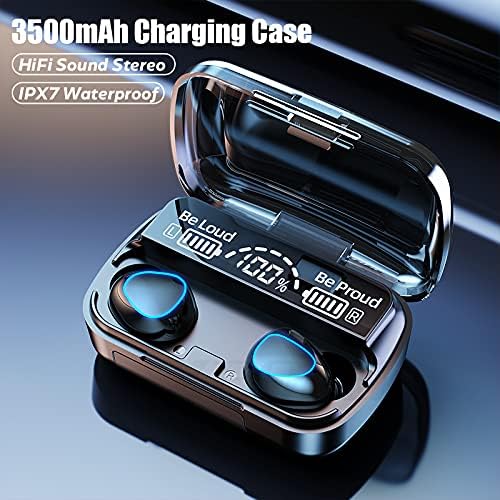
The NC TWS Bluetooth 5.1 Earphones are designed for high-fidelity audio and convenient wireless use. They feature a portable charging case that also functions as a power bank.
Paket İçeriği
- 2 x Bluetooth Kulaklık (Sol ve Sağ)
- 1 x Şarj Kutusu
- 1 x USB Şarj Kablosu
- 1 x Kullanım Kılavuzu (Bu Belge)
- 2 x Pairs of Earphone Cups (L, M Size)
Bileşenler



Kurmak
Kulaklıkları ve Kutuyu Şarj Etme
İlk kullanımdan önce kulaklıklarınızı ve şarj kutusunu tamamen şarj edin.
- Place both earbuds into the charging case. Ensure they are properly seated; the earbuds will light up to indicate charging.
- Connect the USB charging cable to the charging case's port and the other end to a compatible USB power source (e.g., computer USB port, wall adapter).
- Şarj kutusundaki dijital ekran pil yüzdesini gösterecektirtage. A full charge for the case takes approximately 1.5 hours.
- When the earbuds are fully charged, the indicator lights on the earbuds will turn off. The charging case can fully charge the earbuds approximately 8 times.

Bir Cihazla Eşleştirme
Kulaklıklar, kullanım kolaylığı için tek adımda eşleştirme özelliğine sahiptir.
- Open the charging case and remove both earbuds. They will automatically power on and enter pairing mode, indicated by flashing lights.
- Bluetooth özelliği olan cihazınızda (akıllı telefon, tablet, dizüstü bilgisayar) Bluetooth ayarlarına gidin.
- Arama available devices and select "M10" (or similar name) from the list.
- Once connected, the earbud indicator lights will stop flashing, and you will hear a confirmation tone.
- After the initial pairing, the earbuds will automatically connect to the last-paired device when removed from the case.

Kullanım Talimatları
Kulaklıklar, çeşitli işlevler için dokunmatik kontrollere sahiptir.
| Aksiyon | İşlev |
|---|---|
| Light touch (Left or Right earbud) once | Müzik Çal/Duraklat |
| Light touch (Left or Right earbud) once | Telefon görüşmesini cevapla/kapat |
| Long press (Left or Right earbud) for 1 second | Summon Siri / Voice Assistant |
| Touch (Left earbud) triple in a row | Hacim azaltma |
| Touch (Right earbud) triple in a row | Hacim artışı |
| Touch (Left earbud) for 2 seconds | Önceki şarkıya geç |
| Touch (Right earbud) for 2 seconds | Sonraki şarkıya geç |
| Long press (Left or Right earbud) for 5 seconds | Açma/Kapatma |
For optimal fit and sound quality, try the different sizes of earphone cups included in the package. A comfortable and stable fit is crucial for the best audio experience and during physical activity.

Bakım
- Temizlik: Kulaklıkları ve şarj kutusunu düzenli olarak yumuşak, kuru, tüy bırakmayan bir bezle temizleyin. Aşındırıcı temizleyiciler veya çözücüler kullanmayın. Kulak kiri birikmesi durumunda, kulaklık ağını küçük, yumuşak bir fırçayla nazikçe temizleyin.
- Depolamak: When not in use, store the earbuds in their charging case to protect them and keep them charged. Store the device in a cool, dry place away from direct sunlight.
- Suya Dayanıklılık: The earbuds are IPX7 waterproof, meaning they can withstand submersion in up to 1 meter of water for 30 minutes. However, they are not designed for swimming or showering. Ensure the earbuds are dry before placing them back in the charging case to prevent damage.
Sorun giderme
| Sorun | Olası Neden | Çözüm |
|---|---|---|
| Kulaklıklar cihazla eşleşmiyor. | Earbuds not in pairing mode; Bluetooth off on device; previously paired with another device. | Ensure earbuds are removed from case and flashing. Turn Bluetooth off and on again on your device. Forget previous pairings on your device and re-pair. |
| Sadece bir kulaklık çalışıyor. | Earbuds not properly connected to each other (TWS mode). | Place both earbuds back into the charging case, close the lid, wait a few seconds, then remove them simultaneously to re-establish TWS connection. |
| Kulaklıklar şarj olmuyor. | Poor contact with charging pins; charging cable or adapter faulty; case battery depleted. | Ensure earbuds are correctly seated in the case. Check charging cable and adapter. Charge the charging case. |
| Düşük ses seviyesi veya kötü ses kalitesi. | Earbuds not properly seated in ear; earwax buildup; device volume too low. | Adjust earbud position or try different size ear tips. Clean earbud mesh. Increase volume on both earbuds and connected device. |
| Bağlantı kesintisi. | Cihazdan çok uzak; parazit; düşük pil seviyesi. | Stay within 15 meters of your device. Avoid strong electromagnetic interference. Charge earbuds and case. |
Özellikler
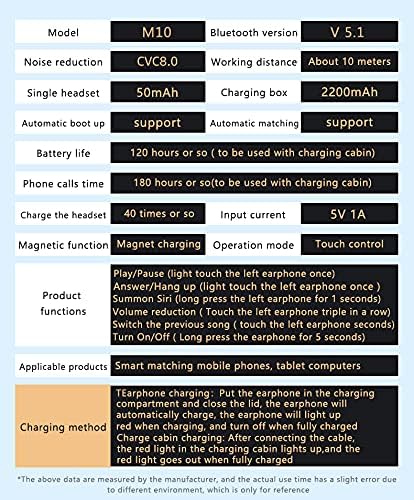
Below are the technical specifications for the NC TWS Bluetooth 5.1 Earphones (Model M10).
| Özellik | Detay |
|---|---|
| Örnek | M10 |
| Bluetooth Sürümü | 5.1 |
| kablosuz Menzil | 15 metreye (49 feet) kadar |
| Gürültü Önleme | CVC 8.0 Noise Cancelling |
| Kulaklık Pil Kapasitesi | 50mAh (her kulaklık) |
| Şarj Kutusu Pil Kapasitesi | 3500mAh |
| Kulaklık Çalma Süresi | Tek bir şarjla 5-6 saat |
| Toplam Oynatma Süresi (şarj kutusu ile) | 180 saate kadar |
| Şarj Kutusu Şarj Süresi | Yaklaşık 1.5 saat (USB-C) |
| Suya Dayanıklılık Derecesi | IPX7 |
| Kontrol Yöntemi | Dokunmatik Kontrol |
| Uyumlu Cihazlar | Akıllı Telefonlar, Dizüstü Bilgisayarlar, Tabletler, Akıllı Hoparlörler |
Garanti ve Destek
For warranty information and technical support, please refer to the official NC product website veya doğrudan müşteri hizmetleriyle iletişime geçin. Garanti talepleri için satın alma kanıtı olarak satın alma makbuzunuzu saklayın.
Çevrimiçi destek: Ziyaret edin NC Store on Amazon Ürün bilgisi ve güncellemeleri için.