1. Giriş
Thank you for choosing the REXING PRD615 Smart Home Projector. This device is designed to transform your living space into an immersive entertainment hub, offering high-definition visuals, robust audio, and smart connectivity features. This manual provides essential information for setting up, operating, and maintaining your projector to ensure optimal performance and longevity.

Image: The REXING PRD615 Smart Home Projector, a sleek, rectangular device with a lens on the front and ventilation grilles on the sides.
2. Güvenlik Bilgileri
- Güç Kaynağı: Yalnızca kutu içeriğinde bulunan güç adaptörünü kullanın. Ses seviyesinin doğru ayarlandığından emin olun.tage, projektörün gereksinimlerini karşılıyor.
- Havalandırma: Havalandırma açıklıklarını kapatmayın. Aşırı ısınmayı önlemek için projektörün etrafında yeterli hava akışı sağlayın.
- Sıvıya Maruz Kalma: Projektörü sudan veya diğer sıvılardan uzak tutun. Su veya başka sıvılarla temas etmeyecek şekilde çalıştırmayın.amp ortamlar.
- Temizlik: Temizlemeden önce elektriği kesin. Yumuşak, kuru bir bez kullanın. Aşındırıcı temizleyicilerden kaçının.
- Lens Bakımı: Do not touch the projector lens directly. Use a lens cleaning cloth if necessary.
- Göz Güvenliği: Projektör lensine doğrudan bakmayın.amp Parlak ışık göz yorgunluğuna veya hasarına neden olabileceğinden, ışık açık bırakılmalıdır.
- Sökme: Projektörü kendiniz sökmeye veya onarmaya çalışmayın. Tüm servis işlemlerini yetkili personele yaptırın.
3. Paket İçeriği
Lütfen aşağıdaki öğelerin kutucuğunu işaretleyin:
- REXING PRD615 Smart Home Projector
- Güç Adaptörü
- Uzaktan kumanda
- Kullanıcı Kılavuzu
- HDMI Kablosu (pakete göre değişiklik gösterebilir)
4. Ürün Bittiview ve Özellikler
The REXING PRD615 is equipped with advanced features for a superior home entertainment experience:
- Theatre Experience: Projects stunning ultra-bright 750 ANSI DLP HD video (1280x800 resolution) with a throw ratio of 1.2:1, supporting projection sizes from 40 to 150 inches.
- Incredible Audio: Features dual built-in 3W stereo speakers for clear, lag-free audio. Supports external audio via 3.5mm headphone jack or Bluetooth.
- Otomatik odaklama: Automatically calculates the distance to the projection surface for crystal-clear imaging without manual adjustment.
- 3D İşlevselliği: Supports 3D movies and games for an immersive viewing experience (3D glasses not included).
- Multimedia Connectivity: Access thousands of apps via the Google Play Store (Android TV 9.0). Connect devices via HDMI, USB, SD card, or wirelessly via Wi-Fi and Miracast.

Image: The REXING PRD615 projector displaying its smart interface with icons for Airplay, Miracast, HDMI, App Store, YouTube, Netflix, and other apps, along with various multimedia ports on the rear.
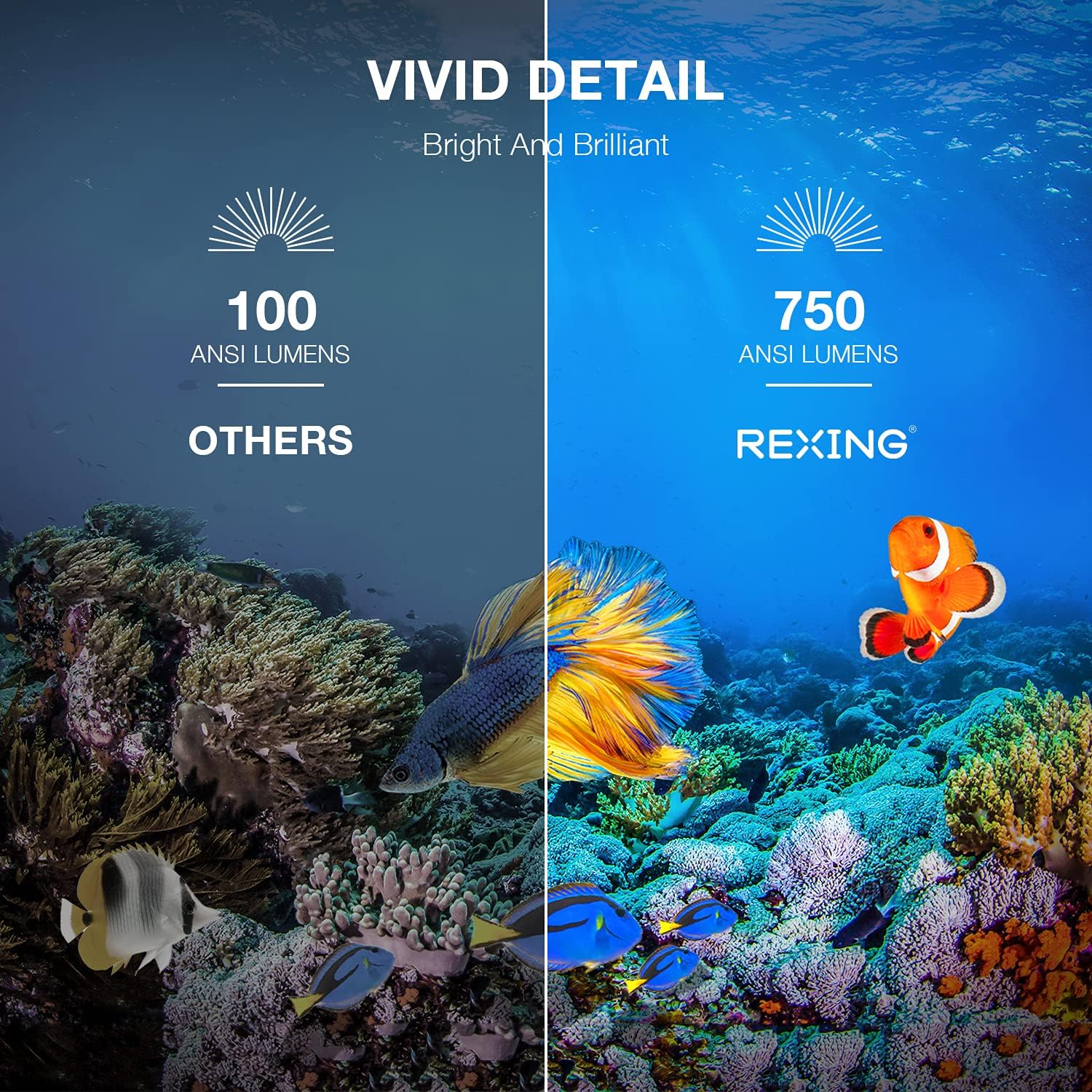
Image: A visual comparison showing the vivid detail of 750 ANSI Lumens (REXING) versus 100 ANSI Lumens (Others) in an underwater scene with colorful fish.

Image: A split screen comparison of a cityscape, demonstrating the clarity of 1080P resolution (REXING) compared to 720P (Other Projectors).
5. Kurulum
5.1 Yerleştirme
Projektörü sabit, düz bir yüzeye yerleştirin. En iyi sonuçlar için. viewing, ensure the projection surface (wall or screen) is clean and smooth. The projector can create an image size from 40 to 150 inches diagonally, depending on the distance from the screen.
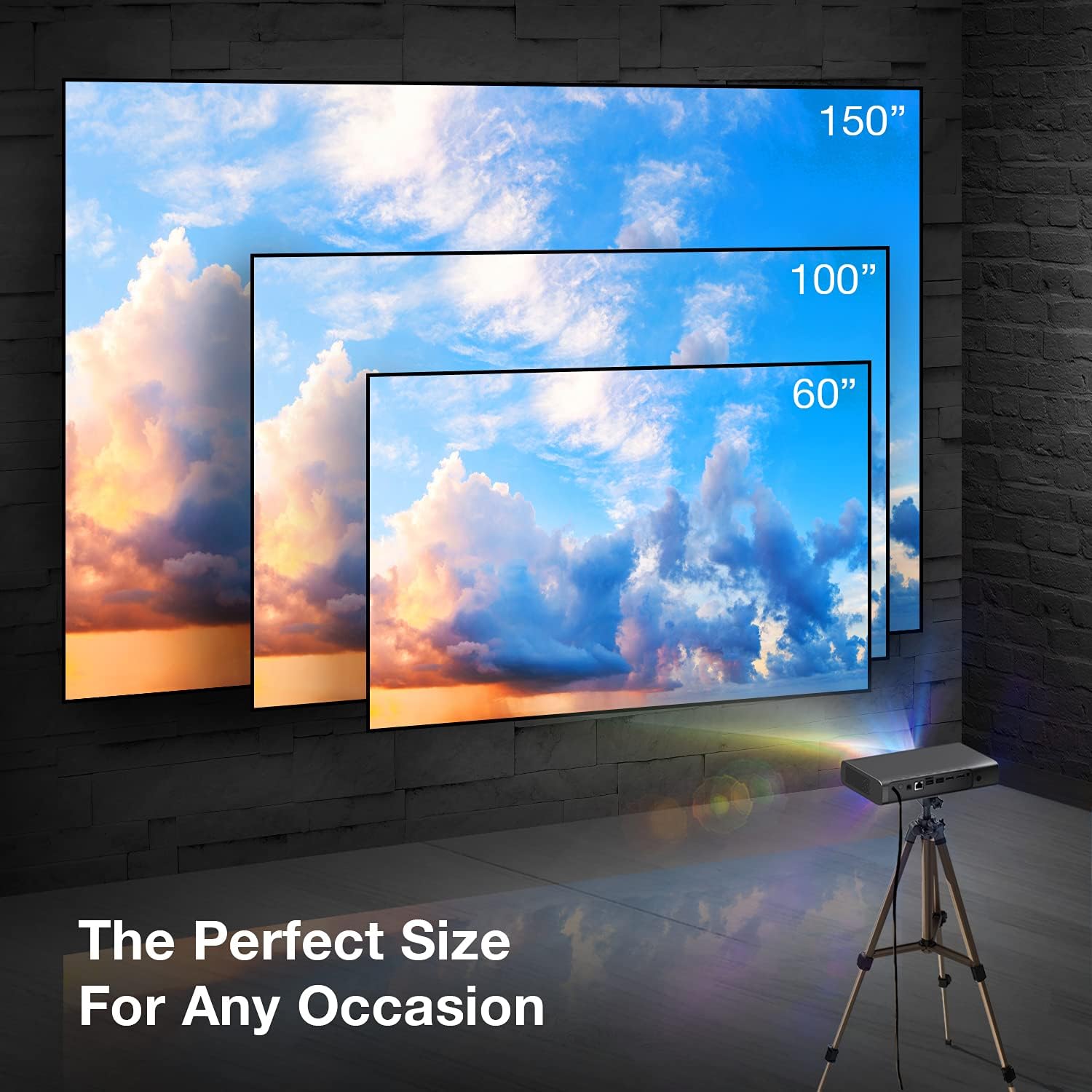
Image: A visual representation showing different projection sizes (60", 100", 150") achievable with the REXING PRD615 projector, illustrating its versatility for various room sizes.
5.2 Güç Bağlantısı
- Güç adaptörünü projektördeki DC IN portuna bağlayın.
- Güç adaptörünü duvar prizine takın.
- Cihazı açmak için projektördeki veya uzaktan kumandadaki güç düğmesine basın.
5.3 Initial Configuration (Autofocus & Auto Keystone)
Upon startup, the PRD615 will automatically adjust the focus and keystone correction. This feature ensures a clear, rectangular image even if the projector is not perfectly aligned with the screen.

Resim: Havadan bir görüntü view showing the REXING PRD615 projector on a table, projecting an image onto a wall, with an overlay illustrating the automatic focus and keystone correction capabilities.
5.4 Ağ Bağlantısı
To access smart features and online content, connect the projector to your Wi-Fi network:
- Projeksiyon cihazının arayüzünde 'Ayarlar' menüsüne gidin.
- 'Ağ' veya 'Wi-Fi' seçeneğini belirleyin.
- Listeden istediğiniz Wi-Fi ağını seçin ve istenirse şifreyi girin.
6. Kullanım Talimatları
6.1 Harici Cihazların Bağlanması
- HDMI: Connect Blu-ray players, gaming consoles, laptops, or other HDMI-enabled devices to the HDMI 1 or HDMI 2 ports.
- USB BAĞLANTI: Insert USB flash drives into the USB 2.0 ports to play media filedoğrudan s.
- Bluetooth: Pair Bluetooth speakers or headphones for enhanced audio.
- TF Kartı: Insert a TF (microSD) card into the designated slot to access media.
6.2 Using Smart Features (Android TV, Apps, Miracast)
The REXING PRD615 runs on Android TV 9.0, providing access to a wide range of applications:
- App Store/Google Play: Download and install your favorite streaming apps like Netflix, YouTube, Chrome, and more.
- Miracast: Wirelessly mirror content from compatible smartphones, tablets, or computers to the projector screen.
- 3D Oynatma: For 3D content, ensure your media is in a compatible 3D format and use active shutter 3D glasses (sold separately).

Image: Two individuals playing a racing video game projected onto a large screen by the REXING PRD615, demonstrating the ability to cast content from a phone to the projector.
7. Bakım
- Lensin Temizlenmesi: Use a professional lens cleaning cloth or air blower to gently remove dust. Do not use liquid cleaners directly on the lens.
- C'yi Temizlemeasing: Projektörün dış yüzeyini yumuşak, kuru bir bezle silin. İnatçı lekeler için, hafifçe kuru bir bez kullanın.amp Önce bir bez, ardından kuru bir bez kullanılabilir.
- Depolamak: Projeksiyon cihazını uzun süre kullanılmadığı zamanlarda, tozdan ve aşırı sıcaklıklardan koruyarak serin ve kuru bir yerde saklayın.
8. Sorun Giderme
| Sorun | Olası Neden | Çözüm |
|---|---|---|
| Görüntü yansıtılmıyor. | Power off; input source incorrect; cable loose | Güç bağlantısını kontrol edin; doğru giriş kaynağını seçin; kabloların güvenli bir şekilde bağlı olduğundan emin olun. |
| Görüntü bulanık | Out of focus; projector too close/far | Allow autofocus to adjust; reposition projector within recommended throw distance. |
| Ses yok | Volume too low; audio output incorrect; external device muted | Increase projector volume; check audio settings; unmute external device. |
| Uzaktan kumanda çalışmıyor | Batteries low/dead; obstruction; not pointed at IR receiver | Replace batteries; remove obstructions; point remote directly at the projector's IR receiver. |
| Wi-Fi bağlantı sorunları | Incorrect password; router too far; network interference | Verify password; move projector closer to router; restart router. |
9. Özellikler
| Özellik | Detay |
|---|---|
| Marka | REXLEME |
| Örnek | PRD615 |
| Ekran Teknolojisi | DLP |
| Parlaklık | 750 ANSI Lümenleri |
| Yerel Çözünürlük | 1280 x 800 (HD) |
| Maksimum Ekran Çözünürlüğü | 1280x800 |
| Projeksiyon Boyutu | 40-150 inç |
| Atış Oranı | 1.2:1 |
| Hoparlör Tipi | Dual 3W Stereo, Built-In |
| Bağlantı Teknolojisi | Bluetooth, USB, HDMI, Wi-Fi |
| Özel Özellikler | Wireless, Portable, Built-In Wi-Fi, Autofocus, Auto Keystone Correction |
| İşletim Sistemi | Android TV 9.0 |
| Ürün Ağırlığı | 4.8 pound |
| Paket Boyutları | 11.2 x 8 x 4.6 inç |
| İlk Mevcut Tarih | 4 Haziran 2021 |
10. Garanti ve Destek
REXING stands behind its products. The PRD615 Smart Home Projector comes with an 18 Ay Garanti from the date of purchase. This warranty covers manufacturing defects and ensures your product functions as intended.
For any questions, technical assistance, or warranty claims, please contact our US-Based Customer Support team. Our dedicated team is ready to assist you.
- E-posta: Refer to your product packaging or the official REXING webiletişim için e-posta adresi.
- Telefon: Refer to your product packaging or the official REXING website for customer support phone number.

Image: A customer support representative with a headset, indicating the availability of US-based customer support for the REXING PRD615 projector.


