1. Giriş
Thank you for choosing the PROXTEND X502 Full HD Webcam. This manual provides detailed instructions to help you set up, operate, and maintain your webcam for optimal performance. The X502 is designed to deliver clear 1080p video at 30 frames per second, featuring an omni-directional microphone and automatic low light correction for various lighting conditions.
2. Paket İçeriği
Lütfen paketinizde tüm öğelerin mevcut olduğundan emin olun:
- PROXTEND X502 Full HD Webcam (PX-CAM007)
- Integrated Universal Mounting Clip
- Kullanım Kılavuzu (bu belge)
3. Kurulum
Follow these steps to set up your PROXTEND X502 Webkam:
- Montajı Webkam:
The webcam features an integrated universal mounting clip. You can place the webcam on top of your computer monitor, laptop screen, or a flat surface. Adjust the clip to securely hold the webcam in position. The webcam also supports mini tripod mounting (tripod not included).
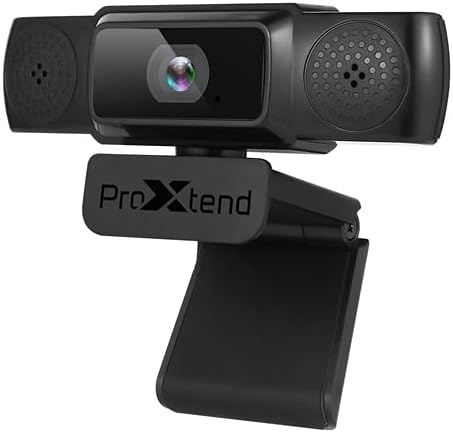
Image: The PROXTEND X502 Full HD Webcam shown with its universal mounting clip, suitable for monitors or flat surfaces.
- Bilgisayarınıza Bağlanma:
USB kablosunu şuradan takın: webKamerayı bilgisayarınızdaki kullanılabilir bir USB bağlantı noktasına takın. webcam is plug-and-play, meaning your operating system should automatically detect and install the necessary drivers. No additional software installation is typically required.
- Driver Installation Verification:
After connecting, allow a few moments for your computer to recognize the device. You can verify successful installation in your operating system's Device Manager (Windows) or System Information (macOS) under 'Cameras' or 'Imaging Devices'.
4. Kullanım Talimatları
Bir kez webcam is set up, you can begin using it with various applications:
- Seçim Webkam:
Open your preferred video conferencing, streaming, or recording application (e.g., Zoom, Microsoft Teams, Skype, OBS Studio). Navigate to the application's video and audio settings. Select "PROXTEND X502" as your camera and microphone input device.

Resim: Ön view of the PROXTEND X502 Full HD Webcam, highlighting the lens and integrated microphones.
- Video Kalitesi:
The webcam automatically adjusts for optimal image quality, including auto-focus and auto low light correction. Ensure adequate lighting for the best video performance. The 1920x1080p resolution at 30fps provides clear and smooth video.
- Ses kalitesi:
The integrated omni-directional microphone captures sound from all directions. Position yourself appropriately to ensure your voice is clearly picked up. Most applications allow you to adjust microphone input levels in their audio settings.
5. Özellikler
Key features of the PROXTEND X502 Full HD Webcam include:
- 1/2.7” CMOS görüntü sensörü
- 2 Megapiksel
- Resolution: 1920x1080 at 30 frames per second
- Çok yönlü mikrofon
- Evrensel Montaj Klipsi
- Mini Tripod Support
- Otomatik düşük ışık düzeltmesi
6. Özellikler
Detailed technical specifications for the PROXTEND X502 Full HD Webkam:

Image: A visual representation of the PROXTEND X502 Full HD Webcam's key features and technical specifications.
| Özellik | Şartname |
|---|---|
| Görüntü Sensörü | 1/2.7" CMOS Image Sensor |
| Megapiksel | 2 MP |
| Max Çözünürlük | 1920x1080 |
| Video Çözünürlüğü | 1920x1080 |
| Maks FPS | 30 kare/saniye |
| Video Kod Çözme Formatı | H.264/MJPG |
| Pozlama Modu | Otomatik |
| Beyaz Dengesi | Otomatik |
| Kazanmak | Otomatik |
| Düşük Işık Telafisi | Otomatik |
| ViewAçı | 77° |
| Odak Uzaklığı | 10 cm'den sonsuza |
| Odak Türü | Otomatik |
| Mikrofon | Çok yönlü |
| Seslerampling Oranı | 1 Kanal 16bit 16K 32K 44.1K 48K |
| Ses Formatı | PCM, uyumlu UAC 1.0 |
| Arayüz | USB 2.0 |
| Kablo Uzunluğu | 1.5 metre |
| Uyumlu işletim sistemi | Windows XP, Windows 7 (32bit/64bit), Windows 8, Windows 10, Android V5.0 or higher OS, MAC OS 10.6 or higher |
| Ürün Boyutları | 12.7x7.62x5.08 cm |
| Ürün Ağırlığı | 453.59 gr |
7. Sorun Giderme
If you encounter issues with your PROXTEND X502 WebLütfen aşağıdaki çözümleri deneyin:
- Görüntü/Video Yok:
- USB kablosunun her iki tarafa da güvenli bir şekilde bağlı olduğundan emin olun. webKameranız ve bilgisayarınız.
- Bilgisayarınızda farklı bir USB bağlantı noktası deneyin.
- Bilgisayarınızı yeniden başlatın.
- Check your application's settings to ensure the PROXTEND X502 is selected as the video input.
- Verify that no other application is currently using the webkam.
- Ses yok/Mikrofon çalışmıyor:
- Ensure the PROXTEND X502 is selected as the microphone input in your application's audio settings.
- Check your computer's sound settings to ensure the microphone is enabled and not muted.
- Sistem veya uygulama ayarlarınızdan mikrofon giriş seviyesini ayarlayın.
- Kötü Video Kalitesi:
- Ensure sufficient lighting in your environment.
- Temizle webcam lens gently with a soft, lint-free cloth.
- Check your internet connection speed if streaming, as bandwidth can affect video quality.
8. Bakım
Ürününüzün uzun ömürlü olmasını ve optimum performans göstermesini sağlamak için webkam:
- Temizlik: Nazikçe silin webcam lens with a soft, dry, lint-free cloth. Avoid using harsh chemicals or abrasive materials.
- Depolamak: Kullanılmadığı zaman, saklayın webKamerayı temiz, kuru bir yerde, aşırı sıcaklıklardan ve doğrudan güneş ışığından uzakta saklayın.
- İşleme: düşürmekten kaçının webcam or subjecting it to strong impacts.
9. Garanti ve Destek
The PROXTEND X502 Full HD Webkamera şunlarla birlikte gelir: 7 yıllık garanti, ensuring peace of mind regarding your purchase. For warranty claims, technical support, or any inquiries not covered in this manual, please refer to the contact information provided with your product packaging or visit the official PROXTEND webalan.
10. Uyumluluk Bilgileri
This device complies with relevant regulatory standards for electronic equipment. For detailed compliance information, please refer to the product packaging or the official PROXTEND webalan.


