giriiş
Welcome to the Altec Lansing NanoBuds True Wireless Earbuds instruction manual. This guide provides essential information for setting up, operating, maintaining, and troubleshooting your new earbuds. Please read this manual thoroughly to ensure optimal performance and longevity of your device.

Image: The Altec Lansing NanoBuds True Wireless Earbuds shown with their charging case.
Kutuda Neler Var?
Your Altec Lansing NanoBuds package includes the following items:
- Altec Lansing NanoBuds True Wireless Earbuds (Left and Right)
- Kablosuz Şarj Kutusu
- USB Şarj Kablosu
- Multiple sizes of ear tips for a customized fit
- Hızlı Başlangıç Kılavuzu

Image: The NanoBuds earbuds displayed alongside their charging case.
Kurmak
1. Kulaklıkları ve Kutuyu Şarj Etme
Before first use, fully charge your NanoBuds and their charging case. Place the earbuds into the charging case. Connect the USB charging cable to the charging port on the case and plug the other end into a USB power source. The indicator lights on the case will show the charging status.

Image: NanoBuds seated in the charging case, with blue indicator lights illuminated, signifying charging status.
2. Bluetooth Eşleştirme
- Kulaklıkların şarj edildiğinden emin olun.
- Şarj kutusunu açın. Kulaklıklar otomatik olarak eşleştirme moduna girecek ve bu durum yanıp sönen ışıklarla belirtilecektir.
- Cihazınızda (akıllı telefon, tablet vb.) Bluetooth ayarlarına gidin ve Bluetooth'u açın.
- Select "Altec NanoBuds" from the list of available devices.
- Bağlantı sağlandığında, eşleştirmenin başarılı olduğu sesli bir uyarıyla doğrulanacaktır.
3. Güvenli Bir Uyum Sağlamak
For optimal sound quality and comfort, select the ear tips that best fit your ears. The NanoBuds feature Altec Lansing Helix wings for a secure fit, especially during active use. Gently insert each earbud into your ear canal and twist slightly to lock the Helix wing into place.

Resim: Yakın çekim view of the NanoBuds, highlighting the integrated Helix wings designed for a stable and secure fit in the ear.
Kulaklıkların Çalıştırılması
Dokunmatik Kontroller
The NanoBuds feature intuitive touch controls on each earbud for managing audio playback and calls.
| Aksiyon | İşlev |
|---|---|
| Tek Dokunuş (Sol/Sağ) | Müzik Çal/Duraklat, Çağrıyı Cevapla/Sonlandır |
| Çift Dokunma (Sağ) | Sonraki Parça |
| Çift Dokunma (Sol) | Önceki Parça |
| Üçlü Musluk (Sol/Sağ) | Sesli Asistanı Etkinleştir |
| Basılı tutun (2 saniye) | Çağrıyı Reddet |
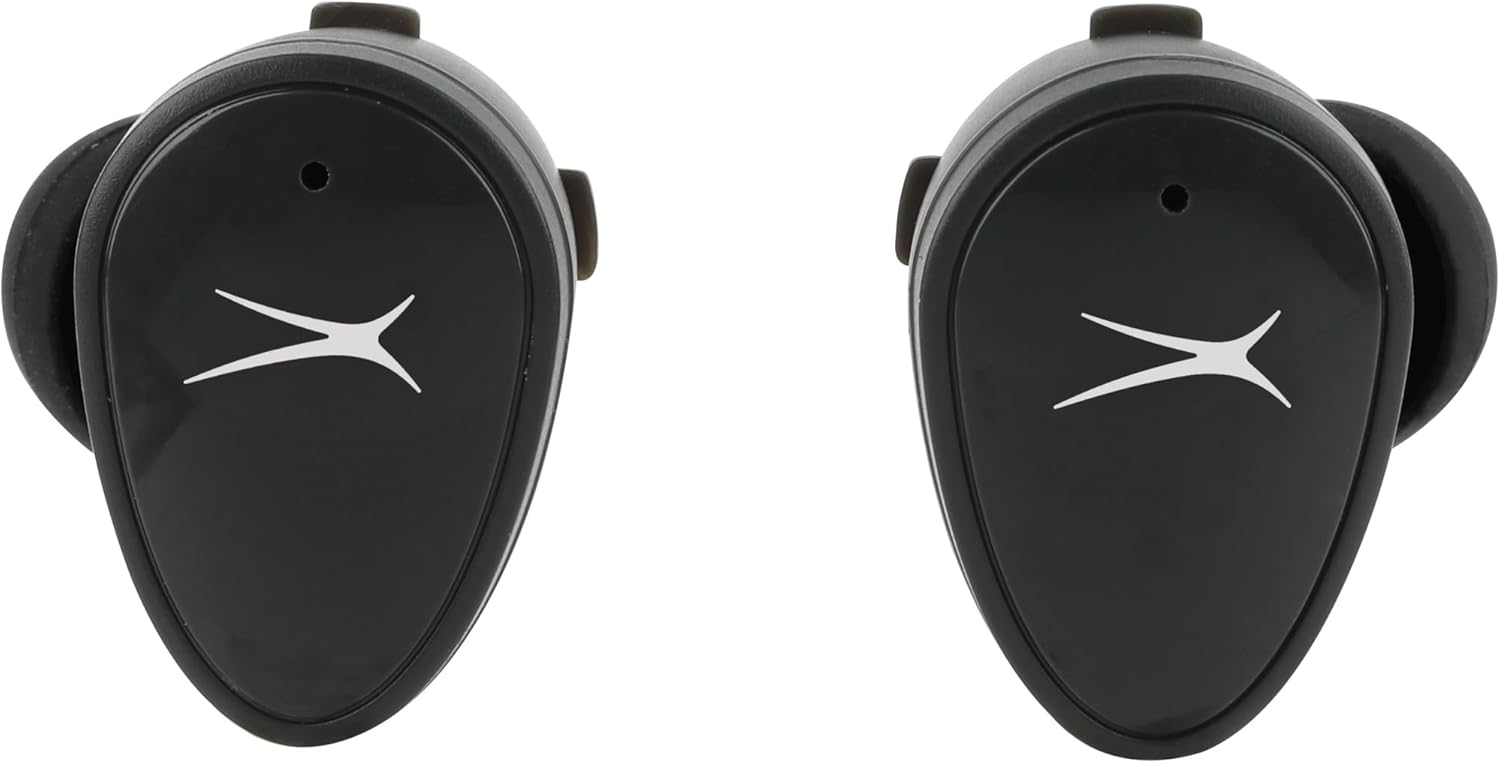
Resim: Ön view of the NanoBuds, indicating the touch-sensitive surface for controls.
Güç Açık/Kapalı
- Güç Açık: Kulaklıklar şarj kutusundan çıkarıldığında otomatik olarak açılır.
- Kapat: Kulaklıkları şarj kutusuna geri yerleştirerek otomatik olarak kapanmalarını ve şarj olmalarını sağlayın.
Çağrı Yapma ve Alma
The NanoBuds feature dual microphones for clear calling. Use the touch controls as described above to manage your calls.
Bakım
Temizlik
Regularly clean your earbuds and charging case to maintain performance. Use a soft, dry, lint-free cloth. Do not use harsh chemicals or abrasive materials. Ensure charging contacts are free of debris.
Suya Dayanıklılık (IPX4)
The NanoBuds are rated IPX4 water-resistant, meaning they are protected from splashing water from any direction. This makes them suitable for workouts and light rain. They are not designed for submersion in water.
Sorun giderme
If you encounter issues with your NanoBuds, try the following steps:
- Güç Yok: Kulaklıkların ve şarj kutusunun tamamen şarj olduğundan emin olun.
- Eşleştirme Sorunları: Make sure Bluetooth is enabled on your device and the earbuds are in pairing mode. Try forgetting the device in your phone's Bluetooth settings and re-pairing.
- Bir Kulaklık Çalışmıyor: Her iki kulaklığı da şarj kutusuna geri yerleştirin, kapağı kapatın, birkaç saniye bekleyin, ardından açın ve tekrar deneyin. Her iki kulaklığın da şarj olduğundan emin olun.
- Kötü Ses Kalitesi: Check the ear tip fit. Ensure there is no obstruction in the earbud's speaker mesh.
- No Audio During Calls: Confirm the NanoBuds are selected as the audio output device on your phone during a call.
- Reset: For persistent issues, consult the Altec Lansing support webModelinize özel sıfırlama talimatları için siteyi ziyaret edin.
Özellikler
| Özellik | Şartname |
|---|---|
| Model Adı | NanoBuds Spor |
| Model Numarası | MZX5200 |
| Bağlantı Teknolojisi | Kablosuz (Bluetooth 5.0) |
| Bluetooth Menzili | 15.24 metreye (50 feet) kadar |
| Su Direnç Seviyesi | IPX4 (Suya Dayanıklı) |
| Pil Ömrü (Kulaklıklar) | Şarj başına 5 saate kadar |
| Toplam Oynanma Süresi (Kılıflı) | Up to 30 hours (4 additional charges from case) |
| Şarj Süresi | Yaklaşık 5 saat (sistemin tamamen şarj olması için) |
| Gürültü Kontrolü | Pasif Gürültü Önleme |
| Kontrol Yöntemi | Dokunmak |
| Frekans Aralığı | 20Hz - 20,000Hz |
| Ağırlık | 5.3 ons |
Garanti Bilgileri
Altec Lansing products are designed and manufactured to the highest quality standards. For detailed warranty information, including terms, conditions, and registration, please refer to the warranty card included with your product or visit the official Altec Lansing webSite. Satın alma belgenizi garanti talepleriniz için saklayın.
Müşteri Desteği
If you require further assistance or have questions not covered in this manual, please contact Altec Lansing customer support. You can find contact information, FAQs, and additional resources on the official Altec Lansing webalan: www.alteclansing.com.


