1. Giriş
This manual provides essential information for the installation, operation, and maintenance of the Cisco Catalyst 9500 C9500-24Y4C-A 24-Port Network Advantage Switch. Please read this manual thoroughly before using the device to ensure proper setup and functionality. This switch is designed for enterprise-level networking environments, offering high performance and advanced features.
2. Güvenlik Bilgileri
WARNING: Failure to follow these safety instructions can result in injury or damage to the product.
- Güç kaynağının ses seviyesiyle eşleştiğinden emin oluntagAnahtarın gereksinimleri.
- Do not operate the switch in environments with excessive moisture or extreme temperatures. The upper temperature rating is 40 degrees Celsius.
- Herhangi bir bakım veya kurulum işlemi yapmadan önce daima gücü kesin.
- Güvenli bir çalışma için uygun topraklama şarttır.
- Bu ekipmanın kurulumu ve bakımı yalnızca kalifiye personel tarafından yapılmalıdır.
3. Paket İçeriği
Paketinizin aşağıdaki öğeleri içerdiğini doğrulayın:
- Cisco Catalyst 9500 C9500-24Y4C-A Switch
- Güç Kablosu
- Rack-mount Kit (brackets, screws)
- Konsol Kablosu (RJ-45 - DB-9)
- Belgeler (Hızlı Başlangıç Kılavuzu, Güvenlik Bilgileri)
Herhangi bir ürün eksik veya hasarlıysa, derhal satıcınızla iletişime geçin.
4. Fiziksel Aşırıview
The Cisco Catalyst 9500 C9500-24Y4C-A is a high-performance network switch. Below is an image illustrating the front panel of the device, highlighting its various ports and indicators.
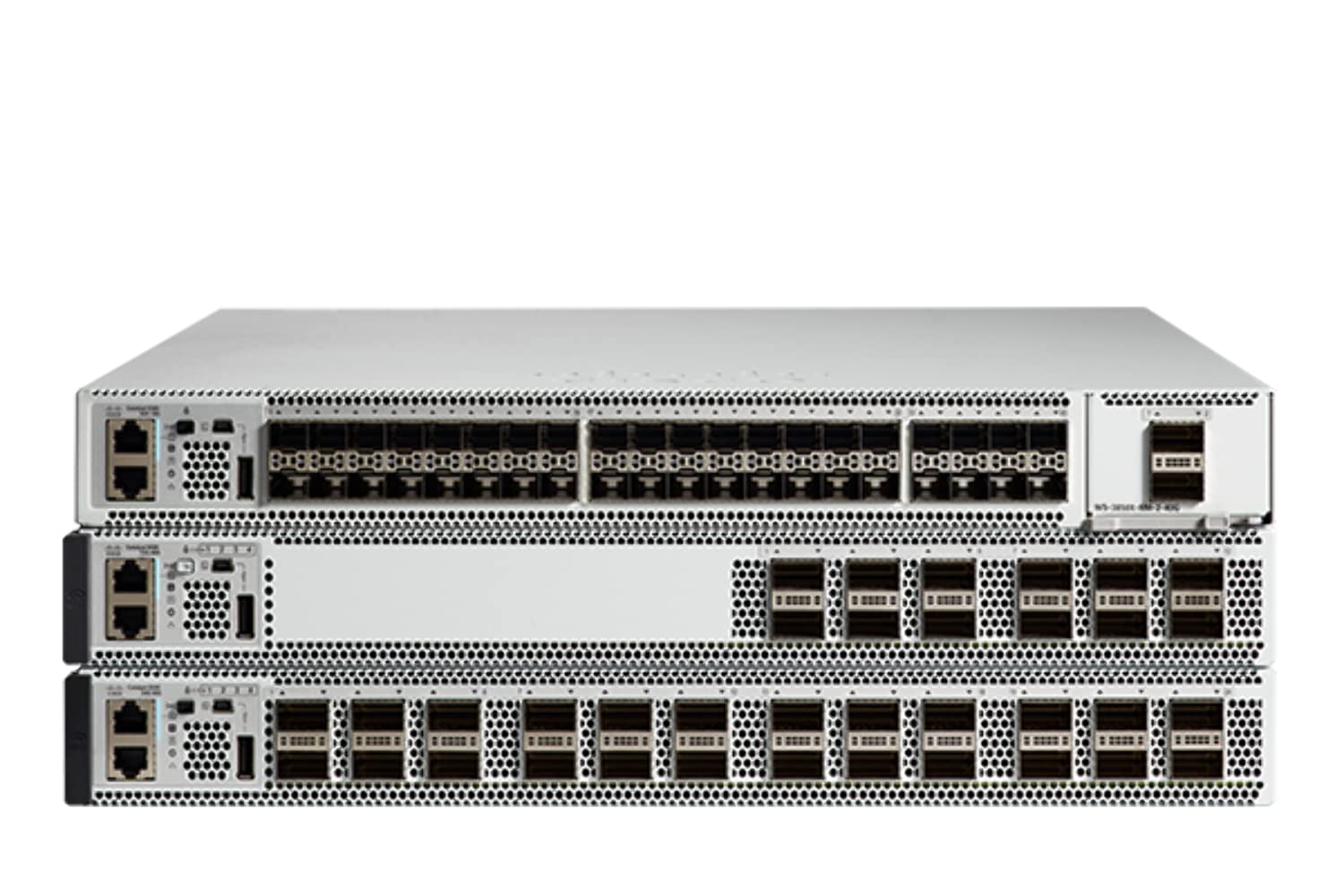
Şekil 4.1: Front Panel of the Cisco Catalyst 9500 C9500-24Y4C-A Switch. This image displays the front of the switch, featuring 24 SFP/SFP+/SFP28 ports for high-speed fiber and copper connectivity, along with 4 QSFP28 ports for even higher bandwidth uplinks. Various status LEDs and management ports are also visible.
4.1 Ön Panel Özellikleri
- 24 x SFP/SFP+/SFP28 Ports: These ports support various fiber and copper transceivers for flexible network connectivity at speeds up to 25 Gbps.
- 4 x QSFP28 Ports: High-density quad small form-factor pluggable ports for 100 Gbps uplinks or stacking.
- Durum LED'leri: Indicators for system status, port activity, and power. Refer to the LED section for detailed explanations.
- Konsol Bağlantı Noktası: RJ-45 port for out-of-band management via a serial connection.
- USB Bağlantı Noktası: For software upgrades or configuration backup/restore.
4.2 Arka Panel Özellikleri
- Güç Kaynağı Modülleri: Slots for redundant power supplies.
- Fan Modülleri: Slots for hot-swappable fan modules.
- Topraklama Pabucu: Şasiyi topraklama hattına bağlamak için.
5. Kurulum ve Kurulum
5.1 Saha Hazırlığı
- Kurulum alanının temiz, kuru ve iyi havalandırılmış olduğundan emin olun.
- Maintain ambient temperature within the specified operating range (up to 40°C).
- Provide adequate space for airflow around the switch.
- Ensure a reliable power source with proper grounding.
5.2 Raf Montajı
The switch is designed for standard 19-inch rack mounting.
- Verilen raf montaj braketlerini, verilen vidaları kullanarak anahtarın yanlarına takın.
- Anahtarı raf direkleriyle hizalayın ve uygun raf vidalarını kullanarak sabitleyin.
- Anahtarın düzgün bir şekilde yerleştirildiğinden ve sağlam bir şekilde sabitlendiğinden emin olun.
5.3 Gücün Bağlanması
- Insert the power cord into the power supply module on the rear of the switch.
- Güç kablosunun diğer ucunu topraklı bir AC elektrik prizine bağlayın.
- If using redundant power supplies, connect both to separate power sources for maximum reliability.
5.4 Ağ Bağlantıları
- Insert appropriate SFP/SFP+/SFP28 transceivers into the desired front panel ports.
- Connect fiber optic or copper cables from your network devices to the installed transceivers.
- For high-speed uplinks or stacking, insert QSFP28 transceivers and connect compatible cables.
5.5 İlk Yapılandırma Erişimi
To perform initial configuration, connect a console cable from your management workstation to the console port on the switch's front panel. Use a terminal emulation program (e.g., PuTTY, Tera Term) with the following settings:
- Baud Hızı: 9600
- Veri Bitleri: 8
- Parite: Yok
- Biti Durdur: 1
- Akış Kontrolü: Yok
6. Anahtarın Çalıştırılması
6.1 Açma/Kapatma
- Güç Açık: After connecting the power cords, the switch will automatically power on. Observe the system LEDs for boot-up status.
- Kapat: To power off, disconnect the power cords from the power source. For graceful shutdown, it is recommended to save the configuration and issue a shutdown command via the CLI before disconnecting power.
6.2 LED Göstergeleri
Ön paneldeki LED'ler, anahtarın çalışma durumunu görsel olarak gösterir:
- Sistem LED'i: Sistem genel sağlığını gösterir (örneğin, yeşil normal, sarı uyarı, kırmızı kritik).
- Bağlantı Noktası Durumu LED'leri: Indicate link status and activity for each network port (e.g., green for link, blinking for activity, off for no link).
- Güç Kaynağı LED'leri: Indicate the status of installed power supply units.
6.3 Management Interfaces
- Komut Satırı Arayüzü (CLI): Accessed via the console port or SSH/Telnet (after initial configuration). Provides full control over the switch.
- Web Kullanıcı arayüzü (Web kullanıcı arayüzü): Accessed via a web browser (after initial IP configuration). Offers a graphical interface for common tasks.
- SNMP: For network management system integration.
7. Bakım
7.1 Firmware Güncellemesi
Cisco desteğini düzenli olarak kontrol edin. website for the latest firmware updates. Keeping the firmware up-to-date ensures optimal performance, security, and access to new features. Follow the specific upgrade procedures provided by Cisco.
7.2 Temizlik
- Ensure the switch is powered off and disconnected from the power source before cleaning.
- Anahtarın dış yüzeyini yumuşak, kuru bir bezle silin.
- Sıvı veya aerosol temizleyiciler kullanmayın.
- Havalandırma açıklıklarını toz ve döküntülerden uzak tutun.
7.3 Çevresel Hususlar
Maintain the operating environment within specified limits to prevent overheating and ensure longevity. Monitor ambient temperature and humidity. Ensure proper airflow through the rack and around the switch.
8. Sorun Giderme
Bu bölümde karşılaşabileceğiniz yaygın sorunlara çözümler sunulmaktadır.
8.1 Güç Yok
- Verify that the power cord is securely connected to both the switch and the power outlet.
- Prizin çalışır durumda olduğundan emin olmak için başka bir cihazla kontrol edin.
- Ensure the power supply modules are correctly seated in their slots.
8.2 Bağlantı Noktasında Bağlantı Yok
- Check the cable connection between the switch port and the connected device.
- Ensure the correct transceiver (SFP/SFP+/SFP28) is used and properly seated.
- Bağlı cihazın açık ve düzgün çalıştığından emin olun.
- Check the port configuration on the switch (e.g., speed, duplex, shutdown status) via CLI or Web UI.
8.3 Bağlantı Sorunları
- Verify IP address, subnet mask, and gateway settings on the switch and connected devices.
- Check VLAN configurations to ensure devices are in the correct broadcast domain.
- Examine routing tables if devices are on different subnets.
- Use diagnostic tools like ping Ve izleme yolu from the switch CLI.
8.4 System LED Indicates Error
If the System LED is amber or red, consult the Cisco documentation for specific error codes or patterns. This usually indicates a hardware fault or a critical system issue. Contact Cisco Technical Support if the issue persists.
9. Özellikler
Key technical specifications for the Cisco Catalyst 9500 C9500-24Y4C-A Switch:
| Özellik | Şartname |
|---|---|
| Marka | Cisco |
| Model Numarası | C9500-24Y4C-A |
| Port Sayısı | 24 x SFP/SFP+/SFP28, 4 x QSFP28 |
| Arayüz Türü | SFP, SFP+, SFP28, QSFP28 |
| Veri Aktarım Hızı | Up to 25 Gigabits Per Second (per SFP28 port) |
| Üst Sıcaklık Derecesi | 40 Derece Santigrat |
| Kasa Malzemesi | Metal |
| Uyumlu Cihazlar | Desktop (for management workstation) |
| Üretici | CISCO SİSTEMLERİ - KURUMSAL |
| UPC | 649661945130 |
10. Garanti ve Destek
This product is a renewed item. For specific warranty information, please refer to the Amazon Renewed Guarantee details provided at the time of purchase. For technical support, documentation, and software downloads, please visit the official Cisco support webWeb sitesini ziyaret edin veya yetkili Cisco bayinizle iletişime geçin.
Amazon Yenilenmiş Garantisi: Renewed products are eligible for replacement or refund under the Amazon Renewed Guarantee if not satisfied with the purchase.


