giriiş
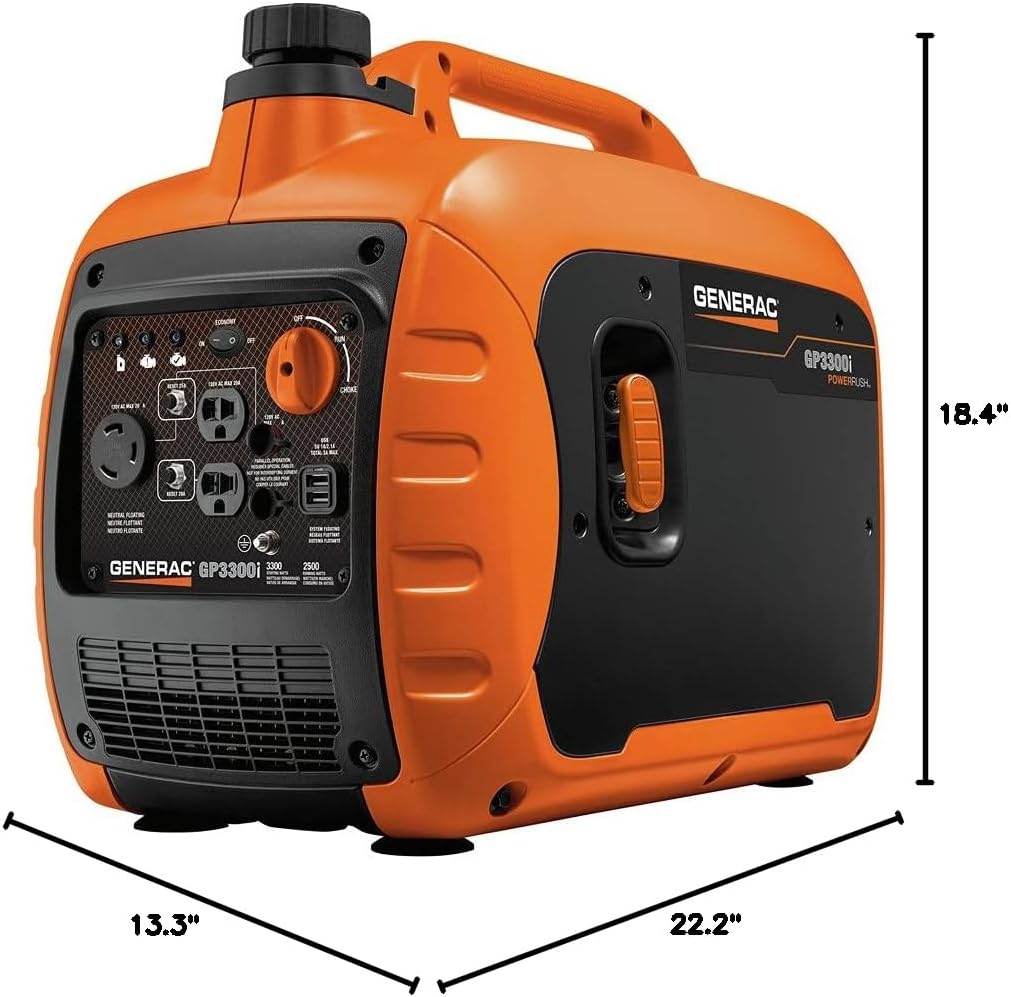
The Generac GP3300i inverter generator is a compact and lightweight portable power source designed for various outdoor activities and backup power needs. Featuring advanced PowerRush™ technology, it delivers enhanced starting capacity for motor-driven equipment. This generator provides clean power suitable for sensitive electronics and includes convenient duplex outlets, a 30A twistlock outlet, and USB ports for mobile device charging. Its fuel-efficient Economy Mode and quiet operation make it ideal for extended use.

Kurmak
1. Paketin Açılması ve İlk Muayene
Carefully remove the generator from its packaging. Inspect for any visible damage. Ensure all included components are present: Engine Oil, Generac 7154 GP3300i Portable Inverter Generator, Oil Funnel, Owner's Manual, Tool Kit.
2. Motor Yağı Ekleme
The generator is shipped without engine oil. Before starting, add the specified amount and type of oil (10W-30 is commonly recommended, refer to the owner's manual for exact specifications and capacity). Use the provided oil funnel to prevent spills.
3. Yakıt Ekleme
Fill the fuel tank with fresh, unleaded gasoline. The tank volume is 1.06 gallons. Do not overfill. Ensure the fuel cap is securely tightened.
4. Jeneratörün Topraklanması
For safe operation, connect the generator to an earth ground using a grounding rod and appropriate wire. Consult local electrical codes for proper grounding procedures.

Kullanım Talimatları
1. Jeneratörün Çalıştırılması
- Jeneratörün düz bir yüzeye ve herhangi bir engelden uzak bir yere yerleştirildiğinden emin olun.
- Yakıt vanasını 'AÇIK' konumuna getirin.
- Jikle kolunu 'JİKLE' konumuna getirin (motor soğuksa).
- Press the 'ENGINE START' button or pull the recoil starter handle firmly until the engine starts.
- Motor çalıştıktan sonra, jikle kolunu kademeli olarak 'ÇALIŞMA' konumuna getirin.
2. Eco-Mode Operation
Activate Economy Mode by pressing the 'ECO-MODE' switch. This feature automatically adjusts engine speed to match the load, reducing fuel consumption and noise levels during periods of low power demand. For full power output, deactivate Eco-Mode.
3. Elektrikli Cihazların Bağlanması
Plug your electrical devices into the appropriate outlets on the control panel. The generator features 120V AC 20A duplex outlets, a 120V AC 30A twistlock outlet, and 5V USB ports (2.1A and 1A). Ensure the total wattagBağlı cihazların e'si jeneratörün çalışma suyunu aşmamalıdırtage (2500 Watts) or starting wattage (3300 Watt).
4. Paralel Yetenek
The GP3300i is parallel-ready, allowing you to connect two compatible Generac inverter generators for increased power output. Parallel operation requires special cables (sold separately) and adherence to the instructions in the owner's manual.
5. Jeneratörün Durdurulması
- Jeneratörden tüm elektrik yüklerini ayırın.
- Motorun soğuması için birkaç dakika yük bindirmeden çalışmasına izin verin.
- Motor anahtarını 'KAPALI' konumuna getirin.
- Saklama için yakıt vanasını 'KAPALI' konumuna getirin.
Bakım
Regular maintenance is crucial for the longevity and optimal performance of your Generac GP3300i generator. Always refer to the owner's manual for detailed maintenance schedules and procedures.
1. Engine Oil Check and Change
Check the engine oil level before each use. Change the engine oil after the first 20 hours of operation, and then every 100 hours or annually, whichever comes first. Use the provided oil funnel for adding oil.
2. Hava Filtresi Kontrolü ve Temizliği
Inspect the air filter regularly. Clean or replace the air filter as needed, especially in dusty conditions. A dirty air filter can reduce engine performance and increase fuel consumption.
3. Buji Kontrolü ve Değişimi
Inspect the spark plug annually or every 100 hours. Clean or replace the spark plug if it is fouled or damaged. Use the correct spark plug type specified in your owner's manual.
4. Fuel System Maintenance
If storing the generator for an extended period (more than 30 days), drain the fuel tank and carburetor or use a fuel stabilizer to prevent fuel degradation and carburetor issues.
Sorun giderme
The Generac GP3300i is equipped with LED indicators to help diagnose common issues:
- Düşük Yağ Göstergesi: Illuminates when the engine oil level is too low. The generator will shut down automatically to prevent engine damage. Check and add oil.
- Overloaded Indicator: Illuminates when the connected load exceeds the generator's capacity. Disconnect some devices and reset the circuit breaker.
- Ready-to-Use Indicator: Illuminates when the generator is running correctly and ready to supply power.
For more complex issues, refer to the detailed troubleshooting guide in your owner's manual or contact Generac customer support.
Özellikler
| Şartname | Değer |
|---|---|
| Marka | Jenerik |
| Model Adı | 7154 (GP3300i) |
| Başlangıç Wattage | 3300 Watt |
| Koşu Wattage | 2500 Watt |
| Yakıt Türü | Benzin |
| Güç Kaynağı | Gazla Çalışan |
| Cilttage | 120 Volt |
| Motor Tipi | 4 Zamanlı |
| Motor Hacmi | 149 Santimetreküp |
| Tank Hacmi | 1.06 Galon |
| Ürün Ağırlığı | 59.5 Pound |
| Ürün Boyutları | 22.2"U x 13.3"G x 18.4"Y |
| Özel Özellikler | Otomatik Sestage Regulation, Fuel Gauge, Fully Enclosed Design, Low Oil Shutdown, Super Quiet |
| Dahil Bileşenler | Engine Oil, Generac 7154 GP3300i 50 ST / CARB Portable Inverter Generator, Oil Funnel, Owner's Manual, Tool Kit |
Garanti ve Destek
The Generac GP3300i Portable Inverter Generator comes with a manufacturer's warranty. Please refer to the owner's manual for specific warranty terms and conditions. For technical assistance, parts, or service, contact Generac customer support. Always provide your model number (GP3300i) and serial number when seeking support.


